
Microsoft lists Microsoft Entra ID P1 at $7 per user per month and P2 at $10 per user per month on an annual commitment, and most single site operators can stay on P1 unless they need risk-based Conditional Access or Privileged Identity Management. That $3 gap is the whole decision, and it shouldn't be paid for features nobody turns on.
A renewal quote lands during survey prep, staffing is short, and someone asks why the Microsoft bill should rise for every nurse, aide, and office user. The vendor answer is usually a feature grid. The useful answer is shorter. P1 controls how people sign in. P2 adds a judgment about whether a sign-in looks wrong and a lock on powerful admin accounts. Buy P2 for those two jobs, or keep P1 and configure it properly.
Table of Contents
- Microsoft Entra ID P1 vs P2 at a Glance
- Static Rules Versus Risk-Based Sign-In
- Just-in-Time Admin Access With P2
- What the Extra Three Dollars Buys
- Nursing Home and Law Firm Scenarios
- Pick P1 or P2 for Your Sites
Microsoft Entra ID P1 vs P2 at a Glance
The verdict on Microsoft Entra ID P1 vs P2 is direct. P1 is the working identity layer for most facilities and small firms. P2 is worth buying only when risk-based sign-in or just-in-time admin rights will be used in daily operations.
Both tiers sit on the same cloud identity foundation, and P2 includes all of P1. According to Microsoft's Entra ID product page, Microsoft lists P1 at $7 per user per month when purchased annually and P2 at $10 per user per month, making P2 $3 more per user monthly, or approximately 42.9% more than P1. At those rates, 100 users cost about $700 per month for P1 versus $1,000 per month for P2, a difference of $3,600 per year.
Entra ID P1 and P2 at List Price
| Capability | P1 | P2 |
|---|---|---|
| Listed price, annual commitment | $7 per user per month | $10 per user per month |
| Single sign-on and application access | Included | Included |
| Multifactor, passwordless, and phishing-resistant authentication | Included | Included |
| Conditional Access by user, device, app, or location | Included | Included |
| Hybrid identity, dynamic groups, and self-service password reset | Included | Included |
| Security and usage reports | Included | Included |
| Full risk detections and risk-based Conditional Access | Not included | Included with Entra ID Protection |
| Privileged Identity Management | Not included | Included |
| Entitlement management and access reviews | Not included | Basic entitlement management and basic access reviews |
Treat those figures as planning numbers, not an invoice. Purchasing agreements and regional pricing can change, so the number on a facility's own agreement controls. A quote that doesn't state the commitment term and the service plan isn't ready for approval.
What P1 Actually Does Every Day
P1 isn't a lite version. Microsoft's Entra pricing page lists single sign-on and application access, multifactor authentication, passwordless and phishing-resistant authentication, Conditional Access, employee self-service, hybrid identity administration, cross-tenant user synchronization, backup and recovery, and advanced security and usage reports among P1 capabilities. It also supports hybrid users who work across on-premises and cloud resources, with dynamic groups, self-service group management, Microsoft Identity Manager, cloud write-back, and self-service password reset for on-premises users.
For a skilled nursing operator, that means one sign-in standard across Microsoft 365, a VPN-connected application, and an EHR identity workflow such as PointClickCare. The same MFA and location or device rules can apply in every building instead of each facility inventing its own practice. A law firm on Long Island gets the same benefit at smaller scale, requiring MFA for email and document libraries without paying for risk detection it may never configure.
Check current licenses before requesting a quote. P1 is included in Microsoft 365 E3 and Enterprise Mobility + Security E3, and it's available with Microsoft 365 Business Premium. Many operators already own the baseline and haven't finished configuring it.
P1 leaves two clear gaps. It doesn't add full Entra ID Protection risk detections, and it doesn't add Privileged Identity Management for time-bound admin access. Those gaps, not a longer feature list, decide whether the extra $3 changes daily control.
Static Rules Versus Risk-Based Sign-In
The diagram below sets the two models side by side before the details get buried in policy names.
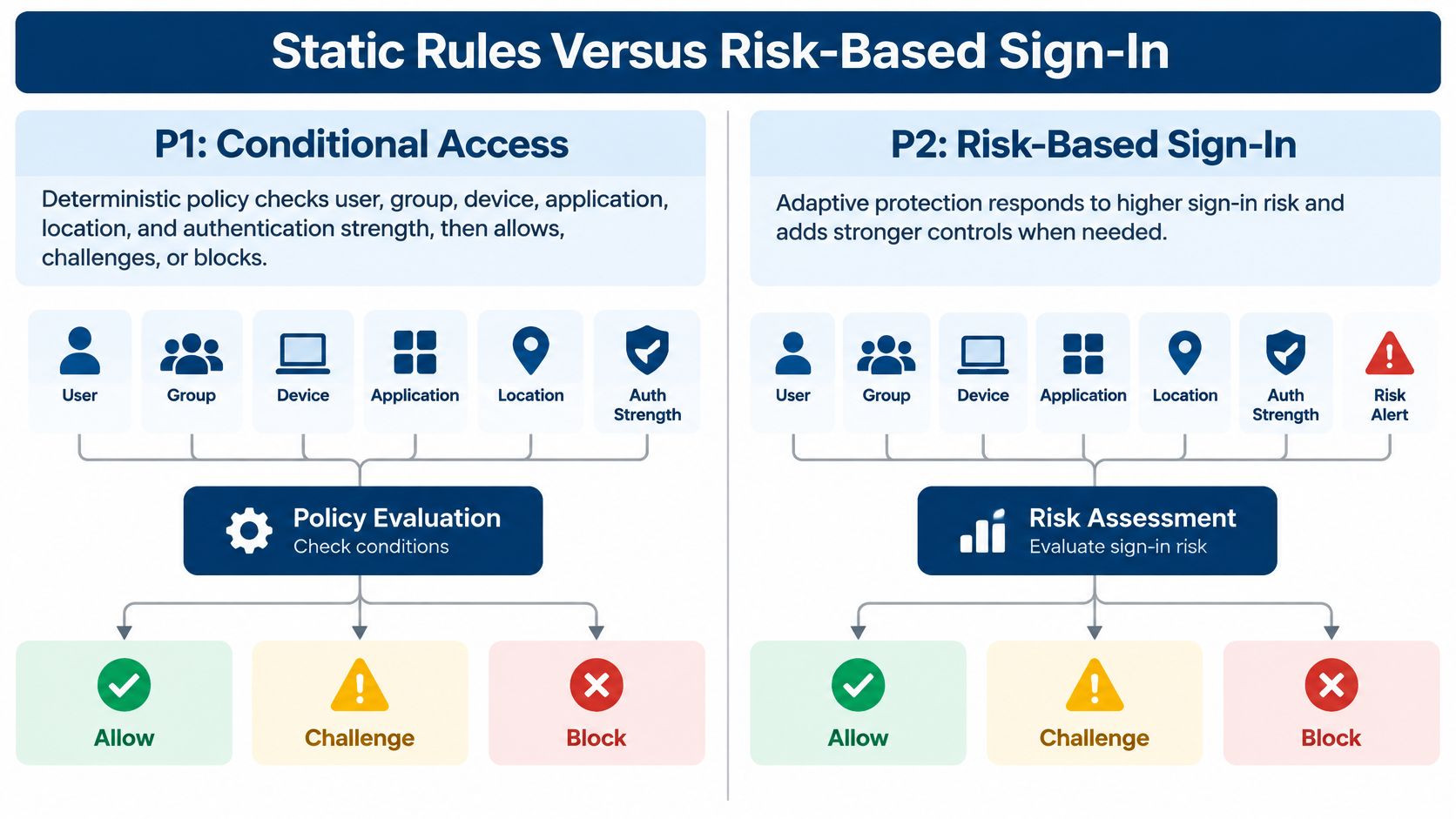
With P1, Conditional Access is deterministic. The policy checks user, group, device, application, location, and authentication strength, then allows, challenges, or blocks the sign-in. A nursing home can require MFA outside the building network and block legacy authentication, and that rule fires the same way every time.
That consistency is valuable, but it has a blind spot. A correct password entered from an allowed place still passes, even if that password just appeared in a breach. P1 users also get only limited risk-report information and no detailed detection drawer, so triage stays thin when something looks off.
Where the Risk Score Changes the Outcome
P2 adds calculated user-risk and sign-in-risk levels from Entra ID Protection. Microsoft's Identity Protection overview states that P2 is required for risk-based access policies, which can require a secure password change or block access when compromise is suspected. Documented signals include anonymous IP use, atypical travel, and malware-linked IP addresses.
Say an agency nurse signs in from the facility in the morning and an identical account signs in from an anonymous address an hour later. A static P1 rule sees valid credentials and may challenge with MFA. A P2 risk policy can treat the second attempt as a compromised identity, force remediation, or block it outright.
P1 enforces the rule that was written. P2 can also react to a sign-in Microsoft scores as risky.
That difference matters most where accounts move a lot. Float staff, agency workers, and administrators covering several buildings create travel patterns that static location rules handle clumsily, either blocking legitimate work or allowing too much. Risk scoring gives the policy a middle path between blind trust and a hard block.
The video below walks through how these sign-in decisions appear in practice for administrators reviewing access.
For standardized MFA and device or location control, P1 is enough, and it should be paired with staff training on recognizing MFA fatigue scams and push bombing so users don't approve prompts they didn't start. P2 earns its place when leaked credentials, anomalous travel between buildings, or a compromised agency account need an automatic response. Don't buy it expecting a published speed gain or detection rate. Microsoft hasn't sold it that way, and neither should anyone else.
Just-in-Time Admin Access With P2
A nurse needs routine access to clinical systems. An administrator who can change mail rules, create accounts, reset passwords, or access tenant data holds a different level of power. Keep those privileges active only when the work requires them.
Privileged Identity Management (PIM) lets an administrator remain eligible for a role instead of holding it permanently. When needed, the administrator activates the role for a set period. You can require approval, MFA, a justification, and notifications, and include a ticket reference when your help desk workflow supports it.
Privileged Identity Management Controls on P2
| Control | What it does | Available on |
|---|---|---|
| Eligible rather than active role | Admin rights stay off until needed | P2 |
| Time limit | Access ends after the set duration | P2 |
| Approval before activation | A second person must allow the role | P2 |
| MFA and justification | The admin proves identity and states why | P2 |
| Notifications and audit | Others are told and the activation is logged | P2 |
| Access review of the role | Eligible admins are periodically confirmed | P2 |
PIM supports just-in-time and approval-based activation for privileged access to Microsoft Entra, Azure, Microsoft 365, and Intune resources. PIM requires P2 or Entra ID Governance, and licensing must cover the relevant users and privileged administrators. P1 does not provide these PIM controls.
P2 is worth the extra three dollars only if your organization will use just-in-time admin access or risk-based sign-in. Temporary privileges reduce the time an admin account can be misused, but they do not manage every access decision across your organization.
What This Means for HIPAA Evidence
For a HIPAA-covered facility, PIM can support access control under 45 CFR 164.312(a) and person or entity authentication under 45 CFR 164.312(d). Activation logs, justifications, and access reviews record who held a privileged role, when, and why. That evidence can support a broader effort to reduce insider threat risk.
Keep the scope clear. PIM records privileged roles, not every clinical user's EHR access. It also does not complete joiner-mover-leaver processes, access reviews for every system, or HIPAA evidence for a multi-building operator. Work with your compliance officer or counsel to document how the safeguards apply at your facility.
After-hours support shows the practical value. Instead of sharing an always-on admin password among on-call staff, let the authorized person activate an eligible role, complete the task, and allow the access to expire. The activation is logged.
What the Extra Three Dollars Buys
Run the arithmetic as a worked example at list price before debating features in the abstract. The image below shows the 50 user case that fits many single buildings and small firms.
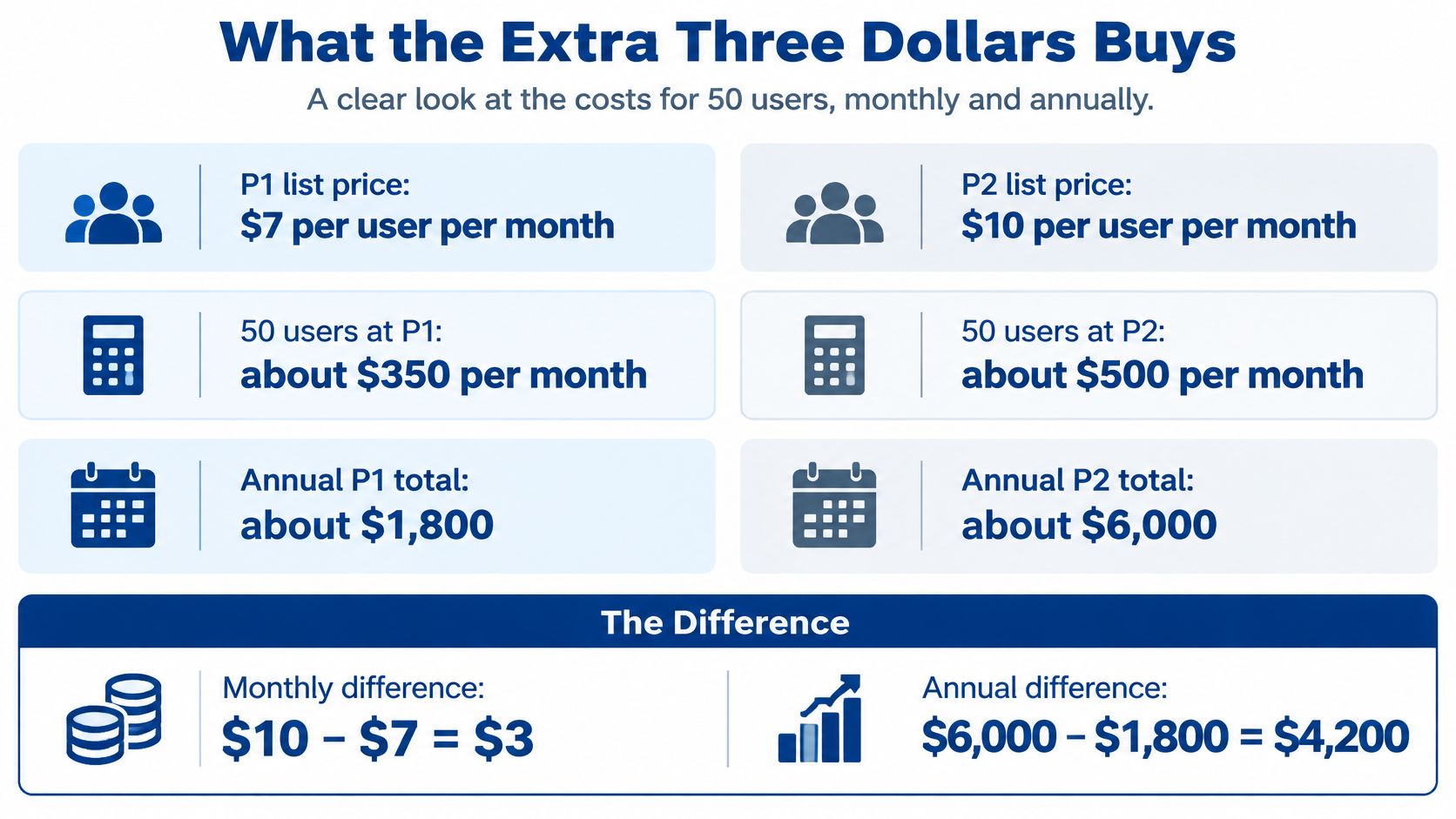
For example, at $7 and $10 per user per month, 50 users cost about $350 versus $500 a month, or $1,800 more a year for P2. Scale that same example and the pattern stays linear, which is why headcount discipline matters more than negotiating theater. Every inactive account carried into the count raises both columns.
Yearly Gap at Microsoft List Prices
| Users | P1 per month | P2 per month | Extra per year |
|---|---|---|---|
| 100 | $700 | $1,000 | $3,600 |
For example, a 250 user operator applying the same $3 gap faces about $9,000 a year in added list cost. That money buys risk-based Conditional Access and Privileged Identity Management, not a faster sign-in and not a general security upgrade across email, endpoints, or backups. Facilities weighing the privileged access side of that spend can also review enterprise security guidance for IT leaders for broader context on why standing privilege draws auditor attention.
A Five Step Buying Check
- Export current service plans. Confirm which Microsoft 365 or Entra plans are already paid for, since P1 may already sit inside E3, Enterprise Mobility + Security E3, or Business Premium.
- Count two groups separately. Workforce users and privileged admins drive different P2 uses, and licensing must cover the people who'll use the features.
- Set a 90 day test. Decide whether risk policies or just-in-time roles will be turned on, configured, and monitored in that window.
- Keep P1 if the answer is no. An unused P2 license is shelfware, and the decision can be revisited when admin rights or leaked credential response becomes a funded project.
- Reconfirm on the agreement. Microsoft licensing and regional pricing change, so the signed agreement, not a blog table, sets the final number.
Don't assume nonprofit, education, or government discounts apply. If a reseller quotes them, get the eligibility and the renewal price in writing.
Nursing Home and Law Firm Scenarios
Four common situations cover most readers, and each gets one license call. The cards below summarize the pattern before the reasoning for each scenario.
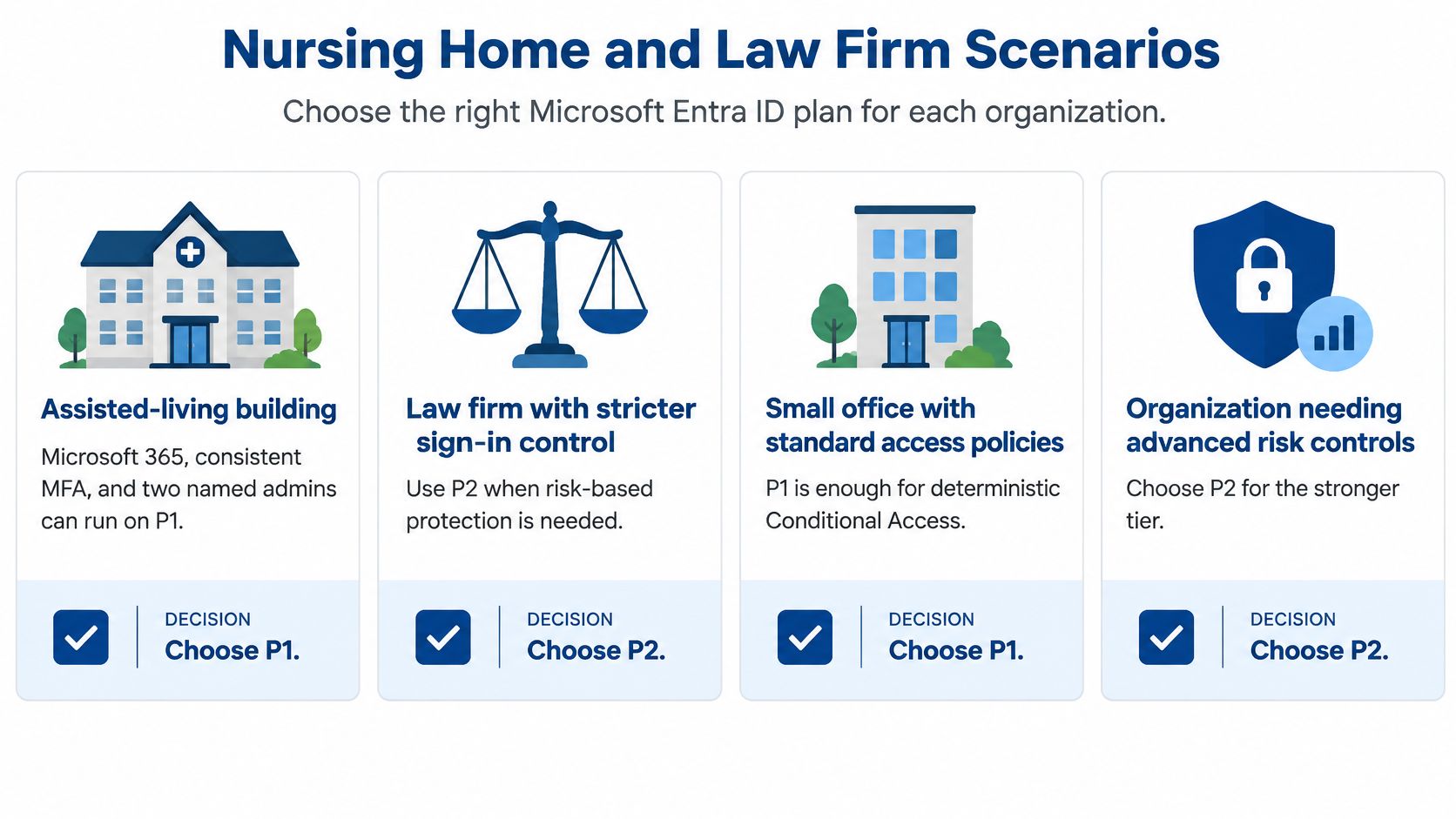
A single assisted living building runs on P1. With Microsoft 365 in place, consistent MFA enforced through Conditional Access, and two named admins whose work is routine, P1 covers the need. Money is better spent finishing policy coverage for every application than adding risk scoring nobody reviews.
A multi-building skilled nursing operator should evaluate P2 seriously. Nurses float between facilities, agency staff need temporary EHR-related access, and sign-ins legitimately appear from several networks in one week. P1 policies still form the base, but risk scoring helps separate normal float patterns from a compromised account, and eligible admin roles let a facility administrator activate rights for a shift instead of holding them permanently.
A law firm where partners also administer Microsoft 365 should put those admin accounts on P2. Staff mailboxes can run under P1-level controls while the handful of privileged users get just-in-time activation, approval, and audit history, provided licensing covers those privileged users. Client confidentiality makes a permanent partner admin account a poor risk at any firm size.
The Lifecycle Gap P2 Doesn't Close
A group with separate tenants, subsidiaries, or heavy contractor access shouldn't expect P2 alone to solve access management. Microsoft's Entra ID Governance licensing fundamentals state that governance products require an active subscription containing the relevant P1 or P2 service plan, and list access reviews, entitlement management, and privileged access as distinct governance considerations. P2 doesn't automatically create a complete joiner-mover-leaver process, prove that every clinical, legal, or contractor account was reviewed, or remove the need for governance licensing and process design.
That distinction is where buyers get misled. Basic reviews in P2 are a start, not evidence that a traveling nurse's access ended when an assignment ended or that a vendor account closed with a contract. Multi-location operators should compare P1 against P2 plus governance requirements, with named owners for hiring, transfer, and termination steps at each facility. Facilities building that evidence into a wider program can align it with structured HIPAA compliant IT services rather than treating the license as the program.
Identity controls support HIPAA safeguards and help organize audit evidence. They aren't a CMS emergency preparedness plan, they don't replace workforce training or device management, and they don't substitute for counsel. Confirm regulatory details with the compliance officer before presenting any Entra configuration as compliance proof.
Pick P1 or P2 for Your Sites
For each site, base the decision on the controls your team will realistically configure and maintain. Check the Microsoft 365 or Entra service plans already assigned, then list the people who can access privileged roles, including outside IT support and anyone with an old admin assignment. That gives you a practical starting point for sizing the need.
Use the 90-day test. If your team will configure risk-based sign-in policies or just-in-time admin access, assign an owner, and review those controls during that period, P2 can justify the extra three dollars. If that work will wait behind staffing or survey priorities, stay on P1, complete your Conditional Access coverage, and revisit the choice at renewal.
Where an Outside Assessment Helps
RDE Technologies performs IT assessments covering cost reduction, risk, data storage, server and network infrastructure, carrier services, cloud services, business services and applications, business continuity, and network security. Its IT security management services include server and network monitoring, firewalls, content filtering, managed antivirus for desktops and servers, desktop patch management, and advanced ransomware protection for endpoints. Those services help place the Entra decision within the wider IT environment.
For a nursing home or other multi-site business, P2 does not by itself complete staff access changes, access reviews, or HIPAA evidence. The compliance officer or counsel should define what the organization must document. An IT assessment can examine relevant areas such as risk, cloud services, business applications, business continuity, and network security.
RDE Technologies offers remote support through an online support and collaboration portal. Its support center provides customers with answers, better solutions, and faster results. Before choosing P1 or P2, request an IT assessment to review the systems and security needs behind the licensing decision.
Before your next Microsoft renewal, review the license count, privileged access, and planned controls together. Choose P2 when the team will use its risk-based sign-in or just-in-time admin features. Request an IT assessment from RDE Technologies to examine the wider IT needs that should inform the decision.