






VoIP phone service carries voice conversations over Internet Protocol networks instead of relying only on traditional circuit-switched phone lines. If your team is answering client calls from desk phones, laptops, and mobile phones in different places, that distinction already affects how you plan, pay for, and support your phones. You're not just buying dial tone. You're deciding how voice will travel across the same kind of data network that carries your other business applications.
Table of Contents
- Defining VoIP Phone Service in Plain Terms
- How Voice Calls Travel Over IP Networks
- Business Benefits and Where the Savings Come From
- Call Quality and Network Readiness Checks
- Emergency Calling and Location Planning for Multi-Site Teams
- Choosing a VoIP Provider and Taking the Next Step
Defining VoIP Phone Service in Plain Terms
A small office manager gets the same question from two directions on the same morning. A new employee working from home needs an extension, and a client asks why calls to the main number went to voicemail during a busy hour. Both problems touch what VoIP phone service does, because the service isn't tied to one physical line at one desk.
The National Institute of Standards and Technology describes VoIP as a combination of software, hardware, and technical standards that enables voice communication over packet-switched networks in its NIST guide to VoIP security considerations. In plain terms, your speech becomes digital data, travels across an IP network, and becomes audio again for the person listening. That network can be a private business network, a managed provider network, or the public internet.
A Road Analogy That Holds Up
Think of a traditional circuit-switched line as a dedicated road opened for one call. While that conversation lasts, the route is reserved for it. VoIP works more like parcels moving on shared roads. Your voice is packaged, sent alongside other traffic, and reassembled at the other end, so the same infrastructure can carry many kinds of communication at once.
If the roads are shared, traffic management matters. That's the first planning lesson VoIP teaches.
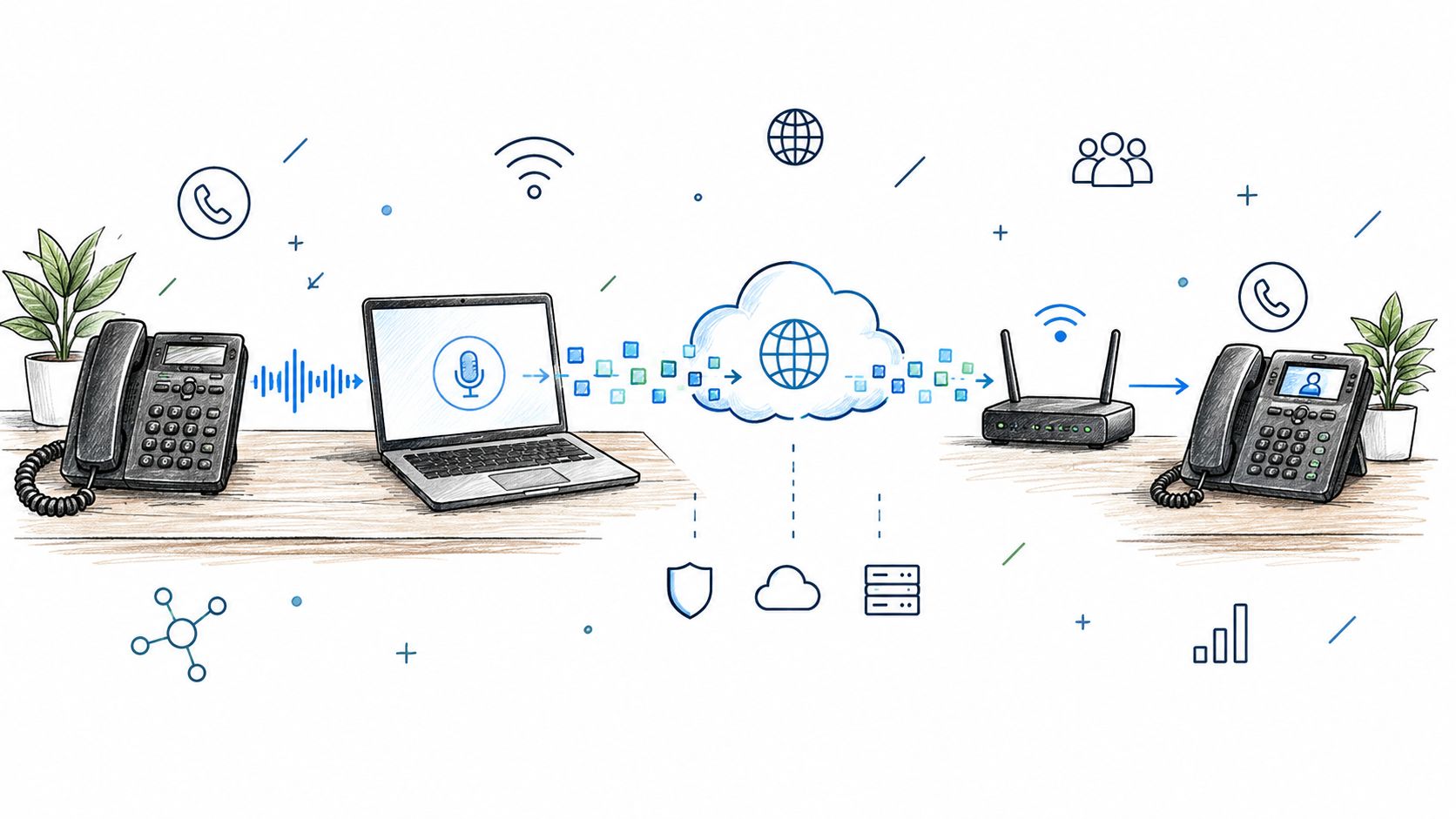
The label covers more than a handset. For organizations, VoIP commonly supports desk phones, softphones, mobile applications, voicemail, call routing, and conferencing, plus centralized administration through the data infrastructure already used for other applications. A receptionist might answer on a desk phone, transfer the call to a colleague's laptop softphone, and send a missed caller to voicemail, all within one service.
This visual shows those different endpoints connecting through routers and cloud networks rather than through separate lines for each desk.
How Voice Calls Travel Over IP Networks
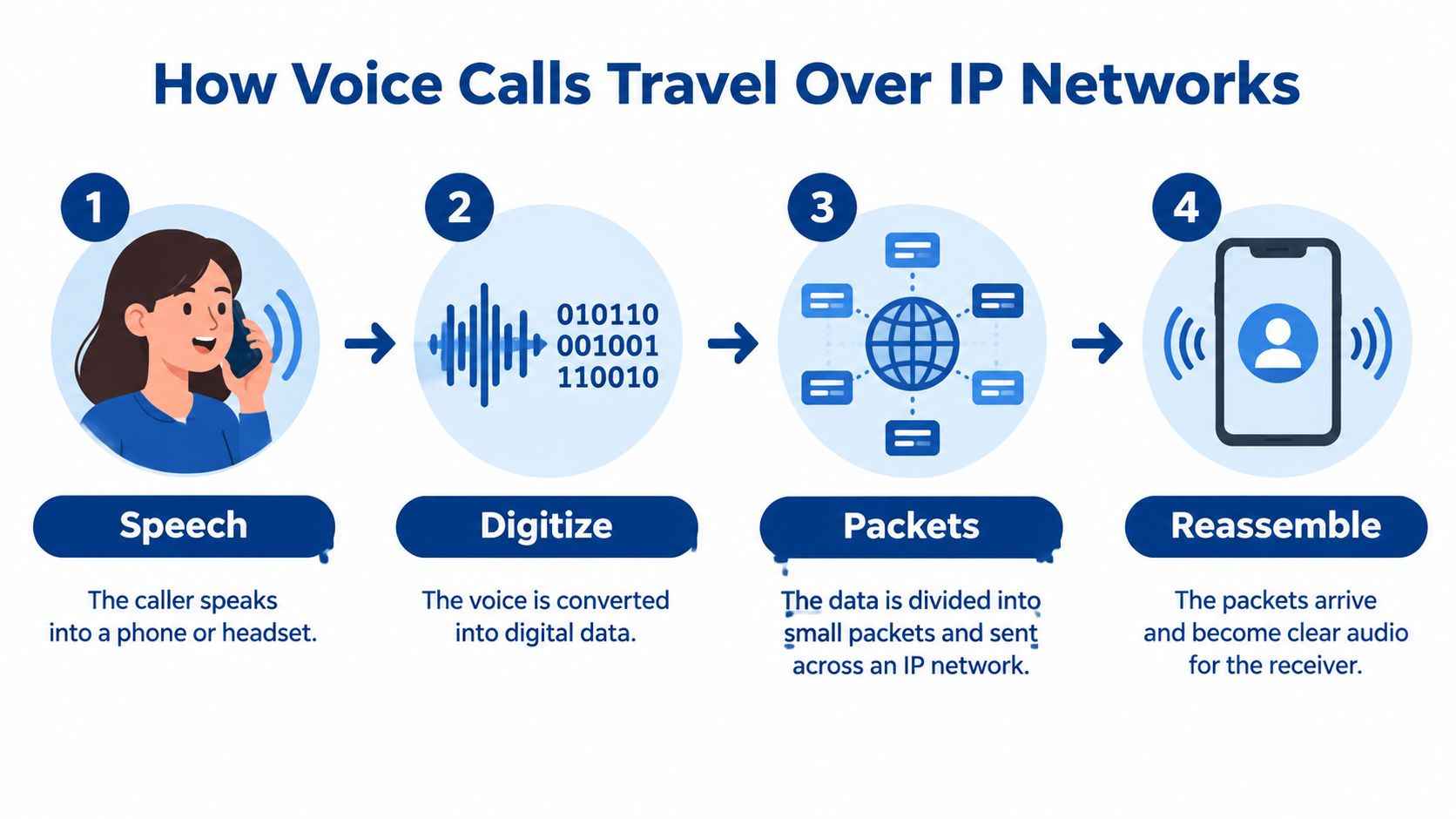
Every VoIP call follows the same basic path, even though it happens fast enough to feel instant. Breaking it into steps makes later questions about quality and reliability much easier to understand.
This diagram lays out the four stages before we walk through what each one means in practice.
The Four Steps of a Single Call
- Speech becomes data: You speak into a phone, headset, or app, and the device converts your voice into digital form.
- Data is divided into packets: The digitized speech is split into small, labeled packets, like a long message sent as a series of numbered parcels.
- Packets cross the network: Each parcel travels across the IP network, and parcels from the same call don't all have to follow an identical route.
- Audio is rebuilt: The receiving device collects the packets, puts them back in order, and reconstructs them as sound the listener hears.
Not every internet calling tool qualifies as business VoIP in the regulatory sense. The Federal Communications Commission defines interconnected VoIP through four elements in its federal rules for interconnected VoIP services: real-time, two-way voice communication, a broadband connection at the user's location, Internet Protocol-compatible customer-premises equipment, and the general ability to receive calls from and place calls to the public switched telephone network.
That last element is the one people miss. An interconnected service lets a VoIP phone, computer, mobile application, or specialized adapter reach ordinary telephone numbers and receive calls from them. An internet-only app that only connects its own users doesn't meet that test, even if the conversation itself sounds similar.
Because those packets share your network with files, video, and backups, visibility into that traffic matters from day one. Our guide to monitoring network traffic on your business network explains how to watch what's competing for capacity before users start reporting problems.
The short video below walks through the same packet journey visually, which helps if the parcel analogy still feels abstract.
Business Benefits and Where the Savings Come From
The scale of adoption tells you this isn't an experiment anymore. In December 2023, the United States had approximately 64 million interconnected VoIP subscriptions, compared with 21 million traditional end-user switched-access lines and 386 million mobile voice subscriptions, for 471 million retail voice-service connections overall, according to figures cited by the International Telecommunication Union in its overview of VoIP development. VoIP began competing directly with traditional public-switched telephone services in the mid-1990s, and it has since become a mainstream platform.
Direct Savings Versus Operational Gains
The direct savings are the easiest to see. We offer VoIP services that require no on-site equipment and reduce long-distance landline phone bills, which removes both hardware upkeep at your office and a familiar source of per-call cost. When voice rides a data network you're already paying for, distance matters far less than it did on circuit-switched lines.
The operational gains take a little longer to notice, but they often matter more. Centralized administration means one place to manage extensions, voicemail, call routing, and conferencing across sites. Staff can work remotely or off-site while staying on the same phone system, so a home-based employee and an office-based employee present the same business number to callers.
- Fewer separate systems: Voice joins the business network rather than living on its own wiring and hardware.
- Easier changes: Adding or moving a user is mainly a configuration task, not a wiring job.
- Connected tools: Voice can integrate with business networks, identity management, software applications, and remote work tools.
A useful distinction: Some benefits arrive automatically with the service model, while others, like clear audio and dependable security, depend on your network and how the system is managed.
That caution is part of an honest answer to what is VoIP phone service. Because voice now depends on data infrastructure, network capacity, device configuration, access controls, and encryption affect both call quality and security. We describe our VoIP services as reliable, safe, and secure, but you should still ask any provider how monitoring, updates, and network segmentation are handled before you sign. Benefits you can test before committing are worth more than benefits you're asked to assume.
Call Quality and Network Readiness Checks
Three measures decide whether a VoIP call sounds natural or falls apart. End-to-end delay is how long speech takes to travel from mouth to ear. Packet loss means some parcels never arrive. Jitter is variation in packet arrival time, so parcels show up unevenly instead of in a steady stream.
Delay is the one callers feel socially before they can name it. ITU-T G.114 guidance recommends not exceeding 400 milliseconds of one-way transmission delay for general network planning, while high-quality voice engineering targets aim for approximately 150 milliseconds or less, as summarized in NetIQ's explanation of VoIP call quality factors. As delay grows, speakers start interrupting each other or pausing awkwardly for replies, and packet loss or jitter adds clipped speech, gaps, or robotic audio.
Checks to Run Before Go-Live
- Measure the full path: Test latency and jitter across the local network, the WAN, the provider network, and the remote endpoint, not only your internet access link.
- Record baselines: Capture measurements during normal use and peak utilization so you know what typical looks like before trouble starts.
- Prioritize voice: Apply quality-of-service settings to voice packets and avoid oversubscribed uplinks that force calls to compete with bulk traffic.
- Test under load: Place test calls during backup jobs or cloud synchronization, when congestion is most likely to appear.
- Set thresholds in writing: Document a remediation threshold for packet loss and latency instead of waiting for user complaints.
Physical infrastructure sits underneath all of this. Old or poorly installed cabling can undermine an otherwise sound design, which is why our page on data cabling services for New York businesses belongs in the same conversation as any phone upgrade. For continuity-sensitive settings such as nursing facilities, keep this performance data alongside outage and failover test records so recurring network conditions can be matched to call-quality incidents later.
Emergency Calling and Location Planning for Multi-Site Teams
Here's an assumption worth challenging directly: registering your headquarters address does not mean emergency responders know where a caller is. A desk phone rarely moves, but VoIP endpoints do. An employee may work from home, shift between offices, use a softphone on a laptop, or carry a device into a patient-care location, and the registered address may point somewhere else entirely.
In the United States, interconnected VoIP providers must provide 911 as a standard feature, collect the customer's physical location, transmit the callback number and registered location, and provide a way to update that location, as the FCC consumer guide to VoIP and 911 service explains. The gap appears with non-fixed services, which may rely on a manually maintained registered address when automated dispatchable location isn't technically feasible. Manual records only stay accurate if someone owns them.
The real question isn't whether VoIP supports 911. It's whether your organization has a documented process that keeps location records true as people and devices move.
Governance Questions to Answer in Writing
- Address validation: Who checks that each registered address is correct and complete when an extension is created?
- Location assignment: How is a location tied to each extension, device, or softphone user?
- Update triggers: What happens after an office move, a floor change, or a shift to hybrid work?
- Testing: How do you test emergency calling without guessing that it works?
- Fallbacks: What do staff do during a power or broadband outage, when VoIP endpoints may not function at all?
This planning matters most where people can't easily self-report their location, including small businesses with several sites, law firms with satellite offices, and healthcare operators such as skilled nursing facilities. It's also a moving target. FCC Next Generation 911 rules took effect on November 25, 2024, and related compliance provisions became effective March 25, 2025, as emergency networks transition toward IP-based systems. Treat location governance as an ongoing operational duty, not a one-time setup form you fill in and forget.
Choosing a VoIP Provider and Taking the Next Step
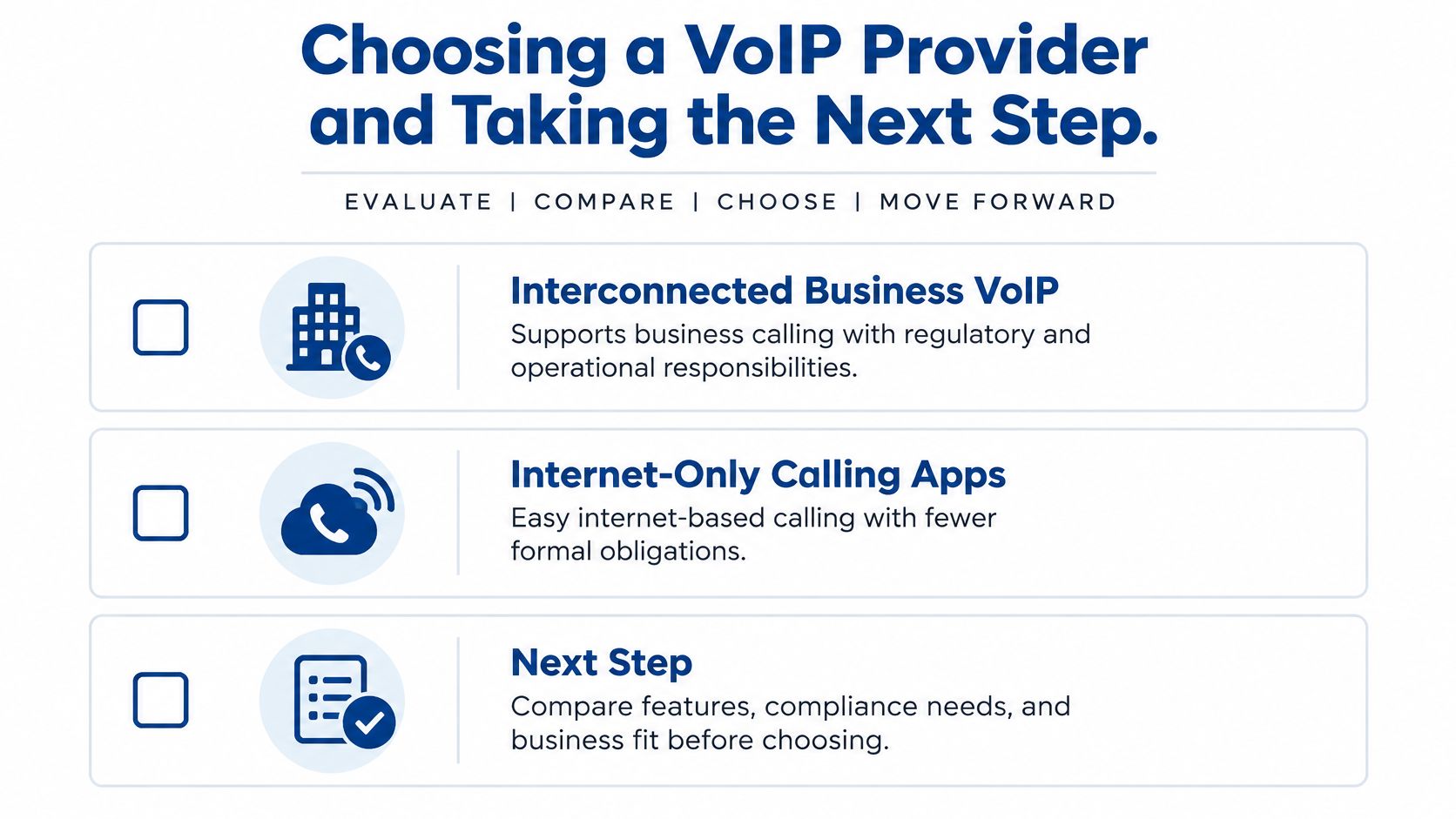
Start your comparison with one dividing line: is the service interconnected, or is it an internet-only calling app? The obligations differ. The FCC states that interconnected VoIP providers must comply with the Communications Assistance for Law Enforcement Act and contribute to the Universal Service Fund, which supports communications services in high-cost areas and telephone service for income-eligible subscribers, in its FCC overview of VoIP regulation. A private or non-interconnected platform may fall under a different framework, with fewer formal duties and less reach to ordinary phone numbers.
This comparison graphic frames that choice and the decision steps that follow from it.
Questions to Bring to Every Provider
- Interconnection: Can the service place and receive calls with the public switched telephone network?
- Emergency locations: How are addresses validated, assigned to extensions, tested, and updated after moves?
- Quality reporting: What delay, jitter, and packet loss data will you see?
- Outages and failover: What happens to inbound calls during a broadband or power failure?
- Support: Who helps with device configuration, updates, and troubleshooting after installation?
Those questions overlap with broader IT management, since phones now depend on the same network as everything else. If you don't have internal staff to own that work, our overview of the benefits of managed IT services for growing businesses helps you judge what to hand off. On our side, we offer a Request a call back form where you can select IT Services, VoIP, Data Backup, Cabling, or Urgent Request. Choose VoIP, bring the checklist above, and your first conversation starts with quality, location, and support instead of a generic sales pitch.
If you're weighing a move away from traditional phone lines, we can help you assess your network readiness, plan emergency calling locations, and set up VoIP service that requires no on-site equipment. Visit RDE Technologies to request a call back and talk through what your team needs.