







RMM software lets an IT provider or internal team monitor, manage, and fix distributed computers, servers, and networks from a single central console, and that remote control makes it a privileged tool that must be governed.
Your office manager may be chasing a failed update while employees wait for a slow computer to respond. You don't necessarily need another dashboard. You need someone to spot problems, take responsibility for fixing them, and explain who has permission to make changes across your business.
Table of Contents
- Why Businesses Are Searching for RMM Software
- How RMM Software Works Behind the Scenes
- Core Capabilities Every RMM Platform Includes
- Business Uses Across Offices, Remote Teams and Care Facilities
- Why Privileged RMM Access Needs Strict Controls
- Choosing an RMM Provider and Where RMM Stops
- Next Steps for Evaluating RMM for Your Organization
Why Businesses Are Searching for RMM Software
Consider a small organization where the office manager has become the unofficial IT department. A printer stops working, a laptop slows down, and someone discovers that an update never finished. Each interruption pulls that person away from their actual job.
The deeper problem isn't any individual fault. It's that employees are acting as the monitoring system. Nobody investigates until someone complains, and nobody has a dependable view of what's happening across the organization.
From complaints to operational visibility
Owners searching for “what is RMM software” are often trying to replace that pattern with something more deliberate. They want to know which devices need attention, whether maintenance is happening, and who's responsible when an alert appears.
Remote monitoring and management, shortened to RMM, supports that operating model. It belongs to a broader category of operational-monitoring software that reports information from remote systems and supports analysis and response, as described in NIST's operational-monitoring guidance.
Practical rule: Buy an accountable maintenance process, not just access to a monitoring screen.
That distinction matters when you're outsourcing IT. Installing software doesn't establish who investigates a warning, who approves a disruptive change, or who tells your staff that a problem has been resolved.
What a useful outcome looks like
A better arrangement gives the owner clear answers to practical questions:
- Coverage: Which business systems are being maintained?
- Responsibility: Who responds when something needs attention?
- Evidence: What records show that maintenance and repairs happened?
- Authority: Which changes can technicians make without additional approval?
Those questions keep the purchase grounded in business operations. The objective isn't to eliminate every technical problem. It's to stop relying on surprise, employee complaints, and improvised repairs as your primary IT process.
How RMM Software Works Behind the Scenes
Think of RMM as a building's central monitoring desk. The desk receives signals from equipment throughout the property, but the operator still needs rules for interpreting those signals and authority to act.
RMM follows a similar cycle across managed technology. The illustration shows how information moves from individual devices to the technicians responsible for them.
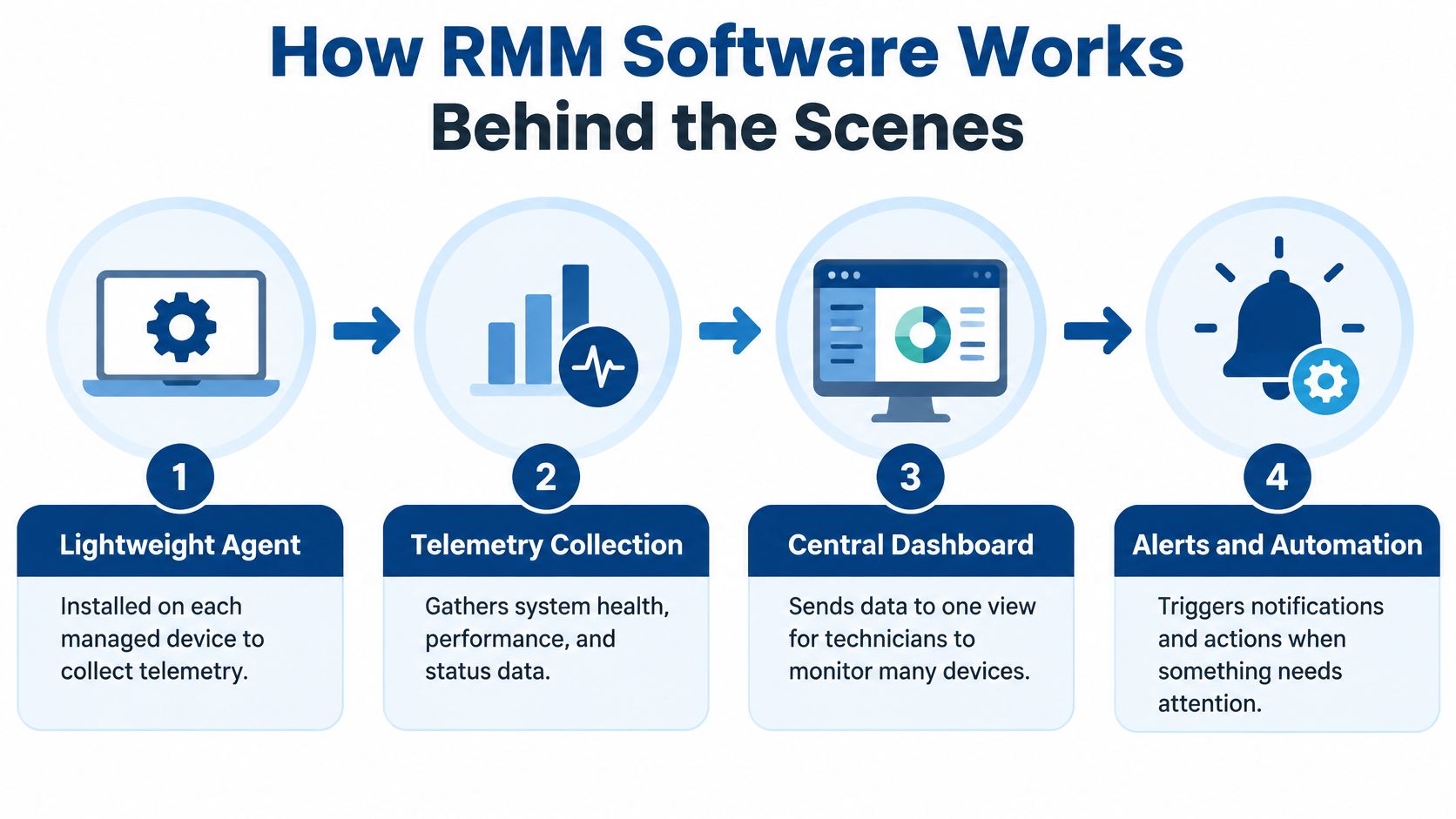
The agent reports what the device is doing
A lightweight agent is software installed on a managed computer or server. It gathers telemetry, meaning information such as operating-system state, running services, hardware health, configuration changes, and security events.
That information goes to a central console, where technicians can review many managed devices together. A comparable connection may support systems that aren't managed through the same kind of installed agent. These collection and remote-administration capabilities are covered in the joint guide to securing remote-access software.
The console isn't just a remote view of someone's desktop. It organizes device information so technicians can investigate conditions without asking each employee to describe what they see.
Rules turn information into work
Administrators configure monitoring rules around conditions that need attention. For example, a rule might identify low disk space, a stopped service, a failed backup, or a missing patch.
The response depends on the condition and the permissions granted:
- Notify a technician: An unfamiliar failure needs investigation before anyone changes the system.
- Run an approved action: A standardized problem may have a predefined remediation script.
- Open a remote session: A technician may need to examine the device directly.
- Check the result: The team should confirm whether the action resolved the original condition.
Suppose a monitored service stops. The useful workflow isn't merely generating a warning. It's identifying the affected system, applying an authorized response, and checking that the service remains available afterward.
Device telemetry also isn't the same as understanding every network connection. Our guide to monitoring network traffic provides related context for investigating activity across a network.
At RDE Technologies, we monitor systems, protect data, and provide preemptive solutions to help clients avoid future IT complications. The business value comes from turning those observations into appropriate action, not collecting information for its own sake.
Core Capabilities Every RMM Platform Includes
RMM product descriptions can sound like a list of interchangeable features. A more useful approach is to connect each capability to a maintenance problem and the authority required to address it.
These are the core capabilities generally associated with RMM. Exact coverage still needs to be confirmed for the systems and applications in your environment.
Monitoring, alerts, and inventory
Automated health monitoring checks conditions that staff shouldn't have to inspect manually. A server approaching its storage limit, for example, deserves attention before employees discover they can't save work.
Alerts identify conditions requiring a response. An alert only becomes useful when someone owns it, understands its importance, and follows it through to resolution.
Device inventory establishes what the team is managing. Without a common inventory, it's difficult to distinguish an intentionally excluded workstation from a forgotten one.
We monitor system statuses to help avoid system failures. That work needs an accurate understanding of which systems belong within the maintenance scope.
Patching, software management, and remote repair
| Capability | Concrete use | Operational responsibility |
|---|---|---|
| Patch management | Identify and deploy missing updates | Approve timing and handle exceptions |
| Software management | Install or update approved applications | Control which software may be deployed |
| Remote access | Investigate a workstation without a site visit | Authorize the session and retain activity records |
| Scripting | Repeat a standardized maintenance task | Review what the script changes |
| Troubleshooting | Examine a failed service or configuration | Verify the repair and document the outcome |
Patch management deserves particular attention because identifying an update and completing its deployment aren't the same task. Our explanation of patch-management fundamentals offers additional context for planning that work.
We also provide remote support through an online remote support and collaboration portal. Remote access is the connection method; troubleshooting is the work performed through it.
Logs make activity reviewable
A dashboard shows current information, but retained logs let administrators investigate what happened earlier. A baseline of normal behavior helps distinguish an expected maintenance action from activity that deserves closer examination.
CISA's guidance for organizations using managed service providers recommends improved monitoring and logging, segregated logging arrangements, and correlation of provider information with customer detection systems. Those practices matter because a dashboard alone doesn't provide independent security oversight.
A completed task should leave evidence, not just a green status indicator.
For an owner, the practical distinction is straightforward: monitoring identifies a condition, management changes something, and logging makes that change reviewable. A dependable service needs all of those functions working together.
Business Uses Across Offices, Remote Teams and Care Facilities
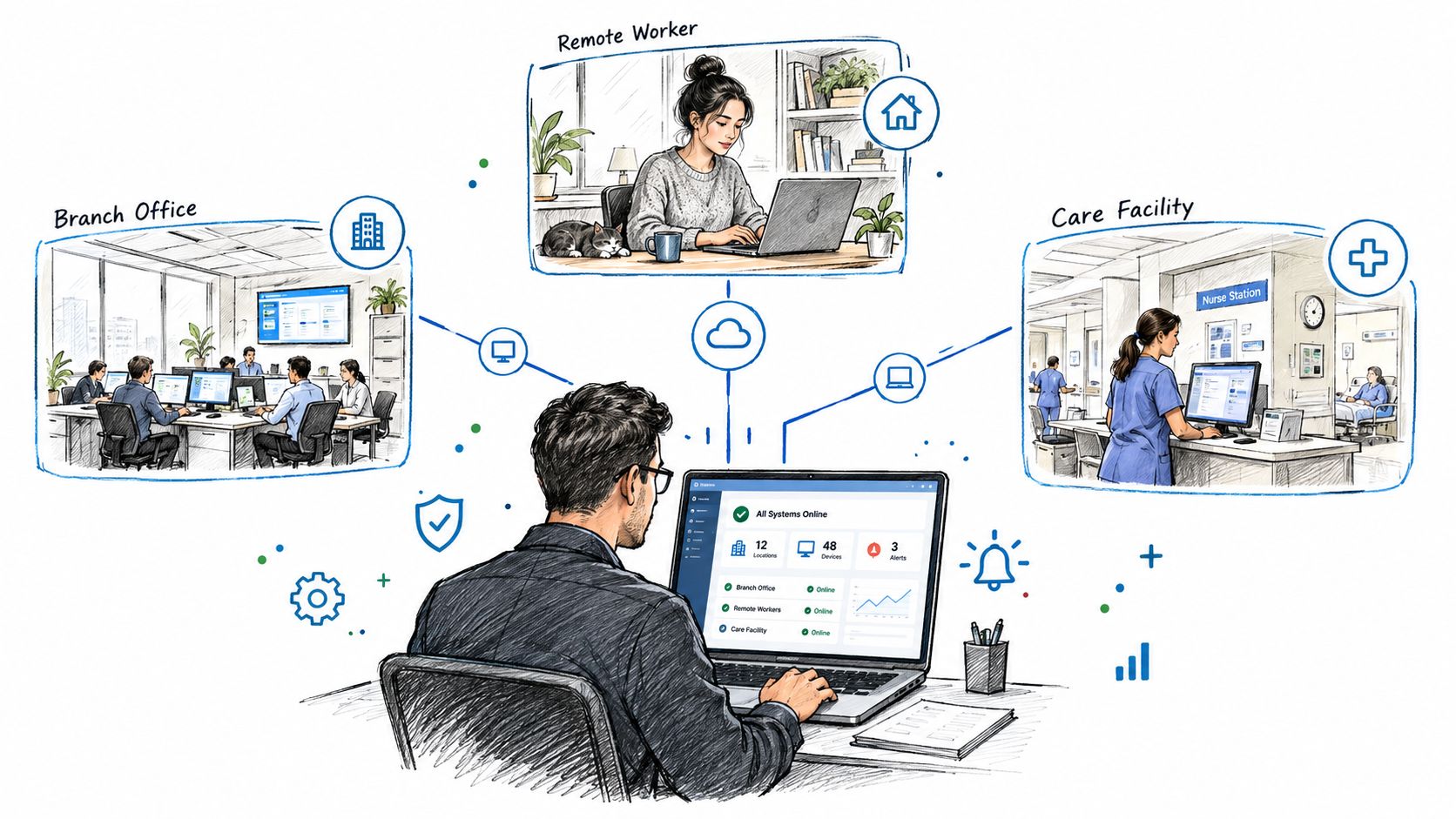
A branch office, a home-based employee, and a care facility have different operating needs. They can still benefit from a shared management approach, provided the team doesn't treat every location as identical.
The illustration below shows the central operating model across those settings.
Offices and remote employees
Consider a professional-services firm with staff working from different locations. A shared inventory and consistent maintenance policies give the operations team a common starting point instead of separate lists maintained by each office.
A remote employee's laptop can also receive attention without waiting for the employee's next office visit. That doesn't mean every issue can be solved remotely. A damaged device or physical cabling fault still requires hands-on work.
The useful boundary is remote maintenance where appropriate, local intervention where necessary. RMM supports the former without replacing the latter.
Care facilities need recovery planning as well as maintenance
For a multi-site care operator, consider a hypothetical arrangement in which facilities previously relied on separate local fixes. Central administration can support common patching practices, a shared inventory, and consistent review of backup status.
Healthcare adds a more consequential question: can the organization restore information and continue critical operations after an emergency? HIPAA contingency requirements address procedures for backing up electronic protected health information, restoring lost data, and operating during emergencies, as explained in HHS's HIPAA Security Rule resources.
A useful distinction for administrators is:
- Backup status: Did the backup process report completion?
- Recovery testing: Can the organization restore the information it needs?
- Protected copies: Would an incident affecting production systems also affect the backups?
HHS ransomware guidance also calls for periodic test restorations and consideration of offline backups. RMM-supported backup oversight should feed that wider recovery process, not substitute for it.
For additional context, the following video is available to view.
Physical network design remains part of the operating environment. A monitoring console can't compensate for an unsuitable wireless installation or repair a disconnected cable.
We design and install wireless networks for large offices, hotels, retail spaces, nursing homes, and assisted living buildings using the latest technology. For care operators, that infrastructure work and ongoing remote maintenance address different parts of the same operational need: keeping staff connected to the systems they depend on.
Why Privileged RMM Access Needs Strict Controls
RMM isn't automatically a security control. It's an administrative tool that can perform security-related work, and its usefulness depends on permissions that can also be abused.
An agent may observe system health, change security settings, install applications, manage local accounts, and support unattended administrative access. If an attacker gains control of that access, the attacker may be able to use legitimate management functions against the organization.
CISA's RMM Cyber Defense Plan addresses this problem directly, including the abuse of legitimate tools for persistence and lateral movement. The implication for an owner is clear: protecting the management console is part of protecting every system it can administer.
Match each permission with a safeguard
Governance works best when controls correspond to actual capabilities rather than a general promise of security.
- Console sign-in: Require strong authentication, including phishing-resistant multifactor authentication where available.
- Administrative reach: Use least-privilege roles so technicians receive only the access their responsibilities require.
- Account separation: Keep administrative accounts separate from routine user accounts.
- Script execution: Require review and approval controls for scripts that can change managed systems.
- Remote activity: Retain audit logs and establish alerts for unusual actions.
- Staff departures: Remove access promptly when a technician or employee leaves.
- Installed agents: Maintain a complete inventory so unauthorized management software doesn't blend into normal operations.
Least privilege doesn't mean preventing technicians from doing their jobs. It means avoiding unnecessary authority. Someone responsible for routine desktop support shouldn't automatically receive unrestricted access to every server and sensitive application.
Accountability must extend beyond the login screen
A strong sign-in process won't resolve every misuse scenario. An authorized person can still make an inappropriate change, run the wrong script, or retain access longer than necessary.
Our discussion of reducing insider-threat risk provides related context for managing the people who already have access. For RMM, the practical response is to make privileged actions attributable, reviewable, and removable.
Owner's test: Can your organization identify who changed a system, what they changed, and whether they were authorized?
The same discipline should apply when responsibilities move between providers. Management agents and administrator access shouldn't become forgotten leftovers from an earlier support arrangement.
Finally, don't confuse administrative reach with complete protection. RMM may execute a security task, but that doesn't mean it detects every attack or guarantees recovery. Its privileged position makes governance more important, not less.
Choosing an RMM Provider and Where RMM Stops
A provider may present RMM, backup, endpoint protection, and security monitoring within a combined service. That's convenient, but you still need to understand which function addresses which problem.
One contract doesn't necessarily mean one tool does everything. Evaluate the actual responsibilities behind the service description.
RMM Compared With Related Security and Recovery Tools
| Tool | Primary role | What it does not do alone |
|---|---|---|
| RMM | Monitor device health and administer managed systems | Guarantee attack detection or data recovery |
| Backup | Maintain recoverable copies of information | Perform the full range of endpoint maintenance |
| Endpoint detection and response | Detect and support investigation of suspicious endpoint activity | Replace backup or routine IT administration |
| Security monitoring | Review and correlate security events for investigation and response | Automatically restore lost business information |
The table is a way to separate responsibilities, not a recommendation to purchase disconnected products. A coordinated service can combine these functions while keeping their limits clear.
For example, an RMM console might show backup information. That view doesn't establish that a restore has been tested. Likewise, deploying endpoint security software doesn't establish who investigates its alerts.
Start with an authorization test
NSA, CISA, and MS-ISAC guidance on securing RMM recommends auditing installed remote-access tools, permitting only authorized RMM applications, using approved paths such as a VPN or virtual desktop infrastructure, and blocking unauthorized RMM execution.
Translate that guidance into a practical review of the proposed service:
- Authentication: Document how technicians prove their identity before accessing your systems.
- Activity records: Establish which remote actions are logged and how those records can be reviewed.
- Service boundaries: Identify which security and recovery functions are included, separately managed, or excluded.
- After-hours response: Clarify who receives urgent alerts and what response the agreement covers.
- Exit arrangements: Specify how access and installed management software will be removed when the relationship ends.
These are selection criteria, not assumptions about a provider's existing policies. The agreement should make the answers explicit.
Evaluate service scope and company background separately
At RDE Technologies, our IT security management services include server and network monitoring, network security, firewalls, content filtering, managed antivirus for desktops and servers, patch management for desktops, and advanced ransomware protection for endpoints.
We've been in business for over 10 years and hold an A+ rating with the Better Business Bureau. Those credentials provide company background, but they don't replace a discussion of technical scope and access governance.
The strongest decision combines both kinds of information: who the provider is and exactly what the provider will do. A familiar name or a long feature list isn't a substitute for clear operational responsibilities.
Next Steps for Evaluating RMM for Your Organization
RMM centralizes monitoring and remote administration, but the business decision is broader than choosing software. You're deciding how maintenance will be performed, who can make changes, and what evidence you'll receive.
Start with your existing environment rather than a product demonstration. An incomplete picture of current devices and access makes it harder to evaluate any proposed service.
Prepare a working inventory
Create a short document your operations team and IT support can review together:
- Managed systems: List business computers, servers, network equipment, and important applications.
- Existing remote access: Record installed management tools and identify who authorized them.
- Administrator accounts: Identify internal staff, contractors, and providers with expanded permissions.
- Operational priorities: Name the processes that need the most dependable support, such as charting, document access, or business communications.
- Known gaps: Note recurring failures, unclear responsibilities, or recovery tasks that haven't been verified.
You don't need a polished technical report to begin. A practical list of systems, responsible people, and unresolved questions is more useful than a broad request to make IT better.
Turn the inventory into a service discussion
Use that document to establish scope before comparing proposals. Keep the governance questions alongside the maintenance requirements so neither gets treated as an optional add-on.
We offer a free quote request form on our website. That provides a low-commitment starting point for discussing your environment, the support you need, and the boundaries that should be documented.
This week, bring the inventory to the person currently responsible for IT and identify anything neither of you can confidently explain. Those unknowns give you a concrete agenda for evaluating support, without assuming that installing another agent will solve every problem.
RDE Technologies offers system monitoring, remote IT support, security management, and data backup services that address the operational needs surrounding RMM. Visit RDE Technologies to request a free quote and discuss your devices, maintenance priorities, and the access controls your organization needs.