
The morning medication pass is underway, a nurse-station computer won't open the electronic health record, and the front desk reports that calls aren't coming through. The administrator has a full schedule, but staff are waiting for someone to decide whether the problem belongs to the internet provider, the software vendor, or IT support.
A managed IT service company should clarify that responsibility before an interruption happens. For a nursing home or business, the value isn't a promise that technology will never fail. It's documented ownership, working safeguards, and a recovery plan that someone has tested.
Table of Contents
- What a Managed IT Service Company Actually Does
- Core Services Included in Managed IT Support
- Security and Backup Duties Your Provider Should Own
- Checklist for Choosing a Managed IT Provider
- Managed IT Requirements for Skilled Nursing Facilities
- Managed IT for Law Firms and Multi-Site Businesses
- Book a Free HIPAA Security Risk Assessment
What a Managed IT Service Company Actually Does
A managed IT service company takes responsibility for agreed business computers, networks, servers, phones, and data under a recurring service agreement. Staff have an established support team to contact, while technicians maintain and monitor the systems included in the contract.
The arrangement resembles scheduled maintenance for a building's heating system. A maintenance contractor checks equipment and addresses warning signs before the building loses heat. Break-fix IT resembles calling a repair person only after the heating stops.
Managed service, break-fix and in-house IT compared
| Model | Who watches the systems | How work is billed | Best fit |
|---|---|---|---|
| Managed IT service | Provider monitors and maintains systems continuously | Recurring agreement | Businesses that want predictable support and fewer surprise outages |
| Break-fix | Business calls when something fails | Per incident | Very small setups with few systems and low downtime risk |
| In-house IT staff | Employees on payroll | Salaries and tools | Organizations with enough internal work to keep a full team busy |
Responsibility matters more than the label
The main shift is from reacting to complaints to looking for problems before staff report them. Technicians can investigate storage warnings, unsuccessful updates, or network errors before those conditions interrupt work. Monitoring can't prevent every failure, but it gives the support team information that a repair-only arrangement may lack.
Managed support can also complement internal employees. An IT lead might retain purchasing and application decisions while an outside team handles routine maintenance and user support. In Flexera's 2025 State of the Cloud Report, 60% of organizations reported using managed service providers in some capacity to manage public cloud environments.
The service areas connect through a shared responsibility for keeping business technology usable.
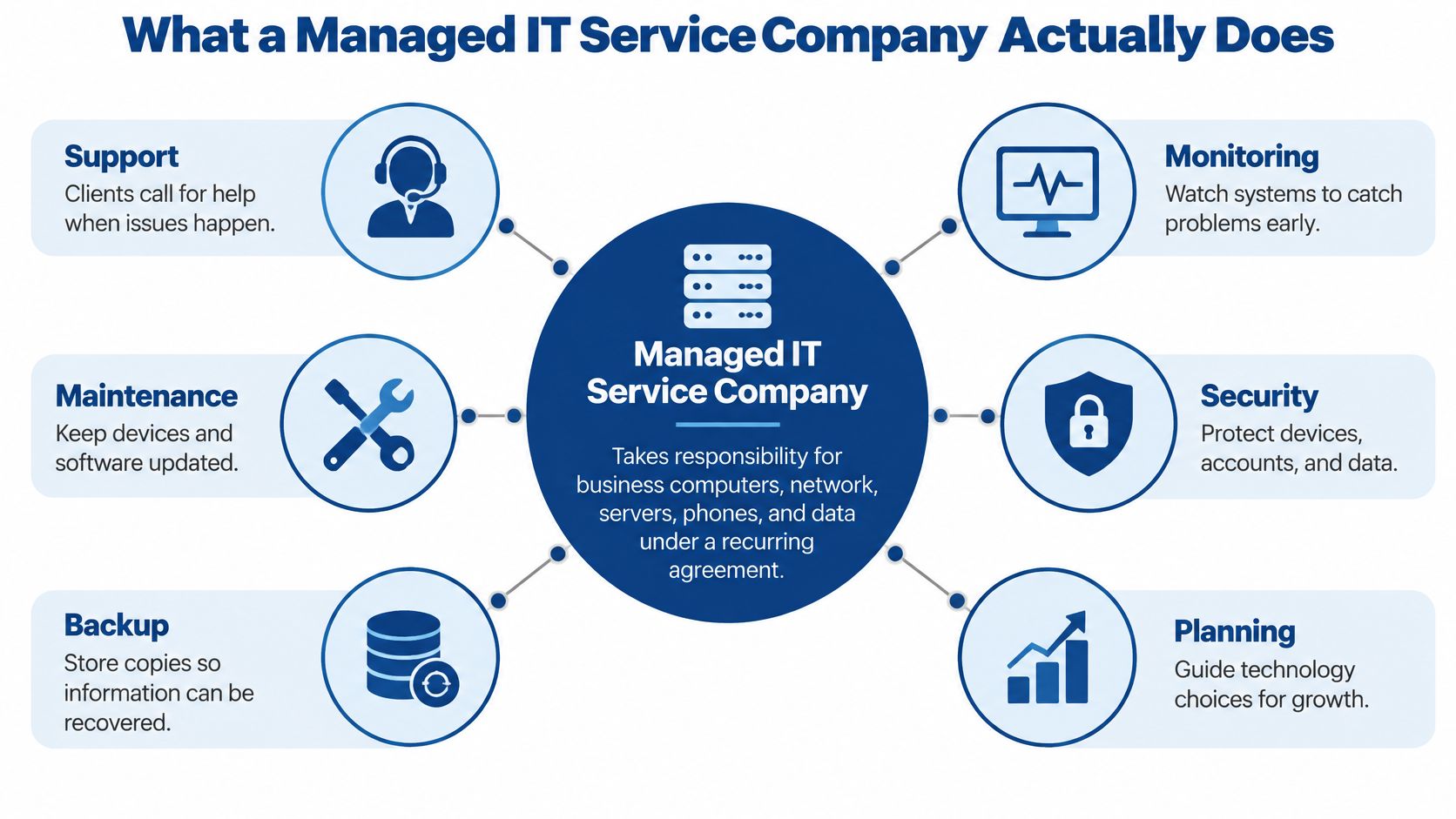
RDE Technologies maintains and services a client's whole system, including network security, data backup, and hosting. Its monitoring and preventive maintenance are intended to identify conditions that could lead to failures.
The contract still needs clear boundaries. A hosted EHR vendor may maintain its application, while the managed provider maintains the workstations and network used to reach it. Administrators should know who coordinates when neither party initially accepts responsibility.
Practical test: A business can list every system whose failure would stop operations for a full day, then identify the person or company currently responsible for maintaining each one.
Phones, internet access, the EHR, and shared files belong on that list. Any blank ownership field deserves attention before another support agreement is signed.
Core Services Included in Managed IT Support
Service names are easier to evaluate when they're connected to everyday work. This lookup separates the main areas so an administrator can compare a proposed agreement against actual interruptions.
Service areas a managed IT provider covers
| Service area | What it includes | Example |
|---|---|---|
| Ongoing IT maintenance | Onsite and remote support, desktop support and repair, server and network maintenance | Fixing a nurse-station workstation before the shift starts |
| Network management and monitoring | Server and network monitoring, firewalls, content filtering | Spotting warning signs from a failing switch before Wi-Fi drops |
| IT security | Managed antivirus, desktop patch management, ransomware protection for endpoints | Patching workstations on a fixed schedule |
| Data backup | Onsite and offsite backup, offsite replication, data retrieval | Restoring a deleted shared drive |
| Web hosting | Hosting for business websites and domains | Keeping a separately hosted public website available during a local server outage |
| VoIP phone systems | Hosted phone service without on-site phone-system equipment, remote-work support, failover setup | Keeping business calls routed when the main line fails |
| Wireless and cabling | Wireless installation, Cat5/Cat6 and fiber network cabling | Providing resident Wi-Fi coverage across a building |
| IT assessments | Review of risk, servers, networks, continuity, and network security | Establishing a baseline before a new contract |
Match the service to the cause
A slow workstation doesn't automatically need replacement. The cause might be a device fault, overloaded storage, poor wireless coverage, or a network problem. Maintenance and monitoring should help technicians distinguish those causes rather than repeatedly restarting the computer.
Security work connects to maintenance but has a different purpose. Patch management closes known software weaknesses, while firewall settings and account restrictions limit exposure. An agreement should identify which devices receive these controls and which require separate arrangements.
The company's 24/7 managed IT services combine a help desk staffed around the clock, remote support through an online portal, and field technicians for work that requires physical access. Maintenance includes basic installation, desktop repair, server and network upkeep, and hardware, virtualization, and switch setup and repair.
Communications need their own continuity plan
Hosted VoIP, meaning phone calls carried over an internet connection, doesn't require an on-site phone-system cabinet. Staff still need suitable devices, power, and connectivity. The service can reduce long-distance landline charges and support employees working off site.
The company also sets up VoIP phone failover for clients. Reliable, secure operation still requires appropriate configuration, protected accounts, and a tested alternative call route.
- Identify recurring interruptions: Staff should record the service areas causing the most daily disruption.
- Match each problem: Dropped calls point toward communications; dead wireless zones point toward network coverage.
- Check the proposed scope: The agreement should describe the work addressing that cause, not promise general support.
Security and Backup Duties Your Provider Should Own
If a server becomes unavailable during a busy shift, staff need to know what information can be restored and how long the interruption may last. A provider should help answer those questions before an incident, then document and test the recovery plan. Administrators still need to identify which operations must resume first and approve business decisions during an incident.
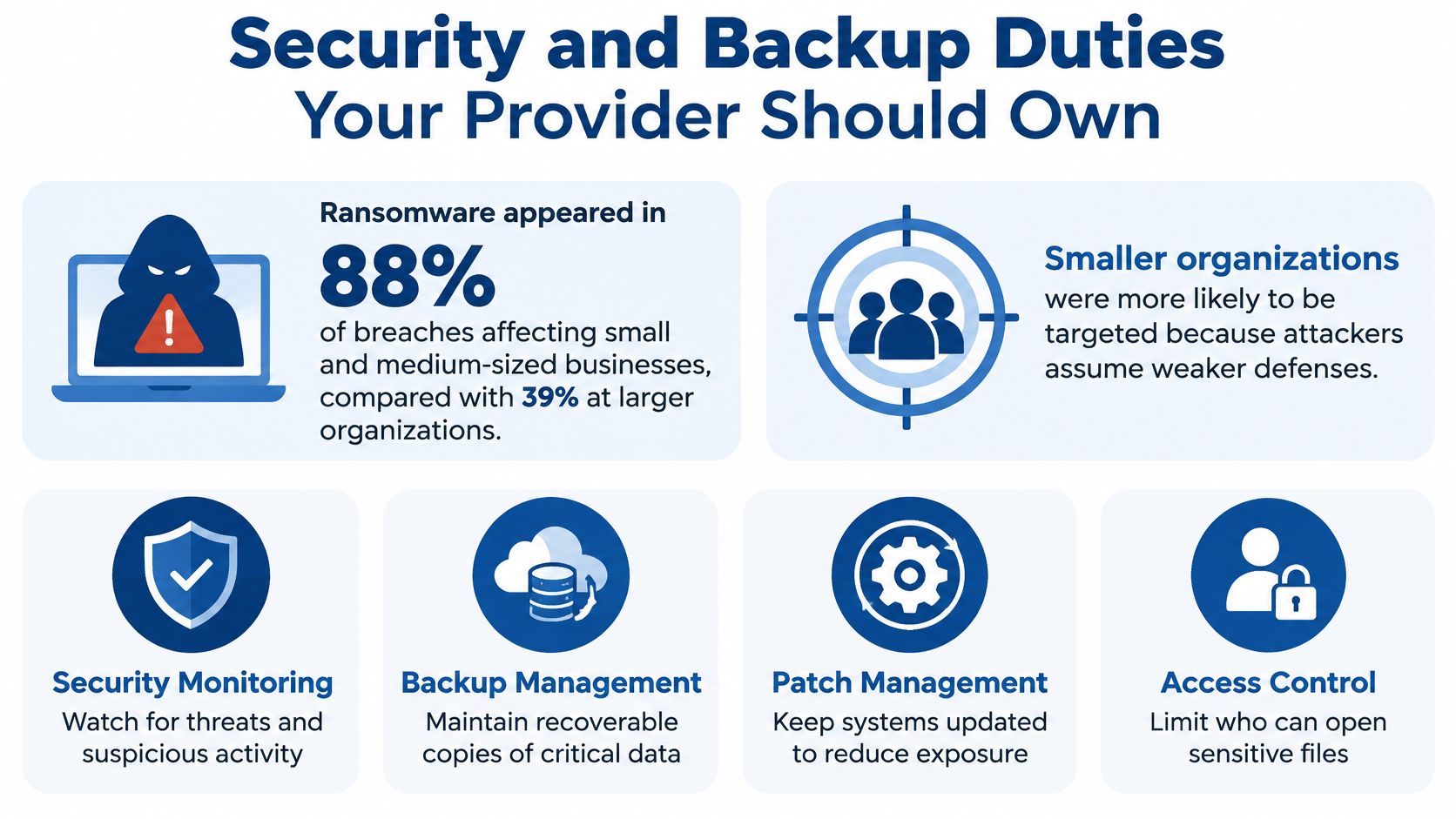
A successful backup job isn't a successful recovery
A common backup practice is the 3-2-1 approach: keep three copies of important files, use two types of storage, and store one copy off site. An offsite copy can still be at risk if an attacker can access it using compromised production credentials. Ask how copies are protected and how recovery is tested.
A recovery-point objective sets the amount of data loss an organization can tolerate. A recovery-time objective sets how quickly a particular system must return to service. For example, a shared marketing folder and a system used for clinical documentation may need different recovery priorities.
A successful job message only confirms that a backup ran. It does not prove staff can use the restored information. NIST's guidance on protecting data from ransomware and other data-loss events emphasizes planning, maintaining, and testing backups.
Recovery evidence should show that the restored information is usable, not merely that files appeared in a destination folder.
Require evidence of the work
RDE Technologies provides security management that includes server and network monitoring, firewall management, content filtering, managed antivirus for desktops and servers, desktop patch management, and endpoint ransomware protection. Its backup services include onsite and offsite backup, offsite replication, data retrieval, and colocation disaster recovery.
For care operators, protecting patient data while maintaining care starts with knowing which systems staff need during an interruption.
Ask the provider to make recovery evidence available, including:
- Restore-test record: The date, scope, outcome, and unresolved problems from the latest full restore.
- Credential separation: Whether an offsite or offline copy remains protected if production administrator credentials are compromised.
- Backup age by location: The latest recoverable information for each facility.
- Failed jobs and fixes: Outstanding failures, assigned owners, and confirmation that corrective work succeeded.
Checklist for Choosing a Managed IT Provider
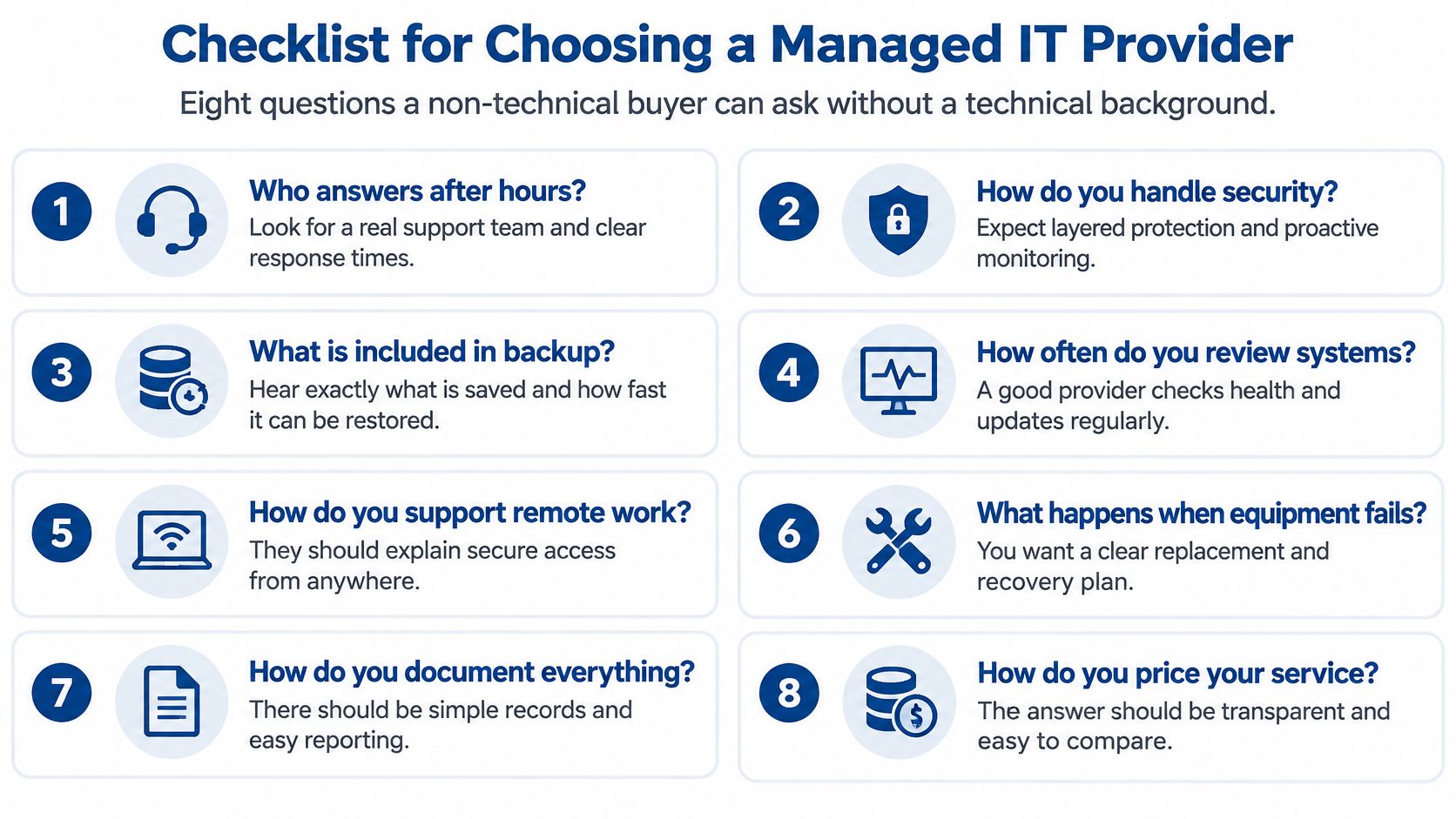
A non-technical buyer can evaluate a provider by asking for records rather than relying on technical vocabulary. The strongest answers identify a person, a process, and something the administrator can inspect.
Questions that make proposals comparable
Who answers after hours, and is the help desk staffed 24/7?
A good answer identifies the support team, the nighttime contact method, and the escalation route.Are systems monitored before failures occur, and what does the monthly report show?
The answer should name monitored systems and show alerts, completed work, outstanding issues, and recommended decisions.When was a full restore last tested, and is the result available?
A credible answer supplies a dated written result, including unsuccessful steps and subsequent corrections.Do technicians work on site as well as remotely, and where are they based relative to each location?
The proposal should describe physical coverage and dispatch arrangements for every facility or office.Who owns each security control, and how often is it reviewed?
Each control needs a named responsible party and a documented review schedule.Will there be a written assessment before signing?
A useful answer includes a sample report and explains how findings affect the proposed scope.What does the recurring fee include, and what is billed separately?
The written proposal should distinguish routine support from equipment, installations, projects, and other exclusions.Can reporting be separated by location?
The answer should show how administrators can identify unresolved work at a particular facility or office.
The visual checklist provides another way to organize a provider interview.
Verify the answers independently
References and credentials deserve direct verification rather than acceptance from a sales presentation. A reference conversation should focus on practical matters, such as communication during an interruption and whether unresolved problems receive follow-up.
Support availability and resolution commitments are different. A staffed help desk establishes that someone can receive a request; the agreement must separately explain how urgent problems are prioritized and escalated.
Buying rule: A claim that can't be explained in writing shouldn't be treated as a contractual commitment.
Administrators should send the same questions to at least three providers and compare their written answers. A clear exclusion is easier to plan around than an assumption that everything is included.
Managed IT Requirements for Skilled Nursing Facilities
A skilled nursing facility depends on EHR access, medication and clinical workstations, nurse call infrastructure, resident Wi-Fi, and staff phones. Those dependencies make the scope of an IT assessment important: checking the administration office alone won't describe the facility's operational risk.
HHS risk-assessment guidance provides a practical sequence: define the scope, gather data, identify threats and vulnerabilities, assess existing safeguards, evaluate likelihood and impact, and determine risk levels. The resulting safeguards should address the organization's actual environment, not a standard equipment shopping list.
Turn the risk analysis into deliverables
HIPAA's risk-analysis requirement appears at 45 CFR § 164.308(a)(1)(ii)(A). HHS's Security Rule overview explains the framework for protecting the confidentiality, integrity, and availability of electronic protected health information.
The inventory should cover every building, including EHR access such as PointClickCare, clinical and medication workstations, wireless networks, remote connections, and vendor access. Including a hosted application doesn't mean the facility maintains the vendor's servers; it means the assessment considers how staff access the application and continue care if access fails.
Healthcare IT requirements and what the provider should deliver
| Requirement area | What the provider should deliver |
|---|---|
| Risk analysis, 45 CFR § 164.308(a)(1)(ii)(A) | Asset inventory, documented threats and vulnerabilities, ranked risk register |
| Contingency plan, 45 CFR § 164.308(a)(7) | Data backup plan, disaster recovery procedures, emergency-mode operations, and restoration evidence supporting applicable testing and revision provisions |
| Security incident procedures, 45 CFR § 164.308(a)(6) | Procedures for identifying, responding to, mitigating, and documenting security incidents |
| Access control, 45 CFR § 164.312(a) | Unique user identification, access restrictions appropriate to staff roles, and access reviews supporting ongoing evaluation |
| Emergency preparedness, 42 CFR § 483.73 | IT continuity and communication steps supporting the facility's emergency plan, communication plan, and testing program |
The risk register should flag unsupported software, excessive privileges, weak remote-access controls, and EHR-dependent systems without a workable recovery path. Each finding needs an owner and a corrective action, so administrators can distinguish an accepted risk from unfinished work.
Connect technical work to care operations
CMS emergency preparedness provisions require an emergency plan and a communication plan for covered long-term care facilities. The facility's procedures should explain how staff reach families, the on-call team, and outside partners when normal phones or network access are unavailable.
An IT provider supports that plan but doesn't replace clinical leadership or the emergency preparedness coordinator. For nurse call system infrastructure, responsibilities should distinguish network and power dependencies from specialist system maintenance and clinical response procedures.
- After-hours coordination: Staff need an escalation route that doesn't rely on an administrator noticing an email overnight.
- Facility-level visibility: Multi-building operators need reports separated by facility, including unresolved risks and corrective work.
Ciphar's overview of HIPAA and GDPR healthcare data requirements offers broader context for organizations assessing different privacy frameworks; GDPR applicability requires its own legal analysis. These regulatory descriptions are general, and administrators should confirm applicability, implementation details, and survey expectations with the facility's compliance officer or counsel.
Managed IT for Law Firms and Multi-Site Businesses
Law firms and other small and mid-sized businesses on Long Island and in New York City face a similar ownership problem. Attorneys need protected client files, secure email, reliable remote access, and a practical recovery route when shared systems become unavailable.
The illustration shows a typical office environment where those needs overlap.
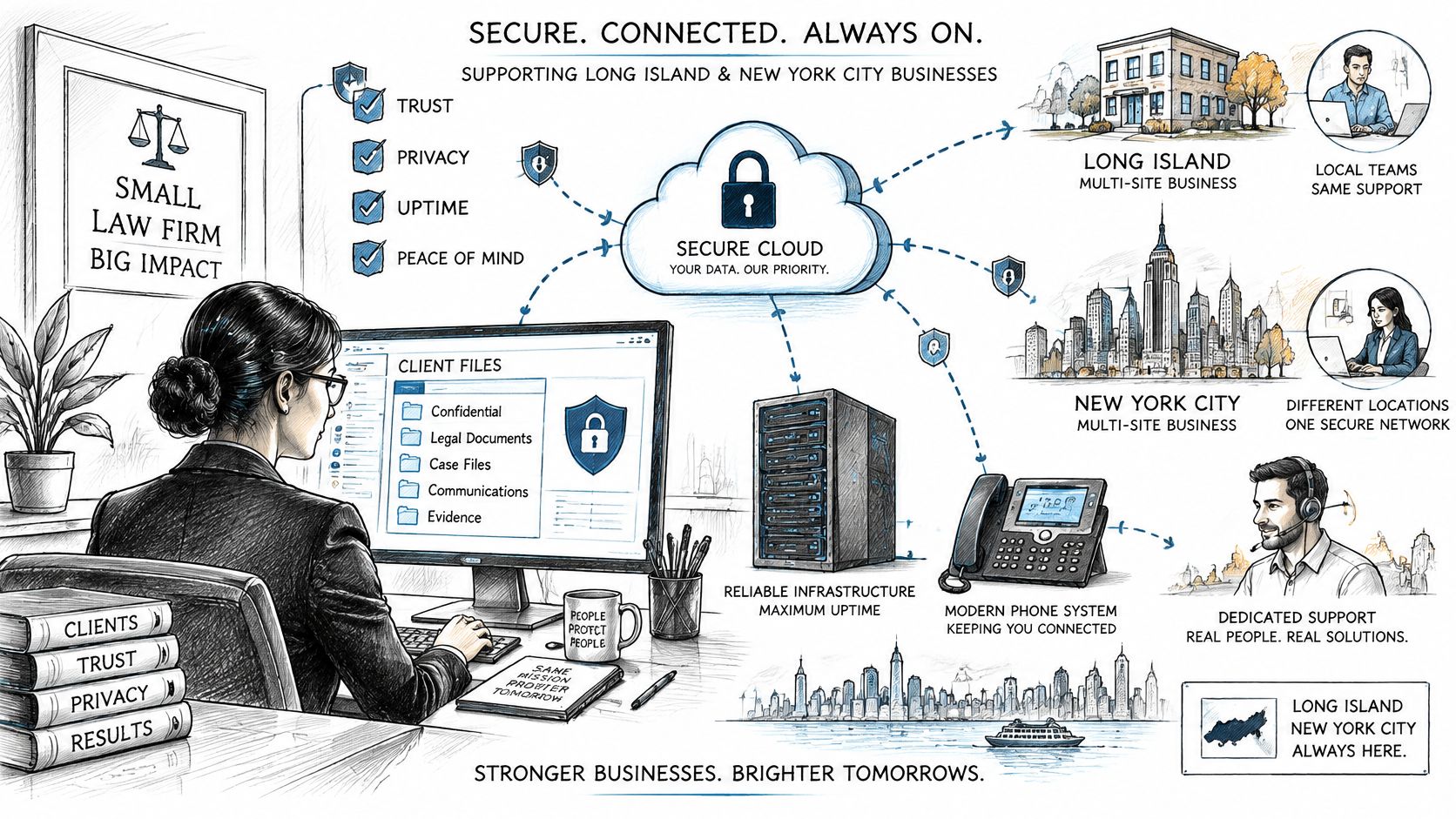
An illustrative office interruption
Consider a hypothetical three-office firm where a failed switch disconnects phones and shared files at a branch. Monitoring could help technicians identify the affected device, while a documented network layout helps establish what needs replacement. VoIP failover could route incoming calls elsewhere, provided the alternative route doesn't depend on the failed equipment.
A backup becomes relevant if the incident also damages data or exposes a separate server problem. It doesn't repair the switch. That distinction prevents a provider from presenting backup as the answer to every type of outage.
RDE Technologies, based in Oceanside, New York, offers on-site services across New York, from basic installations to switch repairs, and remote support beyond New York through its support portal. It also supports facilities nationwide on site and remotely; dispatch arrangements should be confirmed for each address.
The accompanying video offers additional context for evaluating business technology support.
Keep location-level problems visible
A combined report can conceal an office with repeated failures. Location-level reporting lets management distinguish a local cabling problem from an organization-wide application issue.
- Physical coverage: What happens when a location needs a technician rather than remote troubleshooting?
- Remote employees: How do attorneys and other off-site staff reach support?
- Local accountability: Which report identifies open tickets, patch exceptions, and backup problems by office?
The goal is a consistent support process without assuming that every site has identical equipment or risks.
Book a Free HIPAA Security Risk Assessment
Before changing equipment or services, a facility needs a clear view of its technology and risks. RDE Technologies offers IT assessments that examine areas such as data storage, server and network infrastructure, business continuity, cloud services, network security, and opportunities to reduce costs.
For a useful assessment, gather information about the systems and services that support daily operations:
- Buildings and networks: List each building, its network setup, and connections to other locations.
- EHR and clinical systems: Identify the EHR, medication workstations, clinical workstations, and supporting systems.
- Vendor access: Record which outside organizations can access systems remotely and why.
- Operational concerns: Note wireless coverage issues, nurse call dependencies, and phone service interruptions.
Use the assessment to assign corrective work
Ask which risks need attention first, who will address them, and how completion will be documented. A written record of findings and corrective actions can help facility leaders track decisions and revisit them after changes to buildings, systems, or access arrangements.
An IT assessment is not a compliance certification. Facility leaders should confirm regulatory decisions and corrective measures with their compliance officer or counsel.
RDE Technologies is based in Oceanside, New York, and provides IT consulting and support, including maintenance, security, and data backup. Its assessments also cover areas such as carrier services, business applications, and network infrastructure.
Administrators can contact RDE Technologies to discuss an IT assessment and determine what support would fit their operations. Ask what the assessment covers, how findings will be communicated, and what evidence the provider can supply to show that agreed work was completed.