






An administrator reviewing an overnight complaint may hear that a resident pressed the call button but nobody came. The bedside device appears intact, and the nurses' station is working by morning. That still leaves an important question unanswered: where did the call stop?
A nurse call system is a chain of resident devices, lights, controllers, software, networks, and staff notifications. Maintaining that chain takes more than replacing broken buttons. Clinical leaders and IT staff need a shared way to test calls, measure delays, and assign responsibility for repairs.
Table of Contents
- Nurse Call System Parts and Where Each One Sits
- How a Call Travels From the Room to a Caregiver
- Response Times and the Metrics That Measure Them
- Network Design and Failover That Keep Calls Moving
- Securing EHR and Mobile Integrations Without Blocking Alarms
- Where CMS Requires Nurse Call Coverage
- Routine Testing and Who Owns Each Fix
- Confirm Your Setup With an IT Assessment
Nurse Call System Parts and Where Each One Sits
Consider a hypothetical overnight failure: a resident pulls a bathroom cord, but the call never reaches the aide because a hallway controller has lost power. The cord itself works. The missing link sits elsewhere in the building.
The following table is a walk-through checklist, not a ranking of how frequently components fail. Actual equipment and connections vary by installation.
Nurse call system parts, locations and failure points
| Component | Where it sits | What it does | Common failure point |
|---|---|---|---|
| Resident call button or pull cord | Bedside, bathroom, bathing area | Sends a call from the resident | Worn or disconnected cord; device out of reach |
| Room light | Above the room door or bed | Shows staff which room is calling | Failed bulb or light driver |
| Corridor (dome) light | Outside each room | Lets staff spot calls from the hallway | Incorrect room assignment; poor visibility |
| Staff assistance (duress) button | Bathrooms and bathing areas | Lets staff summon help | Unreachable or never tested |
| Staff station or master console | Nurses' station or central work area | Displays and sounds calls | Volume turned down or station switched off |
| Zone controller | Ceiling or wall in each zone | Relays signals between devices and the server | Power loss or poor wiring |
| Server or software | Network closet or data room | Routes calls and logs events | Single point of failure; unpatched software |
| Mobile or wearable devices | Staff pockets or belts | Delivers alerts to phones or badges | Dead battery or weak wireless coverage |
| Network (cabling and wireless) | Walls, ceilings, and closets | Carries signals between connected components | Coverage gaps and shared traffic |
Understanding the device groups
Resident-facing devices start the request. These include bedside buttons and bathroom pull cords, while staff-assistance buttons let caregivers request help. Signal and routing equipment, including controllers and server software, carries the request and identifies its location.
Staff-facing devices display or announce the call. Think of a hotel: a guest rings a bell, a light identifies the room, and a front-desk panel tells staff where assistance is needed. Unlike a basic intercom, a modern nurse call system also needs defined routing and event records, capabilities discussed in research on nurse-call technology and workflow.
Accessibility belongs in this inspection. A resident with limited hand function, speech difficulty, or cognitive impairment may need an alternative to a standard button. Research on augmentative communication and patients' perceptions of care links the ability to summon help and communicate effectively with more favorable perceptions.
A building walk-through should therefore check whether each device is reachable from bed, whether the resident can use it, and whether staff can understand the need and priority. Staff should flag any location where a resident can activate a call but no receiving display identifies it.
How a Call Travels From the Room to a Caregiver
A call moves through a sequence of handoffs. Like runners passing a relay baton, every device and person must complete a handoff before the next participant can act.
The illustration summarizes the process. The detailed sequence separates acknowledgment, resolution, and escalation because they aren't interchangeable.
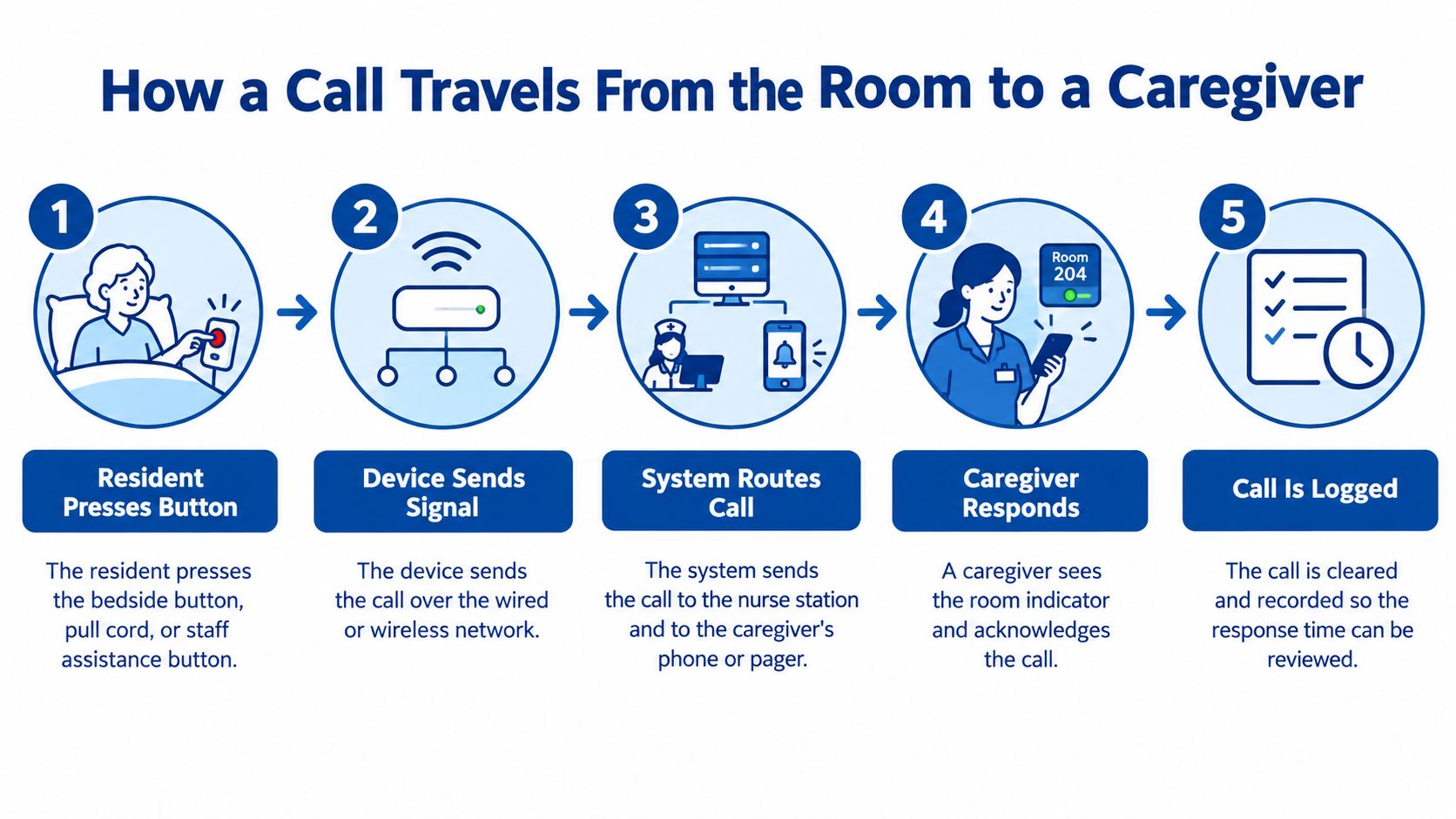
Following the call path
Exact behavior depends on the installed system and its configuration. A typical controller-based arrangement follows this path:
The resident or staff member activates a device. A bedside button, bathroom pull cord, or staff-assistance button starts the request. A disconnected cord or inaccessible button prevents the process from starting.
The device sends its signal to the zone controller, which serves a defined area. A failed connection or unpowered controller can interrupt this handoff even when the resident device appears normal.
The controller activates the room and corridor indicators. These help staff locate the source without depending entirely on a phone or console. An incorrect room assignment can direct staff to the wrong doorway.
Routing rules send the call to the assigned station, pager, or mobile device. Those rules must reflect current staffing, since a call sent to an off-shift caregiver may arrive successfully without reaching anyone available to act.
A caregiver acknowledges the call. Depending on configuration, this may silence an alert and record acceptance, but it doesn't necessarily clear every indicator. Staff need to recognize when acknowledgment has failed or when the room light intentionally remains active.
The caregiver visits the resident, addresses the request, and cancels the call according to facility procedure. Cancellation at the room or station should reflect what happened, rather than merely removing an unwanted sound.
An unanswered call escalates to another caregiver or supervisor. Although listed last, escalation occurs while a call remains unanswered, not after its completion. An outdated backup assignment can leave the system repeating an alert without reaching additional help.
Matching urgency to the route
A request for drinking water and a staff-assistance emergency shouldn't depend on identical routing rules. Clinical leaders should define which requests go to an appropriate individual and which require simultaneous notification to multiple staff members.
Practical rule: A delivery confirmation means the message reached an endpoint. It doesn't establish that someone understood the request or delivered care.
Staff training should address who accepts each call type, what acceptance means, and when another person takes over. Testing should also confirm that duplicate notifications don't leave everyone assuming someone else has responded.
Response Times and the Metrics That Measure Them
A call log turns a nurse call system into measurable clinical infrastructure. Every activation, delivery, acknowledgment, and cancellation leaves a timestamp, and those records show whether residents waited seconds or many minutes for help. Researchers at the Agency for Healthcare Research and Quality measured call-light response across hospitals, and the AHRQ call-light responsiveness report documented how widely those waits can differ from one facility to another.
The lesson for a nursing home administrator is to benchmark the facility's own performance. A hospital average, or a number quoted from a neighboring building, is not a promised service level. Resident needs, staffing patterns, call categories, and how each system defines its timestamps all change what any single figure means.
Nurse call performance metrics and how to calculate them
| Metric | What it tells administrators | How to calculate it |
|---|---|---|
| Median response time | Typical wait for an accepted call | Middle value of activation-to-acknowledgment intervals |
| 90th-percentile response time | Slow waits that the median can hide | Sort intervals and identify the percentile threshold |
| Unanswered calls | Requests without recorded acceptance, including unresolved escalations | Count by shift and review over the reporting period |
| Escalation rate | How often the initial route requires backup | Escalated calls divided by total calls |
| Calls per resident-day | Workload relative to occupancy | Total calls divided by resident-days |
| Peak-hour volume | The busiest calling period | Highest call count during an hour |
| Shift variation | Differences between day, evening, and night | Compare shift medians and slow-tail response times |
| System latency vs. human response | Equipment delivery delay versus acceptance delay | Compare activation, delivery, and acknowledgment timestamps |
All of these calculations come from the facility's own call logs. One caution applies to the unanswered-call count: an escalated call that a backup responder accepted still counts as answered. Reports should preserve that distinction, so the escalation rate measures how often backup is needed rather than inflating the number of failed calls.
Reading the measures together
The median can conceal difficult waits. A facility may post a satisfactory typical response while a smaller group of residents waits substantially longer. The slow-tail measure surfaces those cases without assuming every call follows the same pattern.
A monthly review should pull activation, delivery, acknowledgment, and cancellation records. Clinical leaders can compare shifts, isolate the longest waits, and inspect those calls individually for recurring room locations, call categories, or staffing assignments.
Timestamp definitions matter as much as the arithmetic. Activation-to-delivery measures the electronic path, while delivery-to-acknowledgment measures how long staff took to accept the alert. Cancellation is a separate event and shouldn't automatically be treated as proof of bedside arrival or completed care.
A fast notification isn't the same as a fast clinical response.
None of this reporting works if the clocks disagree. Controllers, servers, phones, and reporting tools all need synchronized time before their timestamps can be compared. Otherwise, a dashboard can show inflated delays or an impossible event order, like an acknowledgment that appears to precede the activation. The ownership model holds everything together here: IT staff validate clock settings and timestamp definitions so administrators can trust the reports they use for staffing decisions, incident reviews, and performance comparisons.
Network Design and Failover That Keep Calls Moving
Bandwidth alone doesn't establish whether a nurse call system is reliable. A connection may carry ordinary traffic successfully while a power interruption, configuration change, or missing backup route prevents an alert from reaching staff.
Nurse-call engineering guidance discusses cabling capacity alongside more consequential controls: separate network segments, resilient power, monitored device status, secure authentication, controlled updates, and documented failover. Failover means transferring operation to an alternate component or route when the usual one stops working.
Separating traffic without breaking connections
A virtual local area network, or VLAN, creates a logically separate network segment. Firewall rules control which traffic may cross between segments. Nurse-call equipment should be separated from resident Wi-Fi and ordinary business computers while retaining only the approved connections needed for clinical operation.
For example, an approved staff phone may need alerts, while a visitor's tablet doesn't need access to the call server. An electronic health record connection or a real-time location tool also needs a defined purpose, rather than unrestricted access across the network.
Wireless testing must include bathrooms, corridors, and corners, not just the nurses' station. A phone that loses connectivity along an assigned route may disappear from the alert path without an obvious warning to the caregiver.
RDE Technologies monitors systems, protects data, and provides preemptive solutions to help clients avoid future IT complications. A useful network traffic monitoring approach should distinguish a device that is online from an alert route that works in practice, with a named person responsible for investigating faults.
Failure scenarios to test and what to record
Disruptive testing should occur in an approved test window with clinical safeguards and the equipment vendor's participation where needed.
| Failure scenario | What to test | What to record |
|---|---|---|
| Loss of network connectivity | Disconnect a zone switch or uplink during an approved test | Activation-to-delivery delay and missed-call behavior |
| Controller restart | Restart a zone controller | Time to restore normal call routing |
| Battery operation | Run a controller or station on backup power | Runtime and any dropped calls |
| Server outage | Stop the primary call server under an approved procedure | Escalation success and failover time |
| Wireless coverage gap | Test calls from bathrooms, halls, and corners | Acknowledgment delay by location |
| Mobile device unavailable | Turn off a staff phone on an alert route | Whether the next responder receives the escalation |
These tests should form part of deployment acceptance and change validation. A basic connectivity check offers little assurance compared with an event record showing delivery, acknowledgment, escalation, and restoration.
Alarm fatigue also needs a design response. Excessive non-actionable notifications can desensitize staff, as the engineering guidance explains. Clinical leaders should approve priority classes, rules for suppressing unnecessary duplicates, escalation intervals, and recurring alert-volume reviews. Suppression must never become an undocumented way to hide unresolved calls.
Securing EHR and Mobile Integrations Without Blocking Alarms
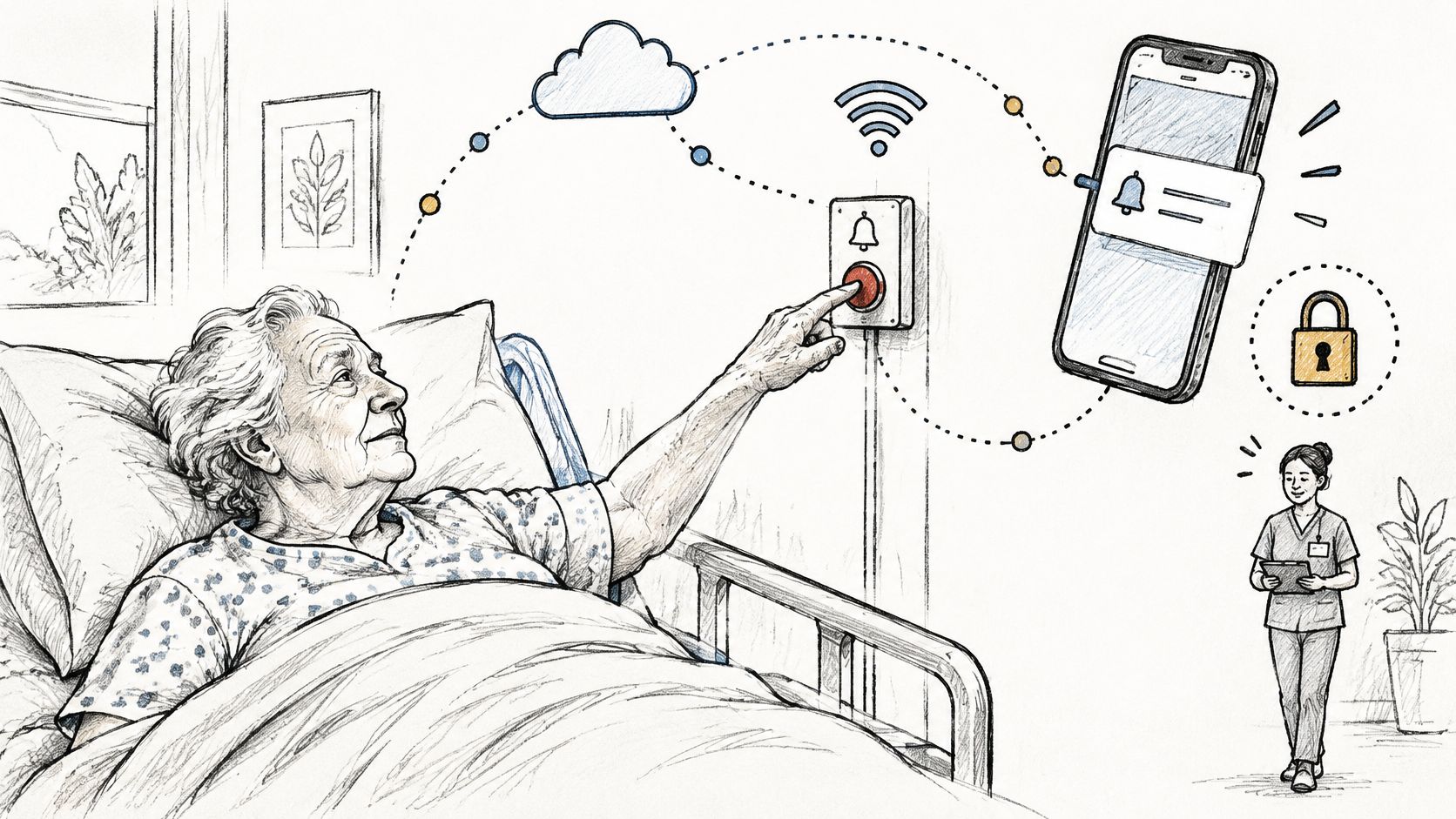
Replacing a wall button with a smartphone app doesn't automatically make a resident safer. A connected system adds devices, accounts, interfaces, and maintenance responsibilities that administrators must understand before relying on the new route.
The bedside interaction can remain simple even when the underlying connections become more complex.
Defining what each integration may do
An electronic health record, or EHR, integration might support documentation or reporting. For a facility using PointClickCare, compatibility and supported data exchanges should be verified rather than assumed. The administrator needs to know which records the interface can access, what information it sends, and how transfers are logged.
Real-time location tools can contribute staff-location information. Their configuration should establish whether location is informational or changes a call's status. Staff presence shouldn't be treated as completed care without a validated workflow.
Staff phones introduce a different question: who has the assigned device, and what resident information appears on it? Shared-device handoffs, account access, and lost-phone procedures belong in the operating plan, not just the installation paperwork.
Separating access control from audit controls
The HIPAA Security Rule requires technical policies and procedures permitting only authorized access to electronic protected health information. It separately requires mechanisms to record and examine activity in systems containing or using that information, as explained in the HHS Security Rule summary.
Under 45 CFR § 164.312(a) and (b), access control and audit controls serve different purposes. Access control restricts entry; audit controls create reviewable records. A facility's patient-data protection practices should address both wherever nurse-call integrations handle protected information.
A practical security checklist includes:
- Asset inventory: Record devices, software, firmware versions, and support contacts.
- Role-based access: Limit console and mobile permissions to each person's assigned responsibilities.
- Separated connections: Document permitted interfaces and restrict unrelated traffic.
- Administrator logs: Preserve records of routing changes, account changes, and other privileged activity.
- Patch ownership: Name the party responsible for obtaining, approving, and installing updates.
- Offline fallback: Test the approved alternative when an integration becomes unavailable.
- Incident handling: Define how a compromised device can be isolated without abandoning resident calls.
Patching questions deserve explicit answers. The maintenance agreement should identify who handles legacy equipment, how security notices reach the facility, and how availability is tested after an update.
Security staff and nursing leaders should approve the fallback together. A technically successful isolation step can still create an unsafe operational gap if nobody receives the affected calls. HIPAA applicability and safeguard details should be confirmed with the facility's compliance officer or counsel.
Where CMS Requires Nurse Call Coverage
For nursing homes subject to federal participation requirements, resident call coverage is a location-specific regulatory obligation. Under 42 CFR § 483.90(g), the system must allow residents to request assistance and relay calls directly to a staff member or centralized staff work area.
The requirement covers every resident's bedside and toilet and bathing facilities. A working console doesn't establish that all required locations have working access.
Turning the rule into a location check
The facility assessment should list each bedside, toilet room, and bathing area separately. The inspection record should connect each initiating device to its intended receiving destination, rather than merely marking the resident room complete.
Bathrooms and bathing areas deserve explicit entries because a bedroom-only checklist can overlook them. For multi-building operators, each building needs its own location list and verified destinations.
- Receiving destination: Which staff member or centralized work area receives each location's call?
- Unstaffed periods: What approved route applies when that work area isn't staffed?
- Repair responsibility: Who receives the report when a bathroom device fails?
- Wireless suitability: Does the installed wireless call arrangement function at each required location?
Resident Wi-Fi availability alone doesn't demonstrate compliance with the resident-call requirement. A wireless nurse-call arrangement still has to provide the required communication function at the required locations.
Applying the correct standard to each building
Assisted living and other senior-living communities are generally governed by state requirements rather than this federal nursing-home provision. An operator with different care settings shouldn't assume every building follows an identical regulatory framework.
State requirements and survey interpretations can add detail. Administrators should confirm the applicable standards, testing documentation, and any temporary arrangements during repairs with their compliance officer or counsel.
The resulting coverage list should be a controlled facility document. Changes to room use, resident placement, or staff work areas should trigger a review so the recorded destination still matches the building's actual operation.
Routine Testing and Who Owns Each Fix
CMS survey guidance considers whether all relevant parts of the call system function correctly. A switched-off station, inaudible volume setting, or failed indicator can undermine operation, as described in the HHS decision discussing CMS nurse-call guidance.
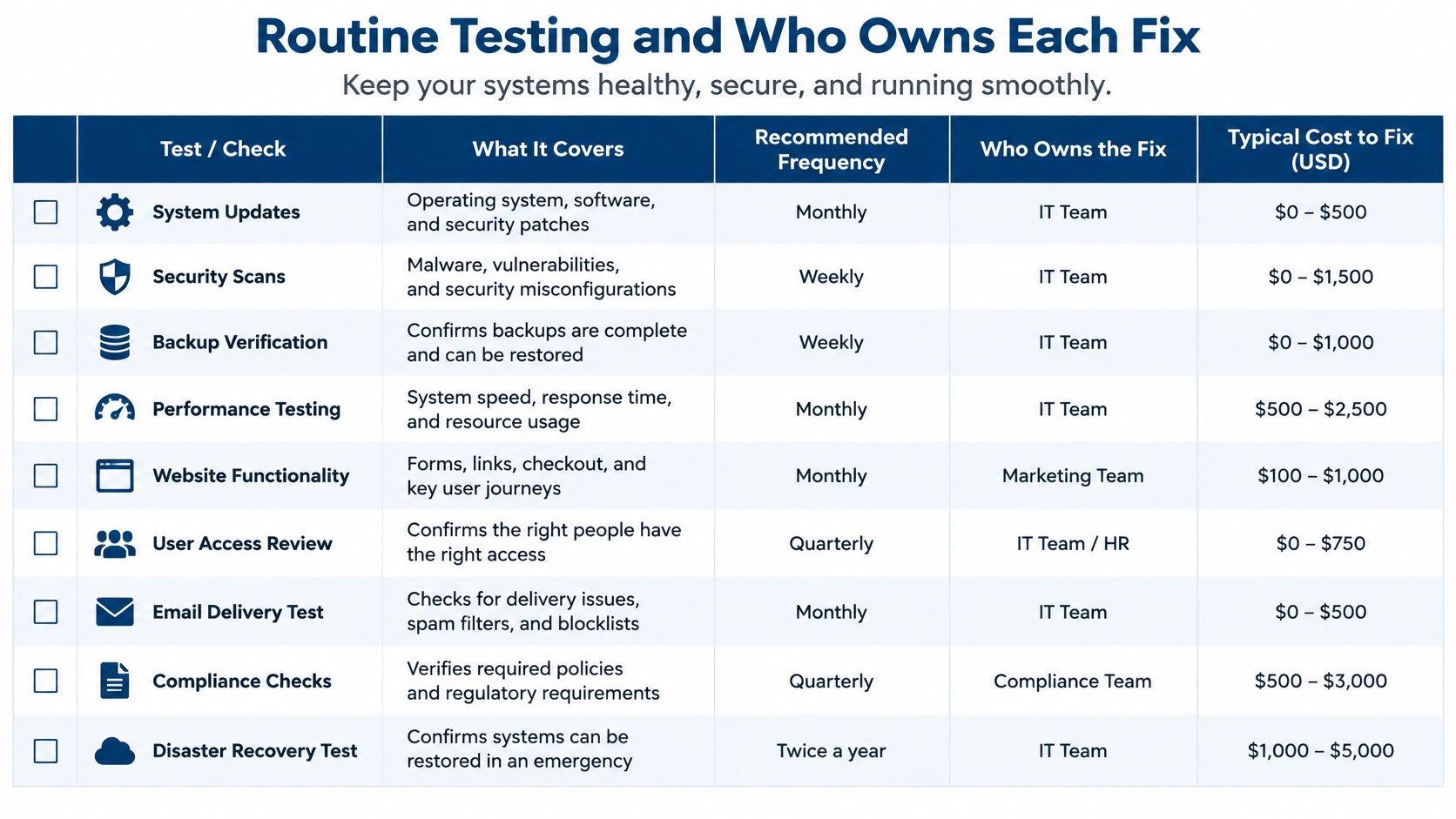
The test scope therefore extends from the resident's initiating device through the transmission path, receiving station, notification, and staff response procedure. The facility's written policy should establish the testing schedule; generic frequency or cost illustrations shouldn't replace site-specific requirements.
The checklist visual can support discussion of testing responsibilities.
A repeatable location test
- Activate each device. Test bedside, bathroom, and bathing-area calls, confirming the associated room and corridor indicators.
- Confirm that the receiving station sounds as intended and displays the correct location.
- Acknowledge and cancel the test. Verify the expected clearing behavior and corresponding log entries where logging is available.
- Check that volume and indicators remain effective from relevant working positions, including the far end of the hallway.
- Verify mobile delivery. Confirm each device included in the alert route receives its assigned test.
- Record the date, tester, result, identified defect, and repair status.
Testing should use clearly identified test calls so staff don't confuse maintenance activity with resident requests. Failed locations need an approved interim care procedure and a tracked repair, not merely a note for the next inspection.
Outage testing requires the safeguards described in the network review. Controller restarts and server failover shouldn't be improvised during an occupied unit's routine device checks.
Assigning responsibility before a failure
The facility owns staffing, clinical procedures, resident-facing testing, and decisions about interim care. IT support should have a documented scope covering the relevant network, servers, firmware coordination, backups, and device-status monitoring. The equipment vendor should have defined repair and configuration-support responsibilities.
RDE Technologies maintains and services a client's whole system, including network security, data backup, and hosting. For a nurse-call environment, the support agreement should still distinguish that infrastructure work from proprietary equipment responsibilities.
The accompanying video can be reviewed alongside the facility's own operating procedures.
Each building needs a named coordinator who tracks faults across these parties. Field technicians and remote support can help close technical gaps, but the facility remains responsible for applicable care and survey requirements.
Ownership check: A repair isn't closed until an end-to-end retest confirms the affected location works again.
Confirm Your Setup With an IT Assessment
A call button that works during a vendor demo can still fail a resident at 2 a.m. if a wireless segment drops or the server clock drifts. An IT assessment exists to close that gap before a surveyor, or a family, finds it first. The wall button is only the starting point. The review examines the whole route the signal travels after the press, because that route is what turns a wall device into measurable clinical infrastructure.
A finished assessment should produce three things: documented findings, unresolved risks, and a named owner for every corrective action.
Questions the assessment should answer
- Inventory match: Does the device inventory match the location list, room by room and bathroom by bathroom?
- Network reach: Do the approved network segments and wireless coverage serve bathrooms, hallways, and staff work areas?
- Comparable records: Are controller, server, and phone clocks synchronized so response-time reports can be compared and trusted?
- Authorized access: Who can reach the EHR interfaces and mobile devices, and is that activity logged?
- Outage behavior: What happens to an active call during backup-power operation and server failover?
- Repair ownership: Who is the written owner for each type of fault?
Multi-building operators should run the same review at every site while preserving building-specific findings. A shared format makes differences visible without pretending the installations are identical.
RDE Technologies monitors system statuses to help clients avoid system failures, protects data, and applies preemptive solutions against future IT complications. Its certified engineers remain in constant contact with clients from the beginning of a project to the end, supporting proper and timely completion.
Administrators can open a review request through the IT infrastructure assessment page, then select IT Services on the "Request a call back" form and name the nurse-call setup as the focus. Compliance conclusions should still be confirmed by the facility's compliance officer or counsel.
On the infrastructure side, RDE Technologies provides server and network monitoring, network security and firewalls, data backup, and wireless network design with Cat5/Cat6 and fiber optic cabling, the same categories the questions above examine. To start a review, visit RDE Technologies, reach a live agent through live chat, or submit the "Request a call back" form under IT Services.