
Buying an encryption product doesn't establish HIPAA compliance. That advice skips the harder work: identifying every copy of resident information, deciding how each location is protected, and recording why any exception is acceptable. HIPAA encryption requirements are a documented risk-management decision, not a product label, especially when different buildings use different devices, networks, and backup systems.
Table of Contents
- HIPAA Encryption Requirements at a Glance
- How to Run the Encryption Risk Analysis
- Encryption Coverage for Data at Rest and in Transit
- Common Encryption Myths That Leave Data Exposed
- Applying Encryption in Nursing Home and Long-Term Care Settings
- Document Your Encryption Decisions Before Your Next Review
HIPAA Encryption Requirements at a Glance
HIPAA doesn't prescribe a single cipher, key length, or encryption product. The HIPAA Security Rule classifies stored-data encryption under 45 CFR 164.312(a)(2)(iv) and transmission encryption under 45 CFR 164.312(e)(2)(ii) as addressable implementation specifications.
Addressable doesn't mean optional. According to HHS's explanation of encryption obligations, an organization must evaluate whether encryption is reasonable and appropriate, implement it when it is, and document its reasoning when it isn't.
HIPAA encryption specifications and their status
The status column distinguishes controls that must be implemented from specifications that require an environment-specific decision.
| Requirement | Citation | Status | What it means in practice |
|---|---|---|---|
| Encryption and decryption of stored ePHI | 45 CFR 164.312(a)(2)(iv) | Addressable | Implement if reasonable and appropriate; otherwise document the decision and adopt an equivalent measure when reasonable and appropriate |
| Encryption of ePHI in transmission | 45 CFR 164.312(e)(2)(ii) | Addressable | Apply the same decision process to email, portals, VPNs, and interfaces |
| Documented risk analysis | 45 CFR 164.308(a)(1)(ii)(A) | Required | Cover every location and data flow where ePHI exists |
| Risk management | 45 CFR 164.308(a)(1)(ii)(B) | Required | Implement security measures sufficient to reduce identified risks to a reasonable and appropriate level |
| Documentation retention | 45 CFR 164.316(b) | Required | Keep required written policies and records for six years |
| Breach notification for unsecured PHI | 45 CFR 164.402 | Applies to unsecured PHI | Properly encrypted data whose key remains uncompromised generally falls outside unsecured PHI |
A required specification can't be skipped because management considers it inconvenient. An addressable specification permits flexibility in the safeguard, but not in whether the organization evaluates it.
A useful analogy is fire protection. A building needs protection, but equipment selection and placement must reflect its layout and hazards. Similarly, the HIPAA security objective remains in place even when organizations select different safeguards.
What an encryption decision must establish
An addressable decision generally follows these paths:
- Implement encryption: The assessment establishes that encryption is reasonable and appropriate for the affected information.
- Use an equivalent alternative: Encryption isn't reasonable and appropriate, but another reasonable and appropriate measure achieves the security objective.
- Document why neither is appropriate: The organization records its justification rather than leaving an unexplained gap.
Cost, organizational size, infrastructure, and available resources can inform the analysis. Cost alone doesn't remove the obligation to select an appropriate safeguard. An entry saying encryption isn't needed, without supporting analysis, doesn't explain the decision.
Practical rule: Every exception should identify the affected information, the reason for the exception, and the protection that remains.
Administrators comparing outside support options can use IT Cloud Global, LLC's HIPAA IT buyer's guide for clinics to prepare purchasing questions. A buyer's guide can help organize a conversation, but it doesn't replace the facility's own risk analysis.
The HHS proposed Security Rule published January 6, 2025 would require encryption of ePHI at rest and in transit, subject to limited exceptions. That proposal must not be confused with an enacted requirement; the existing risk-based rule remains the basis described here. Administrators should confirm rule status and facility-specific interpretations with their compliance officer or counsel.
How to Run the Encryption Risk Analysis
A useful analysis follows resident information through the actual workflow, not just the equipment list. HHS's risk-analysis guidance supports evaluating risks across the environments that handle electronic protected health information, or ePHI.
Follow the information and record the decision
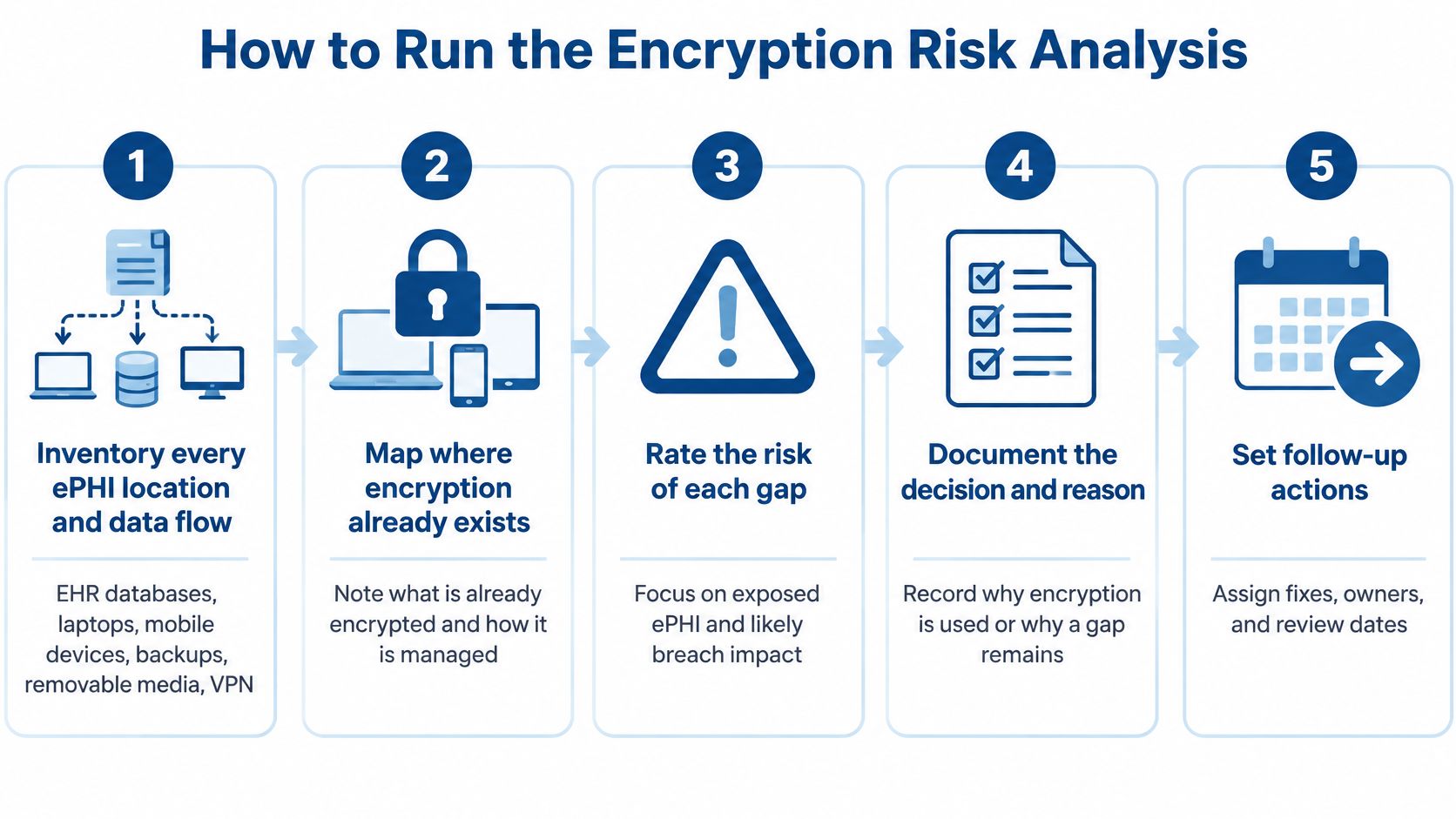
Inventory every ePHI location and data flow. Include EHR databases, laptops, mobile devices, backups, removable media, VPN links, email, interfaces, and cloud storage. Unlisted information can't receive a defensible protection decision; forgetting backup copies is a common slip.
Score threat likelihood and impact. Evaluate what could happen at each location and how exposure would affect residents and operations, using a consistent scoring method. The mistake is assigning the same rating to a locked server and a portable device without considering their different exposure.
Record existing controls and residual risk. Note encryption status, access restrictions, physical protection, and the risk that remains after those controls operate. A policy stating that devices must be encrypted isn't evidence that each device is encrypted.
Decide how each location will be protected. Record the encryption approach or explain why encryption isn't reasonable and appropriate, including the equivalent alternative where appropriate. Copying a generic exception across unrelated systems hides differences that reviewers need to understand.
Assign an owner and review date. Name the person responsible for maintaining the control and resolving any open action. Assigning responsibility only to a department makes follow-through difficult when staff members change.
Test the controls beyond the primary system. Verify that exported or replicated backups remain encrypted, retired devices don't expose recoverable ePHI, and staff can't bypass policy through unmanaged channels. Testing only the live EHR leaves downstream copies unchecked.
The visual workflow groups inventory, existing protection, gap assessment, documentation, and follow-up into a practical review sequence.
Keep evidence with the analysis
The finished file should contain a table listing each location, decision, rationale, owner, and review date. Supporting evidence might include device-encryption reports, backup configuration records, recovery-test results, and approved exception records.
Say a nursing workstation exports a resident census spreadsheet to a shared folder. The analysis should identify the workstation, export destination, users with access, and protection during transfer and storage, rather than treating the EHR's encryption as the complete answer.
Required documentation must be retained for six years under 45 CFR 164.316(b)(2)(i). Retention isn't a reason to leave old decisions unchanged; replacement devices, new workflows, and building changes should prompt reassessment.
The nursing-home HIPAA security risk assessment provides a practical starting point for administrators organizing that review. Counsel or the compliance officer should confirm the documentation's scope and adequacy.
Encryption Coverage for Data at Rest and in Transit
| Data state | Typical ePHI location | NIST reference |
|---|---|---|
| Data at rest | EHR databases, laptops, USB drives, backup media | SP 800-111 |
| Data in transit, web | EHR web access, secure portals, email transport | SP 800-52 (TLS) |
| Data in transit, site-to-site | Links between buildings and remote sites | SP 800-77 (IPsec VPN) |
| Data in transit, remote access | Staff remote access portals | SP 800-113 (SSL VPN) |
These references appear in HHS technical-safeguard guidance, which points to NIST SP 800-111 for stored information and SP 800-52, SP 800-77, and SP 800-113 for relevant transmission protections. They provide technical context, not permission to deploy outdated protocols because a historical publication mentions them.
Match the protection to the data state
A nurse's laptop stores information at rest when a downloaded report remains on its drive. Full-disk encryption can protect that stored copy, but administrators also need controlled access to recovery keys and a tested recovery process.
A secure portal session carries information in transit between the device and the service. A connection between separate facility buildings also needs its own transmission review; sharing an owner doesn't make the link protected.
For terminology around remote connections, GoSafe Dark Web monitoring VPN insights can help administrators distinguish SSL/TLS-based access from other VPN approaches. Technical staff should select currently supported configurations rather than relying on the VPN label alone.
Protect keys separately
HHS recommends keeping decryption tools or keys separate from encrypted data. Otherwise, someone who obtains a backup may also obtain the means to read it.
An encrypted backup and its unrestricted recovery key shouldn't be treated as a protected package merely because they occupy different folders.
Properly encrypted information generally benefits from HIPAA's encryption safe harbor when the encryption process and key remain uncompromised. Stolen keys, weak implementations, or unencrypted copies can defeat that protection, so incident facts still require review.
The broader HIPAA technical safeguards connect encryption with access control and other protections. These references aren't a single-product mandate; specific selections and notification interpretations should be confirmed with the compliance officer or counsel.
Common Encryption Myths That Leave Data Exposed
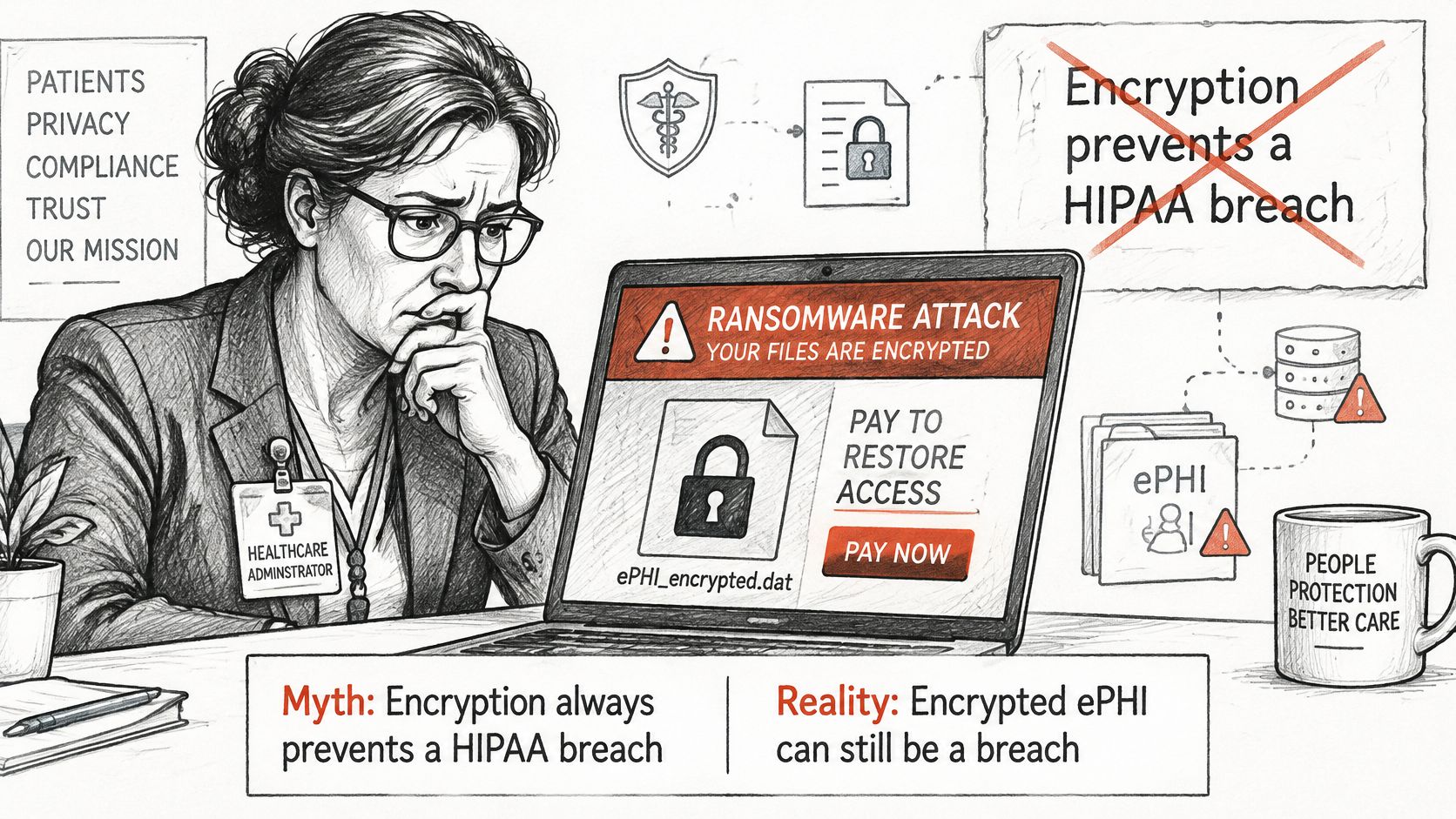
Myth one is that encryption prevents a HIPAA breach. It reduces certain exposures, but an attacker using valid credentials may receive readable information through the same application staff use.
The image illustrates the operational problem that encryption alone can't resolve.
Encryption doesn't replace identity protection
The American Hospital Association's cybersecurity review describes attackers accessing encrypted information through stolen credentials and finding unencrypted copies outside EHR systems. Storage encryption doesn't protect plaintext after an authorized application decrypts it.
Ransomware encryption also isn't protective encryption applied by the facility. Unauthorized acquisition or control of ePHI can still constitute a breach and trigger notification obligations. Incident responders and counsel must evaluate the circumstances rather than assuming that unreadable files establish safety.
The accompanying video offers another format for considering the security discussion.
Correct the assumptions around backups and copies
- Myth two, encrypted backups survive any administrator-account compromise: An attacker with sufficient privileges may delete backups or access recovery material. Pair encryption with phishing-resistant multifactor authentication, privileged-access management, separately protected immutable backups, and documented key rotation.
- Myth three, encrypted laptops cover every copy: Email attachments, spreadsheet exports, shared drives, and mobile applications can create separate exposure. Use endpoint detection, restrict unmanaged transfers, segment backup networks, and monitor unusual mass downloads.
These are layered security practices, not claims that HIPAA expressly mandates every named technology. The appropriate combination should follow the organization's documented risks.
Resident care also needs a downtime plan. Staff should have approved offline access procedures, documented downtime steps, and restoration priorities that distinguish urgent clinical functions from less time-sensitive work. Recovery exercises should test whether staff can follow those procedures before an outage occurs.
Applying Encryption in Nursing Home and Long-Term Care Settings
A facility's exposure changes by location and workflow. A nursing station, resident wireless network, and after-hours support connection shouldn't receive an identical assessment because they belong to the same operator.
Encryption gaps by facility location
| Facility location | Typical gap | Question that closes it |
|---|---|---|
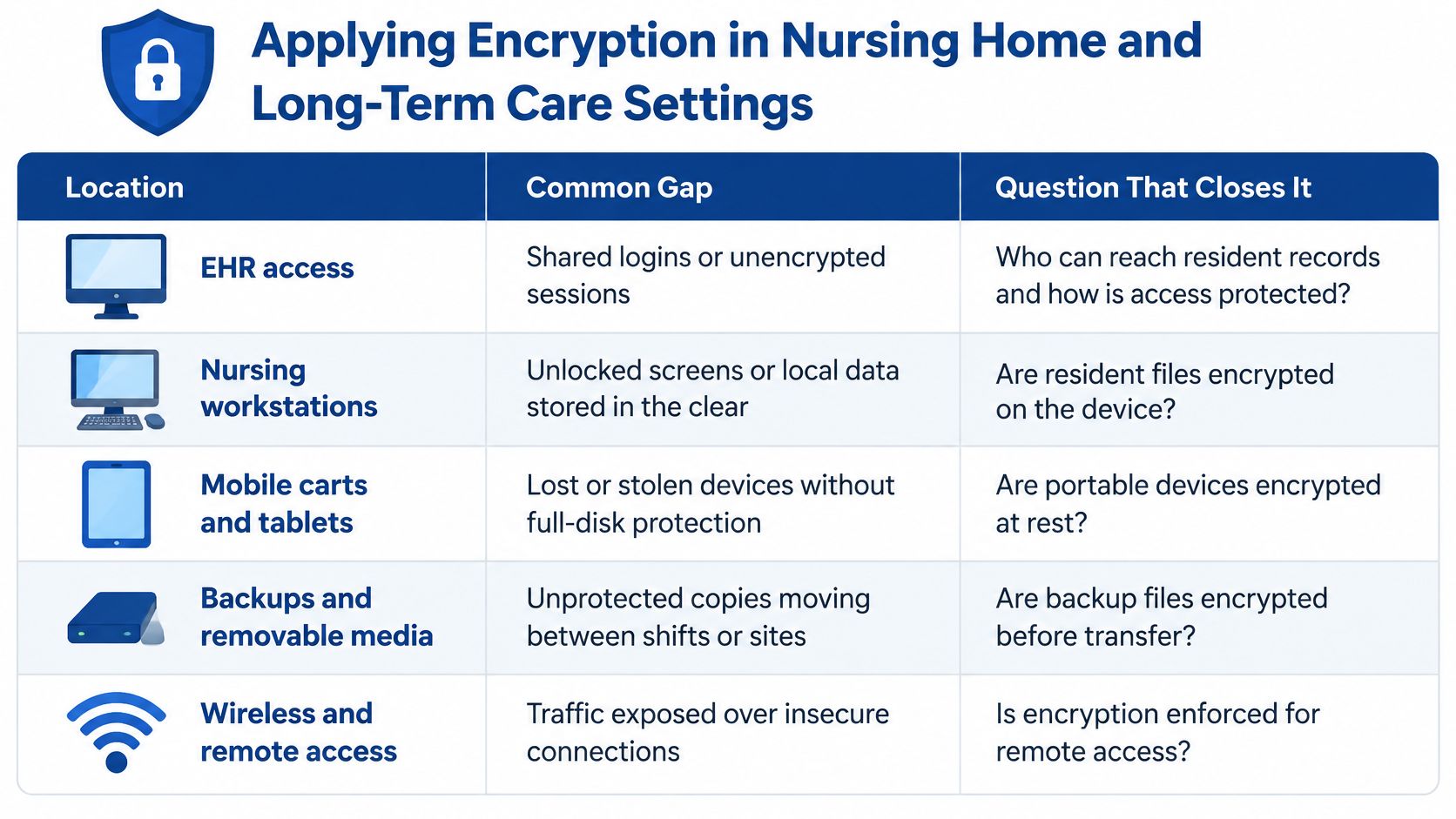
| EHR access such as PointClickCare | Workstations, tablets, and phones used on and off site | Are all devices encrypted, authenticated, and set to lock after inactivity? |
| Medication and clinical workstations | Shared logins and unencrypted local storage | Can each user be identified, and is local data encrypted? |
| Resident Wi-Fi and clinical network links | Clinical traffic sharing networks with guest devices | Is clinical traffic segmented and encrypted in transit? |
| Nurse call systems | Integrations that pass resident data | Does any clinical data leave the system unencrypted? |
| VoIP and telephone systems | Voicemail, recordings, and transcripts | Are recordings encrypted, access-controlled, and deleted on schedule? |
| After-hours remote vendor support | Remote tools with broad access | Is vendor access authenticated, logged, and time-limited? |
| Multi-building operators | Buildings with different controls | Is each building documented, or is the enterprise scope documented clearly? |
The checklist below highlights device and network locations that deserve explicit verification.
Follow telephone information beyond the call
Under HHS guidance on audio telehealth, telephone technologies transmitting ePHI must receive applicable Security Rule safeguards. The assessment should consider interception, encryption capability, authentication, inactivity locks, and unauthorized access to recordings or transcripts.
A resident-care conversation may leave information in voicemail, a transcription service, or a mobile application after the call ends. Staff should identify that path and verify access permissions, retention, deletion, and stored-data protection. A familiar phone product isn't automatically HIPAA-compliant in every configuration.
Wireless planning also needs to distinguish resident internet access from clinical workflows. Purple Access's care home network solutions provide context for those different connectivity needs, without establishing that a particular network design satisfies HIPAA.
For multi-building organizations, HHS's Security Rule overview supports environment-specific safeguard decisions. Each building should be documented, or the enterprise scope should clearly show which systems and local exceptions it covers.
CMS emergency preparedness requirements under 42 CFR 483.73 make continuity and downtime planning relevant to the same operational review. The encryption assessment doesn't replace emergency preparedness work; administrators should coordinate both with their compliance officer or counsel.
The HIPAA-compliant IT services overview provides additional context for organizing technical safeguards around facility operations.
Document Your Encryption Decisions Before Your Next Review
Treat the encryption record as a map of decisions, not a product checklist. For each building, it should show which systems and copies of ePHI are covered, who owns each decision, and what happens when a safeguard has an exception.
For every entry, record the affected location, the decision and its rationale, a responsible owner, and a review date. Include local files, communication records, portable media, and downstream copies in the inventory. An encryption gap should become a tracked action with an interim safeguard and the evidence needed to close it.
Keep test evidence for backup protection and for device retirement procedures that prevent recoverable resident information from being exposed. Written downtime procedures should also explain how staff can maintain care workflows when clinical systems are unavailable.
A replacement administrator should be able to understand what was decided, why, and whether the protection still works. Ask a compliance officer or counsel to review legal interpretations and any residual risk. Technical settings show how a control operates; they do not, by themselves, establish that the legal analysis is sufficient.
RDE Technologies provides IT security management, data backup with offsite replication, and IT assessments covering areas such as risk, data storage, network security, and business continuity. Its services also include server and network monitoring, firewalls, content filtering, managed antivirus, desktop patch management, and advanced ransomware protection for endpoints.
Contact RDE Technologies to discuss your facility's security and backup needs. Its IT assessments can cover relevant infrastructure and business continuity considerations.