
A charge nurse signs into a workstation with a login that several colleagues also use. Later, a resident's family asks who opened the resident's chart, and the administrator can produce an access log but can't identify the person behind the account.
That's the practical problem behind HIPAA technical safeguards. A facility needs more than security settings. It needs records showing who can access electronic protected health information, what they did, how information stays protected, and who checks that those protections work.
Table of Contents
- The Five HIPAA Technical Safeguards at a Glance
- How to Set Up Access Control and Authentication
- What Audit Controls Must Record and How to Review It
- Protecting Integrity and Data in Transit
- Why Recovery Planning Goes Beyond Backup Storage
- Proving Your Safeguards Work With Evidence
- Book Your Free HIPAA Security Risk Assessment
The Five HIPAA Technical Safeguards at a Glance
The shared-login scenario exposes gaps in both accountability and access management. Buying another security product won't resolve those gaps unless the facility also changes how staff accounts are assigned and reviewed.
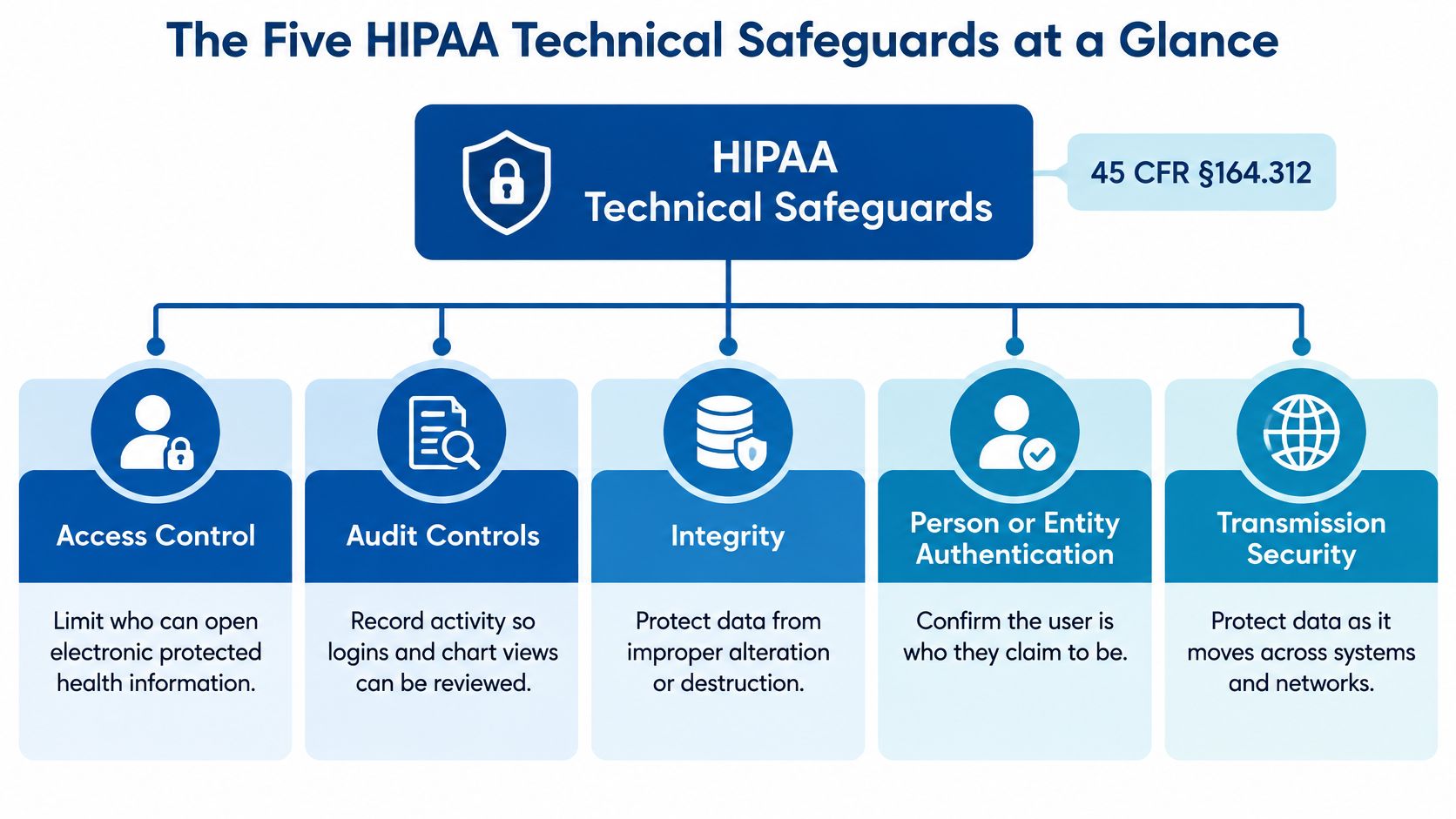
The framework is 45 CFR §164.312, which establishes the five technical safeguard standards described in NIST's HIPAA Security Rule guidance. These standards work like five locks on one building: each protects a different door, and none replaces the others.
The five technical safeguards and their specifications
| Standard | Regulation reference | What it requires | Implementation specifications |
|---|---|---|---|
| Access control | 45 CFR §164.312(a) | Restrict ePHI to authorized users | Unique user identification and emergency access procedures (required); automatic logoff and encryption/decryption (addressable) |
| Audit controls | 45 CFR §164.312(b) | Record and examine activity in systems that use ePHI | No separate implementation specifications; the organization selects the mechanisms |
| Integrity | 45 CFR §164.312(c) | Protect ePHI against improper alteration or destruction, including mechanisms that detect improper changes | Mechanism to authenticate ePHI (addressable) |
| Person or entity authentication | 45 CFR §164.312(d) | Verify the identity of a person or entity requesting access | No separate implementation specifications |
| Transmission security | 45 CFR §164.312(e) | Protect ePHI moving across electronic networks | Integrity controls and encryption (addressable) |
Addressable doesn't mean optional. Under 45 CFR §164.306(d)(3), the organization must assess whether an addressable specification is reasonable and appropriate, implement it when appropriate, or document why it isn't and implement an equivalent alternative when reasonable and appropriate. The HHS technical safeguards guide explains this distinction and defines safeguards as technology together with the policies and procedures governing its use.
The diagram provides a quick reference for assigning operational responsibility.
Turn each standard into a record
For each system containing ePHI, administrators should record the applicable controls, responsible owner, evidence location, and unresolved exceptions. An EHR entry might identify the director of nursing as the access approver and IT as the account administrator.
The same exercise belongs outside the EHR. Scanned admissions documents, billing exports, remote connections, and backup systems need named owners too. A vendor's general assurance doesn't show whether the facility configured its own accounts correctly.
The table should become a working inventory, not a policy appendix nobody opens. Compliance officers or counsel should confirm regulatory interpretations and any decisions to use alternative measures.
How to Set Up Access Control and Authentication
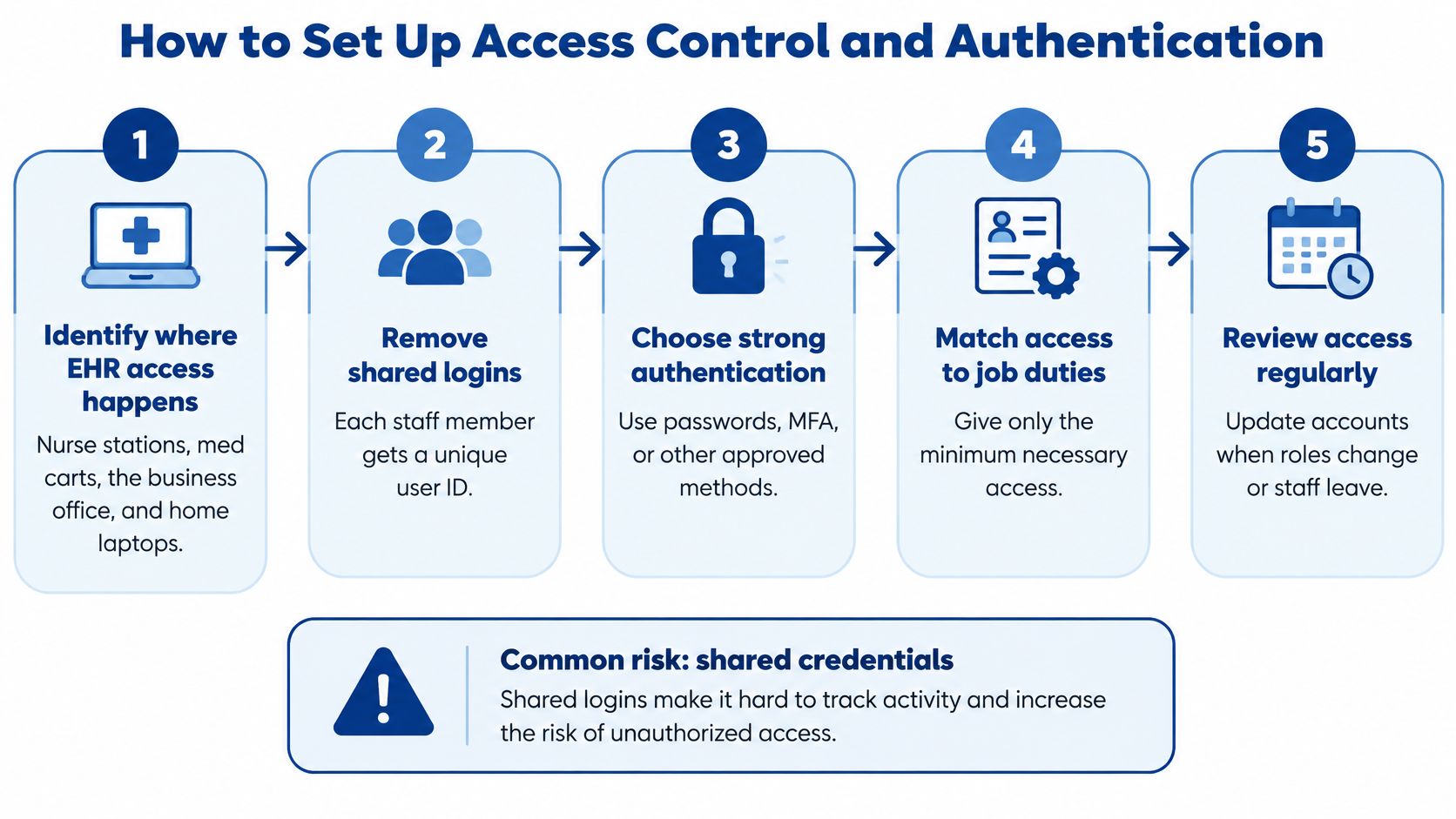
An EHR such as PointClickCare may be accessed from nurse stations, medication carts, the business office, and home laptops. If staff share credentials across those locations, the facility loses the connection between a person and an action.
Under 45 CFR §164.312(a)(2)(i) and (ii), unique user identification and emergency access procedures are required specifications; §164.312(d) requires identity verification, as set out in the HHS Security Rule regulations. Individual identities support attribution, role-based permissions limit exposure, and emergency procedures preserve access during clinical incidents.
The access workflow starts with identifying where staff work.
Put account ownership before convenience
- Inventory every account. Include workforce, shared, service, vendor, and administrator accounts. Service accounts need an owner and documented purpose, even when they aren't used interactively.
- Assign individual workforce IDs. Retire shared clinical logins so chart activity traces to a named person. A shared workstation doesn't justify a shared EHR identity.
- Build permissions around duties. Separate charge nurse, medication aide, admissions, and billing access. Remove permissions that no assigned duty needs rather than copying a longstanding employee's account.
- Enforce multifactor authentication for remote and administrator access. This is a practical security recommendation, not a claim that §164.312(d) expressly mandates MFA. Document legacy-system exceptions and compensating protections.
- Configure automatic logoff or session locking. Under §164.312(a)(2)(iii), automatic logoff is addressable. Test settings during medication rounds so security controls don't encourage staff to bypass them.
- Document emergency access. Define who can invoke the break-glass process, what access it grants, and how use is logged. Set next-business-day review as a facility operating practice.
- Coordinate departures with account removal. Make last-day access termination part of the workforce process, including remote sessions, email, and vendor-managed applications.
Test the permissions staff actually receive
A role matrix isn't enough. The access reviewer should compare approved duties with actual system permissions and investigate accounts with no current owner.
For law firms handling medical records, Cloudvara's guidance on how to review access rights to client files offers a useful parallel: access reviews should follow the files and the people authorized to use them. For facilities evaluating identity-management options, RDE's Microsoft Entra ID P1 versus P2 comparison provides additional context for feature decisions.
This video offers another access-control reference for staff discussions.
Multi-building operators should maintain one workforce identity per person where systems support it, with permissions limited by facility and assignment. Evidence of success includes an inventory without shared workforce logins and a reviewed record for every emergency-access event.
What Audit Controls Must Record and How to Review It
Suppose a certified nursing assistant opens charts for residents outside the assistant's assignment. The EHR records the activity, but nobody examines it until a complaint arrives. Logging worked; the review process didn't.
45 CFR §164.312(b) requires mechanisms that record and examine activity in systems containing or using ePHI. It doesn't prescribe a particular logging product or a single universal audit-log retention period.
Record activity that answers an investigation
Useful audit events include:
- Authentication activity: Successful and failed logins, including source device and time where available.
- Resident-record activity: Chart views, edits, printing, and exports.
- Permission changes: New accounts, privilege changes, disabled accounts, and administrator actions.
- Exceptional access: Remote sessions, vendor connections, and emergency-access use.
The review needs enough detail to connect the account, resident record, action, and time. A report showing only that somebody logged in won't explain which charts that person opened.
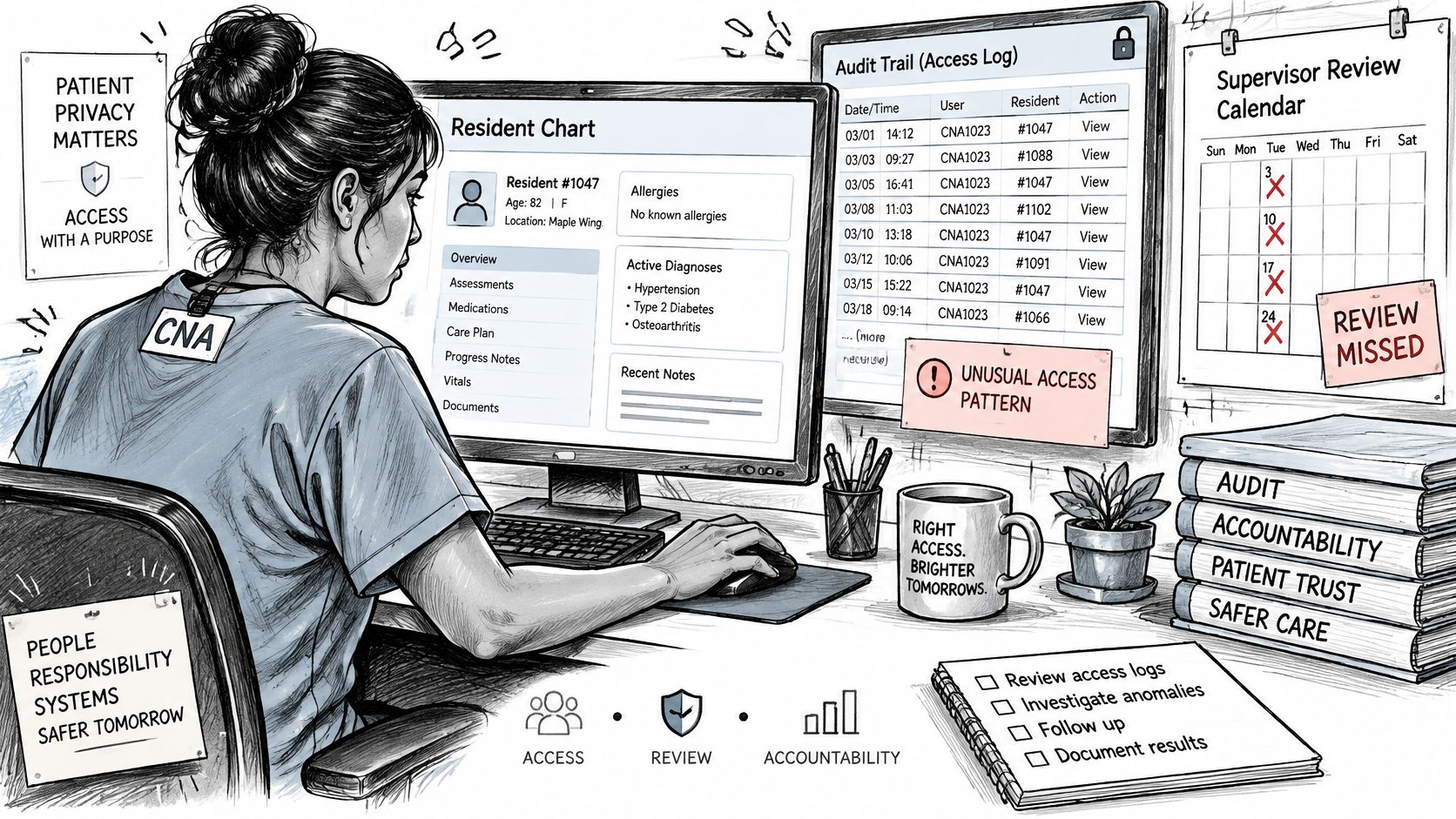
Centralize logs where practical, synchronize system clocks, and restrict alteration or deletion. For hosted applications, document how authorized staff retrieve logs and whether exports remain available after an account or contract ends.
Retention needs a written decision based on risk, investigation needs, contracts, and applicable law. PatientNotes' discussion of setting GDPR log retention schedules illustrates structured retention planning, but GDPR schedules aren't HIPAA requirements and shouldn't be copied into a facility policy.
Review exceptions with clinical context
A designated IT reviewer can flag mass record access, after-hours exports, and repeated failed logins followed by success. The privacy or compliance lead should assess clinical context, including assignment changes, float coverage, and legitimate cross-building duties.
The reviewer should record the period examined, systems included, findings, disposition, and escalation owner. Suspicious activity needs a preserved evidence trail, not an undocumented conversation.
Practical rule: A log review isn't complete until someone records what was checked and what happened to the exceptions.
Network activity can support an investigation, but it doesn't replace chart-level audit records. RDE's guide to monitoring network traffic provides background on that supporting layer.
At the next staff meeting, administrators can ask:
- Coverage: Which systems produce usable logs?
- Storage: Where are logs protected and retained?
- Ownership: Who reviews each source?
- Escalation: Who acts when a review identifies suspicious access?
Protecting Integrity and Data in Transit
How would the facility discover that a medication order or resident record had been changed without authorization? An unexplained change needs more than a current screenshot. Staff need a trustworthy history and a way to reconcile what the originating system sent with what the receiving system accepted.
45 CFR §164.312(c)(1) requires protection against improper alteration or destruction, while §164.312(c)(2) identifies an addressable mechanism to authenticate ePHI. Practical measures include change histories, interface reconciliation, and integrity monitoring for critical files.
Transmission paths and what to verify
Under 45 CFR §164.312(e)(1), facilities must protect ePHI against unauthorized access during electronic transmission. Integrity controls and encryption are addressable specifications under §164.312(e)(2).
| Transmission path | Typical safeguard | Check before go-live |
|---|---|---|
| Remote EHR access from home or the business office | Encrypted VPN with multifactor authentication, or appropriately secured direct application access | Confirm MFA is enforced on every remote account |
| Email containing ePHI | Encrypted email or a secure messaging portal | Confirm staff know the approved method and it is documented |
| Resident and guest Wi-Fi | Separate network segment from clinical devices | Confirm clinical and nurse call traffic is isolated from resident traffic |
| Clinical wireless for med carts and tablets | Segmented, access-controlled wireless | Confirm only approved devices join and vendor access is limited and logged |
| Cloud or offsite backup transfer | Encrypted transfer and encrypted storage | Confirm encryption settings are written in the policy |
| VoIP calls that discuss residents | Encrypted voice traffic on a secured network | Confirm protected internal call paths and document external-carrier limitations |
A VPN isn't automatically necessary for every cloud EHR session. The practical question is whether the supported access method protects the complete connection and enforces the facility's authentication policy.
Voice encryption also has boundaries. Securing an internal phone network doesn't establish that every external telephone connection is encrypted end to end.
Check the device after it disconnects
Encryption at rest matters because laptops, tablets, and medication-cart devices may retain downloaded or cached ePHI. The encryption/decryption specification is addressable under 45 CFR §164.312(a)(2)(iv), so the decision record should identify each device class, its configuration, and the rationale for any alternative.
Clinical wireless should accept only approved devices. Resident and guest traffic should remain separate from clinical devices and nurse call infrastructure, with limited, logged vendor access.
Multi-building operators should apply a documented encryption baseline to every site-to-site link and investigate exceptions. Before go-live, the system owner should list each transmission path, confirm the protection is enabled, and save evidence of the test rather than relying on a product brochure.
Why Recovery Planning Goes Beyond Backup Storage
A backup dashboard can show green while a facility remains unable to recover. The backup may be reachable through compromised administrator credentials, the restore process may depend on an unavailable server, or nobody may have tested whether the recovered application opens.
The American Hospital Association reported that, by the end of 2024, hacking incidents had exposed 259 million Americans' protected health information, with more than 90% of hacked records stolen outside EHR systems, according to its cybersecurity year-in-review. Recovery planning therefore needs to include file shares, email, endpoints, and supporting infrastructure.
Restore care workflows, not just servers
45 CFR §164.308(a)(7) addresses contingency planning, including data backup, disaster recovery, and emergency-mode operations. Backup storage supports that broader administrative obligation; it isn't an additional technical safeguard standard under §164.312.
A practical starting order for clinical recovery planning is:
- Medication administration. Establish access to current orders and approved downtime medication records.
- Admissions. Restore the information needed to receive residents safely.
- Scheduling. Recover staffing and appointment coordination.
- Billing. Restore financial workflows after immediate care needs are supported.
- Communications. Recover remaining routine communications systems.
That sequence isn't a legal mandate or an instruction to leave phones unavailable. Emergency communications and identity infrastructure may need restoration before any application workflow can function.
A usable backup is a clean copy that authorized staff can restore through a tested process.
Use isolated or immutable copies where appropriate, with recovery credentials protected separately from routine administration. Staff also need approved downtime procedures, including paper medication administration records and a process for reconciling entries after systems return.
Prove that restoration is safe
Test in an isolated environment before reconnecting restored systems to clinical networks. Check for compromise, verify application dependencies, and have authorized staff confirm that resident information is usable.
The 2025 proposed Security Rule included backup technical controls with effectiveness reviews and testing every six months, as described in Foley's analysis of the HHS proposal. That is a proposed requirement, not an established current obligation in this discussion; counsel should confirm its status and applicability.
RDE's guidance on planning a backup schedule provides a starting point for matching copies to operational needs. Each critical workflow should have answers to these questions:
- Clean copy: Where is the recoverable copy?
- Responsibility: Who performs and authorizes restoration?
- Downtime: How long can the workflow operate without the system?
- Testing: When was the complete recovery process last demonstrated?
Proving Your Safeguards Work With Evidence
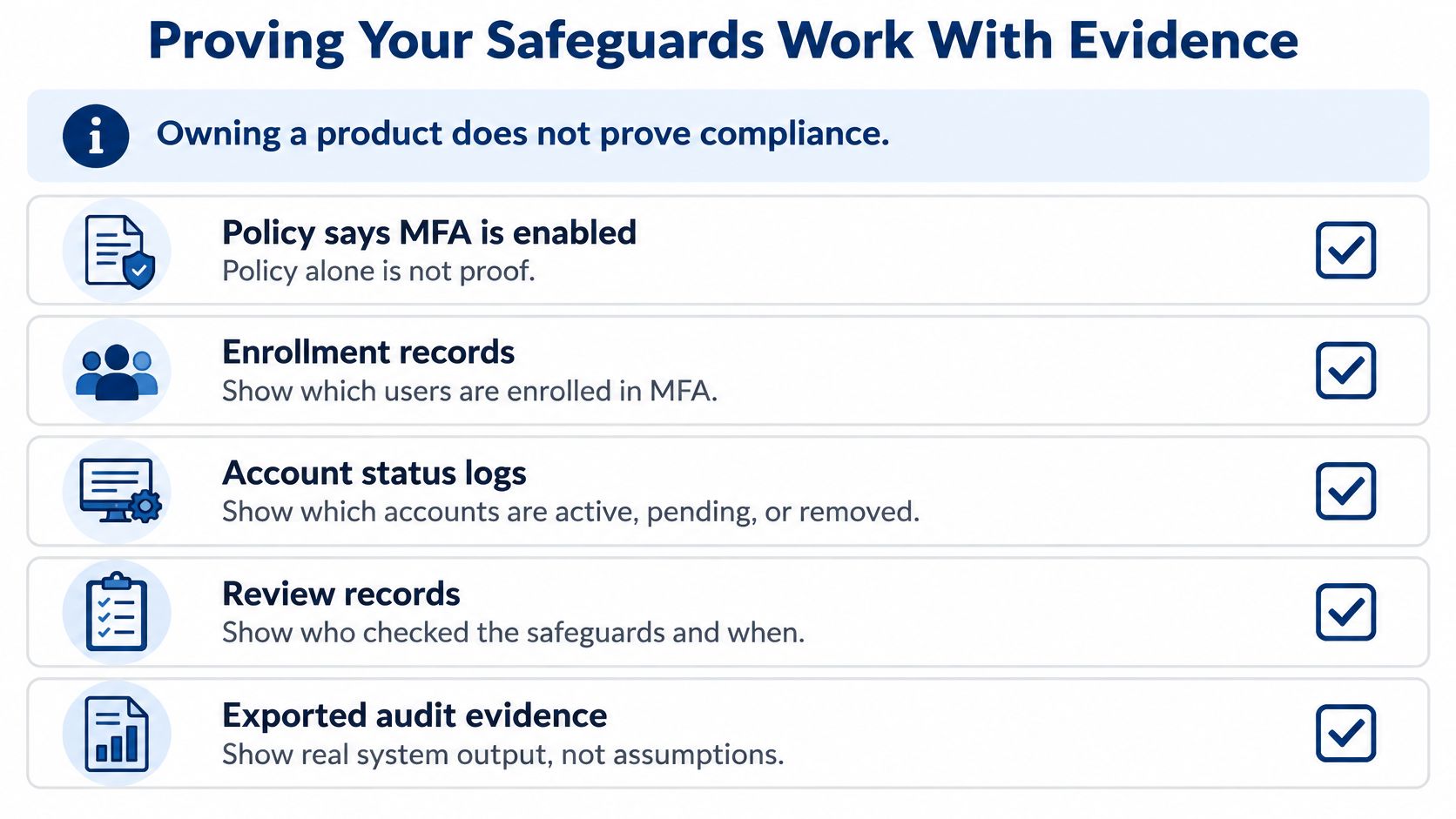
Owning a firewall or an MFA product doesn't prove compliance. A policy declaring MFA enabled is weaker than system output showing enrollment, excluded accounts, exception approvals, and remediation dates.
In 2024, the HHS Office of Inspector General found that OCR audits assessed only 8 of 180 HIPAA requirements, with none covering physical or technical safeguards. That finding concerns the audit program's scope, not a reduction in facilities' obligations.
Assemble a reviewable evidence package
Under 45 CFR §164.308(a)(1)(ii)(A), risk analysis must assess risks and vulnerabilities to ePHI. HHS risk-analysis guidance emphasizes an enterprise-wide scope covering the information the organization creates, receives, maintains, or transmits.
A practical evidence package includes:
- Current risk analysis: Systems, information flows, threats, existing protections, and unresolved risks.
- Asset inventory and network map: Devices, hosted systems, connections, and responsible owners.
- MFA coverage: Enrollment exports, excluded accounts, exception reasons, and correction plans.
- Privileged-account review: Administrator identities, business justification, and review dates.
- Audit evidence: Retention settings, completed review records, and exception dispositions.
- Recovery results: Dated restoration tests tied to actual care and business workflows.
- Remediation tracker: Each finding's owner, due date, status, and closure evidence.
Organize these records by site, system, user group, control owner, test result, and open risk. Multi-building reporting should expose local gaps rather than hide them inside an organization-wide completion percentage.
The evidence hierarchy below distinguishes policy intent from operating proof.
Keep evidence current without creating paperwork theater
Evidence should come from normal operations wherever possible. Account exports, configuration reports, completed tickets, and signed review records are more useful than manually recreated summaries that can't be traced to a system.
Under 45 CFR §164.316(b), required policies, procedures, and documentation need appropriate maintenance. The proposed Security Rule would make documentation of technical-control implementation more explicit, but administrators should have counsel confirm the proposal's status before treating its provisions as effective requirements.
A monthly management routine can remain straightforward:
- Review new accounts against approved roles and locations.
- Check exceptions for expired approvals or overdue fixes.
- Record log-review sign-off and unresolved escalations.
- Update remediation with evidence of completed work.
The administrator's role is to assign accountability and resolve stalled decisions. IT supplies technical evidence; clinical and compliance leaders determine whether access and workflow protections remain appropriate.
Book Your Free HIPAA Security Risk Assessment
How can a multi-building operator check every location without arranging separate discovery efforts for each site? A structured assessment gives administrators a common starting point and makes local differences visible.
RDE Technologies offers skilled nursing facilities a free HIPAA security risk assessment covering every building, delivered through a one-hour remote session, with a written report within 5 days. The assessment helps administrators understand where access, audit, integrity, authentication, and transmission controls stand; multi-facility operators receive reporting by facility.
Prepare the operational records
The most useful preparation materials are:
- EHR and supporting systems: Include admissions, billing, document storage, and hosted applications.
- Remote-access accounts: Identify staff, administrators, vendors, and known exceptions.
- Backup records: Bring the current schedule and latest restoration-test results.
- Network diagrams: Include clinical wireless, resident Wi-Fi, and nurse call connections.
- Latest risk analysis: Include open findings and the current remediation tracker.
Missing documents shouldn't be replaced with assumptions. An unavailable account list or outdated diagram is itself a useful starting finding.
Connect findings to practical work
RDE Technologies, based in Oceanside, New York, supports facilities nationwide on site and remotely, with a help desk staffed 24/7. Its IT assessments address risk, storage, server and network infrastructure, carrier and cloud services, business applications, business continuity, network security, and cost reduction.
Supporting services include IT security management with monitoring, firewalls, content filtering, managed antivirus, desktop patch management, and endpoint ransomware protection. Data backup includes onsite and offsite copies, offsite replication, data retrieval, and colocation disaster recovery; VoIP phone systems include phone failover setup.
An assessment is a starting point, not a certification or substitute for a complete compliance program. The compliance officer or counsel should confirm regulatory details, proposed-rule status, and the organization's final decisions.
Facility leaders can arrange the free HIPAA security risk assessment and review skilled nursing IT support before assembling the preparation materials.
RDE Technologies offers skilled nursing facilities a practical way to identify technical-safeguard gaps across buildings and turn findings into assigned work. Administrators can visit RDE Technologies to discuss an assessment and the IT support needed to keep access, audit evidence, networks, and recovery processes working.