
Network segmentation splits one network into smaller zones so a problem on one device cannot freely reach every other system. In a nursing home, a flat network is risky because an infected office computer may have an unnecessary path to clinical systems, backups, phones, and care equipment.
A facility administrator may already have separate Wi-Fi names, a firewall, and password-protected computers. None of those, by itself, proves that resident devices, medication carts, and backup systems are safely separated. The practical question is which connections the network permits, especially while staff are delivering care after hours.
Table of Contents
- What Network Segmentation Means in a Care Building
- Zones a Nursing Home Should Keep Apart
- How Traffic Is Stopped Between Zones
- How Segmentation Limits a Ransomware Blast Radius
- Where Segmentation Supports HIPAA Access Rules
- A Safe Order for Segmenting a Live Facility
- Review Each Building Before You Block Traffic
What Network Segmentation Means in a Care Building
During a night shift, a billing workstation becomes infected after someone opens a malicious attachment. On a flat network without effective internal restrictions, an attacker could use that workstation to look for reachable servers, phones, cameras, and backup equipment.
Network segmentation means dividing a physical or virtual network into smaller, separately controlled networks. Think of locked wings in a care building: sharing a roof doesn't mean every visitor should have access to every room. Network zones apply that same principle to connected equipment.
The Cybersecurity and Infrastructure Security Agency's segmentation guidance describes each segment as its own subnetwork, adding control points where communication can be restricted. Those boundaries help contain a compromised device instead of leaving unrelated systems freely reachable.
The diagram shows the exposure that internal boundaries are intended to reduce.
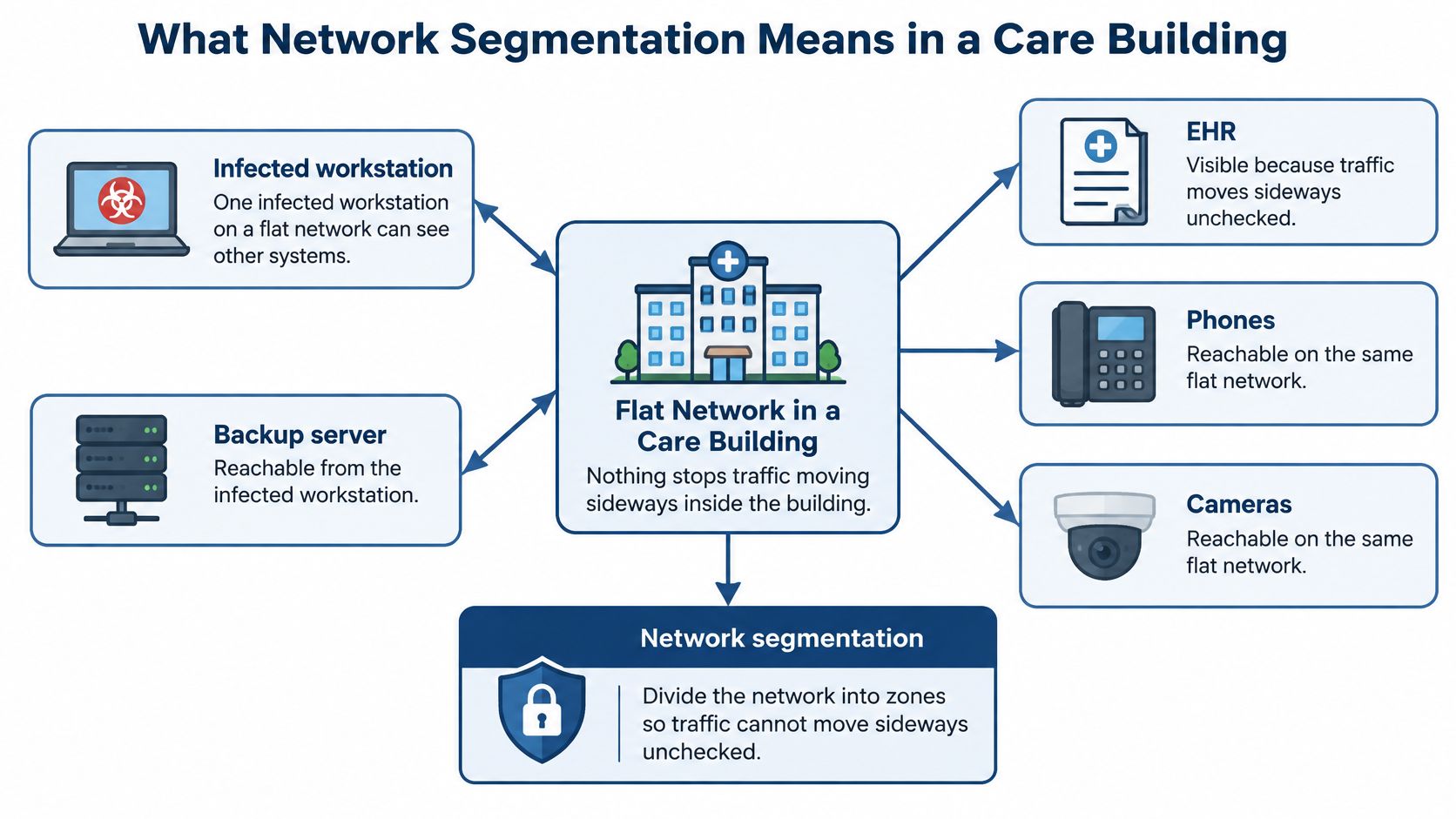
Locked doors rather than room labels
A network address identifies where a device belongs. It doesn't necessarily stop another device from connecting to it. Different address ranges alone aren't an enforced security boundary.
A switch, router, firewall, or gateway must apply rules that inspect or restrict communication. These devices direct traffic and, when configured appropriately, decide which connections may cross between zones.
Practical rule: A zone name describes the intended boundary. A tested access rule proves that the boundary works.
For administrators seeking another plain-language explanation, Atticus Goods on network zoning offers a supplementary way to think about dividing connected systems into controlled areas.
What shares the building's network
A care facility may connect PointClickCare or another electronic health record system, medication and therapy computers, nurse call, resident Wi-Fi, internet-based phones, cameras, and backups. An electronic health record, or EHR, doesn't need the same access as a resident's television or a camera recorder.
The design should preserve necessary connections while removing unnecessary ones. A medication workstation still needs its clinical application, but that doesn't justify access to firewall settings or backup administration.
For an administrator asking what is network segmentation, the useful answer isn't a hardware shopping list. It's a controlled set of communication paths that can shrink an incident's blast radius, meaning the systems an attacker can affect, without requiring the whole building's network to be rebuilt immediately.
Zones a Nursing Home Should Keep Apart
Care-facility zones and what should not cross
| Zone | What belongs here | Keep blocked unless documented |
|---|---|---|
| Clinical and EHR | EHR workstations such as PointClickCare, medication carts, therapy PCs | Resident Wi-Fi, guest devices, personal email |
| Administrative | Billing, HR, office PCs, email | Direct access to clinical servers and backup consoles |
| Resident and guest Wi-Fi | Resident devices, visitors, family | EHR, nurse call, cameras, voice servers, backups |
| Care devices and building systems | Nurse call, cameras, access control, HVAC controls | Open web browsing and EHR networks |
| Voice | VoIP handsets and the phone server | Ordinary staff PCs and guest Wi-Fi |
| Backups and management | Backup servers, switch and firewall admin paths | Everyday user networks and vendor laptops |
| Vendor remote access | Logged landing zone for outside support | Unrestricted paths into EHR or backups |
This map groups systems by their function and the access they need, not by the room containing them. Blocked unless documented means a connection stays closed unless someone identifies a legitimate workflow and approves a narrowly defined exception.
The entries aren't blanket prohibitions against useful work. Billing may need an approved EHR connection, and a clinical application may need a shared printing service. Those connections should be deliberate rather than inherited from an unrestricted network.
Resident Wi-Fi isn't staff infrastructure
A resident's tablet belongs on an internet-access network, not on the same trusted path as a medication cart. Physical presence in the building doesn't establish that a personal device is maintained, secure, or appropriate for clinical access.
The guest network should also serve visitors and family without requiring staff to distribute clinical wireless credentials. A separate Wi-Fi name isn't enough if the underlying configuration still permits access to internal systems.
The same principle applies to administrative computers. HR and email workstations shouldn't gain broad clinical-server access merely because employees use them.
Care equipment needs carefully tested exceptions
Nurse call deserves special treatment because its dependencies may include consoles, paging equipment, or vendor-maintained interfaces. Grouping it under care devices is a starting point, not permission to block every connection immediately.
Cameras, door systems, and heating or ventilation controls may warrant separate subgroups rather than a shared unrestricted equipment zone. Their maintenance needs and permitted destinations should be documented individually.
- Clinical connections: Identify the application services, printers, and interfaces that medication and therapy staff use.
- Voice connections: Document handset registration, calling, paging, and approved support paths.
- Vendor connections: Give outside support a controlled entry point with a record of activity and access limited to the equipment being serviced.
For multi-building operators, consistent zone names make policies easier to compare. Building-specific exceptions should identify the system, business reason, owner, and review condition.
This is a starting design, not a device inventory. Nurse call, EHR access, and phones must pass workflow tests before proposed restrictions become permanent. The wall on a diagram only becomes useful when the equipment enforcing it preserves those necessary connections.
How Traffic Is Stopped Between Zones
A virtual local area network, or VLAN, creates a separate broadcast neighborhood on shared switches. Broadcasts are local network messages sent to all devices in that neighborhood.
The VLAN-tagging framework, IEEE 802.1Q, was ratified in 1998, as described in the VLAN standards history. It allows shared switching infrastructure to carry separate logical networks, but it doesn't decide which routed connections should be allowed between them.
This comparison distinguishes traffic grouping from traffic enforcement.
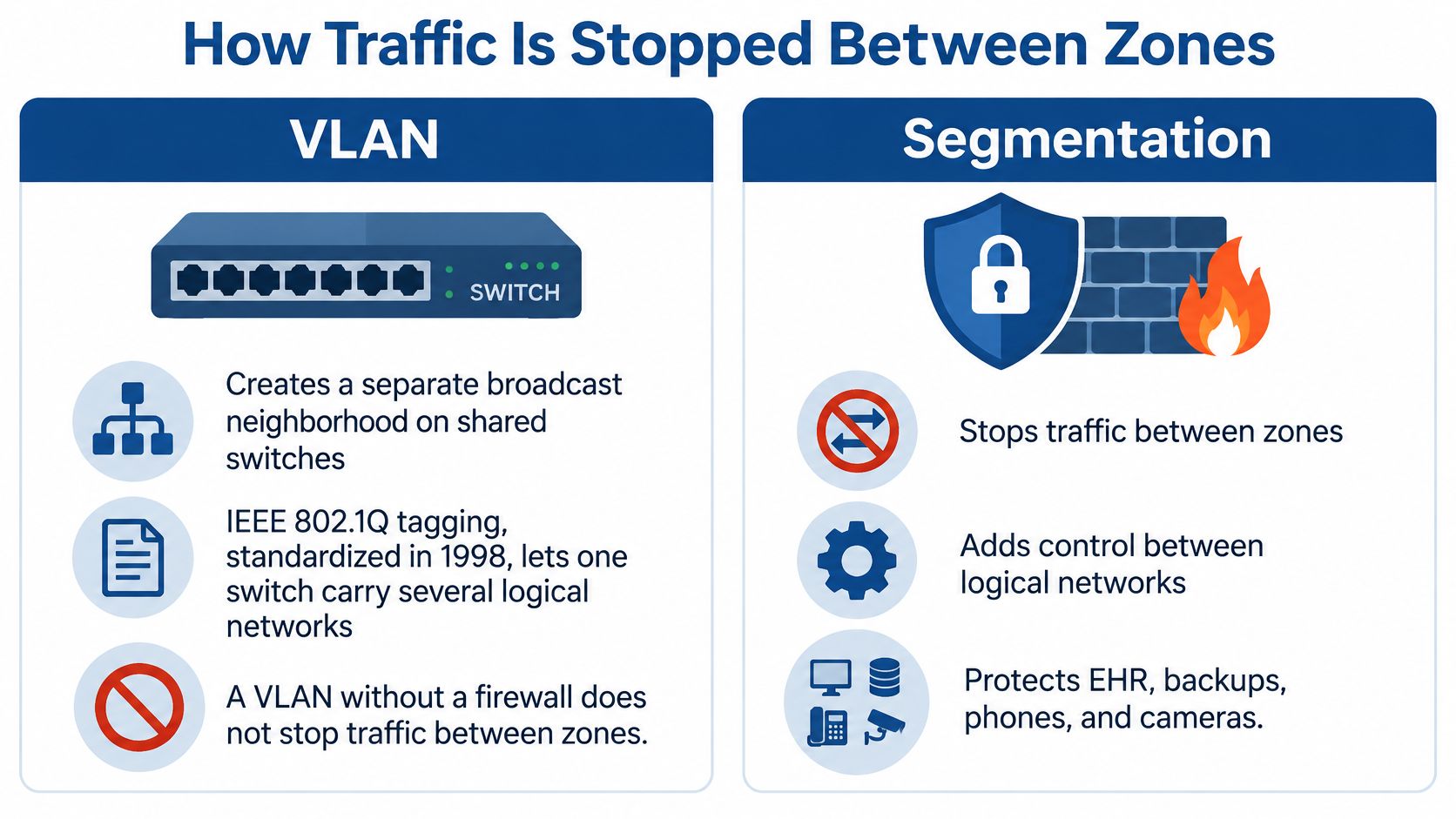
Choose controls that match the exposure
Ways to enforce a segment
| Method | What it separates | Use it when | Watch out for |
|---|---|---|---|
| Separate cabling or switches | Whole groups of equipment | A few high-risk systems justify the cost | Extra gear and upkeep |
| VLANs on shared switches | Logical broadcast groups | The first split of a flat network | Labels alone do not block routed traffic |
| Firewall zones and access lists | Traffic between groups | The allowed application flows can be named | Old rules that nobody reviews |
| Microsegmentation | Single apps, workloads, or devices | Broad zones are too loose for cloud or east-west traffic | Complexity and the chance of an outage |
| Identity checks | People and devices, not just place on the network | EHR access depends on role | Doesn't replace network zones |
NIST's zero-trust architecture guidance describes identity-driven controls, logical microsegmentation, and network-based segmentation. Switches, routers, next-generation firewalls, and specialized gateways can enforce policy; software on an individual device can also restrict its connections.
Deny by default means connections between zones remain blocked unless a rule permits them. For example, an EHR workstation might be allowed to contact its approved cloud service through a specific application port, a designated communication channel, without receiving access to every clinical resource.
A smaller nursing home or law firm needn't begin with microsegmentation. Broad, enforced zones are a practical foundation; finer controls become useful when cloud applications, internal system-to-system traffic, or distributed operations leave those zones too permissive.
The following video provides additional visual context for network segmentation.
Keep traffic visibility and performance in perspective
RDE's guide to monitoring network traffic provides context for identifying actual connections before rules are tightened. Monitoring should distinguish required application traffic from unnecessary connection attempts.
Separate broadcast neighborhoods keep local camera, nurse-call, and phone broadcasts from flooding medication carts and billing PCs. Voice separation also makes call-quality policies easier to apply, although shared links still require bandwidth planning and traffic prioritization so backup jobs don't compete unchecked with calls.
Technicians can narrow some troubleshooting to the affected zone rather than search the entire building. These are useful side effects, not promises of faster computers or reasons to adopt unnecessary microsegmentation.
How Segmentation Limits a Ransomware Blast Radius
A billing PC opens a phishing attachment. If the building's network has no enforced boundaries, malware may be able to search for other systems to attack. Segmentation limits that reach to the connections the facility has allowed. Containment, not immunity, is the benefit.
CISA's ransomware guidance recommends separating business resources and information technology from operational systems to help contain intrusions and limit lateral movement. Lateral movement means an attacker moving from an initially compromised system toward other internal targets.
In a care building, the billing PC should not have an unrestricted route to the EHR database, backup console, or nurse-call equipment. The risks of ransomware in healthcare make it important to examine which internal paths are necessary and which can be blocked.
What a simulation can and can't establish
The Infection Monkey exercise has been used to illustrate how segmentation can restrict malware's reach. The underlying principle is straightforward: when a compromised device cannot communicate with systems outside its permitted paths, those systems are harder to reach through that device. A virtual machine is a software-based computer running on shared computing hardware.
The result of any exercise depends on its setup. It cannot establish that a nursing home's network will behave the same way, so facility staff need to test their own allowed and blocked connections.
Segmentation doesn't stop the first malicious click. It can stop that click from opening an unrestricted route through the building.
An attacker may still exploit an allowed connection, steal an administrator's credentials, or compromise another device in the same zone. Authentication, software updates, endpoint protection, monitoring, and tested recovery procedures remain necessary.
How a careless design fails
CISA warns that weak policy enforcement, user error, and removable media can undermine separation. A temporary troubleshooting rule that permits all traffic can also become a lasting opening if nobody removes it.
Administrators should look for practical evidence that controls work:
- Documented dependencies: Required application connections have named owners and clear purposes.
- Protected administration: Backup consoles and network-management screens are reachable through dedicated administrator paths.
- Narrow exceptions: Approved cross-zone connections identify the intended source, destination, and service.
- Retesting after changes: Changes to EHR, phone, wireless, or vendor systems prompt checks of both allowed and blocked paths.
A quieter network does not prove ransomware containment. A useful test confirms that unauthorized connections fail while required care workflows continue to work.
A firewall purchase cannot compensate for unknown dependencies or uncontrolled changes. Facility leaders should confirm incident plans and care-continuity responsibilities with their compliance officer.
Where Segmentation Supports HIPAA Access Rules
For a nursing-home administrator, the question is practical: which staff, devices, and services need to reach systems containing electronic protected health information, or ePHI? Segmentation can help restrict unnecessary network access, but it is a supporting safeguard, not a HIPAA certification or a substitute for reviewing the facility's obligations.
NIST's HIPAA Security Rule resource identifies segmentation as a consideration when evaluating whether network infrastructure limits access to ePHI systems, in connection with information access management under 45 CFR 164.308(a)(4). The rule's practical meaning is that network access should reflect approved facility policies. A device's ability to connect does not, by itself, mean it should be allowed to reach a protected system.
Translate approved access into actual restrictions
First, identify where ePHI is stored, processed, or transmitted. Then list who and what needs access, and for which care or business task. That review may cover PointClickCare, medication and therapy PCs, billing systems, backup services, wireless carts, remote-support connections, and vendor interfaces.
Next, translate those decisions into network boundaries, firewall rules, and useful logs. A resident Wi-Fi network or camera system does not become a trusted clinical resource because it is inside the same building. Like doors between rooms, network boundaries work only when the right people and devices are allowed through.
Keep a written record that staff can use when systems or workflows change:
- Resource and purpose: Name the protected system and the workflow that needs access.
- Approved access: Record the permitted role, device, service, and connection.
- Control and evidence: Identify the rule, its owner, and the test or log showing whether it works.
The risk control matrix components can help organize risks, controls, ownership, and evidence in one record. A matrix supports clear documentation; it does not establish compliance on its own.
Network access isn't application permission
NIST SP 800-207A explains that network location alone should not establish trust. Authentication and authorization must still govern access to enterprise resources. A PC connected to the EHR network, for example, should not automatically be able to open every clinical application.
Staff role, device condition, and the specific resource requested still matter. Network boundaries complement account permissions and the other controls covered in RDE's overview of HIPAA technical safeguards.
Nursing-home emergency preparedness requirements under 42 CFR 483.73 address emergency planning, policies and procedures, communications, and training and testing. Neither regulation mandates segmentation by name. Facility leaders should confirm applicable requirements and documentation with their compliance officer or counsel, while ensuring network changes do not disrupt required care communications such as nurse-call, paging, or phone-failover workflows.
A Safe Order for Segmenting a Live Facility
The dangerous change is often the blocked connection nobody documented. A medication cart may need a cloud service, a clinical application may need a printer, and after-hours support may use an approved remote connection that daytime testing misses.
Change management is part of the security control. The rollout needs a person authorized to approve changes, clinical staff available for testing, and a way to restore the previous configuration.
The visual summarizes a staged approach; the checklist supplies the operational checks.
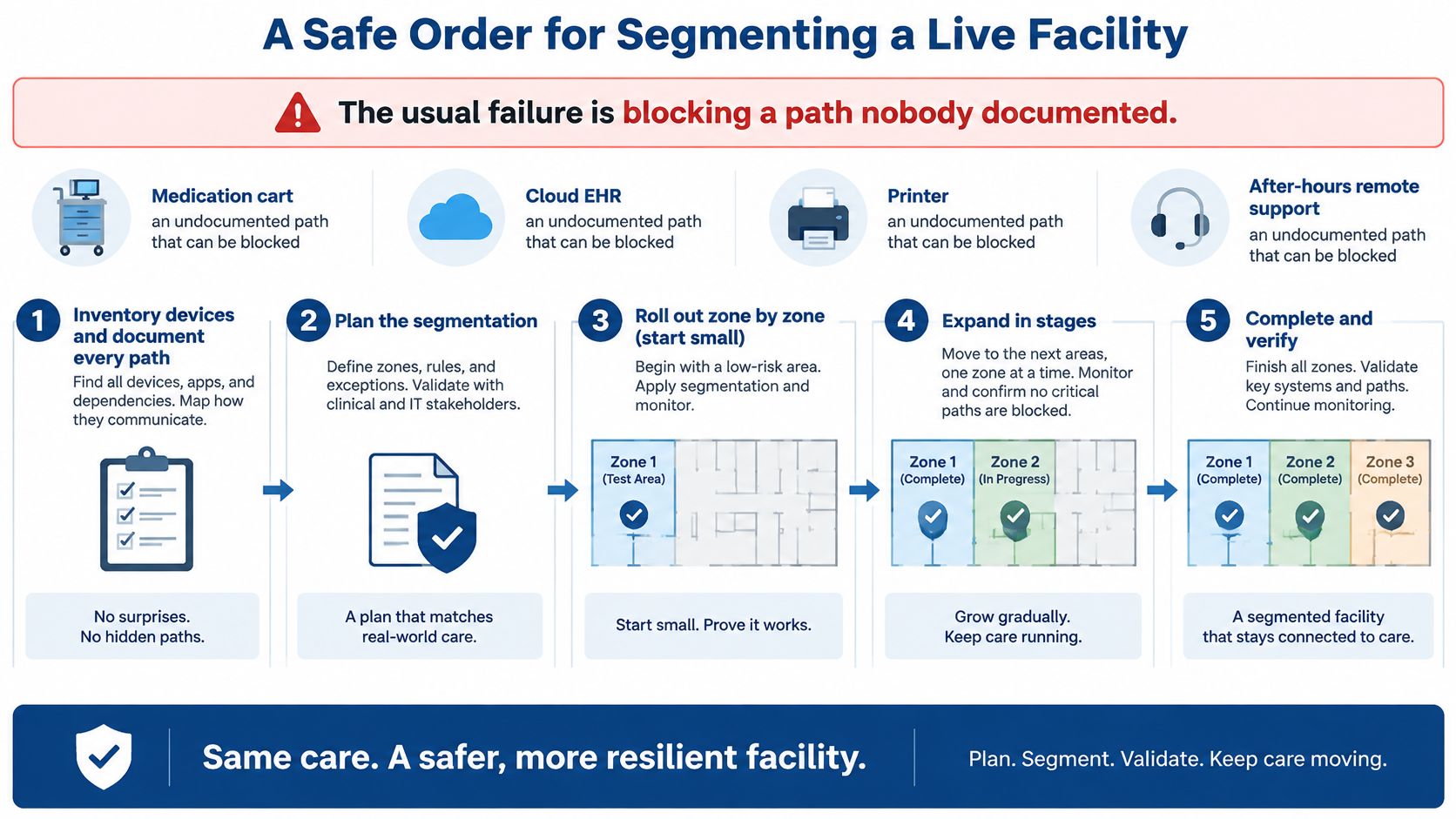
Discover dependencies before enforcing boundaries
Inventory each building's equipment and applications. Include nurse call, cameras, VoIP, wireless equipment, vendor devices, and shared printers. Record location, owner, and clinical purpose so an apparently unused device isn't disconnected during an active workflow.
Observe real traffic and document required flows. Include medication administration, therapy documentation, billing, calling, backup operations, and after-hours remote support. Record the source, destination, application, and reason for each approved connection rather than relying solely on staff recollection.
Separate resident and guest Wi-Fi first. This is often a lower-disruption boundary because personal devices shouldn't need clinical connections. Confirm resident internet access still works and that staff medication carts haven't accidentally been using the guest wireless network.
Protect backup and network administration. Move backup consoles and firewall or switch management onto a restricted administrator path. Test scheduled backups, a restore operation, and authorized emergency support before closing the previous route.
Enforce in stages and preserve a return path
Separate care and building equipment cautiously. Put nurse call and building systems into appropriately controlled zones, accounting for their individual dependencies. Test call lights, alarm delivery, paging, door behavior, and relevant vendor support before applying permanent blocks.
Narrow clinical and billing connections. Permit documented EHR, printing, interface, and billing flows, then inspect denied-connection logs. Clinical staff should test actual work, including medication documentation and therapy access, rather than merely confirming that a login screen appears.
Apply the final deny-by-default policy in a controlled window. Before enforcement, save configurations, define rollback triggers, and assign responsibility for restoring service. The maintenance window must include enough clinical and technical coverage to recognize a failed workflow promptly.
Maintain a shared baseline across buildings. Record site-specific exceptions and retest after EHR, phone, or wireless changes. A working configuration at one facility isn't proof that another building's paging or vendor interface will behave identically.
Change-control test: A restriction isn't ready for permanent use until required work succeeds, prohibited access fails, and the rollback procedure is understood.
Law firms and small offices can follow the same sequence with case files, document systems, guest Wi-Fi, and backups in place of clinical applications. The first useful improvement is protected guest and backup paths, not a perfectly microsegmented environment.
Review Each Building Before You Block Traffic
A network map can show where equipment sits, but not every connection staff rely on during a shift. Before changing access, review the traffic in each building and relate it to care routines, business continuity, and the systems that must remain available.
Buildings can share a floor plan and still differ in their network dependencies. Nurse call, phones, wireless access, backups, and vendor connections may follow different paths from one site to another. Treat segmentation as a live change-management task: identify actual traffic first, then decide which boundaries to strengthen.
Assess the connections that matter to care
RDE Technologies offers IT assessments covering network infrastructure, security, data storage, applications, and business continuity. Its services also include network management, data backup, IT security, wireless installation, cabling, and VoIP. Reviewing these areas together can help identify where guest access, backup traffic, or care-related systems share a path.
A building analogy can help: separate doors are useful only if you know who needs to pass through each one. A VLAN, a way to divide a network into separate logical groups, does not automatically stop unwanted traffic between those groups. Check what connections are allowed and whether the separation works as intended.
Use these questions to guide the review:
- Resident access: Can resident or guest Wi-Fi reach staff systems?
- Backup exposure: Do backups share an unrestricted network with everyday computers?
- Vendor access: Can outside support reach business systems through a limited, documented path?
A yes answer identifies a connection to examine, not an instruction to block it immediately. Document the required traffic, confirm who can approve exceptions, and assess a safer alternative before making a change. Include the staff who depend on the affected systems in the review.
Segmentation can support access safeguards, but it does not replace a facility's risk analysis or advice from its compliance officer or counsel. RDE Technologies provides IT assessments, security management, and managed backup services. Nursing-home operators can request an assessment from RDE Technologies to review network access, backup protection, and the systems that need to remain available during changes.