
When was your last security risk analysis completed, and what has changed in your buildings since the day someone signed it? Most administrators can answer the first half of that question. Far fewer can answer the second. A risk analysis that describes last year's EHR, last year's vendors and last year's building layout is a document about a facility that no longer exists.
The same problem shows up in training binders, business associate files and backup reports. Each one proves that something got written down once. HIPAA administrative safeguards ask a harder question: is the safeguard still running this month, in every building, with a name attached to it?
This guide works through the nine administrative standards in plain language, and for each one it names the evidence a reviewer will ask to see. Three questions organize everything that follows: where does our ePHI live, who can reach it, and how do we keep caring for residents when a system fails. Confirm any interpretation with your compliance officer or counsel before you rewrite a policy.
Table of Contents
- What HIPAA Administrative Safeguards Require
- Nine Standards and Which Specifications Are Required
- How to Run a Risk Analysis That Stays Current
- Assigned Security Official and Ongoing Evaluation
- Workforce Security and Training That Holds Up
- Incident Procedures for Unexpected Security Events
- Contingency Planning Beyond Backups
- Business Associate Oversight and Written Contracts
- Start Your Safeguard Review in a Skilled Nursing Facility
What HIPAA Administrative Safeguards Require
A fire-safety plan earns its keep through the parts nobody photographs: a named floor warden for each unit, a drill log with dates and initials, an inspection tag on every extinguisher. The sprinklers matter, but they aren't the plan. Administrative safeguards work the same way. They're the management rules that decide who is responsible, what gets reviewed, and what evidence survives the year.
In regulatory terms, HIPAA administrative safeguards are the organizational and managerial controls that govern how an organization protects electronic protected health information (ePHI). They sit alongside physical and technical safeguards in the Security Rule, and they cover the assignment of security responsibility, risk analysis and risk management, workforce security and training, incident procedures, contingency planning, evaluation, and business associate arrangements. The HHS overview of the Security Rule records that the final rule was published on February 20, 2003, became effective April 21, 2003, and gave most covered entities until April 20, 2005 to comply, with small health plans receiving until April 20, 2006.
For an operator, the category reduces to a short list of questions:
- Ownership. Who is accountable when a safeguard fails, and does that person have authority to approve spending?
- Documentation. Can you show what you decided, when, and on what evidence?
- Continuity. What happens to resident care when the record system, phones or internet go down?
- Vendors. Which outside companies touch ePHI, and what did they sign?
A written policy proves intent. A log with a name, a date and a result proves a safeguard.
That distinction is where most compliance programs get graded, and it's the standard every section below applies.
Nine Standards and Which Specifications Are Required
Nine standards make up the administrative side of the Security Rule, all collected under 45 CFR 164.308. Each standard carries implementation specifications, and each specification is marked either required or addressable. For a skilled nursing operator running several buildings, the table below is the working map: every row becomes a checklist item, and every item needs a piece of evidence a reviewer can hold in hand.
| Standard | Implementation specifications | Required or addressable |
|---|---|---|
| Security management process | Risk analysis; risk management; sanction policy; information system activity review | Required |
| Assigned security responsibility | No separate specifications | Required |
| Workforce security | Authorization and/or supervision; workforce clearance procedure; termination procedures | Addressable |
| Information access management | Isolating health care clearinghouse functions; access authorization; access establishment and modification | Clearinghouse isolation required; access items addressable |
| Security awareness and training | Security reminders; protection from malicious software; log-in monitoring; password management | Addressable |
| Security incident procedures | Response and reporting | Required |
| Contingency plan | Data backup plan; disaster recovery plan; emergency mode operation plan; testing and revision; applications and data criticality analysis | Required for the three plans; addressable for testing and criticality analysis |
| Evaluation | No separate specifications | Required |
| Business associate contracts and other arrangements | Written contract or other arrangement | Required |
How to read the third column
That column works as a decision rule. A required specification must be implemented, full stop. An addressable specification must be implemented when it is reasonable and appropriate for your organization, and when it is not, you document the reasoning and put an equivalent alternative in place. Addressable has never meant optional, and "we decided it did not apply" has never held up on its own.
Look at how many access and training items carry that label. It is exactly why so many facilities have never formally documented their access authorization: the work felt optional, so nobody wrote it down. The contingency row tells the same story in reverse. The three plans are required, but testing and revision are addressable, and testing is the piece that gets skipped.
What a reviewer asks to see
Each row produces its own paper trail, and a multi-building operator needs either one trail per site or a single record that names every site.
- Security management process: the risk analysis, the remediation plan it produced, the sanction policy, and activity review logs.
- Assigned security responsibility: the named official, with the title and authority to match.
- Workforce security: clearance records completed before access, and termination checklists showing access closed on the last day.
- Information access management: documented authorization for each role that reaches resident records.
- Security awareness and training: attendance records, reminder notices, and written password standards.
- Security incident procedures: the response and reporting log, even where the only entries are drills.
- Contingency plan: the three required plans plus records showing testing and revision happened.
- Evaluation: periodic reviews of the program as systems and vendors change.
- Business associate contracts: the signed agreement for every vendor that touches ePHI, stored where someone can produce it on request.
Starting point: if you can fix only one row this quarter, fix the security management process. A current risk analysis tells you which of the other eight standards are failing.
Missing administrative safeguards are a recurring enforcement theme rather than a rare finding. HHS enforcement data covering October 2009 through September 30, 2013 recorded approximately 750 complaints alleging Security Rule violations in that window, with inadequate safeguards among the cited issues.
The administrative standards are also only half of the rule in practice. The HIPAA technical safeguards cover what the systems themselves must do, and the two lists run more smoothly as one program than as two separate projects.
How to Run a Risk Analysis That Stays Current
A surveyor who asks for your risk analysis is really asking two questions: did you look, and did you act on what you found. The regulatory text of 45 CFR 164.308 requires an accurate and thorough assessment of the risks and vulnerabilities to the confidentiality, integrity and availability of ePHI, followed by measures that reduce those risks to a reasonable and appropriate level. Read that as a process with an output, not a form with a signature.
The work resembles a building inspection that never fully ends. For a skilled nursing operation, the walkthrough starts with an inventory of where ePHI sits in every building: the EHR, the medication administration platform, file shares, backups, email, endpoints and each vendor-hosted tool that holds resident data. Then you map threats and vulnerabilities against each asset, note the controls already in place and rate likelihood and potential impact. The output is a prioritized list with owners and dates, a very different artifact from a thick report nobody opens again.
The loop below is worth copying because it treats the analysis as a recurring cycle instead of an annual deliverable.
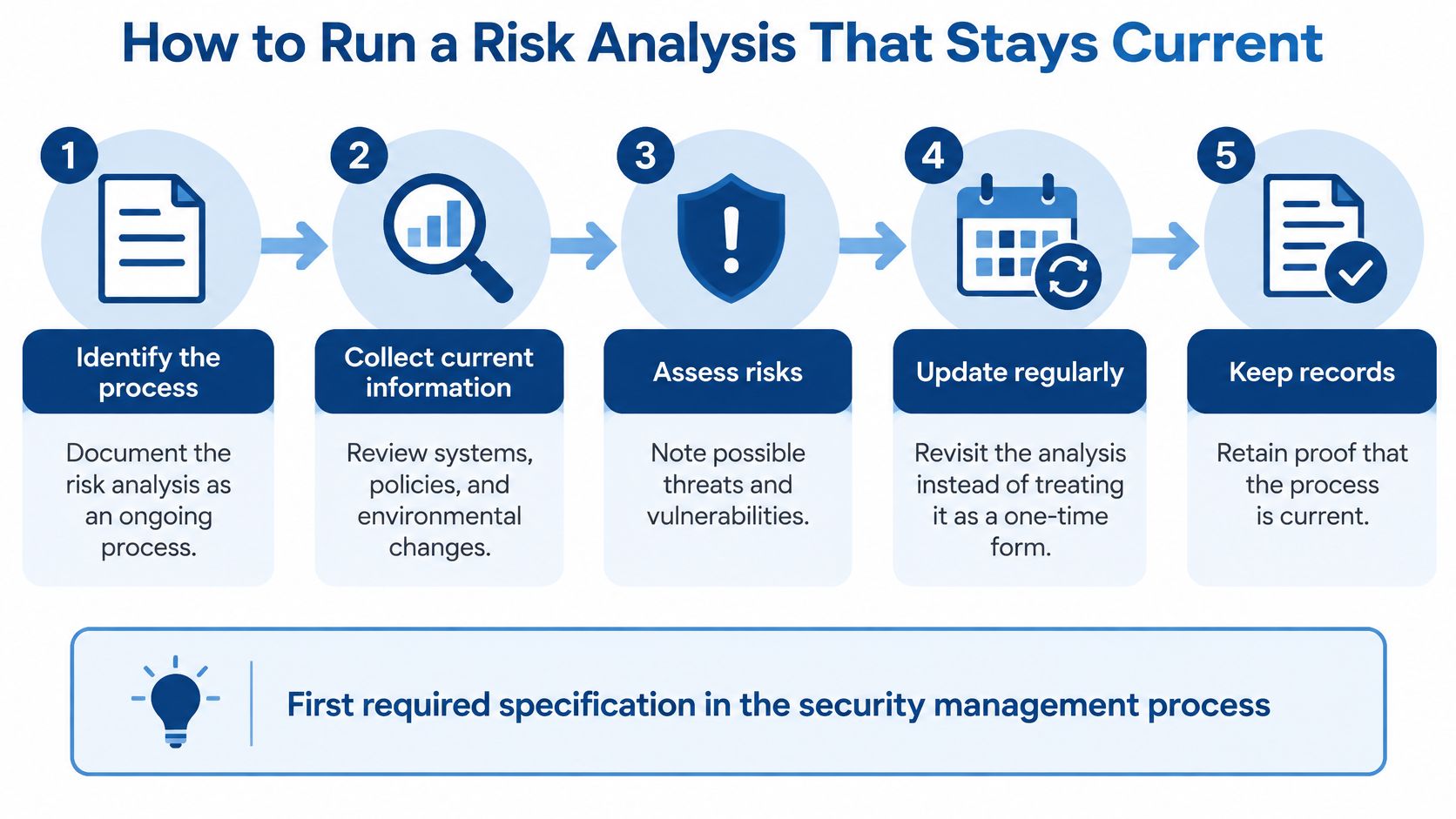
Seven steps that produce defensible evidence
- Inventory every ePHI location. List the EHR, medication platform, file shares, email, backup systems, laptops, tablets and vendor tools. Add the spreadsheets that staff export from those systems, because reviewers find them and administrators forget them.
- Map how ePHI moves. Record where it's created, received, stored, transmitted and deleted, including paper that gets scanned into the record. The goal is to surface undocumented paths, such as a fax-to-email service or a therapy contractor's tablet.
- Pair each asset with threats and vulnerabilities. Threats look like ransomware, a lost laptop, a misdirected email or an insider copying records. Vulnerabilities look like unpatched servers, shared logins at a nursing station and remote access nobody reviews.
- Record existing controls, then rate likelihood and impact. Two facilities with the same threat can carry very different risk, and the rating is what justifies where you spend first.
- Build a remediation register. Every open item gets an accountable owner, a target date and a documented decision. If you're accepting a risk for now, write down the compensating control that covers it.
- Reassess when something changes. A new wing, a new pharmacy interface, a new vendor, a new EHR module or an acquisition all change the answer. Waiting for the next annual cycle leaves a gap an investigator will notice.
- Present the results to leadership and keep the record. Dated versions, owner sign-offs and closure notes are the evidence set. A polished report with no follow-up trail is weaker proof than a plain register updated quarterly.
HIPAA doesn't prescribe one methodology or a single numerical threshold, so your organization has to explain why its choices fit its size, capabilities and infrastructure. For a multi-building operator, that means documenting why the same controls apply to the memory care wing, the rehab building and the administrator's home office, or why they don't. That explanation belongs in writing.
A proposal to plan for, not to comply with yet
HHS has also published a fact sheet on proposed Security Rule changes that would make parts of this more specific: a written risk analysis containing a technology-asset inventory, a network map, anticipated threats, vulnerabilities and a risk level for each threat and vulnerability, plus written restoration procedures targeting 72 hours for certain systems. These are proposed requirements, not current law, but they're useful benchmarks for operators that need a list of EHR servers, network equipment, wireless infrastructure, nurse-call dependencies and vendor connections across several buildings anyway.
Not every organization can staff this work internally. When the register is thin and a survey or contract deadline is close, bringing in outside help is a reasonable way to close the gap: a provider offering a HIPAA risk assessment for nursing homes can handle the asset inventory and threat mapping while your team keeps daily operations moving. Before any engagement starts, confirm with your compliance officer or counsel that the scope covers every building and that the deliverable includes the written record a reviewer will ask for.
Assigned Security Official and Ongoing Evaluation
One name, one phone number, one delegate
HIPAA requires a named security official under 45 CFR 164.308(a)(2) who is responsible for the policies and procedures that protect ePHI. The person doesn't have to be an IT specialist. They do need authority to approve remediation spending, receive incident reports at any hour, and put security on the leadership agenda.
Write the name, direct phone number and backup contact into a document your staff can find, then test it. A facilities director who discovers at 9 p.m. that the listed security official changed roles six months ago has found a gap no policy binder will cover.
Evaluation is a review cycle, not a passing grade
Under 45 CFR 164.308(a)(8), the organization must perform periodic technical and nontechnical evaluation of its safeguards, and a fresh evaluation whenever environmental or operational changes could affect ePHI. A practical review looks like this:
- Open the risk register and confirm each item has an owner and a realistic date.
- Check that policies match how staff work, including shared logins at a nursing station and personal phones used for resident photos.
- Test a sample of controls, such as confirming a recent leaver's accounts were removed, a restore test succeeded and training records are current.
- Record the results, the decisions and the changes leadership approved.
Don't confuse this with passing an inspection. A 2024 review by the HHS Office of Inspector General found that OCR's HIPAA audits assessed only 8 of 180 HIPAA Rule requirements, including just 2 Security Rule administrative safeguard requirements. An audit that never reaches most of the rule is not a clean bill of health.
Information access management under 45 CFR 164.308(a)(4) belongs in the same review. Decide who authorizes each access level, who provisions it, how changes get logged, and how often the list gets re-approved. For operators with several buildings, run the review at each facility and roll the findings into one report for ownership.
Workforce Security and Training That Holds Up
A licensed practical nurse moves from a long-term unit to a short-stay rehab floor. Her badge still opens the memory-care door, her login still shows the old unit's resident list, and nobody has asked whether the new role needs either one. That's the everyday version of an access problem, and it's the reason workforce security exists as its own standard.
The illustration captures the moment when access should shrink rather than grow.
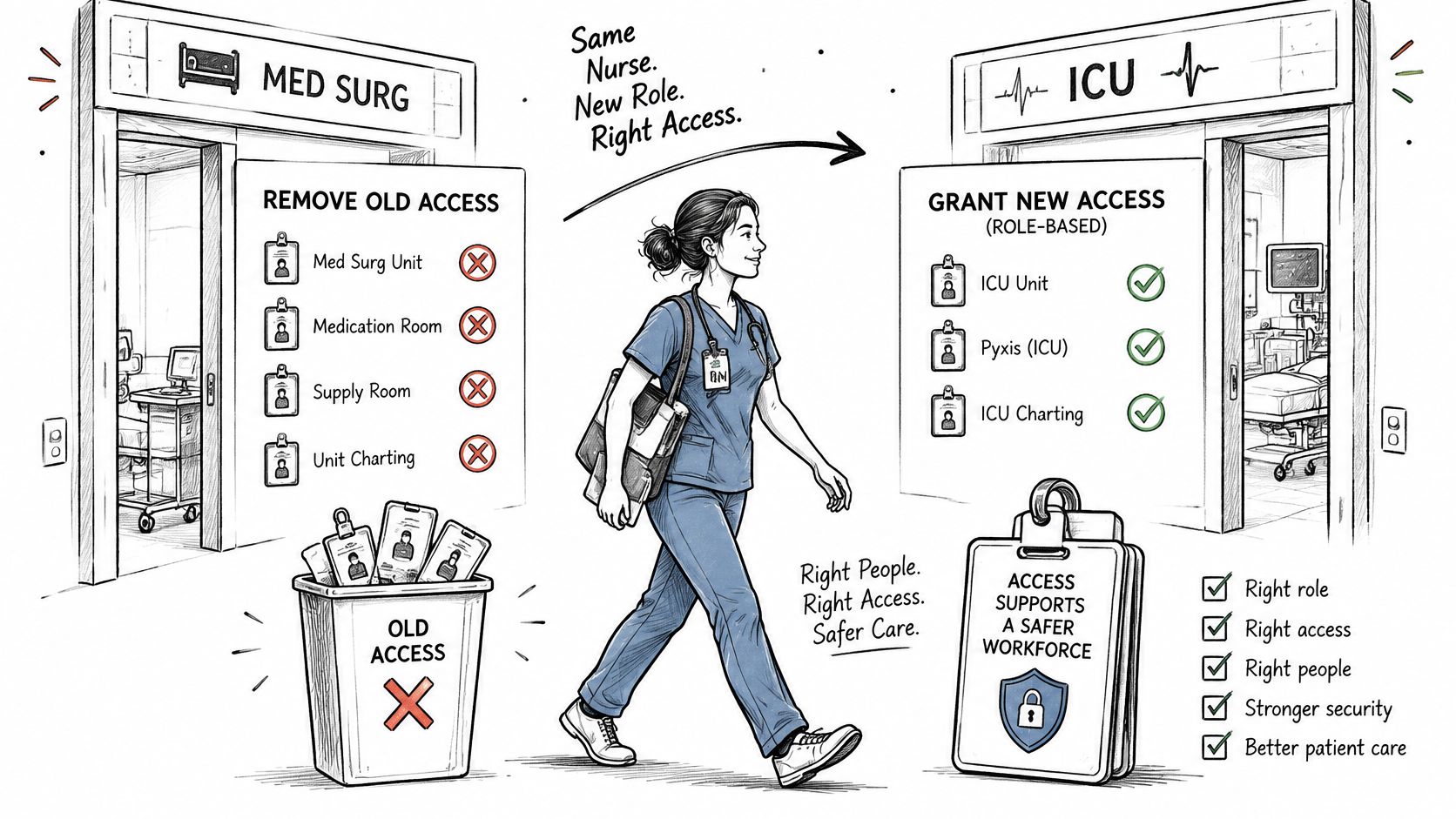
Three addressable specifications do the work here. Authorization and supervision means someone approves access before it's granted and knows what the role requires. Workforce clearance is that approval step in writing, tied to the job description rather than to whoever asked. Termination procedures remove accounts, badges, remote access and shared-password knowledge on the person's last day, not the following week when someone remembers.
The four training topics and the record behind them
Security awareness training under 45 CFR 164.308(a)(5) covers security reminders, protection from malicious software, log-in monitoring and password management. New hires need it before they touch a record system, and everyone with access needs periodic refreshers.
The evidence question is simple: can you produce a record for every person with system access, listing the topics, the date and a sign-off? A roster of who attended a lunch-and-learn won't answer it. Build the record from your access list, not from your sign-in sheet.
If you'd rather buy training than build it, choose courses that map to your own written policies and record completion the same way your access list does. Scripting compliant HIPAA training videos covers how to structure that content so it survives a records request.
The sanction policy is a required specification for a reason. It's a written list of consequences for violating security policy, and it only works when it's applied consistently. A policy that exists but has never been invoked is fine. A policy that gets invoked only for people without seniority is a liability.
This week's checklist:
- Match roles to access. Pull the user list for your EHR and compare each account to the person's current job.
- Hunt shared accounts. Any account two or more people use needs an owner and a replacement plan.
- Compare leavers to logins. Take the last 90 days of terminations and confirm every account is disabled.
- Confirm training records exist. Every person with system access should have a dated entry.
Incident Procedures for Unexpected Security Events
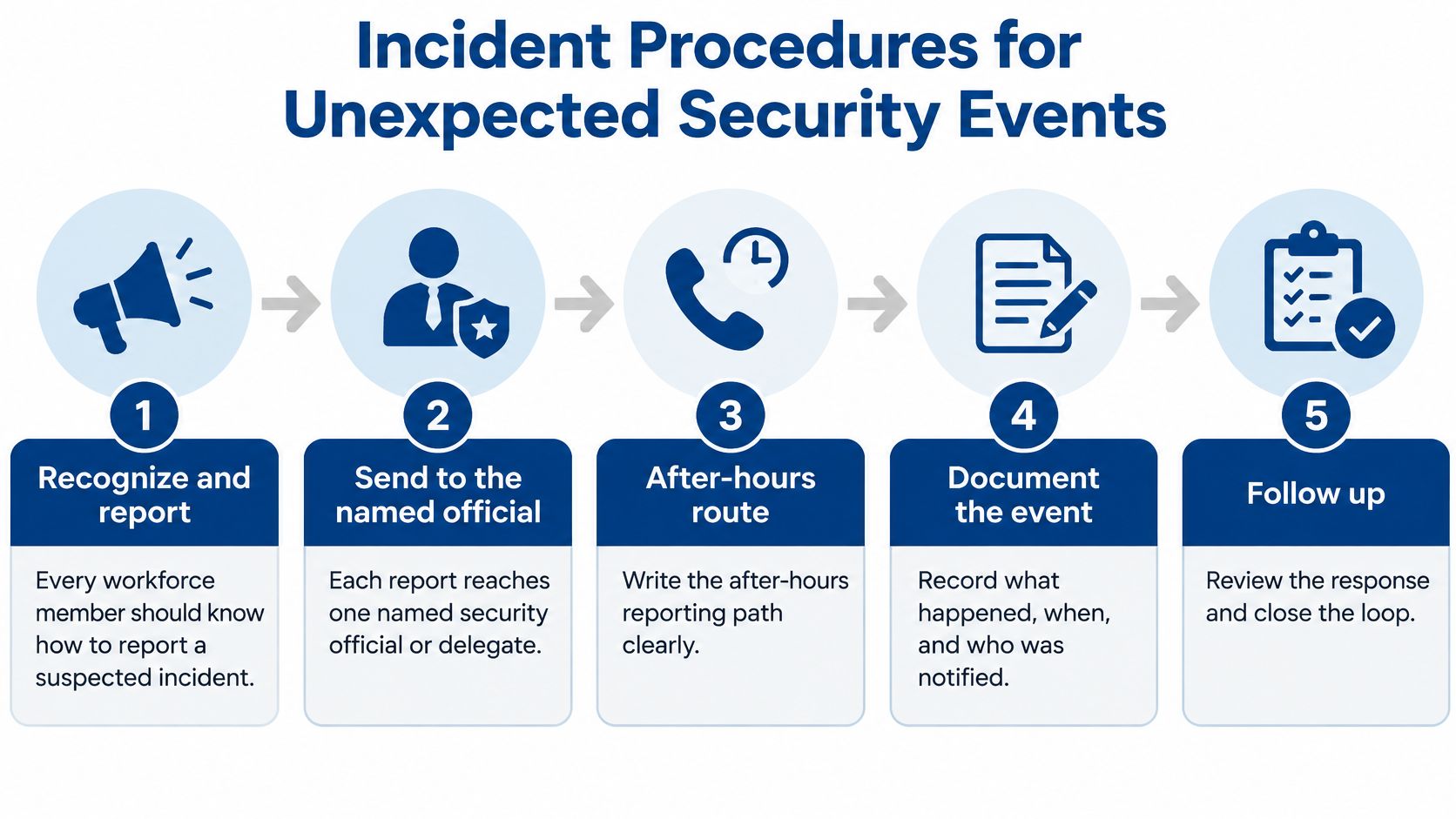
Every workforce member needs to know how to report a suspected incident, and every report needs to reach one named security official or a named delegate. The after-hours route belongs on a contact sheet, not in someone's memory. Security incident procedures are a required standard under 45 CFR 164.308(a)(6), covering both response and reporting.
The reporting path deserves as much attention as the technical response.
- Report and log the event. Time, device, symptoms, who noticed. A housekeeper who finds a logged-in workstation at 6 a.m. is a reporter, not a nuisance.
- Triage whether ePHI may be involved. This decision starts the clock on everything that follows, so make it early and record who made it.
- Contain. Isolate devices, disable compromised accounts, cut off further access. Speed here limits both damage and notification scope.
- Preserve evidence. Keep logs and disk images rather than wiping and rebuilding. Investigators and insurers ask for them later.
- Recover from clean backups once the threat is removed, following the restoration steps in your contingency plan.
- Assess whether a breach occurred and document the analysis, including the reasoning if the answer is no.
- Notify as required. Under the HIPAA Breach Notification Rule, covered entities must notify affected individuals without unreasonable delay and no later than 60 calendar days after discovery (45 CFR 164.404).
Timing is where cases go wrong. The OCR settlement with Syracuse ASC followed a ransomware event affecting 24,891 individuals, and the findings included both inadequate risk analysis and delayed breach notification. The same announcement notes that OCR's 2024–2025 audit program is reviewing 50 covered entities and business associates on the Security Rule provisions most relevant to hacking and ransomware. The lesson for a facility: breach assessment has to run alongside containment, not after the cleanup.
Detection usually comes from monitoring rather than luck. RDE Technologies monitors systems, protects data, and provides preemptive solutions to help clients avoid future IT complications, which is the difference between discovering an intrusion in hours and reading about it in a vendor notice.
Keep a one-page incident contact sheet at the nurses' station and in the IT office. It should list the security official, the backup contact, the IT help desk number and the escalation contact for each business associate, including the EHR vendor and the pharmacy interface.
Contingency Planning Beyond Backups
Contingency planning is about availability, not storage. The contingency plan standard in 45 CFR 164.308 requires three plans: a data backup plan that creates and maintains retrievable exact copies of ePHI, a disaster recovery plan that restores data after loss, and an emergency mode operation plan that keeps critical processes running during an outage.
Name the processes that third plan has to protect, because "critical processes" means nothing until it's specific: medication administration, clinical documentation, admissions, staff communication and emergency access to resident records. If the emergency mode plan doesn't say how a nurse gets the medication list and allergy list during an outage, it isn't finished.
Criticality comes before recovery
Testing and revision, plus the applications and data criticality analysis, are addressable specifications. Skipping them requires a written justification someone signs, which is usually harder than doing the work.
Start with the criticality analysis. Rank each application by how fast it must return, then set a recovery time objective and a recovery point objective for each. Ranked lists settle arguments during an incident, when nobody has time to negotiate priorities.
Then map dependencies. A backup is useless if the identity service, internet connection, phones or pharmacy interface needed to use it is also down.
The test that matters: if the EHR, internet, phones and identity provider were all unavailable for three days, could your night shift document care and administer medication safely? If the answer depends on one server room, the plan is a backup plan, not a contingency plan.
For every dependency, record a fallback: offline access to critical clinical information, alternate communications, and a vendor escalation path with after-hours numbers. Test on a schedule, and run two kinds of exercise. Restore tests confirm the data is intact and the application works. Downtime drills with nursing, pharmacy, therapy and administration confirm people can execute the procedure, and a tabletop exercise walks through a multi-day outage before it happens for real.
Keep the evidence: backup monitoring reports, restore test results, drill records and corrective actions. A green backup dashboard is not proof of recoverability. For multi-building operators, record backups and restore tests per facility, since each building may depend on different systems and connections. CMS emergency preparedness requirements under 42 CFR 483.73 are a separate obligation, and the CMS emergency preparedness rule and IT in nursing homes is easier to satisfy when the two sets of plans say the same thing.
Business Associate Oversight and Written Contracts
A business associate is any vendor that creates, receives, maintains or transmits ePHI on your behalf. For a long-term care operator that list grows quickly: the EHR vendor, the medication and pharmacy interface, billing services, therapy contractors, transcription, document shredding, offsite backup hosting and the managed IT provider.
Most facilities can name their EHR vendor without hesitating and stall on the other seven. Start with the vendor list you already keep for accounting, then mark every entry that touches resident data.
The contract requirement sits in 45 CFR 164.308(b), and the terms those agreements must contain are set out in 45 CFR 164.314. At minimum, the written agreement should require appropriate safeguards, incident reporting to you within a defined window, and return or destruction of ePHI when the arrangement ends. Since the 2013 Omnibus Final Rule, business associates carry direct Security Rule obligations, and they must pass the same requirements down to their subcontractors.
A due-diligence request that gets real answers
Ask each business associate for the following, in writing:
- Their latest risk analysis summary, not the full document if it's sensitive, but enough to show one exists and is recent.
- Backup and restore test evidence, including the date of the last successful restore.
- Incident notification timeline, meaning how fast they tell you and who they call.
- Security contact and escalation path, with an after-hours number.
- Subcontractor list, plus where data is stored and how it's encrypted.
Set a yearly review date for each vendor and keep a register that lists the business associate, the data it touches, the contract date and the next review. That register is the first thing a reviewer asks for and the last thing most facilities build.
Contract language deserves a lawyer's eyes, and it's also where vendors increasingly need to address new tools. Documenting AI evidence trails explains how audit rights and evidence obligations get written into agreements, which matters when a vendor runs AI features over data it holds for you.
Start Your Safeguard Review in a Skilled Nursing Facility
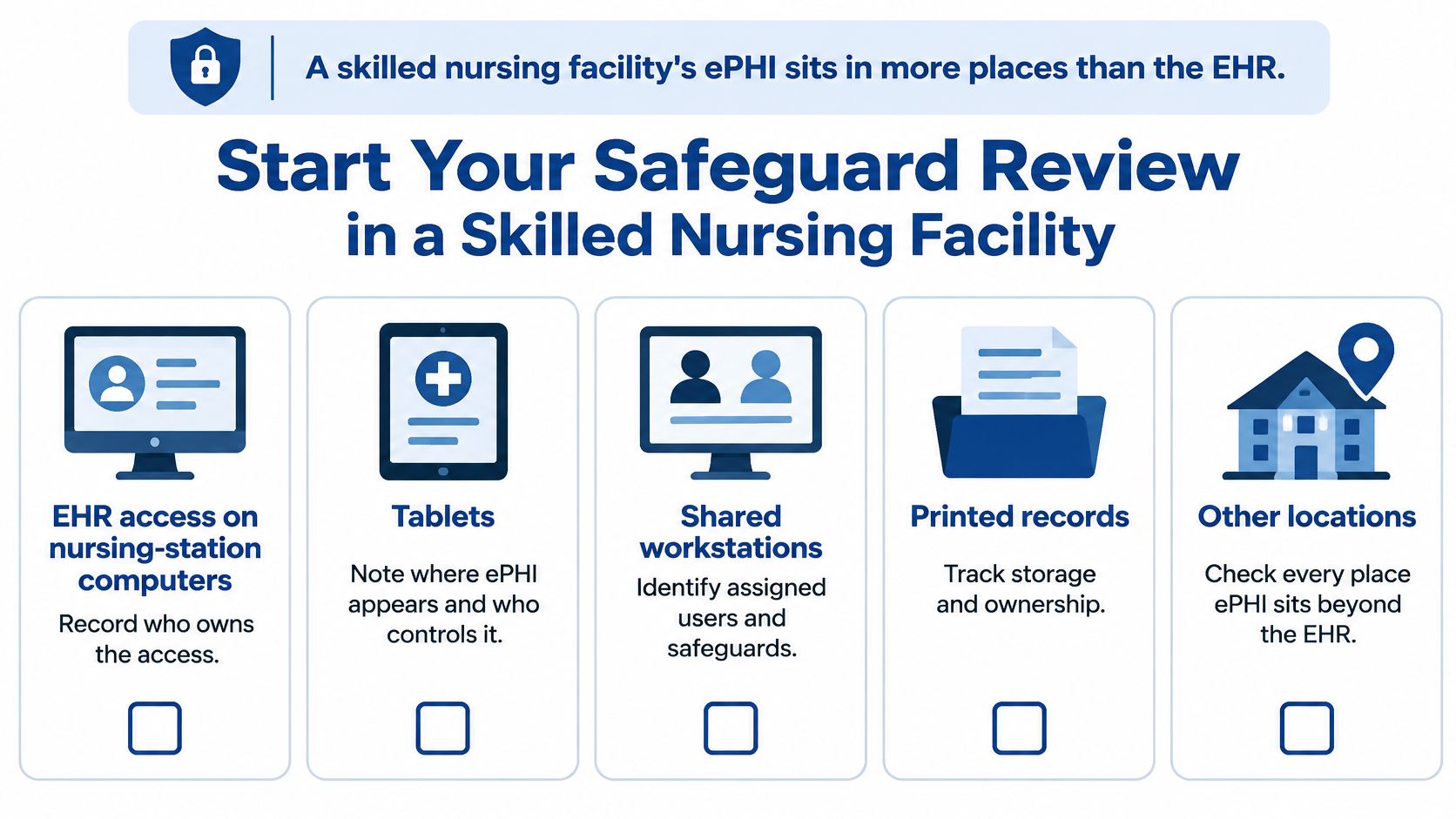
A reviewer can ask for the risk analysis, watch you produce a clean binder, then ask which building it covers. In a skilled nursing operation, ePHI sits in more places than the EHR, so the review has to follow the resident through medication passes, therapy, messaging, photos and after-hours calls. The 2025 OCR settlement announcements, including cases involving Guam Memorial Hospital, BST & Co. CPAs and Syracuse ASC, repeatedly identified failure to conduct an accurate and thorough risk analysis as a violation after ransomware incidents.
Walk each building and record an owner for every location on this list. For each line, write the system, the ePHI it can touch and the proof you would hand a reviewer.
- Nursing-station computers and EHR sessions, including who is signed in when a shift changes.
- Tablets, medication carts and therapy devices, and whether each one locks when set down.
- Nurse call systems wherever they connect to records or staff messaging.
- Resident Wi-Fi, which belongs on a network separated from clinical systems.
- Shared workstations, printers and shared logins, where access often drifts unless one person owns the account list.
- Phones used for clinical communication, including personal phones used for resident photos.
- Cloud and offsite backups, with a named owner and a restore date.
Multi-building operators get better results from one central policy paired with a separate risk register for each facility. Site-specific gaps in medication systems, remote access and shared accounts are exactly what a clean corporate policy hides. Review every building's register on the same schedule, and keep CMS emergency preparedness planning under 42 CFR 483.73 consistent with the contingency plan rather than running them as unrelated paperwork.
Three next steps:
- Name who receives incident reports after hours, and name a delegate, so a medication system problem at night has one clear path.
- Schedule an IT assessment for every building, then map the findings to server and network monitoring, firewalls, patch management and ransomware protection for endpoints.
- Attach evidence to the register as you fix items: session-lock settings, device inventory, network separation, restore-test results and the owner for each open gap.
RDE Technologies supports skilled nursing facilities and long-term care operators nationwide, on site and remotely, with managed IT and security, data backup, server and network monitoring, patch management and ransomware protection for endpoints; VoIP and wireless installation are also listed among its services. Request an IT assessment or contact RDE Technologies, and bring citation or contract questions to your compliance officer or counsel.