
The medication workstation won't connect, billing can't reach its files, and the administrator is waiting for someone to explain whether the problem affects one building or the entire organization. Meanwhile, the phone keeps ringing. The immediate need is technical help, but the larger question is whether anyone owns the whole problem, including recovery.
Choosing IT consulting on Long Island should start with that question, not a list of services. A useful provider can explain what must stay available, demonstrate what can be restored, and put responsibilities in writing. For care operators and professional offices, those answers matter more than a reassuring dashboard.
Table of Contents
- IT Consulting Options and When Each Fits
- Operational Problems That Lead Long Island Firms to Hire IT Help
- How Long-Term Care Operators Apply IT Consulting Requirements
- Backup, Security and Provider Criteria
- Local, On-Site and Remote Coverage Compared
- How IT Consulting Is Priced
- Book an IT Assessment Before You Sign
IT Consulting Options and When Each Fits
IT consulting options by scope and typical buyer
| Option | What It Covers | Best Fit For |
|---|---|---|
| Managed IT services | Ongoing monitoring, updates, help desk and maintenance of the full environment | Offices and care sites that need continuous support |
| Break-fix support | Repairs and troubleshooting billed when something fails | Very small offices with stable, simple equipment |
| IT assessment | Written review of infrastructure, security, storage and continuity | Organizations planning budgets or preparing for audits |
| Project setup | New network, wireless, cabling, VoIP or technology rollout with a defined end date | Relocations, expansions and equipment refreshes |
| Security management | Firewalls, endpoint protection, patching and server and network monitoring | Organizations handling client, patient or legal data |
| Backup and recovery | Managed onsite and offsite backup with restore planning | Any business that cannot absorb extended downtime |
The distinction is ongoing ownership versus a defined task. Managed services assign continuing maintenance responsibilities under an agreement. Break-fix support starts when someone reports a fault, so administrators shouldn't assume that anyone is checking equipment between calls.
An assessment is different from either arrangement. Its deliverable is a written explanation of the current environment, its weaknesses, and recommended actions. It should help an administrator decide what deserves attention first, rather than generate an equipment shopping list.
Matching the arrangement to the problem
Project work fits a specific change, such as installing wireless coverage in a new wing or replacing a phone system. The agreement should identify completion criteria, testing, documentation, and who maintains the installation afterward. Otherwise, a completed installation can become an unsupported operational responsibility.
Security management and backup can stand alone, but their boundaries need care. If a security provider identifies an unsupported server, someone must own its replacement. If a backup provider reports a failed job, someone must investigate and resolve it.
Organizations with an internal IT lead may prefer shared responsibilities rather than full outsourcing. A co-managed IT services arrangement can divide internal and external work, provided the agreement identifies who approves changes, handles escalations, and maintains documentation.
Practical rule: A service name isn't a responsibility assignment. Every recurring task needs an owner and a written deliverable.
A sensible buying sequence is an assessment, an ongoing support agreement where needed, and separately scoped improvement projects. Before requesting proposals, administrators can list their three most expensive interruptions from the previous year and match each to a table row. That exercise separates an urgent repair from a missing maintenance, security, or recovery function.
Operational Problems That Lead Long Island Firms to Hire IT Help
Interrupted work is usually the first visible cost. A failed workstation can delay documentation; an unavailable server can stop billing, scheduling, or legal case work. The administrator needs an explanation of what failed, who was affected, and whether the underlying cause was corrected.
Security exposure may be less visible until access is lost or information is disclosed. The New York Attorney General's small-business cybersecurity guide reports national figures that at least 50% of confirmed data breaches targeted small businesses, and as many as 60% of affected businesses went out of business within six months of a cyberattack. These aren't Long Island-specific estimates, but they explain why security belongs in an operational discussion rather than an occasional equipment review.
The following graphic summarizes the problems that often appear together.
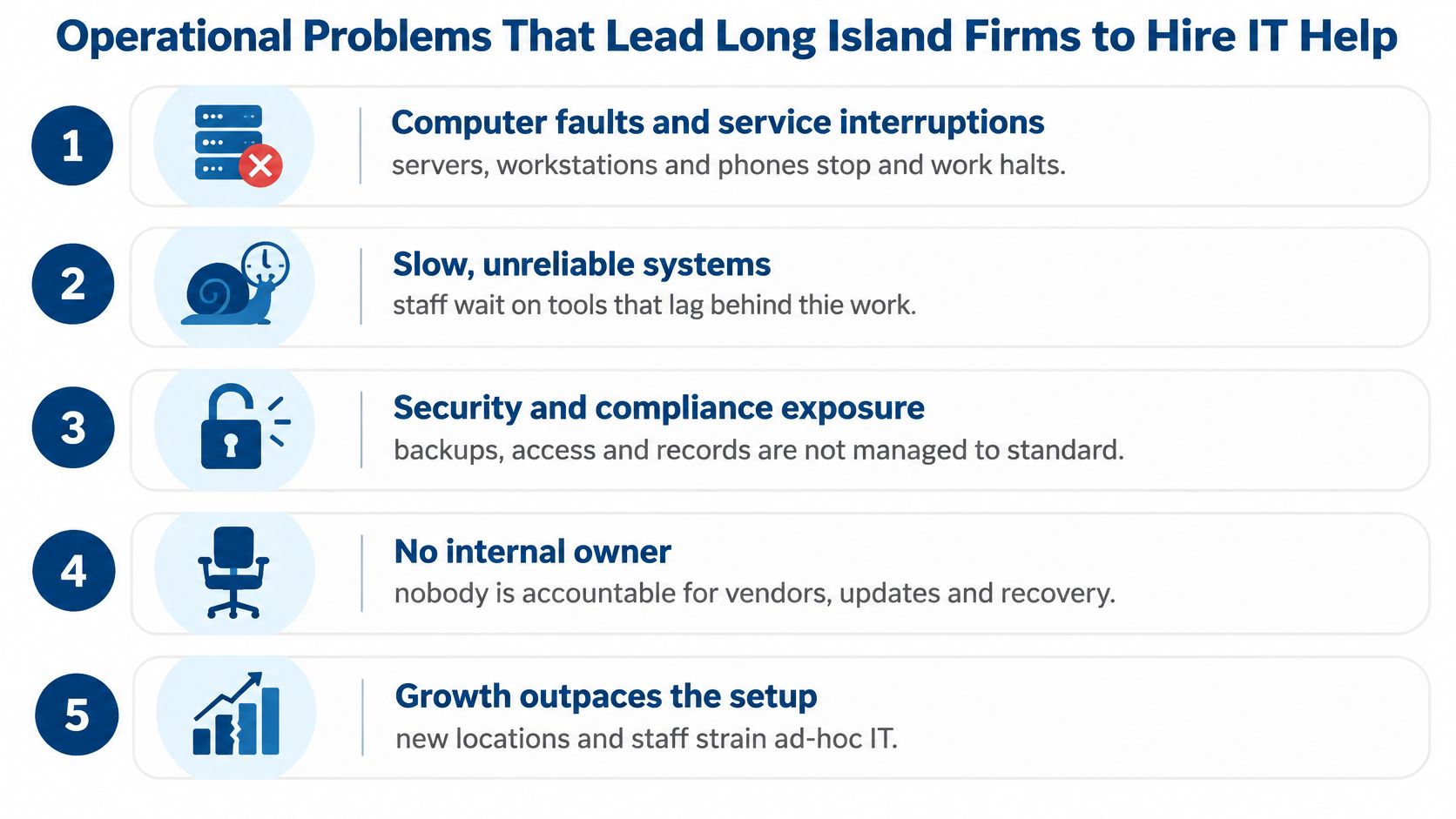
When troubleshooting becomes someone else's second job
An office manager who resets passwords and restarts printers has less time for staffing, purchasing, or collections. In a nursing facility, assigning that work informally to clinical staff also creates uncertainty about escalation. Being helpful doesn't make someone accountable for network maintenance.
Aging, poorly coordinated technology adds another problem. Equipment purchased at different times may have incompatible settings, expired support, or undocumented connections. Replacing the slowest computer won't necessarily fix a bottleneck in the network or a failing shared service.
Phone reliability deserves separate attention. VoIP can be an alternative to traditional telephone arrangements, but administrators should compare connectivity, emergency calling arrangements, failover, and total costs rather than assume that changing phone technology solves every communications problem.
Nursing homes, assisted-living communities, home-care providers, and law firms also handle information whose exposure can affect residents, patients, employees, or clients. Their support arrangements must address confidentiality alongside availability.
Signs that informal IT help is no longer enough include:
- Repeated unexplained outages: Staff restore service by restarting equipment, but nobody documents the cause.
- No written backup record: Management can't identify the protected systems or the latest recovery evidence.
- Unclear administrator access: Nobody can name every person or vendor with expanded permissions.
- Unanswered security questions: A request about remote access, encryption, or incident ownership produces conflicting answers.
How Long-Term Care Operators Apply IT Consulting Requirements
An operator running several buildings can share one EHR, one internet connection, and one phone system, yet still owe regulators a separate accounting of risk at each site. The requirements below come largely from the HIPAA Security Rule and CMS emergency-preparedness rules; the second column translates each one into evidence a consulting provider should be able to produce in writing.
HIPAA and CMS requirements mapped to provider evidence
| Requirement | What to Ask Your Provider For |
|---|---|
| Risk analysis of all ePHI, 45 CFR §164.308(a)(1)(ii)(A) | Documented scope covering every building, EHR access and remote access |
| Contingency plan and data backup, 45 CFR §164.308(a)(7) | Tested backups and a written recovery playbook |
| Access control, 45 CFR §164.312(a) | Unique user IDs, least privilege and regular vendor access reviews |
| Transmission security, 45 CFR §164.312(e) | Documented safeguards and encryption decisions for ePHI sent over wireless and remote links |
| Emergency preparedness for long-term care, 42 CFR §483.73 | Plan covering communications, power and continuity of resident care |
| Vendor and business associate access, 45 CFR §§164.308(b) and 164.314(a) | Signed business associate agreement where applicable and documented vendor access |
| Multi-building operators, organization-wide risk-analysis scope under 45 CFR §164.308(a)(1)(ii)(A) | Shared-system dependency map and reporting by facility |
The HHS HIPAA Security Rule materials explain the obligation to assess risks and vulnerabilities affecting the confidentiality, integrity, and availability of electronic protected health information, or ePHI. That scope can reach PointClickCare access, medication workstations, wireless networks, remote administration, backup systems, and systems shared across buildings.
Read the right-hand column as an audit habit: every requirement should end with a document, a test result, or a named owner, because a provider's service list alone cannot demonstrate that a control exists. Facility-level reporting, for example, helps show oversight across buildings even though HIPAA does not name it as a separate mandate. And where the rule calls an implementation specification "addressable", as it does for encryption, the honest answer is a documented decision with a stated reason.
Administrators should confirm applicability and detail with the facility's compliance officer or counsel. The CMS emergency-preparedness reference applies to participating long-term-care facilities; assisted-living and home-care organizations should not assume identical obligations.
Turning risk analysis into assigned work
The HHS risk-analysis guidance describes a process that examines assets, threats, vulnerabilities, existing safeguards, likelihood, and impact. That process only pays off when it converts into owned tasks:
- Set the scope across facilities. Include shared services and centrally managed accounts, not only equipment physically inside each building.
- Build an asset and data-flow inventory. Identify endpoints, servers, applications, storage, and the information each handles.
- Map ePHI movement. Record exchanges between facilities, cloud applications, remote workers, and outside vendors.
- Rank systems by patient-care impact. A clinical-access outage during a medication pass outranks a delayed administrative report.
- Review privileged access. Examine privileged accounts, remote support connections, and business-associate access, including access that should have ended.
- Create a remediation register. Give each finding an owner, a target date, a priority, and the evidence required to close it.
The workflow below provides a visual reference for coordinating security and operational responsibilities.
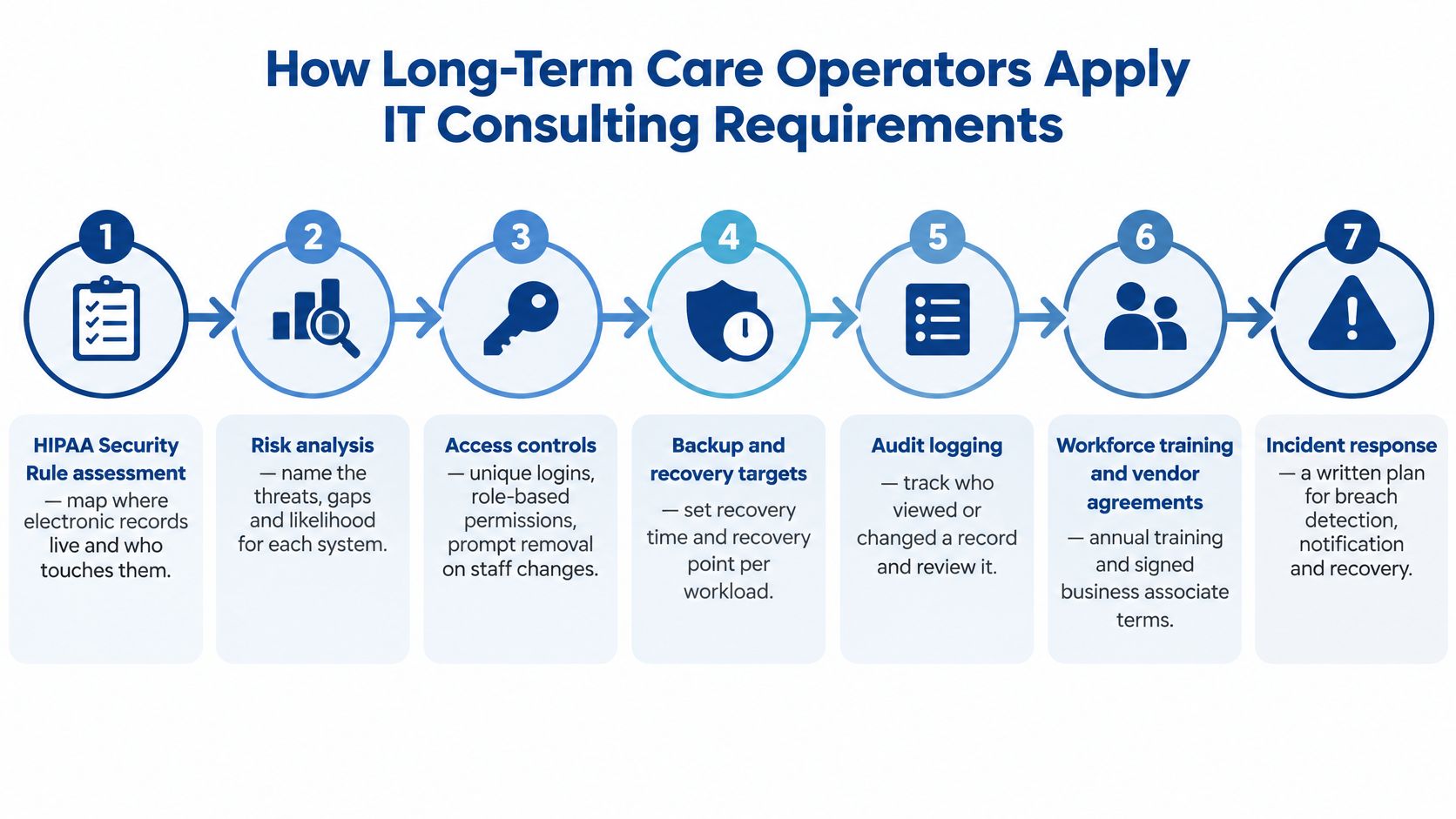
Training frequency should follow applicable requirements and the organization's own risk analysis, rather than treating the graphic's annual-training label as a fixed HIPAA interval.
Accounting for care delivery
Nurse call, resident Wi-Fi, and clinical wireless access serve different purposes. Administrators should document network dependencies and escalation contacts without assuming every nurse-call system runs on the same infrastructure.
The HHS healthcare cybersecurity guidance recommends multifactor authentication for remote and privileged access, plus incident-response and disaster-recovery planning with assigned crisis-team responsibilities. After-hours instructions should tell staff whom to contact and who can authorize containment before damage spreads.
RDE Technologies provides managed backup, IT security management, and onsite and remote IT support, so facilities weighing HIPAA-compliant IT services can ask directly which of the controls above those services cover.
Backup, Security and Provider Criteria
Backup design should prove recoverability, not merely successful copying. NIST's guidance on protecting data from ransomware and other data-loss events recommends maintaining and testing backup files. The buying question is whether the organization can resume essential work using those copies.
A recovery discussion should include administrators who understand operational priorities.
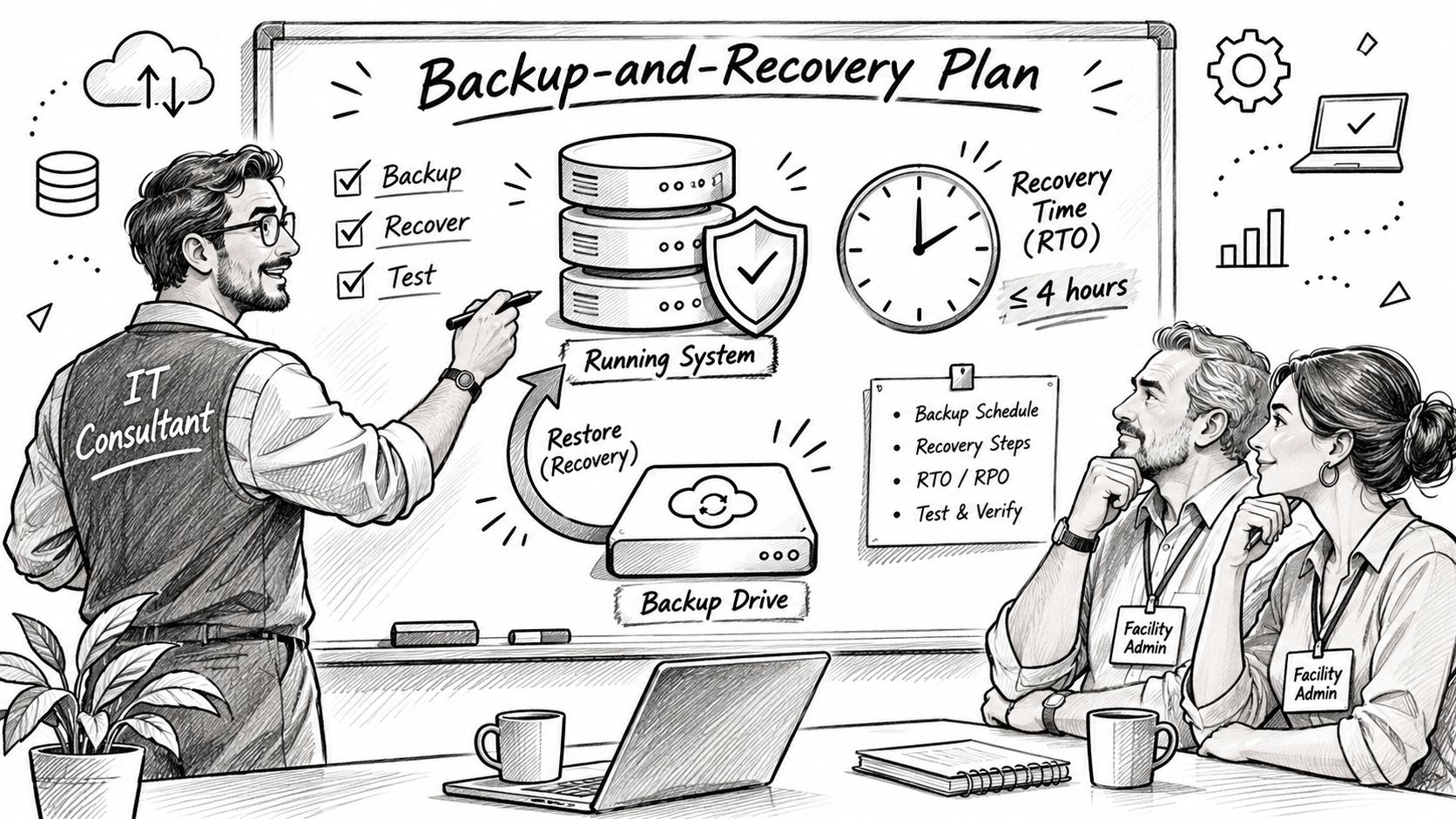
Defining an acceptable recovery
Each workload needs a recovery-time objective, the target time to resume service, and a recovery-point objective, the acceptable amount of lost recent data. Medication systems, payroll, and email shouldn't automatically receive identical targets.
The HHS ransomware guidance recommends protected backup copies that aren't accessible through the network they protect, tested restoration, and an exercised recovery playbook. Backup administration should use credentials separate from production administration, with offsite and offline or otherwise isolated copies.
A practical testing schedule can include monthly sample restores and at least annual full-system or application exercises. These are proposed purchasing criteria, not a universal HIPAA testing interval. Exercises should check identity services, DNS, network shares, and application dependencies.
Monthly reporting should identify:
- Backup-success rate: Whether scheduled jobs completed.
- Restore duration: How long tested recovery took.
- Recoverable-restore rate: Which tested copies restored successfully.
- Newest usable copy: The age of data that can be recovered.
- Critical-system coverage: Which essential workloads are protected.
A green backup dashboard doesn't establish that staff can use a restored application.
Scoring provider evidence
Each answer can be marked clear, vague, or missing.
| Criterion | What to Ask For | Red Flag |
|---|---|---|
| Support hours | Written coverage window including nights, weekends and holidays | Business-hours-only support where continuous coverage is needed |
| Communication | Named engineers and regular progress updates | No single point of contact |
| Documentation | Client-held network diagrams, asset inventory and change logs | Knowledge held only by the provider |
| Backup testing | Restore test schedule and latest results | Backups described only as dashboard status |
| Security practice | Admin MFA, patch and endpoint policies | Controls that can't be described in writing |
| Reporting | Monthly reports split by facility | One blended report for all sites |
| Healthcare readiness | ePHI experience and willingness to sign an applicable business associate agreement | Refusal to sign a required agreement |
Security scope should also address firewalls and content filtering. For an initial email-authentication check, mailX provides a tool to verify your DMARC policy; that check doesn't replace broader email-security review.
RDE Technologies monitors systems, protects data, and uses preventive measures to address potential complications. Its whole-system maintenance approach includes network security, backup, and hosting, while its certified engineers maintain client contact throughout projects. Its help desk is staffed 24/7, but contract language should still distinguish help-desk availability from onsite attendance or guaranteed resolution.
Before signing, management should request a sample monthly report showing the actual evidence it will receive.
Local, On-Site and Remote Coverage Compared
A failed switch at 7 a.m. needs hands in the wiring closet; a locked account does not. RDE Technologies is based in Oceanside, New York, serves businesses throughout New York and the Tri-state area, and provides remote support to companies beyond New York.
The practical distinction is the task, not whether the technician's desk is nearby. Remote support works like triage: fast diagnosis, clear priority, then escalation only when hands-on work is required.

Remote and on-site tasks
| Task | Usually Handled |
|---|---|
| Monitoring and alerts | Remote |
| Account management and access reviews | Remote |
| Software updates and patching | Remote |
| Backup verification and restore tests | Remote |
| Cabling and wireless coverage | On site |
| Hardware replacement and switch repairs | On site |
| Phone hardware and office moves | On site |
| New equipment installation | On site |
Remote work can resolve software and account issues without waiting for travel. Physical work still needs a technician, site access, replacement parts, and sometimes a maintenance window. Wireless troubleshooting may begin remotely but require an onsite coverage survey.
Judge coverage by evidence rather than by a service list: who is dispatched, which building is affected, what access is needed, and what written result comes back afterward. A restore test, a ticket history by facility, and a named responsibility for follow-up show more than a broad promise to “support everything.”
Making dispatch expectations explicit
RDE Technologies provides remote assistance through an online remote support and collaboration portal. For a multi-location operator, the support workflow should identify the affected building, a local contact, and whether the technician needs access to clinical or administrative areas.
Provider comparisons should address these questions:
- Site coverage: Which locations fall within the agreement, including sites outside New York that need remote support?
- Urgent dispatch: How are onsite visits scheduled after an urgent request?
- Remote access: How does the online support channel authenticate requests and obtain appropriate access?
- Facility reporting: How are tickets, recurring faults, and outstanding work attributed to individual buildings?
Any stated response window belongs in the agreement. A promise to answer a call isn't the same as a commitment to arrive onsite or complete a repair.
The accompanying video offers another way to consider the support arrangement.
How IT Consulting Is Priced
Comparable scope matters more than a headline monthly fee. Without written inclusions and exclusions, a lower proposal may leave more work billable separately. No meaningful price comparison can be made before identifying users, devices, locations, support coverage, and recovery responsibilities.
The common purchasing models allocate costs differently:
| Model | How the Quote Should Be Defined |
|---|---|
| Managed services | Recurring agreement identifying whether charges are per user, device, site, or another stated basis |
| Break-fix | Hourly or per-incident billing, with emergency and travel charges disclosed |
| IT assessment | Defined scope, written findings, exclusions, and completion terms |
| Project setup | Itemized implementation scope, milestones, acceptance criteria, and end date |
A recurring agreement helps organize ongoing spending, but it doesn't automatically include every replacement, upgrade, or recovery exercise. Break-fix limits standing commitments while leaving incident costs less predictable. Assessment and project quotes are easier to compare when their deliverables are explicit.
Contract terms that change the comparison
Before approval, administrators should check:
- Monthly inclusions: Covered equipment, maintenance activities, and excluded work.
- Backup charges: Storage allowances, retention, restore testing, and recovery labor.
- After-hours terms: Coverage windows and any additional rates.
- Facility allocation: How invoices identify costs for each building.
- Exit provisions: Notice periods and the return of data, credentials, diagrams, and records.
A useful review of managed IT service cost considerations can help frame the questions, but the signed scope determines the purchase.
Contract check: Documentation should remain usable when the agreement ends, not become a bargaining point during a transition.
Administrators should send the same written scope to two or three providers, then compare proposals line by line. Any unclear exclusion should be resolved before signature, especially when one party maintains a system and another is expected to recover it.
Book an IT Assessment Before You Sign
An assessment earns its cost when it answers three questions for an administrator: what will change, who will do it, and how management will verify the work afterward. Findings that name owners, dependencies, and priorities are far more useful than a long catalog of technical warnings, because each item maps to a decision the business has to make.
A disciplined selection process follows this sequence:
- Identify costly interruptions. Select the three operational problems that have consumed the most staff time, delayed care-related work, or interrupted revenue-producing activity. Match each to the relevant consulting option.
- Send consistent questions. Give two or three providers the same criteria covering communication, documentation, security, recovery, and support coverage.
- Request a defined assessment. Ask for a scope covering cost, risk, data storage, server and network infrastructure, business continuity, and network security, so the findings can be compared across providers.
- Compare written findings. Check whether recommendations identify owners, dependencies, priorities, and the contract terms needed to carry them out.
- Choose clear accountability. Favor a provider whose written answers establish what will happen, who will do it, and what evidence management will receive.
Preparing for the assessment
Administrators can assemble an equipment list, building list, existing contracts, recent incident records, and known application dependencies. Missing documentation should be recorded as a finding rather than treated as a reason to postpone the review, since gaps in records are themselves a risk the provider should address.
Skilled nursing administrators should ask any provider to scope a HIPAA security risk assessment covering every building they operate, then compare the written scope, deliverables, and report terms before signing. An assessment provides a starting point for prioritization, not a guarantee of compliance.
RDE Technologies offers a Request a call back form where customers can select IT Services, VoIP, Data Backup, Cabling, or Urgent Request, giving businesses a direct route to arrange an assessment matched to their operations.
RDE Technologies offers IT assessments, managed maintenance, security, backup, and onsite and remote support for organizations evaluating IT consulting on Long Island. Care operators and business administrators can visit RDE Technologies to request an assessment and establish a written plan for support, recovery, and accountable follow-through.