







A filing deadline doesn't wait for a laptop to cooperate, and a client file can't be unshared once it reaches the wrong inbox. That's why IT support for law firms works best as a governance layer that protects confidentiality and deadlines, not as a number to call after something breaks.
Table of Contents
- Why Law Firms Outgrow Break-Fix Computer Help
- The IT Needs Every Law Firm Shares
- How Firm Size Changes Your Security Gap
- Backups That Survive a Ransomware Attack
- Preparing a Response Plan Before an Incident
- Governing AI and Cloud Tools Without Losing Client Trust
- Questions to Ask Before You Choose a Provider
- Book an IT Assessment Before You Switch Providers
Why Law Firms Outgrow Break-Fix Computer Help
It's Friday afternoon. A filing is due at 5 p.m., a partner's laptop can't reach the document system, and the assistant doesn't know whom to call.
The person who usually fixes the printer is drafting a client letter. A paralegal is searching email for the password reset instructions. Nobody knows whether the problem sits with the laptop, the network, or the cloud service.
Break-fix help arrives after a failure and fixes that one thing. Managed support monitors systems, applies patches, runs backups, reviews access, and answers calls before and after failures. The difference matters because legal work doesn't pause.
Three pressures push firms past break-fix. First, ABA Model Rule 1.6(c) asks lawyers to make reasonable efforts to prevent unauthorized access to client information, and that duty reaches the technology the firm chooses. Second, court and client deadlines turn small outages into missed filings and lost billing. Third, the software stack keeps growing, with document management, billing, e-discovery, phones, and remote access all connected.
Many small firms don't employ an in-house IT specialist, so one staff member ends up fixing printers and passwords alongside client work. A provider can support a firm's compliance work, but it can't make the firm compliant on its own. Rules should be confirmed with counsel.
The IT Needs Every Law Firm Shares
A law firm needs its IT to protect client information, keep the office working on deadlines, and let staff work without becoming technicians.
Those needs sound simple. Covering them takes connected work across devices, networks, cloud accounts, and written rules. A provider that only fixes laptops leaves most of the list uncovered.
Core law firm IT needs and what ongoing support covers
| IT Need | What Goes Wrong Without It | What Ongoing Support Covers |
|---|---|---|
| Client confidentiality | Files reach the wrong person or leak through email or shared drives | Access controls, encryption, email filtering and periodic permission reviews |
| Deadline-ready uptime | A failed server or internet outage halts filings, calls and billing | Monitoring, patching, network management and after-hours help desk coverage |
| Secure remote access | Staff work from unmanaged home devices and personal accounts | Managed devices, multifactor sign-in and a controlled remote access method |
| Recoverable data | Ransomware or an accidental deletion cannot be reversed | Offsite backups, isolated copies and scheduled restoration tests |
| Software and cloud governance | Unapproved apps and broken integrations appear without anyone noticing | Application inventory, vendor coordination and change control |
| Written security policies | Staff are unsure what is allowed with client files and personal devices | Policy drafting, staff training and annual review |
| Staff support | Lawyers and paralegals troubleshoot their own problems and lose billable time | Help desk tickets, field technicians and documented fixes |
Written rules are one gap a provider can help close. According to the American Bar Association Legal Technology Resource Center's 2024 Legal Technology Survey Report, 60% of law firms had implemented formal cybersecurity policies in 2024. A large share still operate without written rules, and a support provider can help draft and maintain them.
The rows affect each other. Weak backups make ransomware harder to recover from. An unmanaged laptop at home becomes a route into email and document systems. Unreviewed permissions let one compromised account reach matters that person never needed.
Provider test: Does a proposed scope cover every row, or only help desk tickets and hardware repair?
That question separates ongoing IT support for law firms from computer repair with a new label. If backups, permissions, policies, and vendor coordination aren't named in writing, the firm still owns those jobs without knowing it. Staff will fill the gaps informally, usually under deadline pressure, which is where inconsistent sharing and personal accounts creep in.
How Firm Size Changes Your Security Gap
Firm size works like building height. A tall building has more floors, more people, and more systems to keep safe, so it usually employs people whose job is building security. A small office often has no one in that role at all.
The pattern shows up in budgets. The American Bar Association's 2024 Legal Technology Survey Report solo and small firm analysis found that only 41% of solo practitioners and 55% of firms with 2 to 9 lawyers maintained a technology budget. The proportions rose to 68% among firms with 10 to 49 lawyers and 90% among firms with 100 or more attorneys.
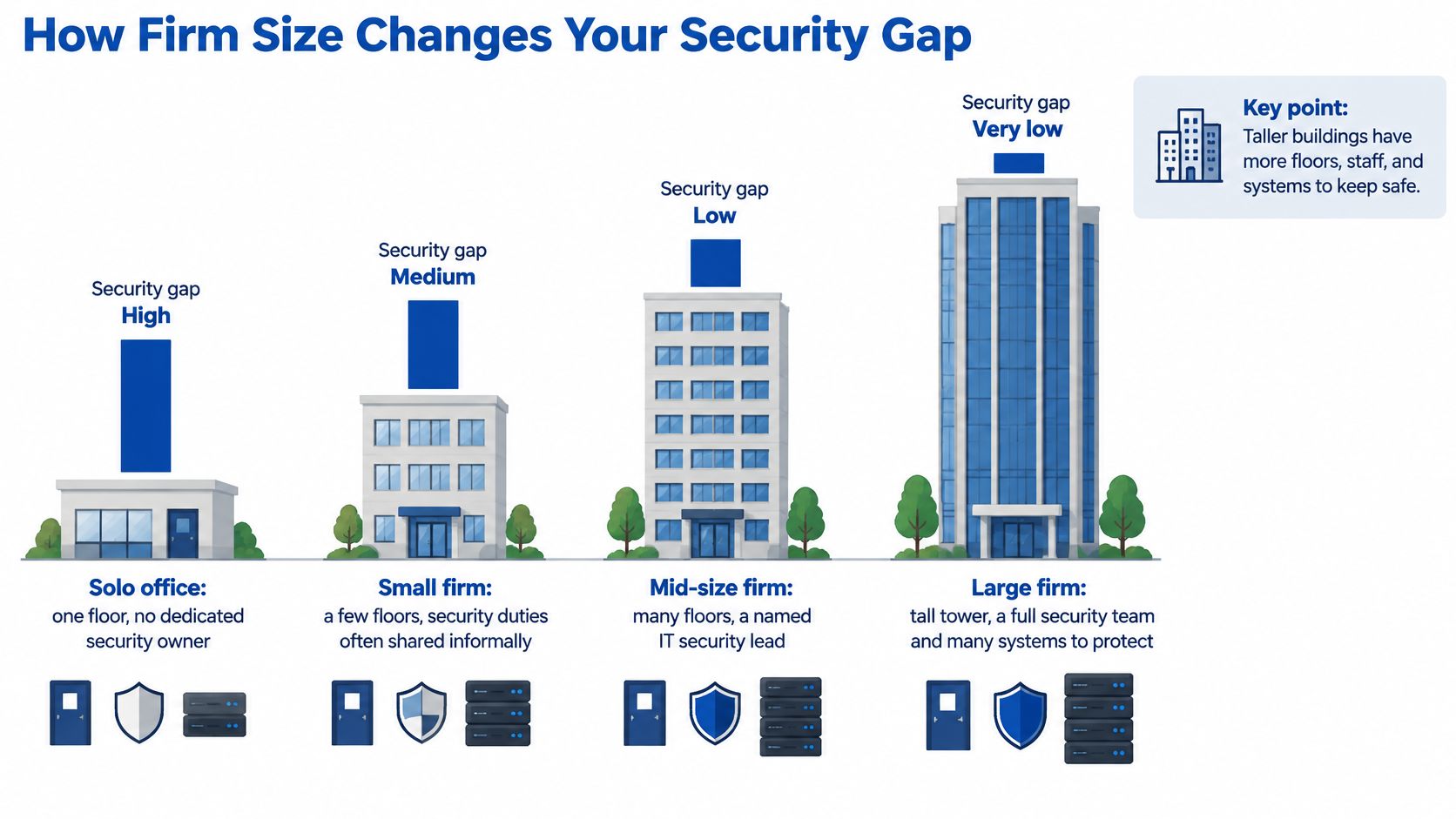
Smaller practices also reported weaker formal controls in that analysis, including 21% of small firms lacked technology policies and 31% relied on external consultants for data security. That's not a criticism of outsourcing. It explains why outside support is often the only practical way to get patching, endpoint protection, encrypted backups, access controls, and vendor oversight covered.
Security readiness by firm size
| Firm Size | Firms With a Technology Budget (2024) | Firms With an Incident-Response Plan (2022) |
|---|---|---|
| Solo practitioner | 41% | 9% |
| 2-9 lawyers | 55% | 26% |
| 10-49 lawyers | 68% | 46% |
| 100 or more attorneys | 90% | 72% |
The two columns come from different survey years, so they shouldn't be read as one snapshot. The incident-response figures come from the ABA 2022 Legal Technology Survey cybersecurity section, which reported that 72% of firms with more than 100 attorneys had a plan, compared with 9% of solo practices.
The figures describe groups of firms, not the risk of any single firm. A small practice can run strong controls, and a large firm can still misconfigure a system. Size changes how much dedicated staffing a firm can support, not whether client information deserves protection, which is why company size doesn't protect a business from security gaps on its own.
For a firm of 2 to 9 lawyers, the first test is ownership. Does anyone own the security budget and the response plan by name? If the answer is no, that's the first gap to fill, before buying another tool.
Backups That Survive a Ransomware Attack
A common mistake looks harmless. Files sync to a cloud drive, or an external disk gets plugged in once a week, so everyone assumes backups exist.
Sync isn't the same as recovery. If an attacker can reach production files and the connected backup at the same time, encryption or deletion can remove both. A spare key hung on the same hook as the house key doesn't help when someone takes the whole ring.
New York State Bar Association guidance recommends at least three full copies stored in separate locations and describes the 3-2-1 model as three copies, two different formats or media, and one offsite copy. The same guidance summary notes that NIST specifies organizations should secure and isolate backups, test restoration, and regularly exercise an incident-recovery plan.
Six controls that make the model work
- Separate administrator credentials: Backup systems shouldn't accept the same admin login used for daily file access.
- Multifactor authentication: Every backup login needs a second factor, including vendor and administrator accounts.
- Encryption in transit and at rest: Copies should stay protected while moving and while stored.
- Immutable or offline retention: At least one copy can't be changed or deleted during a set retention period.
- Deletion alerts: Unusual deletion or retention changes should trigger monitoring alerts for review.
- Scheduled restoration tests: Tests run on a calendar, with results recorded, not only after an incident.
A meaningful test restores a whole matter, not one downloaded file. It checks document metadata, permissions, email, practice-management records, and audit logs, then confirms staff can open and use them in practice. Anything less proves storage exists, not that the firm can work again.
Results should be measured against documented recovery time objectives and recovery point objectives, meaning the downtime and data loss the firm can accept. Kept reports give management, insurers, and clients doing due diligence something concrete to review.
A written schedule helps assign those jobs, and planning a backup schedule for business data covers the basic structure firms can adapt. Retention periods and privilege handling should be reviewed with counsel, since restoring old matter data can raise questions that a technician shouldn't decide alone.
A backup that has never been restored is a hope, not a recovery plan.
Firms should also name who can authorize a restoration. During ransomware, that decision affects evidence, client notice, and which copy is clean enough to trust. Sorting out authority in advance prevents a well-meaning staff member from overwriting the copy the firm needs most.
Preparing a Response Plan Before an Incident
An incident-response plan is a short written sequence that names who acts, who is told, and what gets preserved, so the team doesn't invent those answers during a breach.
It doesn't need to be long. It needs named people, working phone numbers, and decisions made while everyone is calm.
The flow below shows the order firms should be ready to follow.
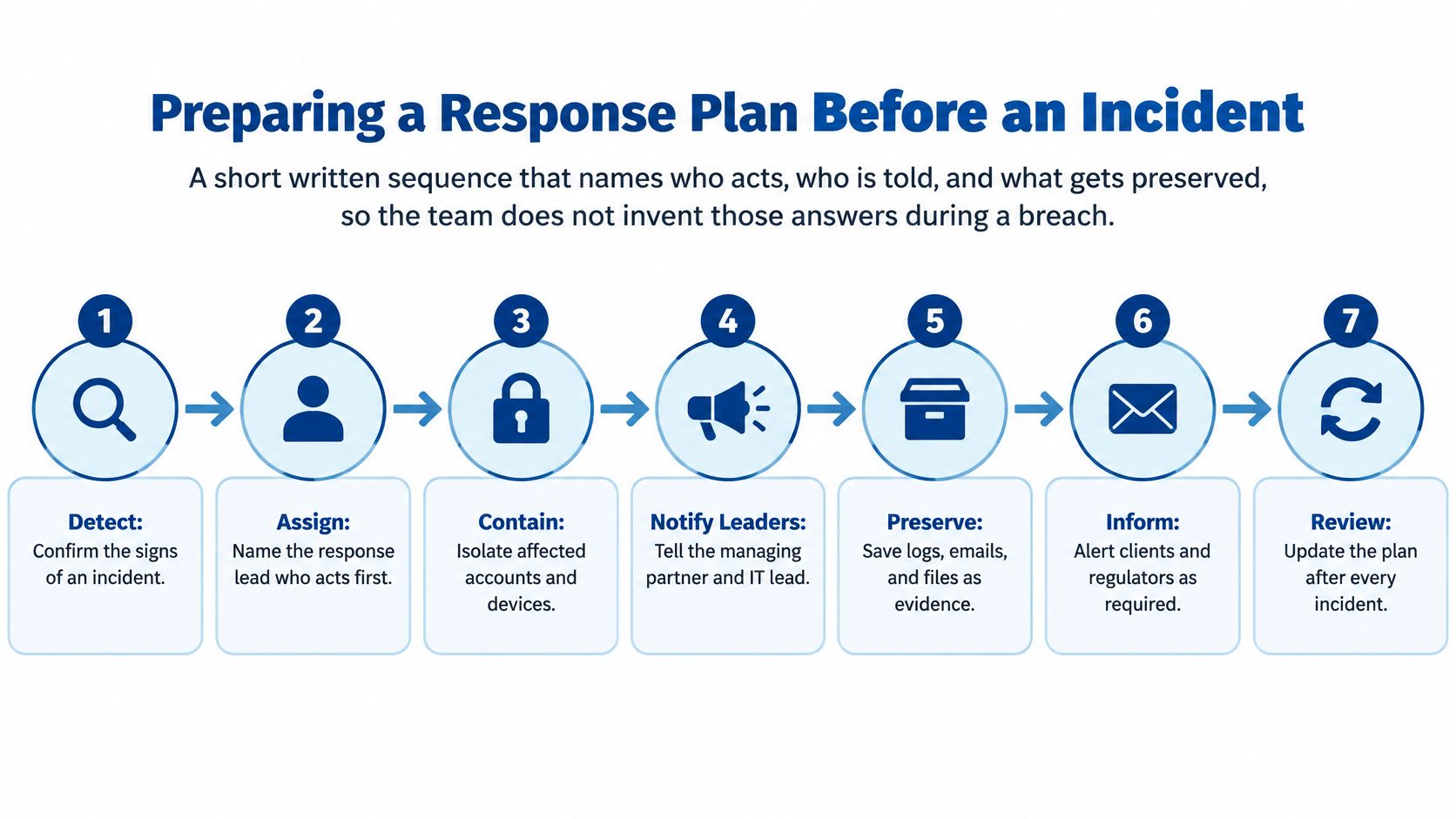
Seven steps to write down now
- Name a primary and backup decision-maker. Delay costs most when nobody has authority to isolate a device or call counsel.
- Build an escalation list. Include the managing partner, the IT provider's help desk, outside counsel, the cyber insurer, and key practice-management vendors.
- Map critical systems to recovery targets. Document management, email, billing, practice management, remote access, and backups each need a recovery time objective and recovery point objective.
- Preserve evidence. Don't wipe or rebuild affected machines until the provider and counsel agree on steps, and keep logs and screenshots.
- Assign client notification with counsel. Notice duties depend on the facts and the jurisdiction, so one named person coordinates with counsel.
- Draft holding messages. Short notes for staff, clients, and courts should be ready to send in the first hours.
- Run a tabletop exercise yearly. Walk through a realistic scenario, time the decisions, and record the gaps that appear.
A tabletop doesn't require shutting systems down. A partner, office manager, and provider can work through a fake ransomware note on a Monday morning and find out whether insurer numbers work and who calls clients.
The most common failure is simple. The only copy of the plan sits on a server that's down during the incident. Printed or offline copies should stay with the decision-makers, along with the escalation list.
Governing AI and Cloud Tools Without Losing Client Trust
A firm rarely loses client trust through one dramatic breach. It loses trust when a paralegal pastes a settlement draft into a personal AI account nobody approved, and nobody finds out for months. Banning every tool pushes staff toward accounts the firm cannot see. Buying an AI-enabled platform and assuming it is safe skips the questions about data use, retention, and access that decide whether client confidences stay contained.
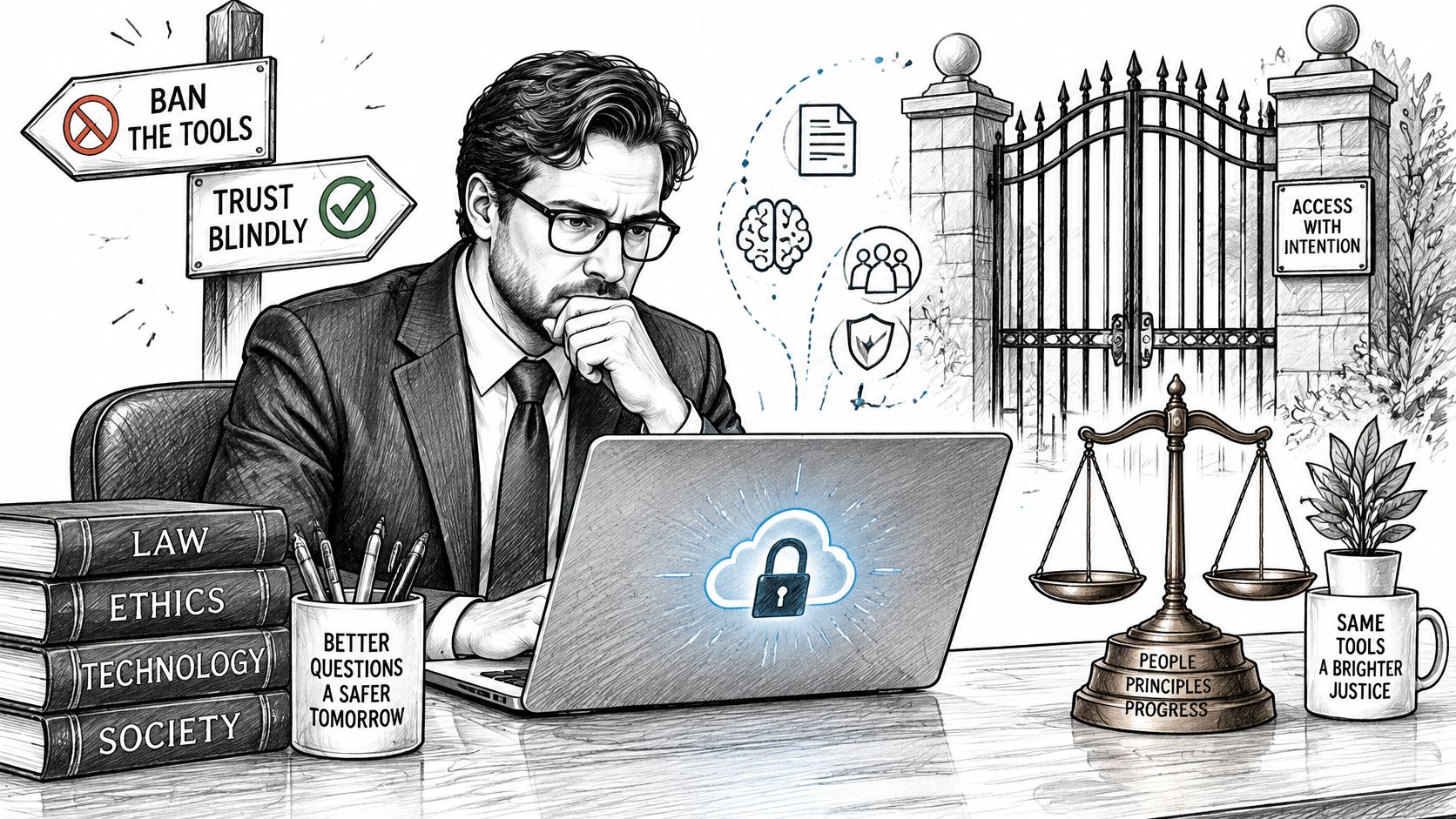
Use is already happening, whether the firm has a policy or not. The ABA's 2025 Legal Industry Report found that 31% of respondents personally used generative AI at work, up from 27% the previous year, and the same coverage reported a 2025 survey of 750 U.S. law-firm clients in which 81% were concerned firms might not protect confidential information when using generative AI.
Governance here is a document problem, not a software purchase. Clients and courts will ask what the firm allowed, what it logged, and who reviewed the output, so the answers need to exist in writing before anyone asks.
An operating model firms can enforce
- Approved-tools list: Name which tools staff may use, and block or remove the rest where practical.
- Data-classification rules: State which matter information may enter a tool and which categories never may.
- Public versus enterprise tools: Consumer tools and enterprise environments differ on contract terms for data use and retention.
- Logging and retention settings: Turn on available logs and set retention deliberately, not by default.
- Vendor-contract review: Check breach notice, data deletion, and subcontractor terms before rollout.
- Human review rule: A lawyer reviews AI output before it reaches a client or court.
- Training and response: Train staff on the rules and add AI misuse or exposure events to the response plan.
Cloud systems need the same discipline before migration. Verify permissions, integrations, backups, and remote-work procedures, then map data flows between document management, practice management, email, billing, e-discovery, and identity systems. Name one owner for each SaaS dependency, because a failed integration between two vendors otherwise lands in a gap where each blames the other.
Treat a vendor's security page as a claim, not a control. The contract, the log settings, and the retention configuration are the evidence.
Lawyers carry a duty to keep up with the benefits and risks of the technology they use, and state requirements differ, so the firm should confirm its obligations with counsel. An AI tool works like a new associate with access to the file room: it needs rules about what it may read, what it may take out, and who checks its work.
Questions to Ask Before You Choose a Provider
No provider can guarantee that a firm is compliant or secure. The firm's obligations and its staff's daily habits stay the firm's responsibility, and any promise otherwise should end the conversation.
Good IT support for law firms can be tested against documents. Marketing claims sound similar across providers, so the questions below turn vague answers into evidence a managing partner can compare.
Provider evaluation criteria
| Criterion | Questions to Ask | Red Flag |
|---|---|---|
| After-hours coverage | Who answers at 7 p.m. on a filing day, and how is an urgent issue escalated? | Business-hours support only, with no escalation path |
| Security scope | Which controls are included: monitoring, patching, endpoint protection, firewalls and ransomware protection? | Security described only as antivirus |
| Backup testing | How often do you restore a full matter, and can you show the last test report? | No restoration tests on record |
| Written procedures | Will you draft or update our policies and incident plan, and share sample templates? | Reluctance to share any documentation before signing |
| Compliance claims | Which tasks do you support, and which remain our responsibility? | Promises to make the firm fully compliant or guaranteed secure |
| Vendor coordination | How do you work with our cloud, e-discovery and practice-management vendors when something fails? | Unclear responsibility when a SaaS tool or integration breaks |
| Reporting | What monthly reports show our systems, tickets and backup status? | No regular reporting |
| Exit terms | How is our data returned, in what format, and how quickly if we leave? | Vague or unclear data export terms |
Score answers by asking for samples before signing. Request security policies, backup logs, a restoration test report, an incident plan template, and written service levels. Redacted samples are fine. Refusal to show any document is information by itself.
Ask for a written scope that lists what's covered and what isn't. Pricing should state which items, such as on-site visits or after-hours work, are billed separately. Firms weighing managed arrangements can also review common challenges with using managed IT and how to address them before comparing proposals.
After-hours coverage deserves a direct test. RDE Technologies provides 24-hour, 7-days-a-week support, monitors systems, protects data, and provides preemptive solutions, so firms can ask every provider who answers at night and how escalation works.
Practical checks finish the review. Ask for references from firms of similar size, confirm who holds administrator credentials, count how many technicians touch the account, and get exit terms in writing. Engagement terms and confidentiality language should be reviewed with counsel before signing.
Book an IT Assessment Before You Switch Providers
A renewal date or a run of unresolved tickets usually starts the switch conversation. A new provider inherits whatever the last one left behind, so an independent read on the firm's environment matters more than the next proposal.
Three items give an assessor a starting point:
- Systems and vendors: a list of applications, cloud services, and support contracts in use.
- Administrator accounts: every staff and vendor account holding administrator rights.
- Slow tickets: the last three IT tickets that took more than a day to resolve.
An RDE Technologies IT assessment covers cost reduction, risk, data storage, server infrastructure, network infrastructure, carrier services, cloud services, business applications, business continuity, and network security. Its security work includes firewalls, managed antivirus, patch management, and ransomware protection for endpoints, and its backup work includes onsite and offsite backup, data retrieval, and offsite replication.
The report turns provider promises into a written record of what the firm really runs. It shows gaps in writing; deciding what to fix, and confirming that legal and client-confidentiality obligations are met, remains the firm's responsibility with its counsel.
RDE Technologies provides managed IT, network management, IT security, data backup, and IT assessments for businesses, and an assessment can help firms check backups, permissions, and response readiness before renewing or switching providers. Visit RDE Technologies to request an IT assessment.