







The number of individuals affected by large healthcare breaches increased by 1,002% from 2018 through 2023, while large breaches affecting at least 500 individuals increased by 102%, according to HHS; in 2023 alone, more than 167 million individuals were affected. For a nursing facility administrator, the issue isn't just exposed records. It's whether staff can safely access medication information, document care and communicate during an incident.
Table of Contents
- Why Healthcare IT Carries Different Stakes
- The HIPAA Requirements Your IT Must Meet
- How Security Monitoring Protects Your Systems
- Backup and Recovery Built for Ransomware
- Who Is Responsible When a Vendor Touches Your Data
- Facility Systems to Protect in Long-Term Care
- Criteria for Choosing a Managed IT Provider and Next Steps
Why Healthcare IT Carries Different Stakes
HIPAA-compliant IT services means managed IT that protects electronic protected health information, or ePHI, through the safeguards the HIPAA Security Rule requires. That includes keeping information confidential, preventing improper changes and making it available when authorized staff need it.
HHS doesn't certify IT vendors as HIPAA compliant. A certification badge on a website isn't a substitute for a business associate agreement, documented safeguards and evidence that those safeguards work.
More than computer repair
Ordinary technical support resembles a locksmith who fixes a sticking door. HIPAA-ready support also maintains the key log, checks the locks and records each inspection.
Healthcare attacks can reach beyond a misplaced laptop into networks, cloud environments and vendor connections. A facility therefore needs prevention, monitoring and recovery, not just someone to restart a frozen workstation.
Practical rule: A promise of compliance should lead to a request for a contract, a control record or a test result.
The facility-floor questions are concrete:
- Access: Can a former employee still open resident records?
- Availability: Can the medication nurse reach essential information during an outage?
- Accountability: Can the administrator establish who accessed sensitive files?
The relationship between clinical work and security is central to protecting patient data while delivering care. Requirements, monitoring, recovery, vendor duties and facility continuity all need documented owners. Buying security software alone doesn't establish that ownership.
The HIPAA Requirements Your IT Must Meet
The HIPAA Security Rule, 45 CFR Part 164, Subpart C, establishes administrative, physical and technical safeguards, as explained in the HHS Security Rule overview. Each category translates into specific IT work and records an administrator can inspect.
Addressable doesn't mean optional. An organization must assess whether an addressable specification is reasonable and appropriate in its environment. If it isn't, the organization must document why and implement an equivalent alternative when reasonable and appropriate.
HIPAA Security Rule requirements mapped to IT work
The references below identify the governing provisions. The implementation column gives practical controls, not a claim that every listed technology is explicitly mandated by name.
| Requirement | Rule Reference | What Your IT Must Do | Proof to Ask For |
|---|---|---|---|
| Risk analysis | 164.308(a)(1)(ii)(A) | Inventory systems holding ePHI and document threats and vulnerabilities | Current written risk analysis with remediation plan |
| Access control | 164.312(a)(1) | Use unique user IDs, role-based access and risk-appropriate automatic logoff on shared devices | Access list by role and offboarding records |
| Audit controls | 164.312(b) | Record and examine activity involving the EHR and file shares | Sample access logs and a review record |
| Integrity | 164.312(c)(1) | Protect ePHI from improper change or deletion | Integrity checks on key systems and backups |
| Person or entity authentication | 164.312(d) | Confirm who is logging in, including multifactor authentication where feasible | Multifactor authentication coverage report |
| Transmission security | 164.312(e)(1) | Protect transmitted ePHI, using encryption for networks, email and remote connections as supported by the risk evaluation | Encryption settings for email, VPN and remote tools |
| Contingency plan | 164.308(a)(7) | Maintain backups, disaster recovery and emergency operating procedures | Restore test results with dates and durations |
| Facility access controls | 164.310(a)(1) | Lock server rooms and network closets and limit entry | Facility access list |
| Workforce training | 164.308(a)(5) | Provide security awareness training and procedures addressing login monitoring | Training completion records |
Turn the requirements into building-level evidence
Access control reaches across an EHR such as PointClickCare, shared workstations, remote-support tools and a VoIP platform containing sensitive messages. An EHR account list alone won't establish that access is controlled everywhere.
An administrator and IT lead should walk through the table together, marking the applicable systems in each building. For a hosted application, the facility should identify which settings its staff control and which records the hosting provider must supply.
Evidence should identify the system, review date, responsible person and unresolved exception. A screenshot showing that a feature exists is weaker than a dated record showing that the feature is enabled and tested.
Business associate contracts need their own review. The compliance officer or counsel should confirm how each safeguard and implementation specification applies to the facility.
How Security Monitoring Protects Your Systems
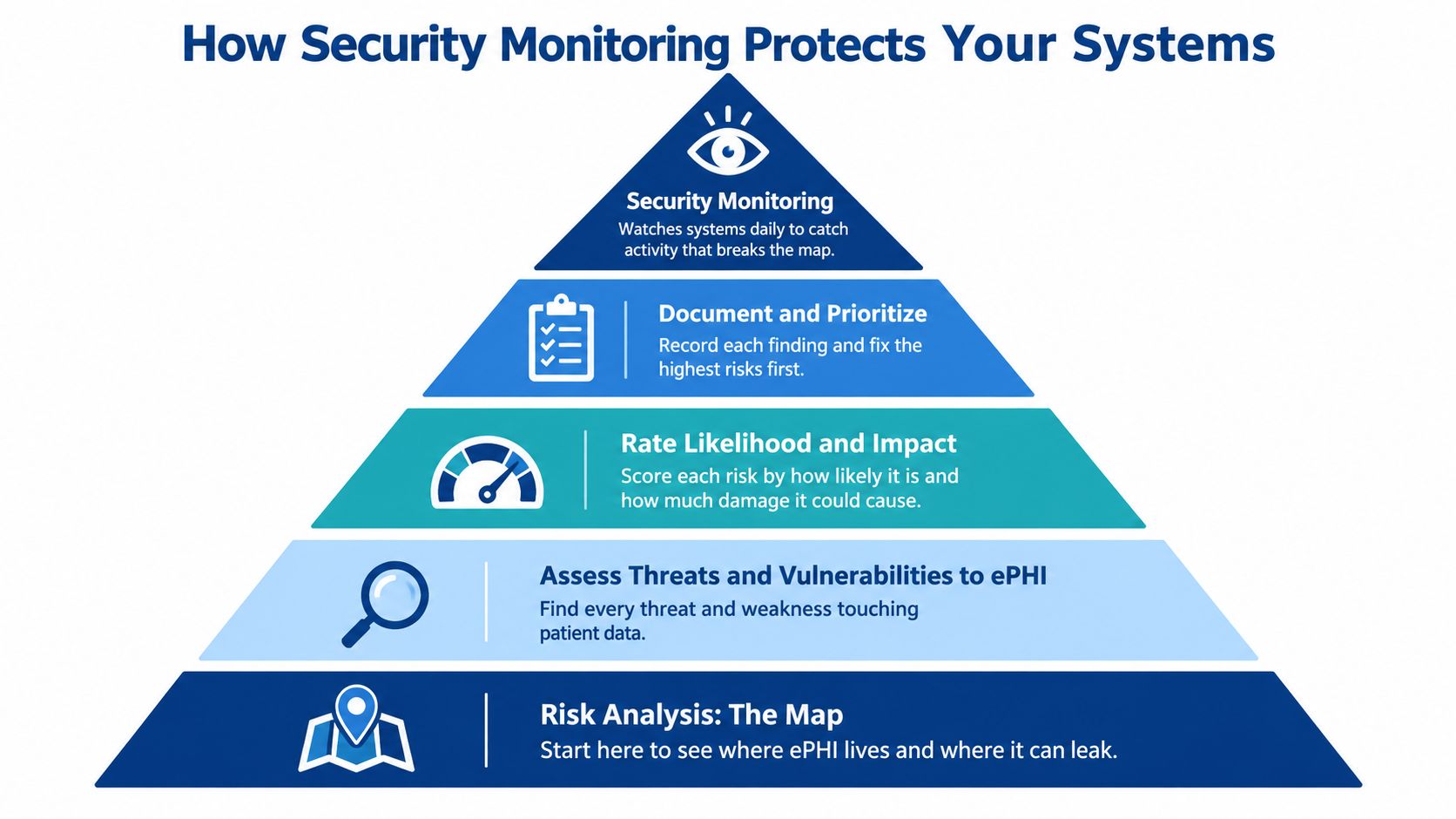
A risk analysis provides the starting map. Under the risk-analysis requirement, HHS guidance calls for assessing threats and vulnerabilities to ePHI, evaluating likelihood and impact, documenting existing safeguards and identifying remediation priorities.
The diagram connects that assessment work with ongoing monitoring.
Build protection around actual care workflows
Inventory the environment. The asset list should cover servers, computers, cloud applications, network devices, remote-access paths and backup repositories. Each entry should identify the ePHI involved, its owner and its recovery dependencies. A medication cart computer shouldn't disappear from the inventory because it moves between units.
Protect the perimeter. Firewalls control permitted connections, while content filtering restricts access to unsafe destinations. Resident Wi-Fi should operate separately from clinical systems so a resident's personal device can't freely reach a charting workstation.
Manage endpoints. Desktops and servers need managed antivirus and planned patching. Workstations also benefit from advanced ransomware protection that can identify suspicious behavior. Updates should account for care schedules and application compatibility rather than interrupting medication rounds.
Control identities. Unique logins, multifactor authentication and least-privilege permissions help distinguish authorized activity from misuse. A shared nurses' station PC needs an appropriate automatic-logoff setting; vendor remote sessions need named, logged accounts rather than a common technician password.
Assign monitoring alerts. Server and network alerts must reach a named person with an escalation path. An alert about a disconnected clinical network switch is useful only if someone checks it and coordinates action.
RDE Technologies provides server and network monitoring, network security, firewalls, content filtering, managed antivirus for desktops and servers, desktop patch management and advanced ransomware protection for endpoints. These services should correspond to identified risks rather than become an unexplained list of tools.
Review changes before they become blind spots
A new wireless deployment, EHR integration or major software change can introduce connections the original assessment didn't capture. IT staff should update the inventory, review permissions and validate logging after the change.
A practical network traffic monitoring review can help administrators understand what IT staff should investigate. The accompanying video provides additional context for that discussion.
Backup and Recovery Built for Ransomware
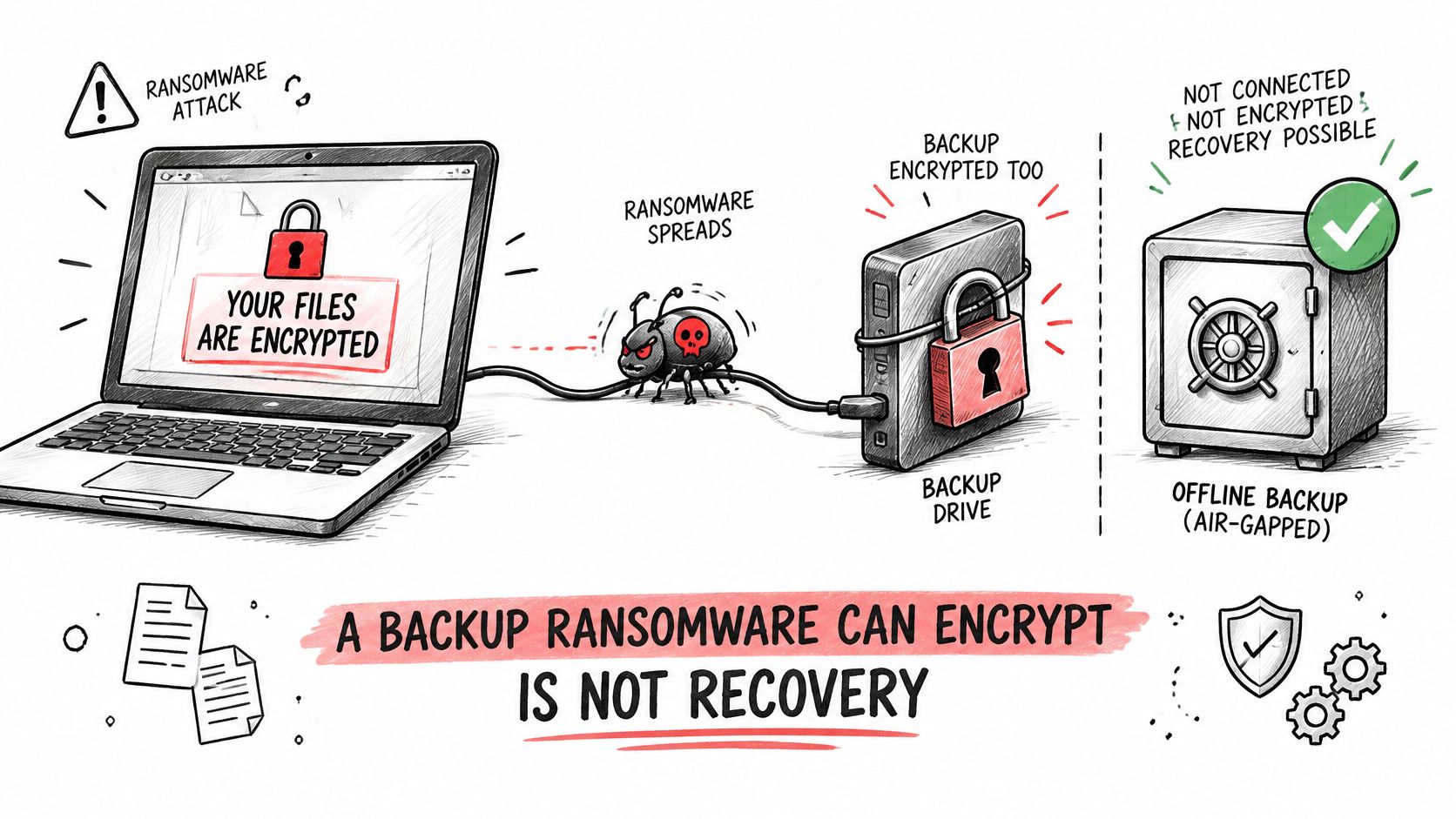
A backup that ransomware can encrypt isn't a dependable recovery plan. An offsite copy may still be exposed if attackers can reach it through compromised credentials.
The contingency-plan standard at 45 CFR 164.308(a)(7) requires procedures for retrievable exact copies of ePHI, disaster recovery and emergency operations, with testing and revision addressed through an addressable implementation specification, as set out in the HHS Security Rule regulations. Facilities should confirm their implementation with the compliance officer or counsel.
The diagram shows why a connected backup drive can remain vulnerable.
Separate recovery copies from everyday access
A sound design combines onsite and offsite copies with an offline or immutable recovery copy. Immutable means the protected copy can't be changed or deleted during its configured protection period.
Backup administrator credentials should be separate from ordinary accounts. Encryption should protect stored data and transfers, while alerts should identify failed jobs, suspicious deletions and changes to backup protection settings.
RDE Technologies provides onsite and offsite data backup, colocation disaster recovery, data retrieval and offsite replication. The appropriate combination should follow the facility's recovery needs, connectivity and system dependencies.
A successful backup job proves that a process ran. A successful restoration demonstrates that usable information can be recovered.
Set priorities and test the result
A business-impact analysis should identify what staff need first. EHR access and medication information generally deserve priority, followed by scheduling, staff communications and less urgent archives, subject to the facility's clinical assessment.
Each system needs a recovery time objective, meaning the target time to restore service, and a recovery point objective, meaning the acceptable amount of missing recent data. Hosted EHR recovery also depends on the application provider's responsibilities, not just local backups.
A meaningful restore test follows a documented routine:
- Select a system. Include representative databases, file shares, virtual machines or configuration files.
- Isolate the restoration. Recover into a separate environment to avoid disrupting live care systems.
- Measure elapsed time. Include dependencies such as networking, authentication and application startup.
- Validate usability. Check data integrity and confirm that authorized staff can use the recovered information.
- Record findings. Save the backup version, duration, problems, corrective actions and retest outcome.
The restore report, not the nightly completion message, provides the stronger evidence of recovery readiness.
Who Is Responsible When a Vendor Touches Your Data
A signed business associate agreement doesn't transfer the facility's HIPAA responsibility to its IT vendor. Business associates have their own obligations, but the facility still must govern its operations and the relationships supporting them.
HHS cloud-computing guidance states that a covered entity or business associate must execute a business associate agreement with a cloud provider that creates, receives, maintains or transmits ePHI, while continuing to comply with the HIPAA Rules. Merely storing encrypted information doesn't automatically remove a provider from that relationship.
Who does what under a managed IT agreement
This division provides a practical starting point. Contract language must reflect the actual services and each party's legal duties.
| Duty | Your Facility | Managed IT Provider | Evidence to Verify |
|---|---|---|---|
| Business associate agreement | Requires it before ePHI access | Signs it and follows its terms | Signed copy on file |
| Overall risk analysis | Owns the facility analysis and approves decisions | Supplies asset inventory and findings; maintains its own required analysis | Written analysis with current date |
| Access approval and offboarding | Decides who gets access | Makes changes and logs them | Access recertification records |
| Backup and restore testing | Sets recovery priorities | Runs contracted backups and restoration tests | Restore test reports |
| Subcontractor and tool vetting | Requires disclosure | Names subcontractors and remote tools with access | Vendor inventory |
| Incident detection and reporting | Makes facility reporting decisions and notifies individuals | Reports incidents as the agreement requires | Incident timeline |
| Staff training | Trains clinical staff | Trains IT staff and supports agreed phishing exercises | Training completion records |
Contracts must match the data flow
Under 45 CFR 164.504(e), business associate contracts address permitted uses and disclosures, appropriate safeguards, reporting obligations, applicable subcontractor restrictions, and return or destruction of PHI when the relationship ends, where feasible. Counsel should confirm the final terms, including what happens when destruction isn't feasible.
Operational details matter just as much. The agreement should support clear incident contacts, evidence preservation and coordination when a subcontractor experiences a problem. A broad promise to provide secure service won't explain who disables a departed technician's access.
The scope review should include remote-support tools, backup repositories, VoIP voicemail, hosted website forms and connected devices whenever they handle sensitive information. A public website without ePHI presents a different situation from an intake form collecting resident health details.
The administrator should retain:
- Vendor inventory: Organizations, services, subcontractors and responsible contacts.
- Data-flow map: Where ePHI enters, travels, resides and leaves.
- Access recertification schedule: Who periodically confirms that permissions remain appropriate.
- Incident tabletop record: Participants, decisions, gaps and corrective actions from a simulated event.
These records make shared governance inspectable. A signature alone doesn't establish prompt offboarding, restricted permissions or usable activity logs.
Facility Systems to Protect in Long-Term Care
Under 42 CFR 483.73, participating long-term care facilities must address all-hazards planning, location-specific risks, communications, training, testing, and emergency and standby power, as described in the CMS emergency preparedness rule overview. Technology continuity belongs within that planning, with facility-specific details confirmed by compliance staff or counsel.
A walk through a typical building shows why this matters. Call buttons, charting stations, phones and resident Wi-Fi often share the same closets, switches and power feeds, so one failed component can take several systems down together.
Facility systems, failure impact and continuity steps
| System | If It Fails | Continuity Step to Plan | Who Owns It |
|---|---|---|---|
| EHR access | Electronic charting, orders and medication-record access may stop | Downtime forms, protected offline reference copies and tested backup restores | Director of nursing with IT lead |
| Nurse call system | Resident call alerts may not reach staff | Confirm backup power and network path; test alerts during drills | Maintenance with IT lead |
| Phones and VoIP | Family, physician and emergency calls may drop | Phone failover that reroutes calls during an outage | IT lead |
| Resident Wi-Fi | Family video calls and resident devices go offline | Separate clinical traffic; document resident-connectivity restoration priorities | IT lead |
| Network equipment and power | Connected clinical and communication systems may become unavailable | Emergency or standby power under the emergency plan; backup power for core switches | Administrator with facilities |
| Building-to-building differences | Different configurations create different failure patterns | A common baseline, documented building exceptions and facility-level reporting | Operator with IT lead |
Practice the clinical response, not just the restart
A drill can include a simulated EHR connection failure or phone outage as part of the facility's emergency testing program. The exercise type, scope and documentation still determine whether it satisfies CMS exercise requirements, so the drill design should be deliberate rather than assumed.
Staff should practice obtaining downtime forms, finding essential contact information and reporting a problem without relying on the failed system. For a nurse call system, maintenance and IT staff should confirm the actual power and communication dependencies instead of assuming every model works the same way.
During a drill: Clinical staff should demonstrate the temporary care workflow while technical staff demonstrate the restoration process.
RDE Technologies offers VoIP services and designs and installs wireless networks for nursing homes and assisted living facilities. Its help desk operates 24 hours a day, seven days a week, on-site work is available in New York, and remote support extends to facilities beyond the state.
For multi-building operators, reports are broken out by facility. A common technical baseline, documented local exceptions and clear night-shift escalation contacts help prevent a persistent problem at a single building from disappearing inside an operator-wide summary.
Criteria for Choosing a Managed IT Provider and Next Steps
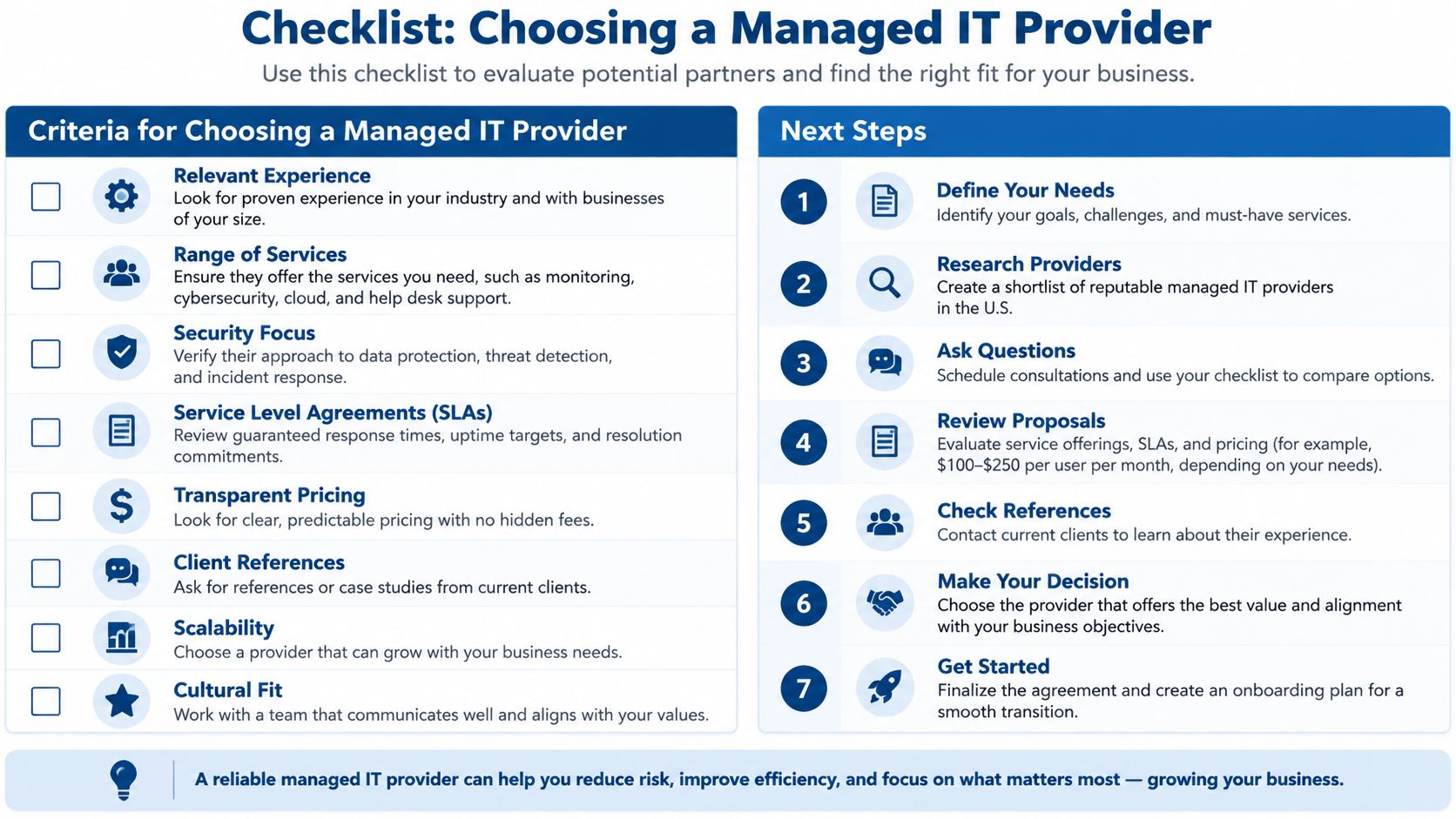
Provider selection should center on evidence an administrator can compare. A strong answer names a document, an accountable person or a demonstrable process. A red flag warrants clarification before anyone receives access. Remember the angle that runs through this entire evaluation: signing a business associate agreement does not hand your HIPAA responsibility to the vendor. You are choosing a partner in ongoing governance, and the questions below are how you confirm the partner can prove it.
The checklist provides a visual starting point for the evaluation.
Provider scorecard for HIPAA readiness
| Criterion | Strong Answer | Red Flag |
|---|---|---|
| Business associate agreement | Signs before access and shares its template | Calls the agreement unnecessary or delays signing |
| Risk analysis | Provides written findings with owners and due dates | Offers only a generic checklist |
| Backup testing | Shares restore test reports with timings | Reports only that the nightly job ran |
| Remote access | Named logins, multifactor authentication and logged sessions | Shared technician logins |
| Subcontractors | Gives a named list of subcontractors and tools | Calls the vendor list proprietary |
| Support hours | Around-the-clock help desk with a clear escalation path | Business-hours-only coverage |
| Incident response | Written steps supporting applicable breach-notification deadlines | No written process |
| Reporting | Reports broken out by facility | A blended report across all sites |
| Scope | Covers security, backup, hosting and phones | Covers only desktop repairs |
| Compliance claims | Explains each claim and provides evidence | HIPAA-certified language without documentation |
Check the incident clock and service boundaries
For breaches of unsecured PHI affecting 500 or more individuals, the covered entity must notify the HHS Secretary without unreasonable delay and no later than 60 calendar days after discovery; smaller breaches must be reported to the Secretary no later than 60 days after the discovery year's end, according to HHS breach-reporting guidance. Individual notification has its own without-unreasonable-delay obligation and deadline under the breach-notification framework, including 45 CFR 164.404 and 164.408.
These are outside limits, not permission to delay investigation. The incident process should assign responsibility for preserving logs, assessing exposure, coordinating with counsel and tracking notices. Ask who preserves logs when a suspicious login appears on a Saturday night, and expect a name rather than a department.
Service boundaries deserve equal scrutiny. The company maintains and services a client's whole system, including network security, data backup and hosting. Its IT assessments cover cost reduction, risk, storage, server and network infrastructure, carrier and cloud services, business applications, continuity and network security.
An administrator should still confirm which services appear in the proposed contract. A desktop-repair agreement shouldn't be mistaken for responsibility over phones, hosted systems or backup recovery.
Establish a usable assessment scope
- List the environment. Include every building and each system that stores, processes or transmits ePHI. Phones, Wi-Fi and backups belong on the review list even when their role is connectivity rather than storage.
- Compare documented answers. Use the scorecard to identify missing ownership and evidence.
- Inspect a sample restore report. Check whether it demonstrates usable recovery, not just job completion.
- Arrange an assessment. Compare the findings with the facility's own inventory and assign remediation owners.
An assessment produces a snapshot. It supports planning and gives each finding an owner, and the facility's continuing compliance program and counsel's review of contract terms still carry the ongoing obligation. Treat the report as the first entry in a file that grows with every monitoring summary and restore test, and the vendor relationship becomes shared governance you can show to a surveyor.
RDE Technologies, based in Oceanside, New York, supports facilities nationwide with managed IT, security, backup and technical support. Administrators can request a free quote or use the "Request a call back" form to discuss their facility's IT scope, and review skilled nursing IT support for ongoing operational needs.