
A vendor's demonstration shows resident information flowing neatly into a dashboard. Then the nursing home administrator asks whether the application can reach every building, include readmissions correctly, and stop accessing records when permission ends. The answers aren't always as clear as the demonstration.
A PointClickCare integration needs more than a working connection. Administrators need to confirm the access route, the application's approved data scope, each facility's activation status, and the process for catching missing updates. Those decisions determine whether staff can rely on the information during daily care and after-hours disruptions.
Table of Contents
- Which PointClickCare Integration Route Fits Your Organization
- What a PointClickCare Integration Connects Across Care Settings
- How to Get an Application Approved and Authenticated
- Enabling Every Facility Without Gaps in Access
- Keeping Synchronized Resident Data Accurate After Go-Live
- HIPAA and Emergency Planning Around PointClickCare Access
- Confirm Your Integration Plan Before Go-Live
Which PointClickCare Integration Route Fits Your Organization
| Route | Data It Exchanges | Facility Enablement | Third-Party Status |
|---|---|---|---|
| USCDI Connector (FHIR APIs) | Standardized clinical data aligned with USCDI v1 | Each facility must be enabled for the application | Current program; provider apps launch from the core application or a mobile device |
| USCDI bulk-data applications | Larger system-to-system exchange | Each facility must be enabled | Current program; field-level scope requires vendor confirmation |
| Marketplace integrations | May offer broader proprietary capabilities | Facility-level enablement | Confirm approved capabilities and request the application's field list |
| Custom Extracts | Existing extract contents require confirmation | No approved third-party activation path | Not approved for third-party vendor access |
| Data Relay | Existing relay contents require confirmation | No new authorization requests accepted | Not approved for third-party vendor access; authorization cutoff described below |
A route is the channel a vendor application uses to reach PointClickCare data, and it determines what information can move and who must approve access. An API is a structured way for applications to request or exchange information. It isn't blanket permission to retrieve everything in a resident's record.
Standard clinical exchange versus broader capabilities
The PointClickCare USCDI Connector documentation describes FHIR-based APIs aligned with USCDI version 1 and three application categories: patient-facing, provider-facing, and bulk-data applications. Provider applications can launch from the core PointClickCare application or a mobile device, while bulk-data applications support larger system-to-system exchanges.
For an administrator, the important distinction is the intended workflow. A clinician opening an application during resident care has different access and context needs from a corporate reporting system retrieving records in bulk.
Marketplace access may offer broader proprietary capabilities, but that doesn't establish what a particular application can retrieve. Its exact field list, read or write permissions, update frequency, and supported facilities remain unknown until confirmed. A vendor should supply those details in writing rather than answer with a general statement about FHIR compatibility.
Legacy workflows need a migration decision
According to PointClickCare's third-party data guidance, Custom Extracts and Data Relay aren't approved for third-party vendor access, and new Data Relay authorization requests stopped being accepted on March 20, 2026. An existing file-based workflow therefore needs a documented review and migration plan, not an assumption that another building can receive the same arrangement.
Clinical purpose should guide that review. Orange Neurosciences' explanation of models of coordinated patient care provides useful context for deciding which handoffs an integration must support. It isn't PointClickCare technical documentation, but it can help administrators connect information requirements to continuity of care.
Decision rule: Choose the approved route that covers the information residents' care requires, then confirm precisely which facilities the application can reach.
What a PointClickCare Integration Connects Across Care Settings
PointClickCare is better understood as a hub connecting organizations than as a filing cabinet inside a single building. A facility's approved connections may involve hospitals, clinics, health plans, laboratories, and government agencies. Network membership alone doesn't authorize every participant to view every resident's information.
The diagram illustrates the relationships administrators should inventory, not a promise that every displayed connection is included in a particular deployment.
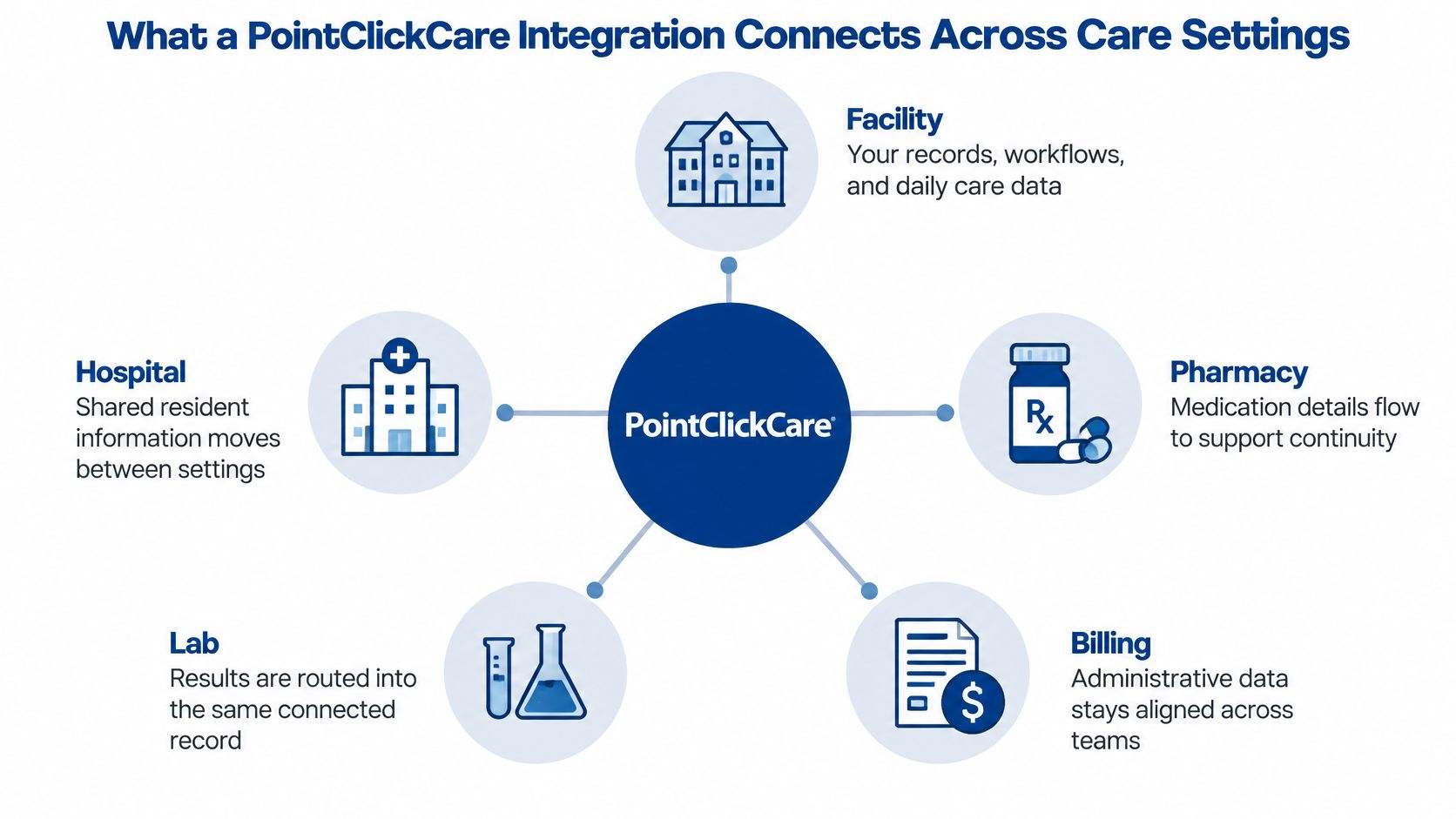
A network beyond the nursing home
In its 2024 nationwide exchange announcement, PointClickCare reported this platform footprint across North America:
| Care setting | Reported platform use |
|---|---|
| Long-term and post-acute care | More than 27,000 providers |
| Hospitals | 2,800 hospitals |
| Ambulatory care | 3,600 clinics |
Two exchange formats help explain what those connections can accomplish. PointClickCare's interoperability announcement describes support for Continuity of Care Documents, or CCDs, and laboratory-result integration. A CCD is a standardized clinical summary that helps receiving systems interpret shared information, although compatible handling and correct mapping still need testing.
Laboratory-result integration can reduce manual transcription and make results available sooner to post-acute teams. Neither format guarantees that every field needed for a local workflow will arrive correctly.
Turn the hub into a relationship map
Before go-live, an administrator should document:
- Authorized parties: Identify the receiving organization and any vendor personnel permitted to handle resident information.
- Data direction: State whether information leaves the facility, enters its records, or moves both ways.
- Accountability: Name the person responsible for approving and reviewing each relationship.
Say a resident transfers to a hospital. The hospital handoff and a separate billing application may involve different recipients, permissions, and correction procedures.
Related building systems deserve their own inventory. Reviewing a nurse call system alongside EHR dependencies can clarify operational responsibilities, but administrators shouldn't assume those systems exchange data without a specifically verified connection.
How to Get an Application Approved and Authenticated
PointClickCare's API terms describe registration, authorization, authentication, endpoint discovery, shared context, and SMART-on-FHIR implementation, including verification of the developer's legal entity. These are distinct controls, not interchangeable names for logging in.
Authentication establishes identity. Authorization establishes permitted access. An application can successfully identify itself and still lack permission to retrieve the information its user expects.
The process diagram separates the main connection mechanics.
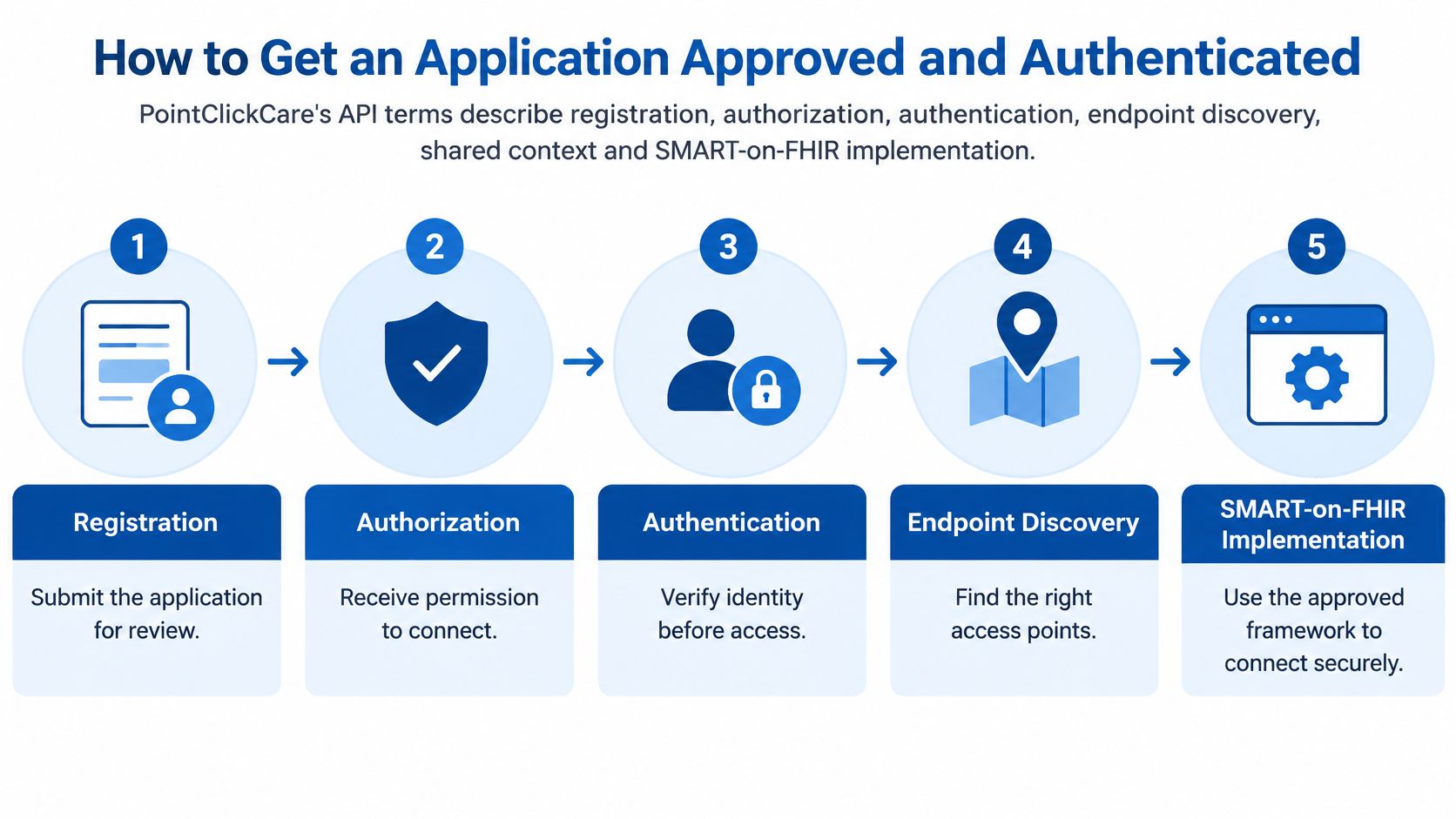
Build an approval record before production access
Verify the developer's legal identity. Confirm the official legal entity name and address against the applicable state or commonwealth Secretary of State record. A product's trading name may not identify the organization legally responsible for the application.
Register the application and assign an accountable owner. Record the registration status and name the operator's business owner for its use of resident information. Technical contacts can change, so accountability shouldn't depend on a vendor employee's inbox.
Define the permitted data scope. List the resources and fields the application needs, and distinguish reading information from changing it. Remove unnecessary access so an application error or compromise exposes less information.
Test identity and permissions before production use. Use an approved testing environment and test identities where available, rather than live resident information. Include an attempted action outside the approved scope, because a successful permitted request doesn't prove that prohibited requests are blocked.
Confirm the launch path and shared context. Document whether staff launch the application from PointClickCare or access it directly through a mobile device. Verify how it identifies the current user, resident, and facility so staff don't unknowingly work in the wrong record.
Record approval and schedule review. Enter the approved scope, owner, authorization evidence, and review date in an integration register. Include the process for removing access when the contract ends or the application's purpose changes.
Keep the final record readable
The approval summary should fit on a page, with supporting technical documents attached. It should identify the legal entity, application, business purpose, authorized facilities, approved fields, access direction, launch method, approval authority, and escalation contacts.
Technical staff should also record the correct endpoints, meaning the approved addresses applications use to request information. Those details belong in controlled documentation, not informal messages.
RDE's explanation of HIPAA technical safeguards provides background for discussing access controls with the compliance team. Application approval still needs to match the operator's actual workflows and security policies.
A vendor's ability to connect isn't the same as the facility's approval of everything that vendor could request.
Enabling Every Facility Without Gaps in Access
An application that runs correctly at one pilot building can still fail at the next one. Each customer facility must be enabled for the application separately, and corporate approval, local activation, and usable permissions rarely arrive at the same time. Enablement is decided building by building.
A technically sound project can still stall. The application may be ready while a building's authorization, field access, or operational approval remains unresolved.
Set the rollout decisions before scheduling buildings
| Decision | Evidence to collect |
|---|---|
| Route for each facility type | A supported route matched to the building's required workflow |
| Corporate and local authority | Named people who can approve access and request changes |
| Building-level data scope | Approved resources, fields, and read or write permissions |
| File-workflow migration | Replacement process, cutover owner, and retirement approval |
| Unavailable fields | A documented alternative accepted by clinical or business leadership |
A facility matrix should show more than enabled or disabled. Useful statuses include awaiting authorization, activated but untested, accepted for production, and operating with an approved exception. Each status answers a different question: who approved the building, what has been tested, and who owns any gap that remains.
A corporate dashboard can retrieve census information from a skilled nursing building while an assisted living location is still pending. If leadership sees only a portfolio total, staff could mistake incomplete coverage for a change in occupancy. Facility-level reporting makes that gap visible.
Pilot the process, not just the software
Start at a facility whose staff can participate in testing and explain local workflows. Record every activation step, permission request, support contact, and issue that required vendor involvement. That record becomes the runbook for the buildings that follow.
Correct the runbook before expanding. Group later rollout waves by building type or workflow similarity instead of activating the whole organization at once. The acceptance record for each wave should identify who checked the results and which unresolved exceptions remain.
RDE Technologies' certified engineers remain in constant contact with clients from the beginning to the end of a project to support proper and timely completion.
A rollout report should separate technical readiness from operational acceptance:
- Enabled: The application has the required building-level access.
- Validated: Staff have checked the agreed workflows and resulting records.
- Accepted: The accountable facility leader has approved production use.
- Exception open: A missing field or process limitation still has an assigned owner.
Finish each building's deployment with a fallback sheet. It should name the unavailable information, the approved manual process, the staff role responsible for completing it, and the person authorized to approve exceptions. A missing field shouldn't lead staff to share credentials or create an unapproved export.
Keeping Synchronized Resident Data Accurate After Go-Live
A secure connection can still produce unreliable information. Successful authentication proves that the application connected, not that every resident, diagnosis, or discharge update arrived.
The APIs.io PointClickCare directory identifies contracts covering facilities, assessments, diagnoses, and FHIR APIs. That breadth doesn't establish identical permissions, supported fields, or update behavior for every deployment. Those details require application-specific confirmation.
Match each failure to a control
Post-go-live failure cases and controls
| Failure | What It Looks Like | Control to Set Up |
|---|---|---|
| Stale census data | Discharged or transferred residents still show as active | Reconciliation report compared against the census on a set schedule |
| Duplicate residents | The same resident appears twice after a readmission | Duplicate-resolution rule with a named reviewer |
| Missed updates | A changed diagnosis never reaches the receiving system | Audit log review plus a negative test for changed diagnoses |
| Rate-limit failures | Large data pulls fail or return partial results | Retry and backoff policy with a request-volume plan |
| Silent partial sync | The job reports success but some records are missing | Record counts reconciled against the source system |
| Revoked access still active | The application keeps pulling data after authorization ends | Access review tied to the integration register |
Reconciliation means comparing the destination against the source, not merely checking that a scheduled job ran. Staff should compare record counts and investigate meaningful differences, with attention to admissions, discharges, and other time-sensitive changes.
Audit logs need a review schedule and a named reviewer. Failed records should enter a downtime queue that staff can inspect, correct, and replay without duplicating records already processed.
Test what happens when something goes wrong
Acceptance testing should include late admissions, readmissions, discharged residents, changed diagnoses, revoked access, and temporary API unavailability. Each test needs an expected result and evidence that the application either handled the situation correctly or alerted the right person.
Technical staff should define retry and backoff, meaning how failed requests are repeated and how the application pauses between attempts. They should also set data-minimization controls and assign someone to review API or schema changes, because a renamed or altered field can disrupt a previously accepted workflow.
Administrative users need accurate information too. When an authorized medical coder supports documentation or coding work, MedicalVirtual's role overview can help administrators identify downstream tasks that depend on complete diagnosis information. It doesn't establish permission to access a facility's records.
A green connection indicator isn't an acceptance test. Staff need evidence that the right information reached the right destination.
After-hours ownership should be explicit. RDE Technologies monitors systems, protects data, and provides preventive solutions to help clients avoid future IT complications. Its help desk is staffed 24/7, with remote support and field technicians available for on-site needs; application-side failures still require escalation to the responsible vendor.
HIPAA and Emergency Planning Around PointClickCare Access
A risk analysis that stops at the EHR misses most of the problem. Under the HIPAA Security Rule, 45 CFR § 164.308(a)(1)(ii)(A), covered entities must assess risks and vulnerabilities to the confidentiality, integrity, and availability of electronic protected health information. For a portfolio running PointClickCare through different routes and enablement states, that review has to reach every path staff use to see resident data.
Emergency planning turns those duties into a practical question: when the network, a vendor, or a facility's integration fails at 2 a.m., how does the night nurse confirm a medication list? Administrators should confirm regulatory details and local implementation decisions with their compliance officer or counsel.
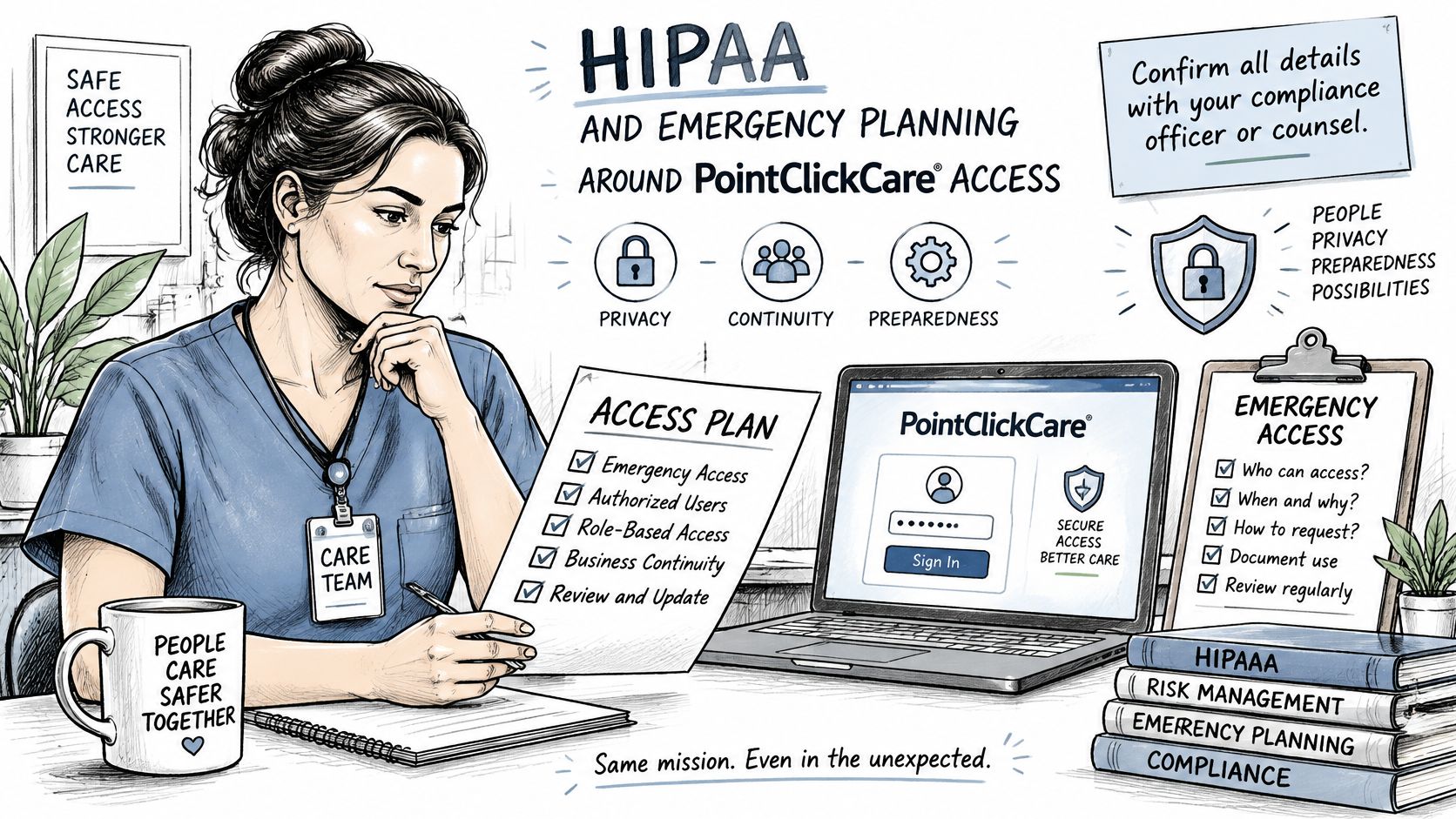
Assess the whole information path
HHS risk-analysis guidance lays out an eight-part sequence: define scope, gather data, identify threats and vulnerabilities, assess existing safeguards, determine likelihood, assess impact, determine risk level, and identify security measures while completing documentation.
For PointClickCare use, the review should include workstations, mobile devices, interfaces, accounts, networks, backups, remote access, and every building where resident information is created or accessed. In a portfolio, scope also means knowing which facilities exchange data through the integration and which still rely on direct EHR access. A nurse covering two buildings may see current records at one and stale or absent records at the other if enablement differs, and that gap only surfaces if the analysis asks about it.
Vendor relationships belong in scope too. Magnitude Marketing's discussion of managing BAAs for clinic workflows offers workflow context, but counsel or the compliance officer should determine which business associate agreement obligations apply.
Map emergency requirements to usable procedures
For participating nursing homes, 42 CFR § 483.73 governs emergency preparedness; CMS's nursing-home technical details describe an all-hazards program with four core elements and survey references under Appendix Z E-tags. An all-hazards plan works like a fire drill written for any fire: it covers the failures most likely to happen (power, connectivity, equipment) rather than betting on one scenario.
What to cover for PointClickCare access under HIPAA and CMS
| Requirement | What to Cover for PointClickCare Access |
|---|---|
| Risk analysis, 45 CFR § 164.308(a)(1)(ii)(A) | Every building, workstation, mobile device, interface, account, network, backup, and remote access path touching electronic PHI |
| Risk assessment and emergency plan, 42 CFR § 483.73(a) | How authorized staff reach resident records during an outage |
| Policies and procedures, 42 CFR § 483.73(b) | Documented alternate steps for care records when access is down |
| Communication plan, 42 CFR § 483.73(c) | Contact methods if normal systems fail, across all facilities |
| Training and testing, 42 CFR § 483.73(d) | Staff practice of downtime access and scheduled testing consistent with applicable requirements |
A usable plan assigns someone to obtain authorized downtime information, tells staff how to communicate if normal contact methods fail, and sets how records get reconciled once access returns. Multi-facility organizations should also name which buildings depend on the integration route, since an outage there looks different from a direct EHR outage and calls for different fallback steps. RDE's PointClickCare outage checklist can support that operational review.
The video below is another resource for the planning discussion.
Emergency preparedness means every shift can reach resident information and keep communicating while normal systems are down. RDE Technologies provides IT security management, network protection, and data backup, and you can request a free quote through its website to discuss how those services apply to your facilities.
Confirm Your Integration Plan Before Go-Live
A go-live decision works like a building inspection: the sign-off only counts if someone checked every floor, not just the lobby. A polished demonstration, or a vendor's statement that the application supports FHIR, proves the connection can work somewhere. It does not prove it works in every facility your organization operates. The administrator, director of nursing, IT lead, and compliance representative should agree on the acceptance conditions before approving launch.
Require a clear answer at each gate
- Route confirmed: Each facility type has an approved route, and the vendor has answered outstanding questions about fields, permissions, and supported workflows.
- Approval documented: The register identifies the developer's legal entity, accountable owner, permitted data scope, and authorization evidence.
- Coverage visible: Enabled and pending facilities are listed separately, with every exception assigned to a named owner.
- Monitoring assigned: An owner has scheduled reconciliation and audit-log reviews, with an escalation path for failed synchronization.
- Downtime tested: Staff have practiced reaching resident information and communicating when normal access fails.
An unresolved item does not always mean abandoning the project. It does require a documented decision: whether the affected workflow can operate safely, who accepts the limitation, and when it will be corrected. Unknown access or missing resident information should never become an undocumented production assumption.
RDE Technologies supports facilities nationwide on site and remotely, including remote assistance through an online support and collaboration portal. Based in Oceanside, New York, it can support the infrastructure and access planning surrounding a PointClickCare deployment while the application vendor remains responsible for its own software.
To discuss the building-level infrastructure, support responsibilities, and downtime preparation for your PointClickCare deployment, contact RDE Technologies through the "Request a call back" form and select IT Services. Administrators can also review RDE's skilled nursing IT services and confirm regulatory decisions with their compliance officer or counsel before acting. RDE Technologies offers managed IT, network management, IT security, data backup, and support center assistance for facilities that depend on reliable EHR access. Visit RDE Technologies to start that conversation.