
The most common advice about nurse call system installation is simple: choose wireless, mount the devices quickly, and move on. That advice gets facilities into trouble. A button that powers up isn't proof that the right room displays, the call reaches staff at shift change, or any call survives a power transfer.
Installation is finished when every station passes testing, simultaneous calls work, failover is proven, staff on every shift know the escalation path, and administrators hold a signed acceptance package. Anything less leaves survey risk sitting behind freshly painted wall plates.
Table of Contents
- Nurse Call System Installation at a Glance
- Requirements Every Care Facility Must Meet
- Plan the System Around Residents and Workflow
- What Installation Costs and How to Budget
- Prepare the Infrastructure Before Installation Day
- How to Install a Nurse Call System Step by Step
- Test Every Station Before You Call It Done
- Train Staff and Set Up Ongoing Support
Nurse Call System Installation at a Glance
A care facility installation is a clinical operations project, not a hardware swap. It touches cabling, wireless coverage, power, nursing workflow, and survey readiness at the same time. The administrator and director of nursing should lead planning, the IT lead and low-voltage contractor should own infrastructure, vendor engineers handle programming, and nursing and IT test jointly.
Two phases get rushed most often. Infrastructure preparation is skipped because devices look wireless on a brochure, and testing gets compressed because rooms are already occupied. Both shortcuts surface later as dead zones, wrong room labels, and unanswered calls.
| Phase | What Happens | Key Deliverable |
|---|---|---|
| Assess and plan | Walk the building with nursing and IT to map beds, bathrooms, corridors and call demand | Workflow map and device schedule |
| Design and compliance review | Choose wired or wireless devices, routing and priorities against UL 1069, NFPA 99/70 and CMS rules | Approved drawings and specifications |
| Infrastructure preparation | Install cabling, wireless coverage, network VLANs, PoE and backup power | Tested cabling and network ready for devices |
| Device installation | Mount stations, pull cords, corridor lights, consoles and mobile endpoints | All hardware installed and labeled |
| Programming and integration | Set device IDs, call priorities, escalation paths, phone and clinical-system interfaces | Configured system matching the device schedule |
| Testing and acceptance | Test 100% of devices, simultaneous calls and power failover, then document results | Signed acceptance and test report |
| Training and go-live | Train every shift and set maintenance and monitoring routines | Trained staff and support plan |
Hold Every Phase to a Deliverable
Don't let a phase close on a verbal update. Planning closes with a device schedule, design closes with approved drawings, and infrastructure closes with tested cabling and coverage results. Programming closes when the live configuration matches that schedule line by line.
Practical rule: If there's no document, test result, or signature to file, the phase isn't done yet.
That discipline gives administrators control. Vendors can be paid against deliverables, nursing can verify routing before go-live, and IT inherits a system it can troubleshoot.
Requirements Every Care Facility Must Meet
In nurse call system installation, the requirements have to live in the vendor's scope of work and acceptance criteria before devices are ordered. Under 42 CFR §483.70(f), the nurses' station must receive resident calls from resident rooms and from toilet and bathing facilities, according to the CMS transmittal on nurse call requirements. CMS permits audible, visual, or wireless signals, but it judges the complete system in use.
That changes what “installed” means. Stations cannot be switched off, volume cannot be set too low, room indicator lights must work, and calls must be answered by the staff responsible for them. For wireless systems, the answering staff must carry functioning devices, with device assignment, battery management, and monitoring treated as daily operations rather than construction details.
Equipment, Wiring, and Emergencies
Specifications should require nurse-call components independently listed for healthcare use and able to provide audible and visual communication between patients and staff. Put design responsibility on the drawings: device selection, cabling, power, and labeling follow the facility's applicable healthcare electrical and life-safety codes rather than installer preference.
Emergency planning belongs in the same scope. For every building, the acceptance file should show how calls still reach staff during a power loss, how in-facility warning signals receive auxiliary power, and which alternate communication method staff use if the network or console is unavailable. If failover cannot be demonstrated during testing, it is not in the project yet.
| Requirement | Source | What It Means for Your Installation |
|---|---|---|
| Calls from rooms and bathrooms must reach staff | Federal nurse call rule | Every resident room and toilet or bathing area needs a working call device routed to the nurses' station or answering staff |
| Listed nurse call equipment | Independent healthcare listing | Specify components listed for patient-to-staff audible and visual communication |
| Safe design and wiring | Applicable healthcare electrical and life-safety codes | Device selection, cabling, and power are documented on approved drawings |
| Emergency communication capability | Facility emergency plan | Prove backup power, auxiliary power for warning signals, and an alternate communication path during acceptance |
| Fully functioning system | CMS survey practice under the federal nurse call rule | No switched-off stations, audible volume, working room lights, carried wireless devices, and answered calls |
Use the table during drawing review and again at acceptance. A bathroom device, answering point, battery routine, or backup-power result that cannot be pointed to on the plan or in the test report is not in the project.
Plan the System Around Residents and Workflow
Start with a walk-through on every unit. The administrator, director of nursing, IT lead, and installer should map each bed station, toilet and bathing pull station, corridor light, duty station, staff console, and mobile endpoint. Every device gets an unambiguous identifier tied to its room and call priority before anyone orders hardware.
Then size the answering model from real demand, not bed count alone. The clinical account of a centralized nurse call system at Presbyterian Hospital describes 13 units serving approximately 450 beds, with trained nonclinical operators handling approximately 1,300 to 1,500 calls per day. The same account notes that hourly rounding reduced call-button use by 37.8%, so nursing routines shape demand as much as device counts do.
Facilities planning broader digital workflows around that demand can also review Ekipa AI's healthcare industry expertise as background on healthcare technology work. For the nurse call design itself, a dedicated nurse call system overview for care facilities helps align device choices with daily operations.
| Factor | Wired | Wireless |
|---|---|---|
| Best fit | New construction and major renovation | Occupied buildings, concrete floors and multi-building campuses |
| Cabling | Cat6 runs to every station, labeled at both ends | Access points placed by site survey, with nurse call on its own VLAN |
| Device power | PoE from switches with UPS and backup power | Battery management routine for every staff device |
| Staff accountability | Fixed stations at the nursing desk | Every answering staff member must carry a working device |
| Main risk | Cable routing delays during occupied renovation | Coverage gaps in bathrooms and corridors |
Decide Routing Before Devices Arrive
Use unit-by-unit estimates to decide who answers first, when a call escalates to a phone or mobile device, and how emergency or code calls differ from routine ones. Don't let default vendor settings make those clinical decisions. Nursing leadership should approve priorities, timeouts, and escalation order in writing.
Planning produces four deliverables: drawings, a device schedule with IDs, a written escalation policy, and a training outline. If those four items don't exist, installation day becomes design day, and that's when bathrooms get missed and rooms get mislabeled.
What Installation Costs and How to Budget
Budget from a benchmark, then replace it with itemized quotes tied to the device schedule. The Douglas Insights hospital nurse call systems market estimate for 2025 reported that roughly 1.62 million hospital and care-facility beds received new or upgraded nurse call systems in 2025, at an average realized value of USD 1,150 per bed including installation and related services.
Treat that figure as a sanity check, not a price. As arithmetic only, a 40-bed unit at that average equals about USD 46,000 before facility-specific differences. A quote far below that range usually means testing, backup power, or integration work isn't in the scope.
Ask every vendor to price these items separately:
- Stations and endpoints: Room stations, bathroom pull stations, corridor lights, consoles, and mobile devices.
- Infrastructure: Cabling, wireless access points, switches, VLAN work, UPS, and backup power for the head end.
- Integration: VoIP phones, paging, mobile escalation, and clinical-system interfaces.
- Commissioning: Programming, 100% station testing, simultaneous-call testing, power-failure testing, and documentation.
- Training: Sessions for every shift, superuser support, and go-live coverage.
Reserve contingency money for a phased go-live. Confirm assumptions with the finance lead after the draft device schedule exists, because budgeting before planning prices the wrong system.
Prepare the Infrastructure Before Installation Day
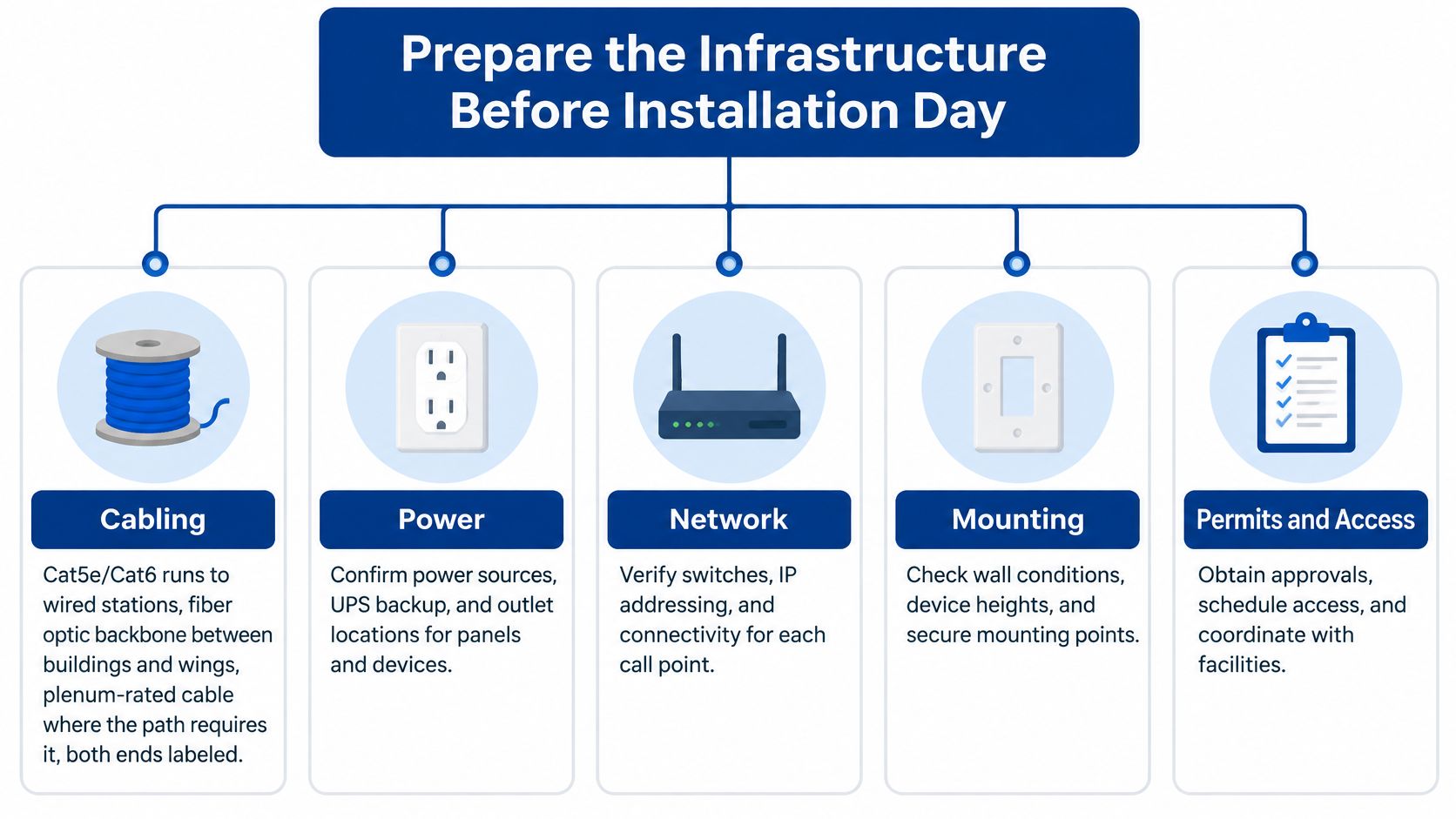
Infrastructure work decides whether installation day is orderly or improvised, and commissioning starts here. A station that cannot get a clean network drop, or a closet with no UPS protection, becomes a failed acceptance test weeks later after the walls are closed. Verify each layer before devices arrive, including the wireless and network details covered in guidance on nursing home Wi-Fi for residents and clinical systems.
Cabling and Wireless Coverage
Run Cat5e or Cat6 to wired stations, with a fiber optic backbone between buildings and wings where distances require it. Use plenum-rated cable where the path demands it, and collect test results on every run instead of trusting the label on a jack. One mislabeled pair found during station testing means opening finished walls.
Wireless designs need a site survey proving coverage in resident rooms, bathrooms, corridors, and common areas, wherever staff carry devices in daily work. Put nurse call traffic on its own VLAN or segmented SSID so resident Wi-Fi and guest traffic cannot compete with call traffic, then confirm the segmentation holds at the switches the stations use.
Network, Power, and Integrations
Confirm switch and PoE capacity for every station and access point, with headroom for additions, plus UPS protection in each data closet and backup power for consoles and the head end. Load math belongs to a licensed electrician applying healthcare requirements; residential load calculation code steps show how a load calculation is structured as a general reference only, while the facility's electrician applies the healthcare code requirements that govern the actual work.
Ask for the failover demonstration early. Cut utility power to a closet or console and confirm the UPS holds while call traffic keeps routing. Simultaneous-call load is an infrastructure question too, since the VLAN, PoE budget, and UPS sizing confirmed here are what let every station call at once during acceptance testing.
Document integrations before programming starts. Escalation to VoIP phones or mobile devices, paging, and interfaces to clinical systems such as PointClickCare each need VLAN, power, backup, interface, and service-level assumptions signed by the responsible organization.
A wireless nurse call system still depends on wired switches, access points, and power. Wireless describes the endpoint. The infrastructure underneath stays physical.
HIPAA Contingency Check
Where the platform shares infrastructure with systems handling electronic protected health information, contingency planning applies. The HHS HIPAA Security Rule overview requires procedures for emergencies that damage systems containing ePHI, covering data backup, restoration of lost data, and protection of ePHI during emergency-mode operations.
Separate or restrict access to connected systems, document recovery dependencies, and run the failure scenarios now: server down, network down, power path down. Confirm the approach with the compliance officer or counsel before sign-off, because an untested recovery plan stays a document.
How to Install a Nurse Call System Step by Step
Field work should follow the drawings and device schedule, with deviations recorded the same day. The photo below shows the planning review that should happen before walls are opened or devices are mounted.
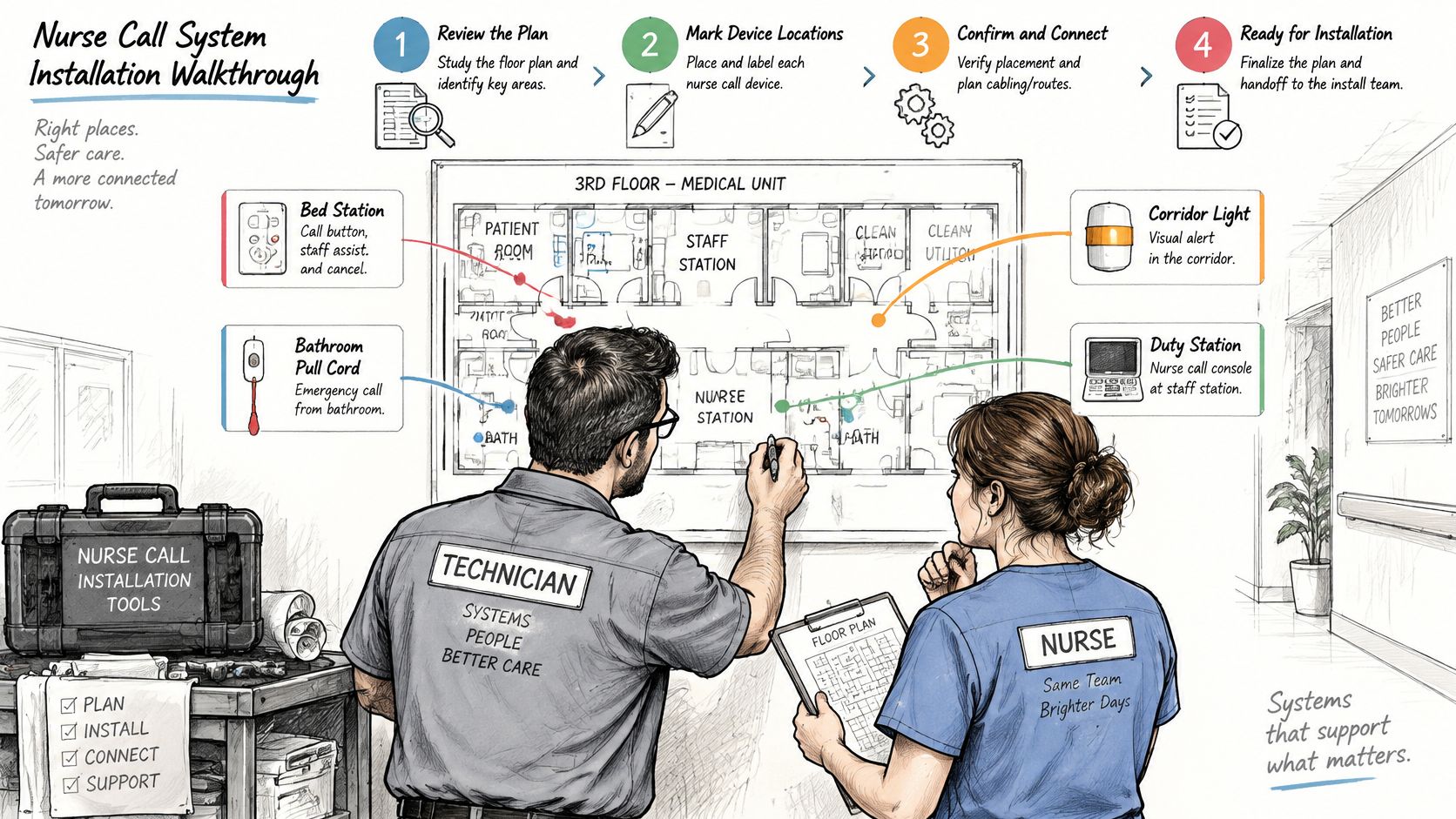
- Walk and mark every location. Hold a pre-installation walk-through and mark bed stations, bathroom pull cords, corridor lights, duty stations, and console positions against the drawings.
- Install cabling and pathways. Pull Cat6 or fiber, label both ends, and keep low-voltage runs separate from electrical work.
- Mount the head end and consoles. Connect nurses' station consoles to power, UPS, and network drops, then verify each drop before closing up work.
- Install room devices. Fit bed and pillow-speaker stations in every room and pull cords in every toilet and bathing area, set so the cord is reachable from floor level.
- Install corridor and staff devices. Mount dome lights and staff stations, then register wireless or mobile endpoints on the network.
- Program the system. Enter device IDs, room numbers, call priorities, escalation rules, routing, and volumes exactly as approved.
- Configure the network. Set VLAN, IP addressing, and PoE, and connect interfaces to phones, pagers, and clinical systems.
The short video below gives administrators a useful visual reference for how components fit together during a typical installation sequence.
- Power up and verify reporting. Confirm every device reports correctly at the console before testing begins.
- Record as-built changes. Mark every deviation forced by field conditions on the drawings, not from memory weeks later.
- Hand over the inventory. Deliver a complete device list with IDs and locations to the testing phase.
Label at Install Time
Field tip: Label everything at install time, because mislabeled rooms are the most common commissioning failure.
Don't accept temporary labels or a promise to sort it out during programming. A station labeled for the wrong room sends staff to the wrong bed, and that error survives every later software fix until someone physically rechecks it.
Test Every Station Before You Call It Done
Finishing installation is not the same as passing acceptance. A mounted, powered system can still misroute calls, lose calls during power transfer, or display the wrong room. Testing proves the notification chain works under realistic demand.
Run tests in execution order and record each result against the device schedule. The UFGS nurse call specification guidance supports 100% functional coverage of new equipment, plus a concurrent-load test at 10% of maximum stations or three stations minimum. It also states that bathroom pull cords should be set no more than 12 inches above the floor where the cited healthcare guidance applies.
The Acceptance Sequence
First, test 100% of newly installed equipment: every patient station, staff and duty station, bathroom pull station, call priority, reset and cancel function, display location, volume, and routing path. Sampling is not acceptable for functional testing. A 10% random inspection of low-voltage terminations can supplement these checks, but it can't replace them.
Second, activate 10% of the maximum station count, or at least three stations, at the same time. Simultaneous calls expose queueing and annunciation defects that single-button tests miss. Third, simulate loss of primary power and confirm battery takeover without losing a call.
| Test | What to Verify | Pass Criteria |
|---|---|---|
| 100% station test | Every bed, staff, duty and bathroom pull station activates, displays and resets | Every device passes; no sample testing |
| Simultaneous call load | Activate 10% of maximum stations or at least three at once | All calls annunciate without loss or queueing defects |
| Routing and display | Correct room and priority appear at the console for every call type, including emergency | Matches the approved device schedule |
| Bathroom pull cords | Cord operates freely and is reachable from floor level | Height matches the vendor listing as confirmed by the compliance officer |
| Audibility and volume | Signals heard and seen in noisy areas and at every answering point | Heard and seen wherever staff respond |
| Power failure test | Simulate loss of primary power | Battery takeover without losing any call |
| Documentation and signoff | Test results, device IDs, defects, corrective actions and administrator signoff | Signed acceptance package on file |
Watch hardest for wrong room labels, missed bathroom devices, calls lost during power transition, weak volume in noisy areas, and untested interfaces to wireless or clinical IT systems. Each defect gets logged, corrected, and retested, not noted verbally. The signed results become the baseline for preventive maintenance and future troubleshooting.
Train Staff and Set Up Ongoing Support
A technically correct system still fails if the night shift cannot answer a call at 3 a.m. Schedule hands-on sessions for every shift, weekends included, and name a superuser on each unit so the first question on a bad night has a human answer nearby. Rehearse escalation paths from corridor light to charge nurse, and drill the power-failure scenario as a staff exercise on top of the commissioning test. Assign wireless pagers and phones to named individuals, and put the battery charging and replacement routine under a single owner.
Adoption is where schedules slip. The evaluation of a high-tech call system at a 210-bed community hospital collected comparable responses from 144 participants before and 143 participants after implementation and reported significant installation delays across participating units. Facilities that adopt quickly tend to share the same pattern: staff know what to expect before go-live, and managers stay visibly involved through the first weeks instead of handing training off entirely.
Plan a phased go-live with contingency dates. Activating unit by unit lets you fix labeling or routing defects on a single floor before they repeat across the building, and delays on large installations are common enough that slack belongs in the schedule from the start, alongside the broader support model described under healthcare IT support for care facilities.
Ongoing Support That Matches the Risk
Set a preventive maintenance calendar for station tests and battery replacement, keep the signed acceptance package as the troubleshooting baseline, and name one person accountable whenever a call goes unanswered. Multi-building operators should require reporting by facility, so one building's problems stay visible instead of disappearing into system-wide averages.
RDE Technologies provides 24-hour, 7-days-a-week support and monitors systems while providing preemptive solutions to help clients avoid future IT complications. Ask any support provider about VoIP phone failover as well, so escalated calls still reach staff when a primary path fails.
Close the project with IT and nursing signing the acceptance package together. After that, run a HIPAA security risk assessment covering the network, hosting, and skilled nursing IT services the new system depends on.
For facilities that need the network, cabling, wireless, VoIP failover, and round-the-clock help desk support behind a nurse call installation handled by one accountable team, RDE Technologies supports skilled nursing and long-term care operators nationwide on site and remotely. Visit the site to request an IT assessment and talk through the infrastructure, testing, and support plan before installation day arrives.