
Your night nurse calls at 2:15 a.m. because the EHR won't load on the medication cart, and the person who usually fixes it stopped answering his phone hours ago. By the time the system comes back, two passes are charted on paper, a family member has been called twice, and you're the one explaining it at shift change.
That call is where healthcare IT outsourcing decisions really get tested. Not in the sales deck, not on the monthly invoice, but at 2 a.m. when one building can't reach the resident record and nobody can say who is responsible for restoring it.
This guide is for administrators, owners, directors of nursing and IT leads at skilled nursing facilities, nursing homes, assisted living communities and multi-site long-term care groups. It covers what outsourcing includes, what has to stay in your hands, what HIPAA and CMS expect, and the questions that separate a provider managing your risk from one that just closes tickets.
Table of Contents
- What Healthcare IT Outsourcing Covers
- Which IT Work to Outsource and What to Keep
- Why Providers Outsource Beyond Cost
- Keeping Resident Care Running During an Outage
- Third-Party Risk Most Outsourcing Guides Skip
- Proof to Require and Metrics to Track
- How Skilled Nursing and Multi-Site Operators Apply This
- Confirm Your Scope Before You Sign
What Healthcare IT Outsourcing Covers
Healthcare IT outsourcing means an outside provider takes responsibility for running defined IT functions under a written agreement. Your facility keeps ownership of its data, its clinical decisions and its accountability to regulators. That last part never transfers, whatever the contract says.
Three models show up in long-term care:
- Full outsourcing hands over the whole IT operation, strategy included. It exists, but it's uncommon in nursing homes.
- Selective outsourcing, usually sold as managed services, covers routine operations such as monitoring, patching, help desk and backups while leadership keeps the decisions.
- Project work covers one-time jobs: a new network build, wireless installation, network cabling, VoIP phone setup or a move to a new EHR environment.
Selective is the model most operators live with. In 2023, 43.9% of hospital IT services were outsourced to managed service providers, according to Info-Tech Research Group, as reported by Market.us.
Whatever a provider calls its offering, ask it to state in writing which functions it runs, which it only advises on, and which model the agreement follows. "We'll manage your IT" isn't a scope. If you're mid-renewal, compare the agreement against the function list below before you sign anything.
Which IT Work to Outsource and What to Keep
Say the network drops at 11 p.m. in one of your buildings. The night nurse needs current medication orders, the scheduler needs tomorrow's shift filled, and the administrator on call wants to know who is handling it. Three tasks, three owners, and only one of them belongs to the IT provider.
The split that decides everything else is which work a provider runs and which decisions stay with the facility. Get it wrong and you either pay someone to own strategy you already own, or you hand away control of a system that touches direct care.
Routine work travels well. These five functions belong in a managed services agreement:
- Continuous monitoring of servers, networks and endpoints, with alerts that reach a person rather than a dashboard nobody opens.
- Patching on a published schedule, including the exception list and who approved each exception.
- Device setup, desktop repair and help desk coverage for staff who can't log in at shift change.
- Backup operation and restore testing, not backup creation alone.
- After-hours escalation with a named on-call path that reaches a technician, not a voicemail box.
Decisions stay inside: clinical workflow and EHR configuration, approval of patch windows that could interrupt medication administration, cybersecurity risk acceptance, recovery priorities for each resident-care system, and the final choice of vendor.
| IT function | Typical split | What the facility keeps |
|---|---|---|
| Monitoring, patching and device management | Outsource, with monthly reporting | Approve patch windows that touch clinical systems |
| Help desk and after-hours support | Outsource | Name the on-call administrator who receives escalations |
| Backup operations and restore testing | Outsource | Set recovery priorities for each resident-care system |
| Network and wireless management | Outsource | Approve changes to access rights and network segmentation |
| EHR configuration and clinical workflows | Support only | Clinical leaders decide how the workflow runs |
| Cybersecurity risk acceptance | Shared | Facility leadership signs off on residual risk |
| Technology strategy and vendor selection | Advise only | Owner or director decides and reviews performance |
Full handover is rare for a reason. When KLAS reviewed the market in 2005, it found that 100 non-federal, non-prison healthcare provider organizations in North America had fully outsourced their IT operations, representing 315 hospitals and 80,642 beds, or about 6% of U.S. hospitals and 10% of U.S. hospital beds (KLAS review published by Longwoods). Hospitals with 201 to 500 beds were the most common segment at 46% of those interviewed.
That pattern holds today. Regional and multi-site operators tend to keep selective outsourcing with centralized governance, which is close to what RDE Technologies describes as co-managed IT services. Apply one test before any task leaves your building: if it changes how residents are cared for or who accepts a risk, name an internal owner first.
Why Providers Outsource Beyond Cost
Price is rarely the reason a facility signs. Look at what long-term care operators are funding. A 2025 survey of more than 170 senior-living, continuing-care and skilled-nursing organizations found the average share of capital budgets allocated to technology rose from 8.8% in 2024 to 9.8% in 2025, with 65% investing in information and communications infrastructure, 41% in electronic medical record systems and 38% in point-of-care documentation (McKnight's Senior Living).
Read those numbers as a staffing problem. Every one of those investments creates something to configure, secure, patch and recover. A three-building operator with no network engineer can't staff that from the existing roster, and hiring one engineer doesn't cover nights, weekends and vacation.
What outsourcing actually buys
Evidence from outside the United States points the same direction. A peer-reviewed study using the 2011 Korean Hospital Association roster surveyed 311 general hospitals and received 103 usable responses. Among them, 55.34% outsourced at least one information-systems function, and the motive reported most often was the need for outside experts. Outsourcing of broader managerial functions was more strongly associated with cost savings (study published in PMC).
That distinction matters when you're writing a scope. If you buy IT support to save money, you'll evaluate it on price and get what you paid for. If you buy it because nobody on staff can design a segmented network, test a restore or read a vulnerability report, you'll evaluate it on capability.
The question to settle internally: which capability do we genuinely lack, and is buying it cheaper than hiring for it, training for it and covering it seven days a week?
Two answers usually emerge. Facilities outsource for specialist skill they can't recruit, and for maintenance coverage that doesn't depend on one person's phone. Consistent standards across buildings is the third reason, and it's the one multi-site operators feel most.
Treat the Korean findings as directional. That study reflects hospital settings, not nursing homes, so use it to shape the questions rather than to predict your own results.
Keeping Resident Care Running During an Outage
A nurse cannot chart a medication pass when the EHR is down. The continuity plan therefore has to name the work that continues, not just the servers that get restored. The rule behind that plan is the HIPAA Security Rule contingency standard at 45 CFR 164.308(a)(7), which requires covered entities to establish procedures for responding to emergencies or other events that damage systems containing ePHI, including data backup, disaster recovery and continuation of critical business processes in emergency mode. HHS lists fire, vandalism, system failure and natural disaster among the triggers, and its ransomware guidance for healthcare adds a practical expectation: isolate backups from the production network, verify backup integrity, and test restoration periodically.
The downtime sequence
- Detect and alert. Monitoring should wake the on-call administrator within minutes, not wait for the first nurse to notice a cart that won't load. Someone has to be reached on purpose.
- Declare downtime and name a leader. One person, typically the house supervisor or DNS, states that the building is in downtime mode. Without a declaration, half the staff charts on paper while the other half waits for a screen.
- Move medication and documentation to downtime forms. Pre-printed MARs, treatment sheets and progress notes live in a known location, and staff practice them during orientation rather than during the outage.
- Confirm what is down and what is still reachable. A network failure and an EHR failure are different events. If orders remain visible on one workstation, the procedure should say which system staff fall back to.
- Restore from isolated backups and verify. Backups kept off the production network are what make recovery possible after ransomware. Validate the restored system before anyone trusts it with a medication order.
- Reconcile paper into the EHR. Assign one person the back-entry of paper records with a deadline attached, because surveyors will ask how the gap was closed.
- Log the timeline and review the cause. Start time, systems affected, who was notified, when service returned. That record feeds the next drill and your next risk analysis.
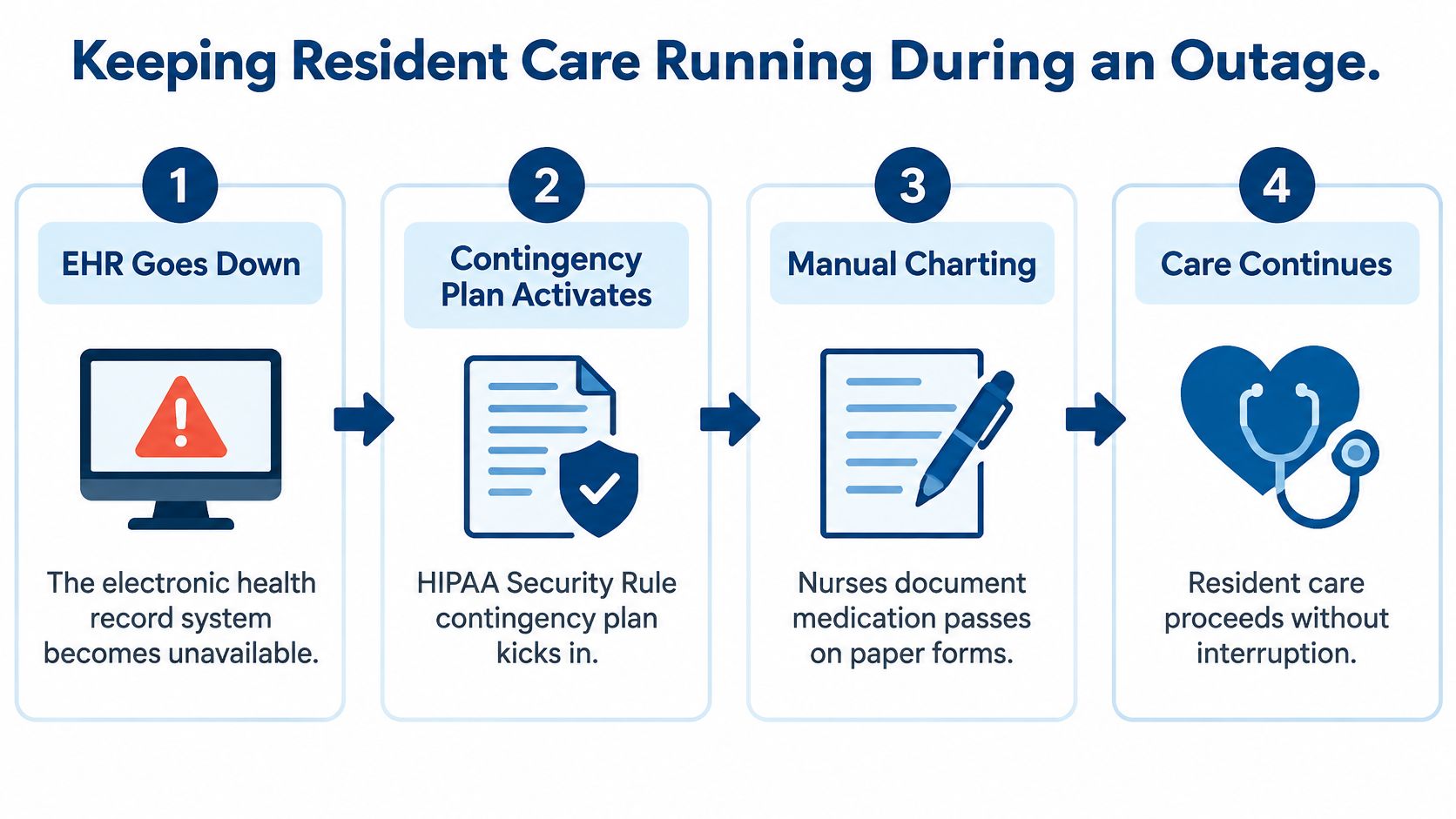
Every step above needs a named owner in the outsourced agreement. Left to chance, backup monitoring and restore testing land on a nurse whose actual job is 34 residents, and the first restore test happens during the emergency.
CMS emergency preparedness requirements for long-term care facilities at 42 CFR 483.73 also expect a documented plan for emergencies that disrupt operations, including communication and continued resident care. Compare the IT downtime procedure against that standard, since surveyors read them together.
The practical test: could the night shift run medication passes for a full day with the network down, using only what's in the building?
If the answer is no, the gap belongs in the contract, not in a future training session. Confirm the specifics with your compliance officer or counsel before finalizing the plan, and use a documented EHR downtime procedure for nursing homes as the starting draft.
Third-Party Risk Most Outsourcing Guides Skip
Outsourcing can reduce internal workload while increasing exposure, because the provider becomes part of your attack surface. That's the part most buying guides skip.
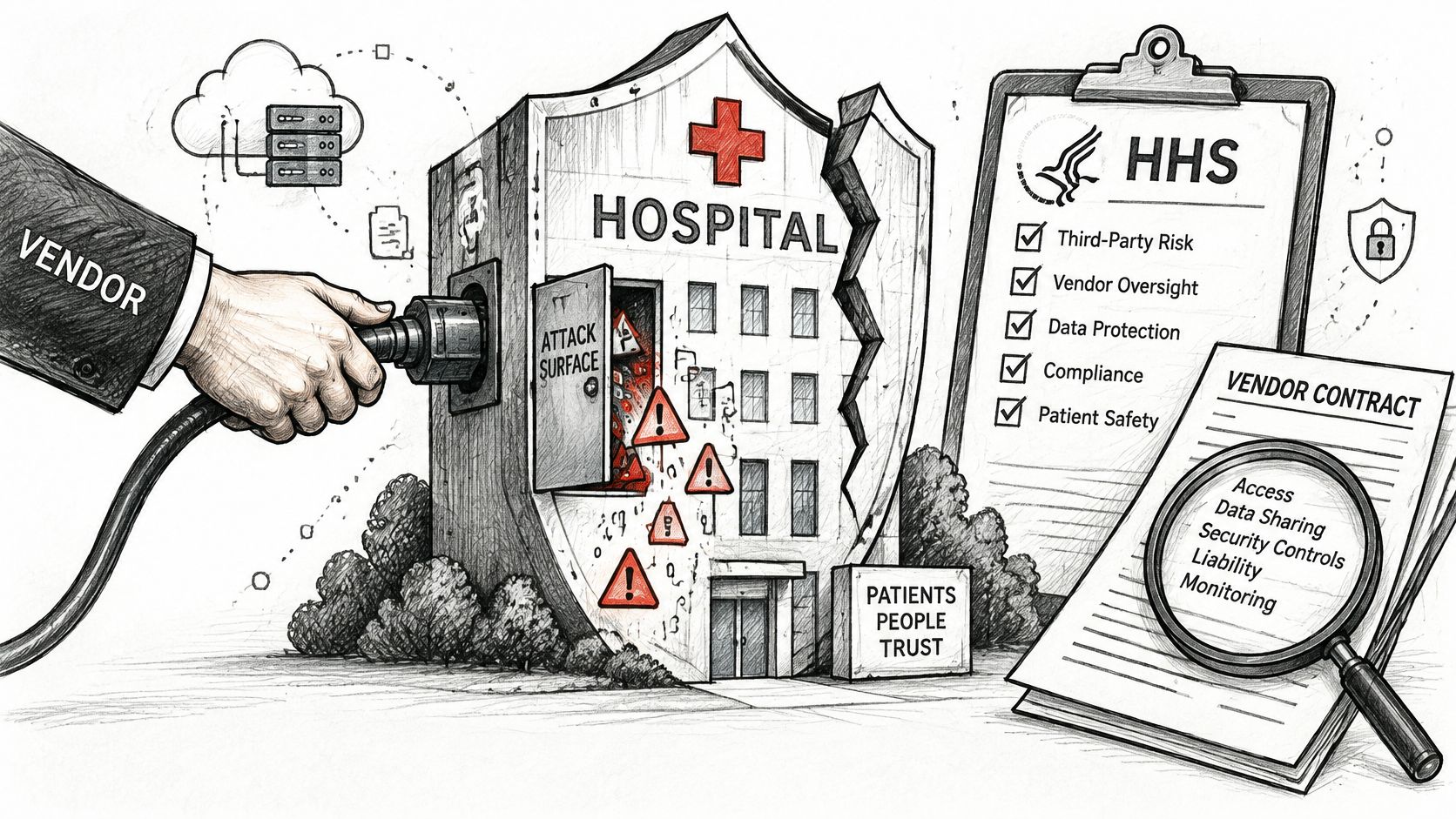
The breach numbers explain why. As of October 3, 2025, 364 hacking incidents reported to the U.S. Department of Health and Human Services affected more than 33 million people, and over 80% of stolen protected health information records came from third-party vendors, software services, business associates, nonhospital providers or health plans rather than hospitals (AHA 2025 cybersecurity year in review). More than 90% of hacked records were stolen outside the electronic health record system.
That last figure reframes the whole purchase. Endpoint support, email, remote-access tools, backups, file shares and vendor integrations deserve as much scrutiny as the EHR itself, because that's where most of the stolen records came from.
Remote access is the quiet exposure
HHS guidance on secure remote use and access, based on NIST SP 800-66, calls for documented authorization, least-privilege access, strong authentication, logging, and prompt removal of access when personnel or vendors no longer need it. A single shared vendor credential can expose every building at once, and a technician who left the provider six months ago should not still be in your system.
For a facility relying on an outside team to administer networks, support remote users and maintain systems connected to a resident EHR such as PointClickCare, these controls belong in writing. The administrative side of the rule is where most of it lives, and this overview of HIPAA administrative safeguards covers what to document.
Turn each risk into a question you can put in front of any provider:
- Incident ownership: who runs incident response when the provider, its cloud platform or a subcontractor is breached?
- Notification speed: how quickly must the provider notify your facility, and in what written form?
- Scope: which logs, backups, privileged accounts and subcontractors does the agreement cover?
- Evidence: what can they show to prove access is reviewed and controls are tested?
The same discipline applies to consent and authorization records, which sit in the same file shares and email threads attackers target. Practices that still collect signatures on paper should look at collecting patient consent for small practices, because a scanned authorization on an unmanaged share is a disclosure waiting to happen.
The contrarian conclusion is uncomfortable: outsourcing may lower your workload and raise your systemic exposure unless the contract defines shared responsibility, least-privilege access, monitoring, immutable backups, recovery testing and transparent breach reporting. Facilities without dedicated security staff carry the most risk here, because nobody internal is reading the vendor's access logs.
Proof to Require and Metrics to Track
Assurances are easy to give in a sales meeting. Evidence is harder. Start with the scale of the problem: HHS's 2024 breach report, as summarized in the Office of the National Coordinator's report to Congress, records 663 notifications involving unsecured protected health information affecting at least 500 individuals. That was 9% below 2023, and the volume still shows that providers and their business associates remain high-value targets.
Treat the agreement as a security-control document, not a help-desk order form.
What the contract must name
- Centralized identity management with multifactor authentication, for staff and for every technician who touches your systems.
- Separated privileged access, so day-to-day support accounts can't change firewall rules or delete backups.
- Endpoint detection and response on workstations and servers, including the clinical carts.
- Immutable or offline backups, plus encryption in transit and at rest.
- Patch time targets in days, not "as soon as practicable," with an exception process for clinical systems.
- Documented incident escalation, with names, phone numbers and time thresholds.
Insist on recovery objectives tied to clinical workflows rather than to servers. For medication administration, the amount of data you can lose and the time to restore it are short. Scheduling and billing tolerate more. Write down both numbers for each system, because "we'll restore as fast as possible" gives your DNS nothing to plan around.
Evidence follows. Ask for access logs, backup-restore test results, vulnerability reports, security risk assessments, subcontractor inventories and breach-notification procedures. Before an EHR upgrade or network change, ask how the provider tests in a copy of the environment rather than in production; compliance testing with GoReplay traffic replay is one method technical teams use to replay real traffic against a test build and catch breakage before staff hit it.
| Metric | What it shows | Evidence to request |
|---|---|---|
| Recovery time after an outage | How quickly each system returns to service | Incident timelines by facility |
| Backup restore test results | Whether backups can actually be restored | Test logs and restored-system validation |
| Unresolved critical vulnerabilities | Exposure left open after patching | Vulnerability scan reports with patch age |
| Privileged-access review completion | Whether admin rights are checked | Signed review records and removed-access logs |
| Uptime by facility | Reliability at each building, not just overall | Monthly uptime report split by site |
| Onboarding time for a new facility | How fast new sites come under management | Onboarding checklist with dates |
| Downtime drill completion | Whether staff can run the downtime procedure | Drill records and corrective actions |
One reporting rule matters more than the rest: ask for numbers by facility, not one blended average across the group. A 99% uptime average looks fine until you learn that one building accounts for all the failures.
How Skilled Nursing and Multi-Site Operators Apply This
A director of nursing can describe what matters in one sentence: the medication pass, the resident record and communication with families. The technical estate behind those three things is far larger than most administrators expect.
Start with the system everyone recognizes. Resident EHR access through PointClickCare touches workstations on wheels, badge-in laptops, wireless access points, the network path to the vendor's environment, and the interfaces that exchange orders with the pharmacy and lab.
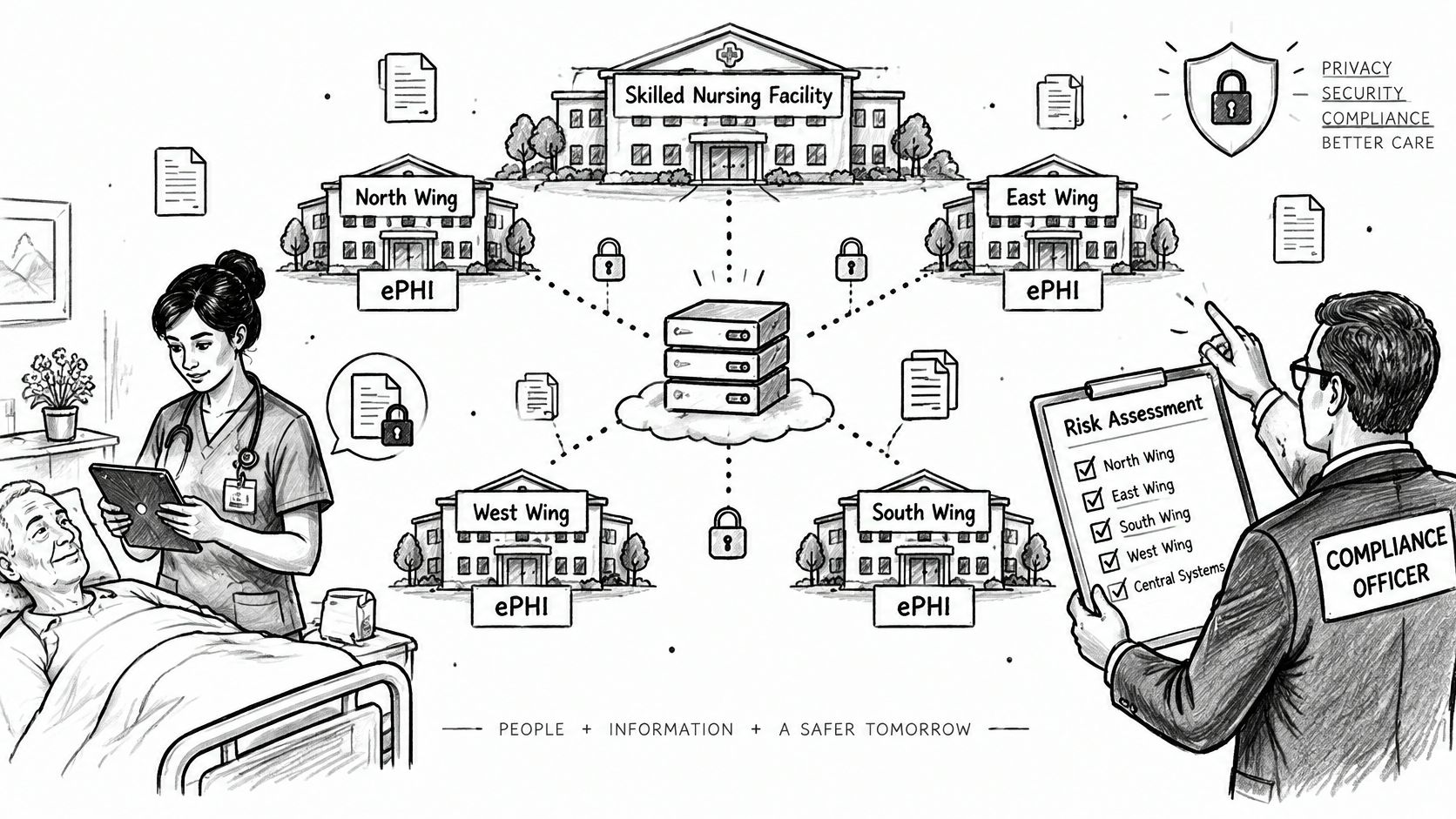
HIPAA requires every covered entity, including a skilled nursing facility, to conduct an accurate and thorough assessment of the risks and vulnerabilities to the confidentiality, integrity and availability of all ePHI it creates, receives, maintains or transmits. That means the full environment, not one server. HHS guidance on HIPAA risk analysis sets out an eight-part process: define the scope, gather relevant data, identify and document threats and vulnerabilities, assess existing security measures, determine likelihood and impact, assign risk levels, and document the security measures selected. HHS also states the analysis should be continuous enough to catch when controls need updating.
Scope the environment building by building
A workable inventory covers, at minimum:
- Clinical access points, from medication room workstations to the laptops nurses carry.
- Wireless networks, including staff Wi-Fi, resident Wi-Fi and any nurse call system that rides the same infrastructure.
- Backups and recovery paths, with the location of each copy and who can access it.
- Interfaces, meaning every connection between the EHR, pharmacy, lab, billing and any health information exchange.
- Remote access, including vendor connections and support tools that reach into your network.
- Business associate systems, since their safeguards are part of your risk picture.
For a multi-building operator, a facility-by-facility inventory with a written remediation log beats a one-time checklist every time. A weakness in one building's network or EHR access path can affect resident information across the group, and a group-level report that averages it away hides the building that needs help first.
Then there's the after-hours gap. At 2 a.m., when one building loses its network, the question isn't whether the contract mentions support. It's who answers, how fast they can reach the site, and whether the person on the phone can see that building's equipment. Assisted living communities and home care providers can apply the same method with fewer systems and fewer interfaces, adjusting scope rather than skipping it.
Give your compliance officer the inventory before the next renewal. A risk analysis written against a real list holds up far better than one written against a template.
Confirm the regulatory specifics with your compliance officer or counsel, since coverage decisions vary by entity type and business associate relationships.
Confirm Your Scope Before You Sign
A contract can name “IT support” without making clear which buildings, systems, or tasks that support covers. Before renewal, compare the agreement with your current inventory and ask for each boundary to be stated in writing. ISO 27001 scope statement examples illustrate how organizations define what falls inside a control boundary.
Check five areas:
- Sites and suppliers. Confirm which buildings, interfaces, and subcontractors are covered. Ask how the agreement handles a site that is added or changed.
- Incident ownership. Specify who leads a response, who contacts whom, and how quickly the provider must notify you about a suspected breach.
- Controls and evidence. Name the required safeguards, such as MFA, privileged-access separation, immutable backups, patch targets, restore-test results, and recovery objectives for each clinical system.
- Interoperability. Ask how the provider will support EHR connections with laboratories, pharmacies, and health information exchanges. Clarify how connections are authenticated and encrypted, and how errors, retries, and endpoint documentation are handled.
- Assessment timing. Schedule an IT assessment before renewal so you can use its findings while contract terms are still open.
RDE Technologies' IT assessments cover areas including network security, business continuity, data storage, and infrastructure. The company provides remote IT support beyond New York and on-site IT services in New York. It also designs and installs wireless networks for nursing homes and assisted living communities.
To define the next step, use RDE's “Request a call back” form and select the service category that fits your needs, such as IT Services, VoIP, Data Backup, Cabling, or Urgent Request. Ask how the proposed scope would cover your sites and systems, and review HIPAA responsibilities with your compliance officer or counsel.
For nursing homes, assisted living communities, and multi-site operators, a clear agreement identifies who maintains each part of the technology environment and who makes decisions about risk, access, and recovery. Request a call back through RDE Technologies' inquiry form to discuss the scope your organization needs.