
53% of adults aged 55 and older use at least one assistive or health-related technology, and 88% of the people in the same survey said assistive technologies had improved their overall quality of life, according to a 2023 U.S. survey of 2,000 adults aged 55 and older reported by McKnight's Senior Living. Read that again and notice what it means for a building full of residents. The technology is already inside the walls, whether or not it appears in anyone's budget line.
The same survey explains why adoption still looks lopsided. Among people who don't use these tools, 70% said they did not yet need the technology, 16% cited affordability and 14% worried about losing independence. That split is useful to an administrator. Resistance is rarely about fear of computers. It's about relevance, money and control.
This guide treats senior living technology as infrastructure first. Each layer of the stack gets the same treatment: what it does, what it needs to keep working, and who answers when it stops.
Table of Contents
- The Technology Stack Behind Senior Living Communities
- Safety Technologies That Need a Response Plan
- Network, Phones and Backups That Keep Care Running
- Connecting Systems Without Replacing Everything
- HIPAA and CMS Requirements for Technology Teams
- Privacy, Consent and Resident Dignity
- Start With a Free HIPAA Risk Assessment
The Technology Stack Behind Senior Living Communities
Senior living technology is every digital system a community relies on to care for residents, communicate with families and stay safe. Residents and families see the taps: the pendant on a lanyard, the tablet used for a Sunday video call, the Wi-Fi icon in the corner of a screen. Whether any of those work depends on the pipework behind the wall, and nobody photographs the pipework.
Here's the stack as it sits in a community, from the layer families touch down to the layer that powers everything.
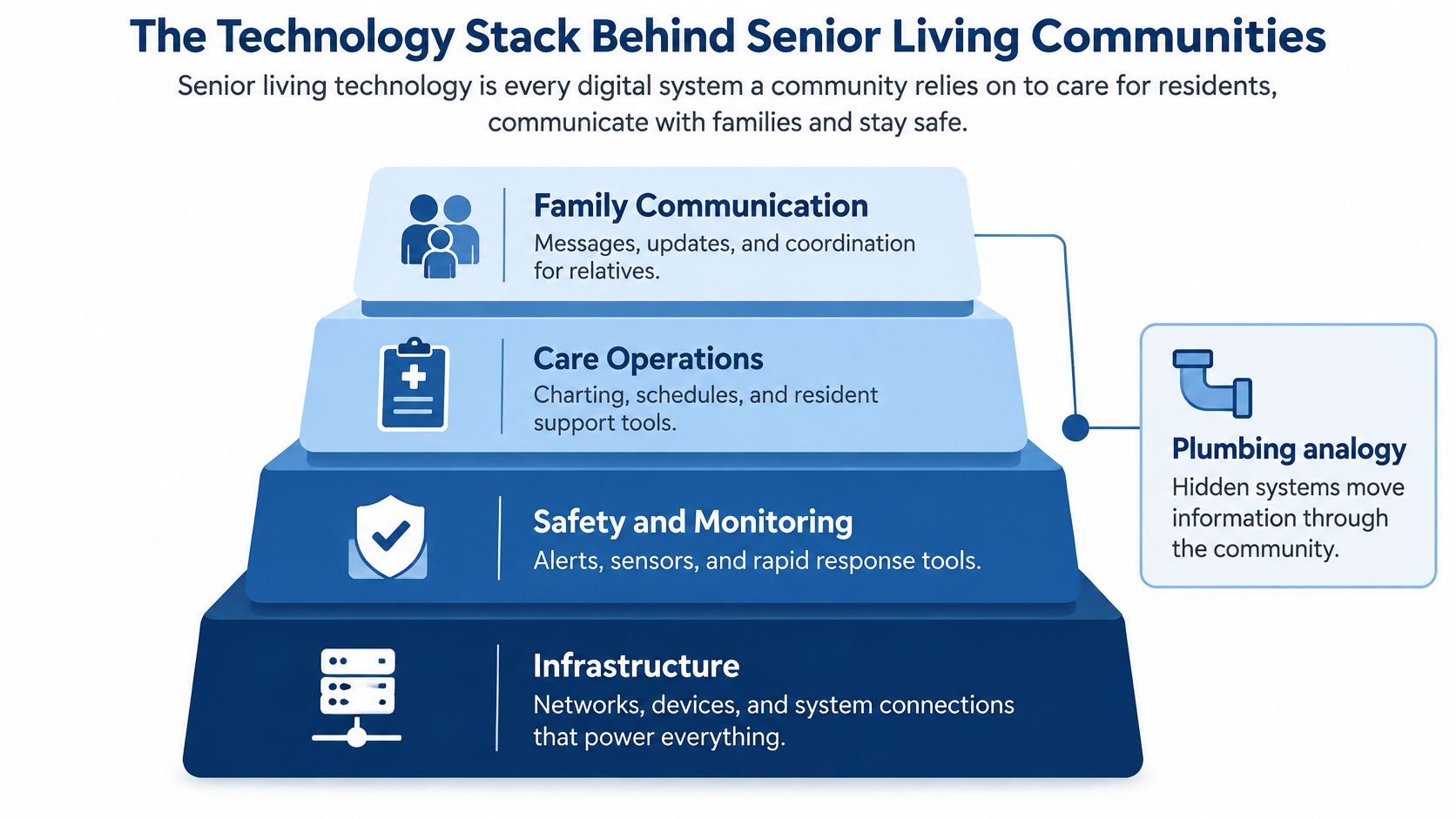
Most communities run three families of systems, and each one fails in a different way.
- Clinical records. The EHR (PointClickCare and MatrixCare are the names most administrators already know), medication and eMAR systems, incident reporting, and the scheduling tools that feed them.
- Resident-facing tools. Nurse call, resident Wi-Fi, family video calls, and the shared tablets residents use for all three.
- Safety and independence devices. Fall detection, wander alerts, room sensors, and smart-home assistance such as voice controls or automated lighting.
This isn't a narrow slice of operations. A 2023 systematic mapping review published in JMIR Aging examined 59 studies involving 39,153 older adults and found remote or assistive-care technologies in 54% of them. Technologies supporting activities of daily living, including medication management, smart-home assistance and remote monitoring, appeared in 68% of studies, and safety-oriented technologies in 61%. Most of that literature was published after roughly 2018, which is a polite way of saying the field is young and moving fast.
The lookup below is the one most administrators never get handed: for each layer, the systems involved and the thing that keeps it alive.
| System layer | Typical systems | What it needs to keep working |
|---|---|---|
| Clinical records | EHR such as PointClickCare, medication and eMAR systems, incident reporting | Individual logins, permission levels, retrievable backups, vendor support contacts |
| Resident communication | Nurse call, resident Wi-Fi, family video calls, tablets | Wireless coverage in rooms and hallways, power backup, device management |
| Safety and monitoring | Fall detection, wander alerts, room sensors | A named responder, a response time, battery checks, scheduled testing |
| Care coordination | Staffing platforms, scheduling, shared care notes | Integration with clinical records, one account per staff member |
| Building and infrastructure | Internet circuits, switches, access points, VoIP phones | Network segmentation, phone failover, documented configuration |
Communities comparing device categories, from fall sensors to smart-home assistance, can weigh options in this guide to senior living technology solutions before signing with a vendor.
Practical rule: if nobody can name the owner of a system, that system has no owner.
Write this down before the next 2 a.m. call. List every system that holds resident data or touches resident safety. Name one owner per system, a person and not a department. Record who responds when it fails outside business hours and where that phone number lives. Note which systems share a network, because those fail together.
Safety Technologies That Need a Response Plan
A fall alert isn't a device event. It's a chain, and the chain breaks in predictable places. A wearable or ambient sensor registers a movement pattern. An algorithm compares that pattern against a threshold or a trained model and decides. Then the system pushes an alarm toward a human being, and that last step is where most deployments fail.
Watch the sequence happen before you buy anything.
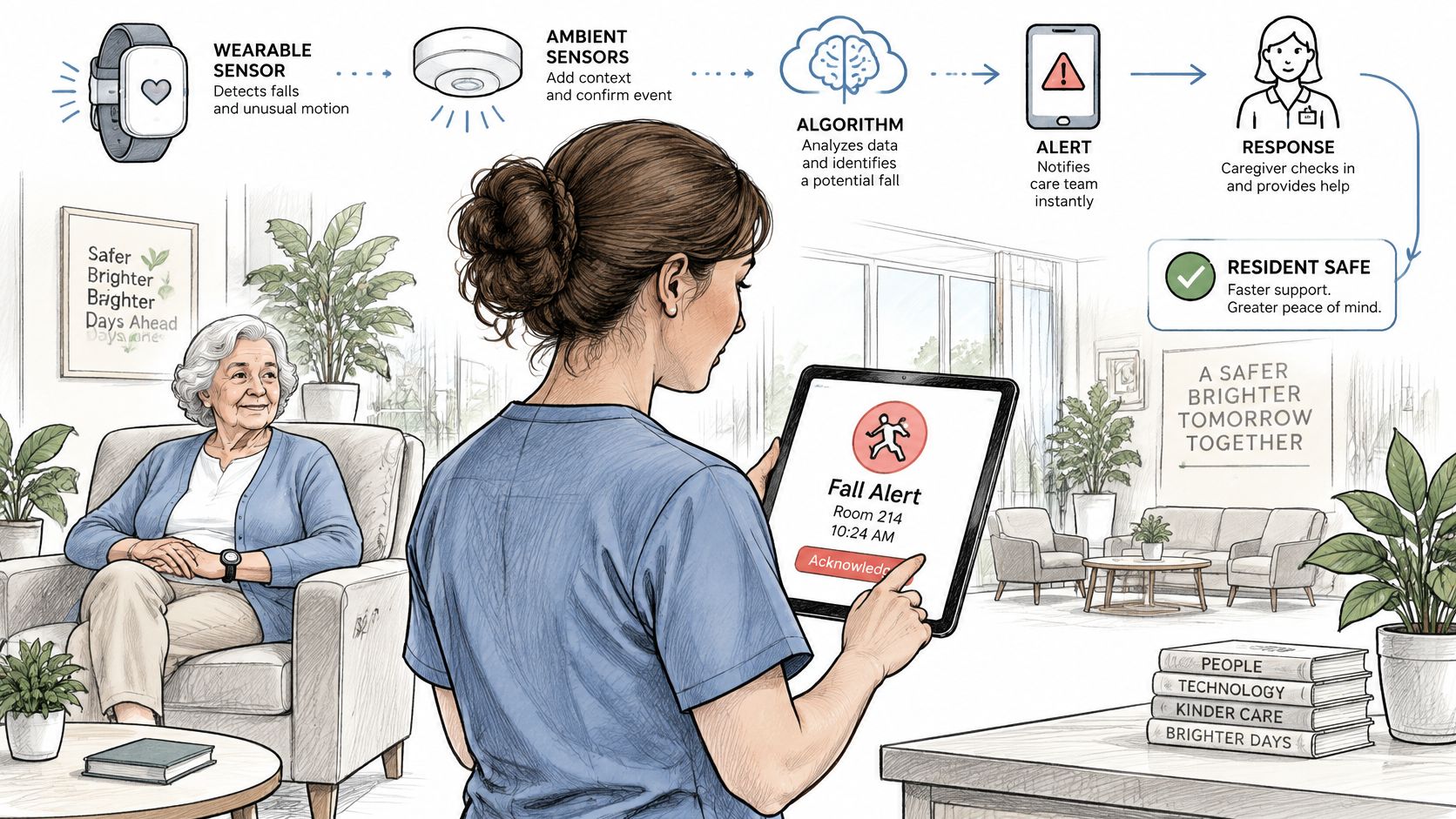
A 2023 systematic review in PLOS Digital Health identified 44 studies in this area. Of those, 43 evaluated fall detection, two covered detection and prevention together, and one covered prevention alone. Accelerometers appeared in every included experiment, usually alongside smartphones or external sensors, and systems commonly triggered an alarm to a guardian or caregiver.
Where communities get stuck is the alarm. A sensor that pages nobody is a sensor that does nothing, and a pager nobody answers is worse because it creates a record of a missed event. The review's practical point is blunt: sensor deployment alone is insufficient. Communities need a monitored escalation workflow, defined response times, device battery checks, and testing against ordinary activity such as transfers, walking and sitting, all of which can resemble a fall.
Test against normal life first. A resident who slides from a chair to a walker, or who sits down hard on a bed, is not falling, and a system that says otherwise will train your night aide to ignore it.
Practical rule: every alert needs a named responder, a stated response time and a log entry, or it's decoration with a battery.
Be careful with vendor accuracy figures. Published numbers come from heterogeneous datasets, thresholds and experimental conditions, which limits direct comparison between products. Two systems quoting the same accuracy percentage may have been tested on completely different populations.
Remote monitoring carries the same lesson at a larger scale. A systematic review of 91 publications in BMJ Open reported evidence that home telemonitoring may reduce certain 30-day hospital readmissions and mortality outcomes, and that continuous observation of daily activity and health-related signals may help identify deterioration before an emergency. The same review classified 50% of the included studies as level-IV evidence and 39% as level-V, with small samples and inconsistent technologies underneath.
So decide, in advance, which signals are clinically actionable. Motion, sleep, activity deviation and vital signs aren't equally urgent, and a community that treats them as equal will drown its nurses. Set a baseline for each resident, route alerts into the care workflow rather than a standalone app, and measure before scaling.
| Pilot metric | What it tells you | How to record it |
|---|---|---|
| Sensitivity | How many real falls the system detects | Compare alerts against incident reports |
| False-alert rate | How often staff respond to no event | Log each alert and its outcome |
| Time to acknowledgment | How fast a caregiver responds | Timestamp from alert to staff acknowledgment |
| Time to in-person assessment | How fast a resident is checked | Timestamp from acknowledgment to bedside check |
| Device and battery status | Whether sensors are working | Weekly device check log |
Run these numbers for a month on one unit before you sign a building-wide contract. If time to in-person assessment doesn't improve, you bought a notification system, not a safety system.
Modern nurse call platforms are where these alerts converge, at the bedside and at the station, so it's worth understanding nurse call system integration before adding another app to the pile.
Network, Phones and Backups That Keep Care Running
Say the primary internet circuit drops at 9:40 on a Tuesday night. Something breaks within seconds, and it's rarely the thing the administrator expected.
Nurse call, resident Wi-Fi and VoIP phones usually share switches, cabling and access points. One failed circuit or one unmanaged switch can take all three at once, which turns a routine carrier outage into a safety event. This is why infrastructure deserves the same attention as the devices riding on it.
Where the shared dependency hides
Start with coverage. Wireless has to work in resident rooms, bathrooms, hallways and the common areas families use, not just in the administrator's office where the signal was tested. Then look at cabling for fixed equipment such as nurse stations, workstations and printers, because a flaky run to a medication room printer becomes a medication delay.
- Segmentation. Resident Wi-Fi, clinical traffic and administrative systems belong on separate network segments, so a resident streaming video or a compromised personal device can't reach the EHR.
- Phone failover. Calls should reroute to another circuit or a mobile number automatically when the primary line drops, rather than through a receptionist reading a sticky note.
- Power backup. Switches and access points on battery backup keep the network alive through short outages, which is when alerting matters most.
- Tested restores. A backup nobody has restored is a hope, not a backup. Test the restore, not the backup job.
Coverage gaps in older buildings often need more than another access point. Thick walls, long wings and steel construction defeat standard equipment, and in-building wireless options such as DAS and small cells explain how distributed antenna systems fill those dead spots.
The question to answer on paper: if the internet drops for an hour, which system fails first, and who is standing next to it?
Test the failover instead of trusting it
Once a quarter, during a planned window, take the primary circuit offline and walk the building. Confirm nurse call still reaches staff, that phones ring somewhere a human answers, and that the EHR is reachable or that the downtime procedure has kicked in. Write the result down with a date and a name.
The downtime procedure itself needs paper forms, a phone tree and a named person for nights and weekends. Confirm that your support arrangement covers those hours and that on-site technician visits are written into the procedure rather than improvised. A managed provider like RDE Technologies sets up VoIP phone failover for clients, which is the difference between calls rerouting and a family hearing a busy signal.
The IT side of outage planning is also where CMS emergency preparedness documentation tends to be thinnest, and preparing for the CMS emergency preparedness rule covers what surveyors expect to see.
Multi-building operators should keep one documentation page per building, listing its circuits, access points, carrier contacts and backup arrangements. Buildings differ. Documentation that assumes otherwise is fiction.
Connecting Systems Without Replacing Everything
76% of respondents to a 2026 senior living technology benchmark published by Ziegler reported experiencing fragmented technology systems, and 68% identified data integration as a leading AI use case. That pairing is the whole problem in one line. The thing everyone wants to automate depends on data that does not currently move.
Replacement budgets are rare in this field, so the workable route is a sequence: improve one connection at a time, starting with the systems you already own. It helps to picture the job in layers. The top layer is what staff touch each shift, the scheduling tool, the EHR, the care platform. Beneath it sits the data layer, where each system defines a resident, a date or an incident in its own way. At the bottom is the network and access layer that decides who can connect to what. Problems usually start in the middle layer and surface at the top.
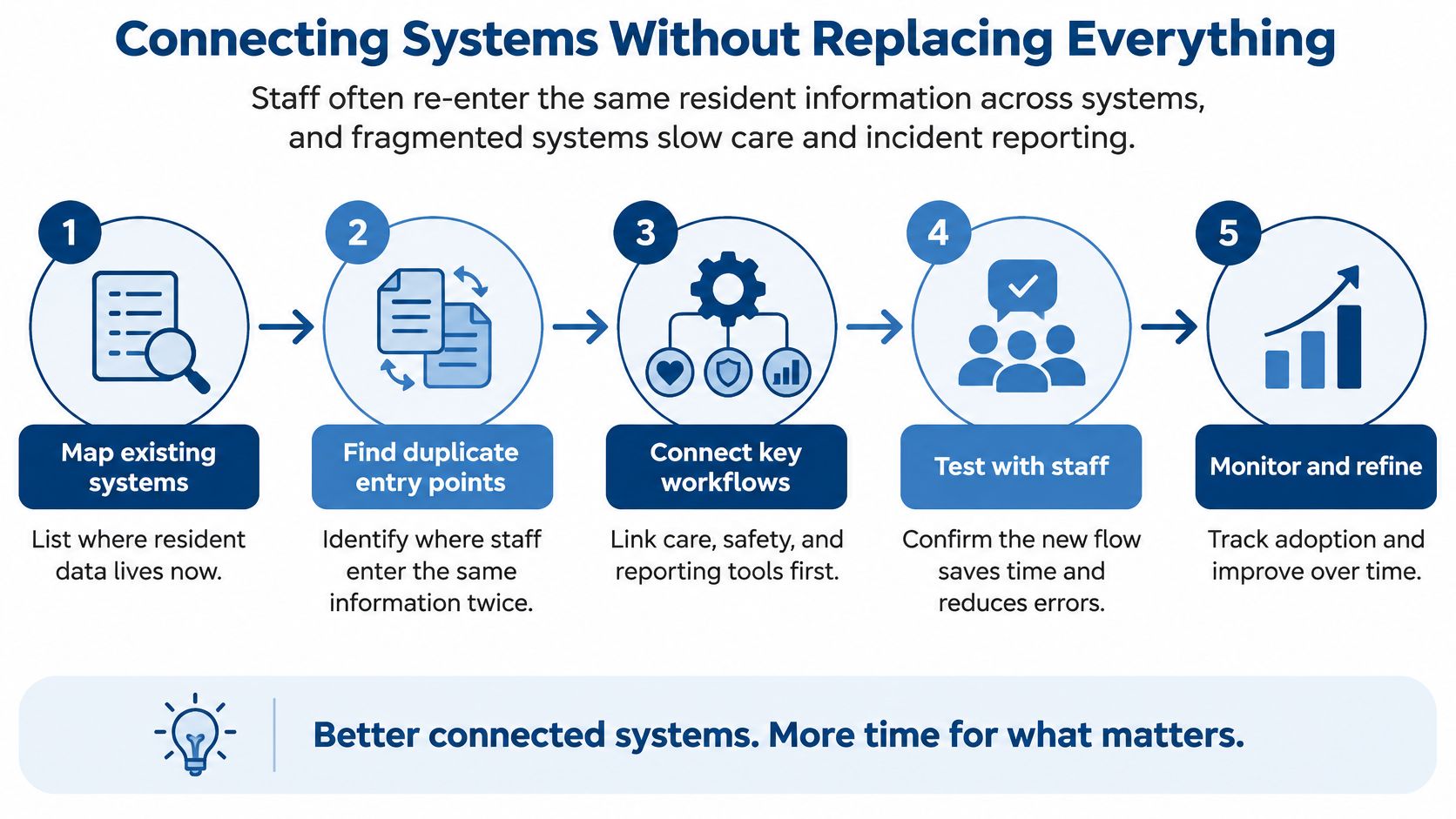
The order below works because each step answers a question the next step depends on.
- Inventory every system that holds resident or operational data. You can't govern what you haven't listed. Include the scheduling tool the staffing coordinator bought on a department card, because that is usually where the surprise lives.
- Name a data owner for each system. That person decides who gets access and how long records are kept. Without a name, requests default to whoever asks loudest.
- Map which systems exchange data and how. Some use an API, some use a nightly file export, and some rely on a nurse retyping the same resident information into a second screen. Manual re-entry is a hidden staff cost and the most common source of mismatch between systems.
- Confirm each data link meets the network and access rules you already set. An integration is a connection, and every connection is a path into the building.
- Rank the work and define the finish line. Review vendor contracts for data export rights and support terms, and ask what happens to your records on the day you leave. If the answer is a spreadsheet and a fee, you have room to negotiate now rather than later. Then pick the duplicate documentation that costs staff the most minutes per shift and set a measurable outcome, such as fewer duplicate entries per admission, faster incident escalation or a shorter month-end close. If you can't name the number, you can't tell whether the project worked.
Once the links exist, automated decision-making raises the stakes rather than lowering them. A model that flags a resident for follow-up is only as good as the data feeding it, and inconsistent records from three systems produce confident, wrong answers.
Governance comes before automation, every time.
Here's a short walkthrough of how these systems fit together in practice.
HIPAA and CMS Requirements for Technology Teams
What counts as ePHI in a nursing home
The HIPAA Security Rule requires covered entities and business associates to protect the confidentiality, integrity and availability of all electronic protected health information they create, receive, maintain or transmit, as HHS guidance on the Security Rule risk analysis sets out. In a skilled nursing facility, that scope reaches further than most staff assume. It covers PointClickCare records, medication and eMAR data, clinical notes, billing files, email, backups, and the data exchanged with hospitals, labs and vendors.
Email deserves its own line. A nurse practitioner emailing a wound photo to a physician is exchanging ePHI, and that message lives on whatever device received it.
Risk analysis means every building
HHS requires an accurate and thorough assessment of potential risks and vulnerabilities, followed by reasonable and appropriate measures to reduce them. The assessment must account for the probability of threats and their potential impact. It is not a checklist run against a single server.
HHS identifies risk analysis as the first step in implementing the Security Rule safeguards, not as an exercise you perform after an incident. For multi-site operators this becomes concrete: each facility may have different internet connections, wireless networks, workstations, medical devices, access controls and backup arrangements. One analysis copied across five buildings documents five buildings badly.
Access and audit controls in practice
The technical safeguards include both access control and audit control, as HHS's summary of the Security Rule describes. Covered entities must use technical policies and procedures so only authorized persons can reach systems containing ePHI, and must use hardware, software or procedural mechanisms to record and examine activity in those systems.
Shared logins break the first requirement and hollow out the second. If three aides use one account, a log entry can't tell you who opened a resident chart, and a departing employee's access may survive their last shift. Excessive permissions create the quieter problem, exposing more of a resident's record than a worker needs to do the job.
| Requirement | Regulation reference | What it looks like in a facility |
|---|---|---|
| Risk analysis | HIPAA Security Rule, 45 CFR 164.308(a)(1)(ii)(A) | Building-by-building review of connections, Wi-Fi, workstations, medical devices and backups |
| Access control | 45 CFR 164.312(a)(1) | One login per employee, role-based permissions for nurses and aides, access removed the day someone leaves |
| Audit controls | 45 CFR 164.312(b) | Reviewable EHR activity logs with a scheduled review |
| Availability of ePHI | 45 CFR 164.308(a)(7) | Tested backups and a documented restore procedure |
| Emergency preparedness | 42 CFR 483.73 | Written plan for system outages, power loss and continued access to records |
The CMS emergency preparedness requirements for long-term care facilities sit in 42 CFR 483.73 and expect a documented plan that holds up when systems go down. Surveyors ask for the plan. They also ask staff whether they know where it is stored and how they'd reach records without the EHR.
Confirm the specifics of any requirement with your compliance officer or counsel before changing policy, because facility type, state rules and business associate arrangements vary.
Technical detail on logging, permissions and encryption lives in this walkthrough of HIPAA technical safeguards.
Privacy, Consent and Resident Dignity
A camera in a resident's room will catch a fall. It will also catch a dressing change, a difficult phone call to a daughter, and a bad night. That trade-off is the reason consent has to be designed into the deployment rather than stapled on afterward.
Research on always-on care technologies found that older adults distinguish what they're willing to share according to who receives it, what type of data it is, and how much control they keep, according to this study of privacy in always-on care settings. The same work found that family members' protective intentions can bypass residents' own preferences. A son who wants a camera for peace of mind and a mother who wants her bedroom back are both acting reasonably, and the resident's preference is the one that keeps getting overridden.
That undercuts a comfortable assumption in this field: that more monitoring automatically produces better care.
A resident-centered governance model covers eight things, and most communities have four of them.
- Consent at admission and again after a change. A signature on page forty of an admission packet isn't understanding. Revisit it when a new sensor or camera is added.
- A working way to revoke. If a resident says stop, the process for stopping should take days, not a committee cycle.
- Named substitute decision-makers. Write down who can consent on a resident's behalf and under what conditions, before the question becomes urgent.
- Camera-free alternatives. Motion and behavioral pattern detection can identify risk without visual recordings, and many families accept it where they'd refuse video.
- Defined retention periods. Sensor data that lives forever is a liability with no clinical upside.
- Access logs. Someone should be able to say who viewed a resident's monitoring data and why.
- A breach response plan. Decide who calls whom, and in what order, before the call is needed.
- Plain-language explanations. Staff and families both need to hear what the system records, what it doesn't, and who sees it.
Privacy is an adoption requirement, not a compliance obstacle. A community that pairs technical safeguards with an ongoing conversation gets residents to use the pendant. One that installs the most invasive tool available gets compliance and quiet refusal.
Start With a Free HIPAA Risk Assessment
The first action costs staff time, not equipment money. A HIPAA security risk analysis asks three plain questions: where resident data lives, who can reach it, and what happens when a system fails. You can start answering all three with a building list and one honest afternoon, which is why it comes before any device pilot or platform demo.
Walk each layer in turn. At the network layer, note where wireless coverage drops and which closets still run consumer-grade hardware. At the phone and backup layer, check whether lines and recovery copies survive an outage. For every finding, record the system, the data it touches, and the fix it needs. That document decides what gets fixed first, and it gives your team a defensible record when someone asks how priorities were set.
Some findings will be bigger than your staff can test alone. An outside assessment covers that ground: RDE Technologies performs IT assessments covering risk, data storage, server and network infrastructure, carrier and cloud services, business continuity, and network security, so your walk-through results can be checked against a full technical review.
Support continues after the findings land. RDE monitors systems and provides preemptive solutions to head off IT complications, backed by a support center, a remote support and collaboration portal, live chat with live agents, and the 24-hour, 7-days-a-week availability a client describes. Its technicians handle on-site IT work throughout New York, while remote support reaches companies beyond it. That matters when one building's wireless is fine and another's is held together with a consumer router in the business office.
RDE Technologies provides managed IT services, network management, IT security, data backup, VoIP, and wireless installation, with on-site IT services in New York and remote support for businesses beyond it. Bring your building list to the first conversation. Visit RDE Technologies or contact its Oceanside, NY office to request an assessment and get one clear picture of where your buildings stand.