







The front desk can't print, a phone line keeps dropping, and the shared records folder won't open. Staff are working around each problem, but nobody knows whether they're connected or who should take charge.
For a nursing home administrator or business owner comparing IT services on Long Island, the useful question isn't who can repair the computers. It's which systems must keep working, how staff will operate during an interruption, and who will coordinate recovery.
Table of Contents
- The IT Services Long Island Businesses Use Most
- Why Long Island Organizations Depend on Reliable Technology
- Managed Support Versus Calling for Repairs
- Keeping Backups and Security Working When Systems Fail
- Phones, Networks and Wi-Fi for Multi-Site Operators
- Planning IT for Skilled Nursing and Long-Term Care
- Choosing a Provider Before You Sign
The IT Services Long Island Businesses Use Most
Managed support brings maintenance, staff assistance and infrastructure work under a defined service agreement. The categories below describe different responsibilities, not necessarily separate purchases.
IT service categories, what they cover and who needs them
| Service | What It Covers | Who Usually Needs It |
|---|---|---|
| Managed IT and maintenance | Ongoing upkeep, software updates, monitoring, troubleshooting and preventive work | Offices that want problems found before staff notice them |
| 24/7 help desk and remote support | Staff requests and fixes handled by phone, ticket or remote session through a support portal | Clinics, care homes and firms with shift work or after-hours needs |
| Field technicians | On-site repair, installations and hardware swaps that remote work can't fix | Sites with printers, servers, switches or workstations |
| Network management | Switch, server and network monitoring, configuration and repair | Multi-floor offices and multi-building operators |
| IT security | Firewalls, content filtering, managed antivirus, patch management and endpoint ransomware protection | Organizations holding client, patient or legal records |
| Data backup | Onsite and offsite copies, replication and data retrieval | Businesses that can't afford to lose their records |
| VoIP phone systems | Business calling over an internet connection, with failover planning | Multi-site groups, remote staff and firms with high call volume |
| Wireless and cabling | Wireless network design, Cat5/Cat6 and fiber optic cabling | Buildings with dead zones, new construction or expansions |
| IT assessments | Review of cost, risk, storage, servers, network, cloud, continuity and security | Owners planning budgets or considering a provider change |
| New technology setup and web hosting | Setup of new systems and equipment, plus website hosting | Businesses launching a website or adding systems |
Start With Operational Risk
Administrators should identify the three failures that would hurt most this week, then match each risk to the relevant rows. A medication workflow interruption calls for more than workstation repair: network access, application access and staff escalation may all need attention.
Buying rule: Purchase coverage for an operational responsibility, not just a list of products.
A small law firm usually starts with managed maintenance, security, backup and dependable staff support. A multi-site care operator adds building-specific network planning, coordinated field service and visibility into each facility's unresolved issues.
The agreement should also identify exclusions. Software subscriptions, replacement hardware, construction cabling and major upgrades shouldn't become surprises after onboarding.
Why Long Island Organizations Depend on Reliable Technology
When technology fails, phones go quiet, schedules won't open and an EHR or case file won't load. Billing stalls, payments wait, and clients may not receive email. Staff spend their morning finding workarounds instead of doing their jobs.
The dependency is regional, not just organizational. The New York State Department of Labor's significant-industries report identified 13 significant industries representing 51.0% of Long Island jobs in 2025, showing how many local employers rely on working infrastructure every day.
The security exposure is just as broad. Reported data-compromise incidents across the U.S. have been increasing, and Long Island organizations handling health, claims and client records have appeared among those affected. For a multi-site operator, the stakes multiply: one compromised account or failed server can interrupt every location that shares it.
Planning starts with a short ranking: which systems must keep running when something fails, who gets alerted, and how quickly each one has to come back.
Signs Informal Support Has Been Outgrown
- Competing responsibilities: An administrator or office manager fixes everything alongside a full workload.
- Unproven recovery: Nobody can identify the last successful backup restoration.
- Invisible recurring problems: Printer and Wi-Fi complaints never become tracked tickets.
- Client-led escalation: The owner learns about outages from customers.
- Unclear incident decisions: There's no written cyber incident plan.
- Slow onboarding: New hires wait days for working accounts and equipment.
Managed maintenance, a logged help desk, security controls and tested backup procedures each address part of this problem. Buying antivirus alone won't fix poor accountability or unreliable hardware.
The first purchase should close the most dangerous operational gap, not add the most impressive dashboard.
For a care facility, that may mean establishing an after-hours escalation route before replacing otherwise functional computers. For a law firm, protecting access to matter files and email may take priority.
Managed Support Versus Calling for Repairs
Calling a plumber after a pipe bursts is break-fix support. A maintenance contract that checks the boiler, replaces worn parts and watches the pressure gauge is closer to managed support.
Both models have a place. Occasional repair can suit a noncritical standalone device; it becomes a weaker choice when several departments depend on the same server, network or identity system.
The comparison below shows the difference in operating approach.
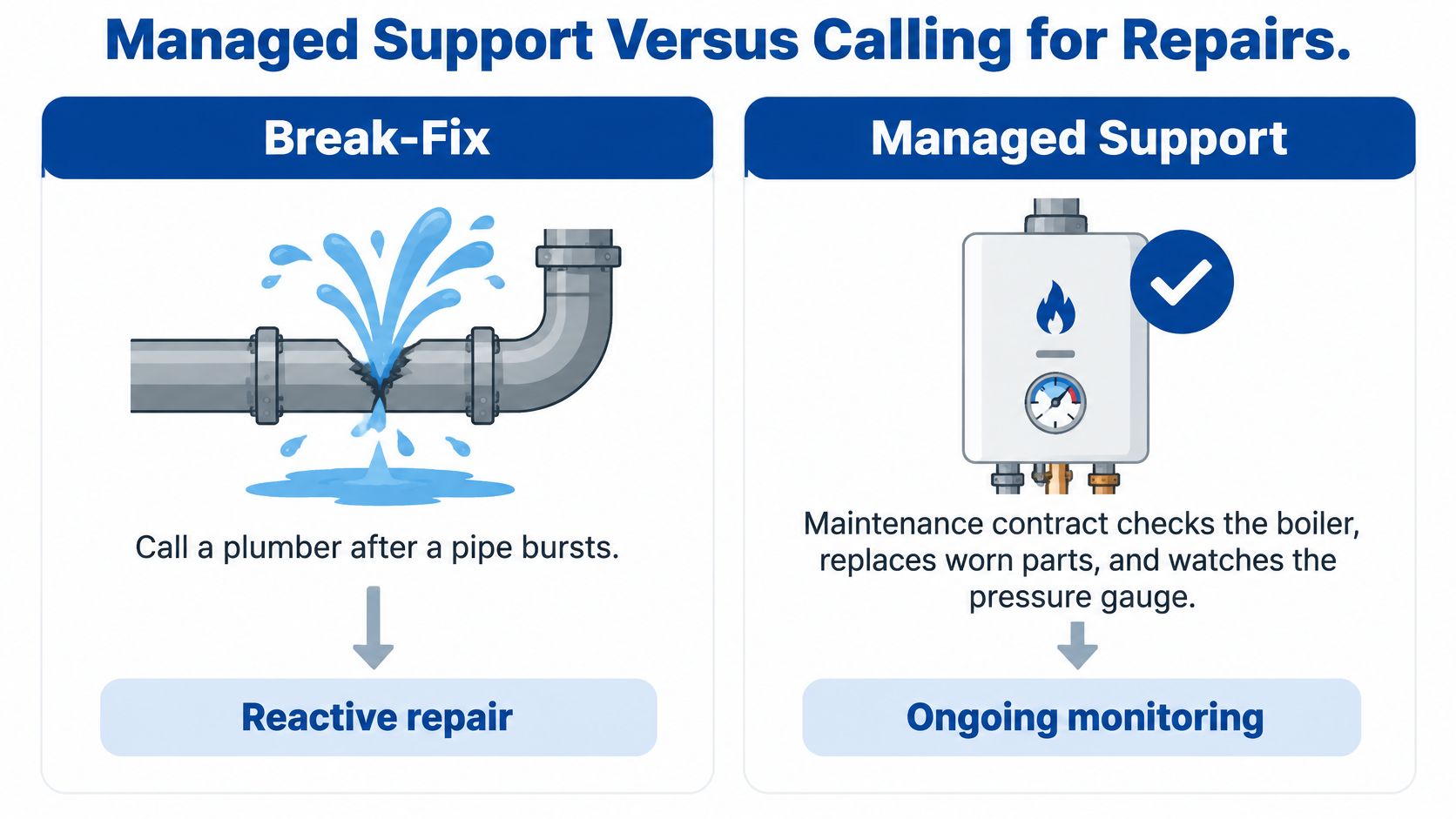
Break-fix repair compared with managed support
| Criterion | Break-fix repair | Managed support |
|---|---|---|
| Who finds the problem | Staff, after something stops | Monitoring tools and the provider's regular review |
| When it is addressed | After the call, often during an outage | Scheduled maintenance, plus a 24/7 help desk for urgent issues |
| How the work is billed | Per incident or visit | Recurring fee for defined services |
| What is documented | Often only the invoice | Requests logged, changes recorded, backup and security status reviewed |
| Who owns the outcome | Responsibility may end with the individual repair | Provider accountable for the agreed operating scope |
What Managed Work Actually Includes
A useful maintenance schedule turns broad promises into repeatable work:
- Monitor infrastructure. Review alerts from servers, network devices and workstations, with someone responsible for acting on them.
- Schedule updates. Apply patches during agreed maintenance windows and check that critical workflows still function afterward.
- Log staff requests. Record symptoms, affected users, actions taken and closure details.
- Dispatch field technicians. Send someone when a failed switch, damaged cable or hardware replacement requires physical access.
- Review protection status. Investigate backup exceptions and security warnings rather than merely collecting them.
- Record changes and plan upgrades. Keep configuration records useful enough for another technician to continue the work.
RDE Technologies provides onsite and remote IT maintenance, basic installations, desktop support and repair, server and network support, and switch setup and repair. Its help desk is staffed 24/7, and technicians maintain contact throughout a project.
Where the Trade-Off Sits
Recurring support costs money even during quiet periods. In return, the organization buys defined maintenance and accountability rather than waiting for staff to report every failure.
That doesn't make every managed agreement equivalent. A contract may exclude application-vendor work, equipment replacement or project labor, so scope matters more than the service label.
The key decision is which model supports the systems that keep care and operations running, not which appears cheaper per visit. Monitoring also is not a guarantee of uninterrupted service; management still needs an agreed plan for what happens when prevention is not sufficient.
Keeping Backups and Security Working When Systems Fail
Having a backup isn't the same as being able to recover. A successful copying job proves little if an attacker can delete the copy or staff can't use the restored system.
The CISA ransomware guide recommends offline, encrypted critical-data backups, regular availability and integrity testing, and protected system images. Accessible backup repositories can become targets alongside production systems.
The diagram illustrates the distinction between ordinary online storage and isolated recovery copies.
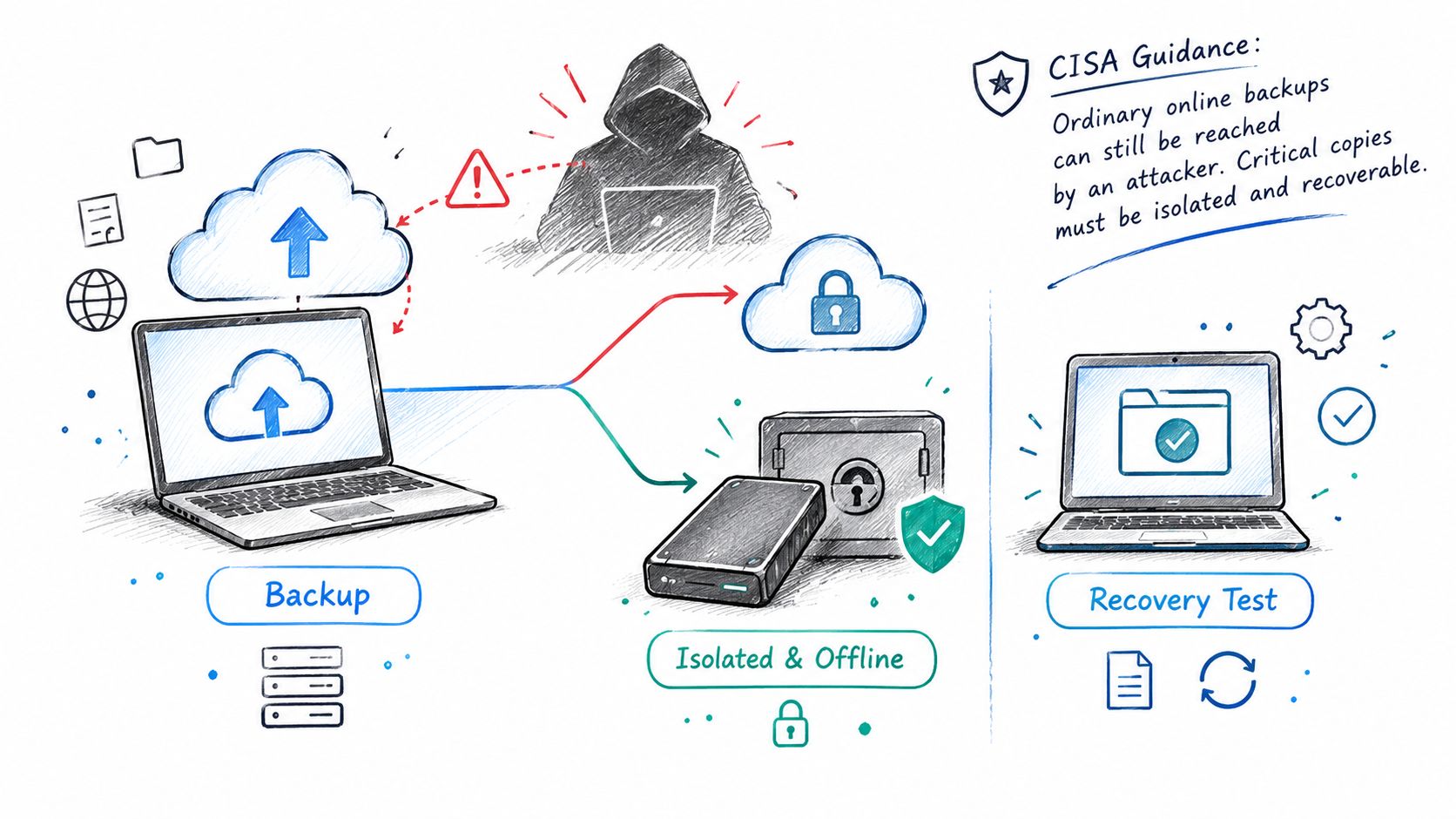
The joint CISA, FBI and HHS healthcare ransomware advisory recommends the 3-2-1 rule: three copies of critical data, on at least two types of media, with at least one copy offline. Offsite storage alone doesn't establish isolation if compromised administrator credentials can still erase it.
Specify Recovery Before Buying Storage
- Rank systems by operational priority. Identify which services staff need to resume care, communicate and access records. Include dependencies such as network configuration and identity services.
- Set recovery targets. A recovery-time target describes how long a system can remain unavailable. A recovery-point target describes how much recent information the organization can tolerate losing.
- Maintain an isolated copy. Document who can access it and how isolation remains effective if production accounts are compromised.
- Protect against deletion. Enable retention locks or deletion protection where supported, with permissions separated from routine administration.
- Test usable restoration. Exercise EHR interfaces, medication systems, file shares, identity services and configuration recovery, not just individual documents.
- Report by location. Show backup success, retention, encryption, the last restore test and unresolved exceptions for each facility.
More frequent copying can reduce potential data loss, but it also consumes storage and network capacity. Retaining copies longer helps recover from delayed discovery, while increasing storage requirements and the need for clear retention rules.
A backup schedule built around operational needs connects those decisions to the work staff must resume. Replication helps maintain another copy, but it can also copy corruption, so it shouldn't replace protected historical recovery points.
The accompanying video provides another format for reviewing backup planning.
Reduce the Chance of Needing Recovery
Security work should include multifactor authentication for email and remote access, patch management, endpoint protection, firewalls and content filtering. Administrator accounts need review, especially when employees leave or vendors stop providing support.
A written incident plan should name who can disconnect devices, who preserves evidence and who contacts the insurer. Those decisions shouldn't depend on locating the owner during an outage.
RDE's backup services include onsite and offsite copies, offsite replication, data retrieval and colocation disaster recovery. Its security services include server and network monitoring, firewalls, content filtering, managed antivirus, desktop patch management and advanced endpoint ransomware protection.
Recovery check: This month, management should request the record of the last completed restore, what was restored and who confirmed it worked.
Phones, Networks and Wi-Fi for Multi-Site Operators
VoIP carries business phone calls over an internet connection instead of a traditional phone line. A plain-language explanation of VoIP phone service can help administrators separate the calling service from the network supporting it.
That distinction matters on a Friday afternoon when an internet connection drops or a switch loses power and every phone in the building goes quiet. Reliable calling depends on the whole chain of equipment, not on the handsets alone.
Before Moving Business Numbers
The pre-switch review should cover internet capacity for calls alongside clinical systems, uploads and resident traffic. A backup internet path needs a tested switching process, not a second connection sitting somewhere in the building.
Battery or generator coverage must include the equipment carrying calls: routers, switches, wireless access points where relevant, and phone gear. Number porting also needs coordination so staff know when incoming calls will move and who owns problems during the transition.
Emergency calling deserves its own check. Each line's registered location and the provider's arrangements for routing emergency calls should be confirmed before activation, particularly where staff move phones between buildings.
RDE Technologies' hosted VoIP services can operate without an on-site phone system, support remote work and reduce long-distance landline calling costs. Internet access and powered network equipment still remain necessary.
Design Each Building Separately
Wireless planning should account for construction materials, room layout, clinical work areas and expected device use. Installing additional access points without checking placement and interference can leave the original problem unresolved.
RDE provides wireless design and implementation, Cat5/Cat6 and fiber optic cabling, plus switch and server support. For nursing homes and assisted living communities, coverage planning should distinguish clinical access from resident and visitor Wi-Fi.
Before signing, the phone and network review should answer these questions:
- Capacity: Can the connection support calls while the other systems staff depend on are busy?
- Failover: What happens to incoming and outgoing calls when the primary connection fails?
- Power: Which network and phone components remain powered during an outage?
- Porting: Who coordinates the number transfer and checks call routing afterward?
- Emergency calling: Are registered locations correct for the lines and buildings involved?
- Facility visibility: Can management review uptime, incidents and changes by location?
That last question belongs in the contract conversation. Management should define which measures a per-location review must show, rather than assuming a combined dashboard will reveal trouble at a single building.
Planning IT for Skilled Nursing and Long-Term Care
Care teams depend on EHR access such as PointClickCare, medication and clinical workflows, nurse call, admissions, billing and staff communications. Resident Wi-Fi matters too, but it shouldn't compete unchecked with systems staff need for care.
A facility assessment should map these services to their actual dependencies. A nurse-call system may have its own controller, power supply and specialist vendor; its continuity plan shouldn't assume that restoring office internet will restore every care-related service.
Assess the Whole Facility
Under 45 CFR 164.308(a)(1)(ii)(A), the HIPAA Security Rule requires covered entities and business associates to conduct an accurate and thorough risk analysis of risks and vulnerabilities affecting electronic protected health information, as explained in HHS risk-analysis guidance.
That review extends beyond office computers. Servers, backups, portable devices, wireless networks, vendor connections and relevant clinical applications all belong within the assessment's scope.
Risk analysis identifies and evaluates risk; risk management implements safeguards to reduce it to a reasonable and appropriate level. A workstation vulnerability scan can contribute evidence, but it doesn't replace a facility-wide assessment of how information is accessed, transmitted and protected.
A practical HIPAA-focused IT review should also identify who owns each corrective action. Findings without assigned responsibility and follow-up dates can remain unresolved through successive budget cycles.
Turn Emergency Planning Into Shift-Level Instructions
CMS emergency preparedness requirements for long-term care facilities at 42 CFR 483.73 include an emergency plan, policies and procedures, a communication plan, and training and testing. IT downtime arrangements should support that broader preparedness work rather than sit in a separate technical binder.
The CISA healthcare ransomware response guide emphasizes downtime drills, clinical impacts, confirmed restoration and decision trees for disconnecting systems. Nursing leadership, administration and IT need defined roles before an incident.
A usable downtime checklist addresses the following:
- Restoration order: Clinical leadership identifies which workflows must resume first and what dependencies must be available.
- Paper procedures: Staff know where current downtime forms are stored, how entries are secured and how information will later be reconciled.
- Disconnection authority: Named roles can authorize isolation of affected systems while considering clinical consequences.
- After-hours contact: Shift supervisors have an escalation route that remains accessible without facility email.
- Building independence: Each location has instructions for losing its own network or phones, including access to essential contact details.
- Clinical verification: Designated staff confirm that restored access supports the actual workflow, not merely a successful login.
A technically restored system isn't ready for clinical use until the responsible care team confirms the workflow functions safely.
RDE designs and installs wireless networks for nursing homes and assisted living communities, and supports multi-building operators with reporting by facility. That location-level view helps administrators distinguish a local access problem from an organization-wide service interruption.
Regulatory details, applicability and documentation expectations should be confirmed with the facility's compliance officer or counsel. An IT assessment supports compliance work; it doesn't replace legal review or the facility's clinical emergency planning.
Choosing a Provider Before You Sign
A proposal full of hardware counts and license costs says little about how a provider performs when a building loses connectivity mid-shift. The contract decides who acts, how quickly, and who confirms that systems came back correctly.
The questions below make those service boundaries easier to compare.
- Help desk coverage: What are the staffed hours, and how does after-hours escalation work?
- Remote and onsite support: Which problems require a field visit, who are the named technicians, and how is dispatch arranged?
- Backup evidence: How are restores tested, how often are exercises scheduled, and what records will management receive?
- Security scope: Are firewalls, multifactor authentication, patching and endpoint protection included, excluded or separately priced?
- Protected information: Will the provider sign a business associate agreement when its role requires one?
- Location reporting: Can reports separate incidents, changes and unresolved work by facility?
- Phone continuity: How will VoIP failover be implemented and demonstrated?
- Contract exit: Who returns data, transfers administrative access and removes provider accounts when the agreement ends?
The visual checklist adds prompts for comparing agreements and support arrangements side by side.
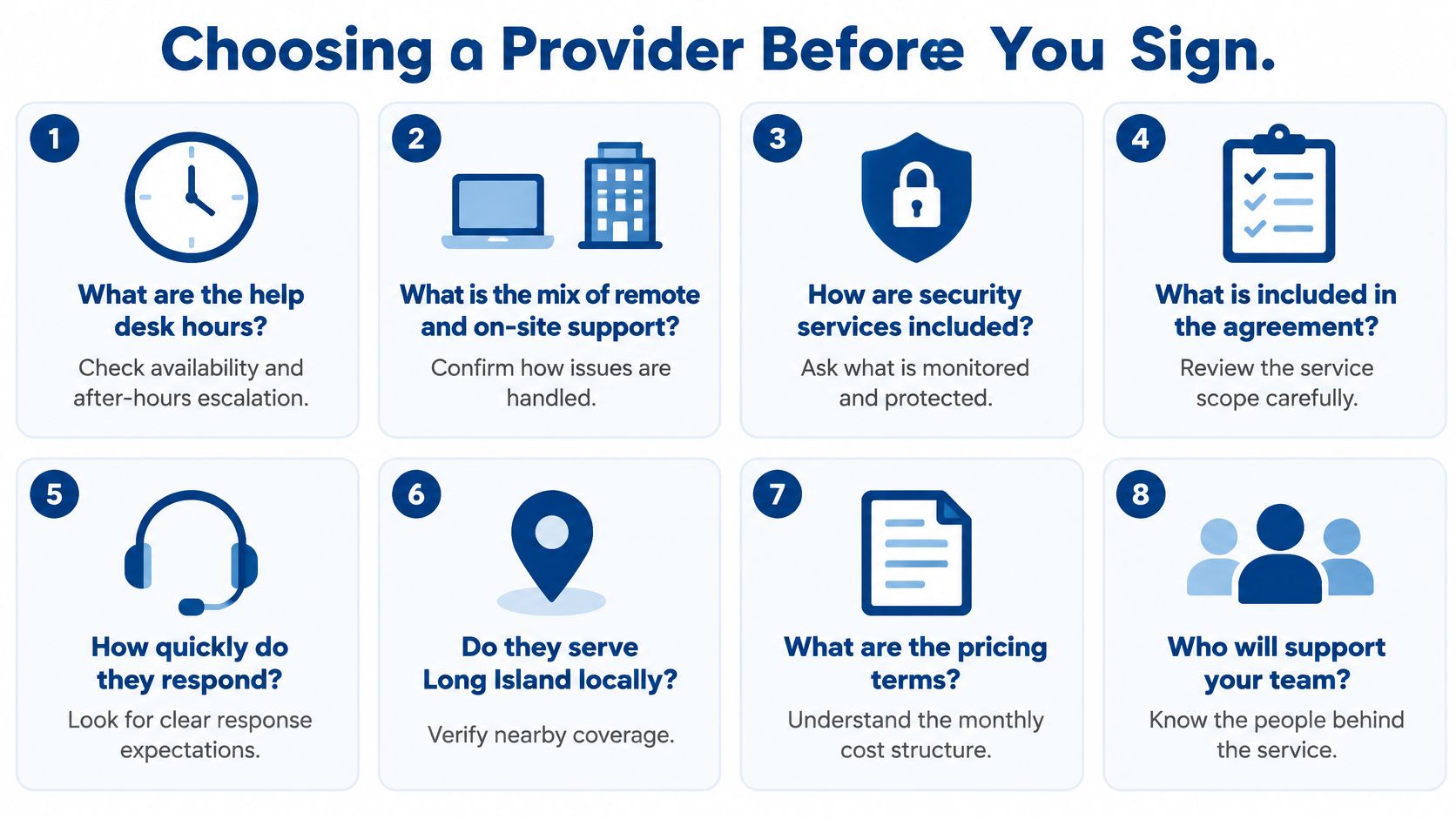
Put Commitments in Writing
A good provider answers these questions in writing and separates response expectations from restoration commitments. A quick acknowledgment is not the same as a technician beginning work, and neither guarantees an immediate repair. Asking for a redacted incident report or a restore-test record during evaluation is reasonable; a provider that already produces these documents will have no trouble sharing one.
The location-reporting and phone-failover questions serve as a final check on network planning. The agreement should name the required reports and test responsibilities rather than leave them as sales-stage assumptions.
RDE Technologies is based in Oceanside, New York, provides on-site service across New York and the Tri-state area, and offers remote support to companies beyond the region. Its support runs 24 hours a day, seven days a week, and its call-back request form lets customers select IT Services, VoIP, Data Backup, Cabling or Urgent Request. Nursing home operators can use its HIPAA risk assessment page to begin a facility-level risk review.
RDE combines managed maintenance, monitoring, security, backup and network services so organizations can plan for interruptions rather than depend on repairs alone. Discuss an IT assessment through RDE Technologies, open a facility risk review on the HIPAA risk assessment page for nursing homes, or review skilled nursing IT support for multi-building planning.